
Contains tools for segmentation of skin lesion images. A prebuilt unsupervised Segmentation model and various helper functions to increase the efficacy of segmentation. Includes tools to visualise, compare, experiment with different image configurations and segmentation types. Tools can be used in cascade to the mask generator or independently. Feel free to play around with.

Project description
Unsup-Segmentation
This repository contains code that was a part of the project "SEGMENTATION AND CLASSIFICATION OF SKIN LESION IMAGES USING DEEP LEARNING BASED TECHNIQUES", published as part of my final year project. This was an experiment to create an unsupervised segmentation pipeline that can create segmentation masks of any given skin lesion image from the ISIC datasets. Although this was predominantly tested on the 2016 and 2017 datasets, this can be extended to latter datasets as well. These are the results tested on the 2016 dataset.
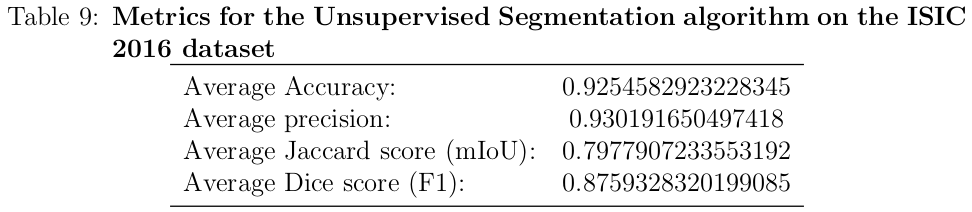
The complete pipeline will require you to run the "mask_generator.py" file first, which should save the unfiltered mask images into an 'UNFILTERED/' directory inside your 'MASKS/' directory. After that, you can run either of "color_clean.py" or "texture.py" (first one being a simpler cleaning approach while the second one being a slightly more complicated but accurate approach), this will create the final masks for you. At any point of time you can run the "metrics.py" file to check the performance of the model. You can run all of these algorithms sequentially or in parellel. Graph execution won't be an issue as they read each image and process it in real time. For example, if you have been running mask_generator for a few minutes and have a few images in the UNFILTERED/ directory, you can run texture which will start working on the unfiltered images in real-time. tqdm will consider the existing number of files and start accordingly. Simiarly, you can run metrics at any point to check the performance on the masks generated so far.
You can download the original ISIC 2016 dataset from https://challenge.isic-archive.com/data/. Or you can try this on your own dataset. To run metrics, you'll need to have reference masks against which the generated masks will be compared.
You can play with "permute_channels.py" to get an idea of how the different channels interact when combined.
"mask_overlay.py" will help you draw the mask outlines on the original images so that you can have a better idea of how the algorithm is performing.
Feel free to play around with the code. Also make sure to modify the directory locations as required.
Release history Release notifications | RSS feed

Download files
Download the file for your platform. If you're not sure which to choose, learn more about installing packages.
Source Distribution
Built Distribution
Filter files by name, interpreter, ABI, and platform.
If you're not sure about the file name format, learn more about wheel file names.
Copy a direct link to the current filters
File details
Details for the file skinseg-0.0.1.tar.gz.
File metadata
- Download URL: skinseg-0.0.1.tar.gz
- Upload date:
- Size: 21.5 kB
- Tags: Source
- Uploaded using Trusted Publishing? No
- Uploaded via: twine/4.0.2 CPython/3.9.13
File hashes
| Algorithm | Hash digest | |
|---|---|---|
| SHA256 |
f585486bb17b19c851d8b31d1bf8c351b75e863bd443cd0206a7285d8b821788
|
|
| MD5 |
46566c2a8245ee59a6ab2b8d998dbef1
|
|
| BLAKE2b-256 |
e4eedb1b2bab85cffd65fd8d6d5840d962b4e1d6efb82ef2d7930b48e6d7db8f
|
File details
Details for the file skinseg-0.0.1-py3-none-any.whl.
File metadata
- Download URL: skinseg-0.0.1-py3-none-any.whl
- Upload date:
- Size: 29.1 kB
- Tags: Python 3
- Uploaded using Trusted Publishing? No
- Uploaded via: twine/4.0.2 CPython/3.9.13
File hashes
| Algorithm | Hash digest | |
|---|---|---|
| SHA256 |
6e3525842c408652d10ae59e4b99356672075bb8261a73ac0c2ee54e8800cd60
|
|
| MD5 |
2609b77e1dfc5de46f7065bc81047e82
|
|
| BLAKE2b-256 |
208031078829ed8eec1cf6757a80413af6c3f6a7a4cea731709cd9a105524767
|






