


sklearn_minisom
MiniSom is Numpy based implementation of the Self Organizing Maps (SOM). SOM is a type of Artificial Neural Network able to convert complex, nonlinear statistical relationships between high-dimensional data items into simple geometric relationships on a low-dimensional display. Minisom is designed to allow researchers to easily build on top of it and to give students the ability to quickly grasp its details.
This is MiniSom library wrapper for seamless integration with SciKit-learn package.
Credits to:
-
Wrapped library: MiniSom by Giuseppe Vettigli
This wrapper aims to integrate SklearnMinisom library into SciKit-learn ecosystem. It enables easy integration with Scikit-learn pipelines and tools like GridSearchCV for hyperparameter optimization. It also provides easy, scikit-learn like API for developers to interact with while aiming to sustain high flexibility and capabilities of MiniSom library.
Example clustering datasets from Comparation of clustering algorithms on SciKit-learn

This is separate project and not part of MiniSom library due to creator's of the original project aim to keep their as lightweight as possible.
Table of content
Installation
Just use pip:
pip install sklearn_minisom
or uv:
uv add sklearn_minisom
Dependencies:
- minisom>=2.3.6
- scikit-learn
- numpy
Examples
Just use it like any other scikit-learn cluster algorithm.
Let's start with importing required libraries and dataset.
from sklearn.datasets import load_wine
from sklearn_minisom import SklearnMinisom
from sklearn.preprocessing import StandardScaler

data = load_wine()
X = data.data
X = StandardScaler().fit_transform(X)
You can use fit and predict separately.
som = SklearnMinisom(3, 1, random_seed=40)
som.fit(X)
y = som.predict(X)
Or simply use convenient function.
som = SklearnMinisom(3, 1, random_seed=40)
y = som.fit_predict(X)
Alternatively you can also use SciKit-learn pipelines.
from sklearn.pipeline import Pipeline

pipeline = ([
    ('scaler', StandardScaler()),
    ('classifier', SklearnMinisom(3, 1, random_seed=40))
])

y = pipeline.fit_predict(X)
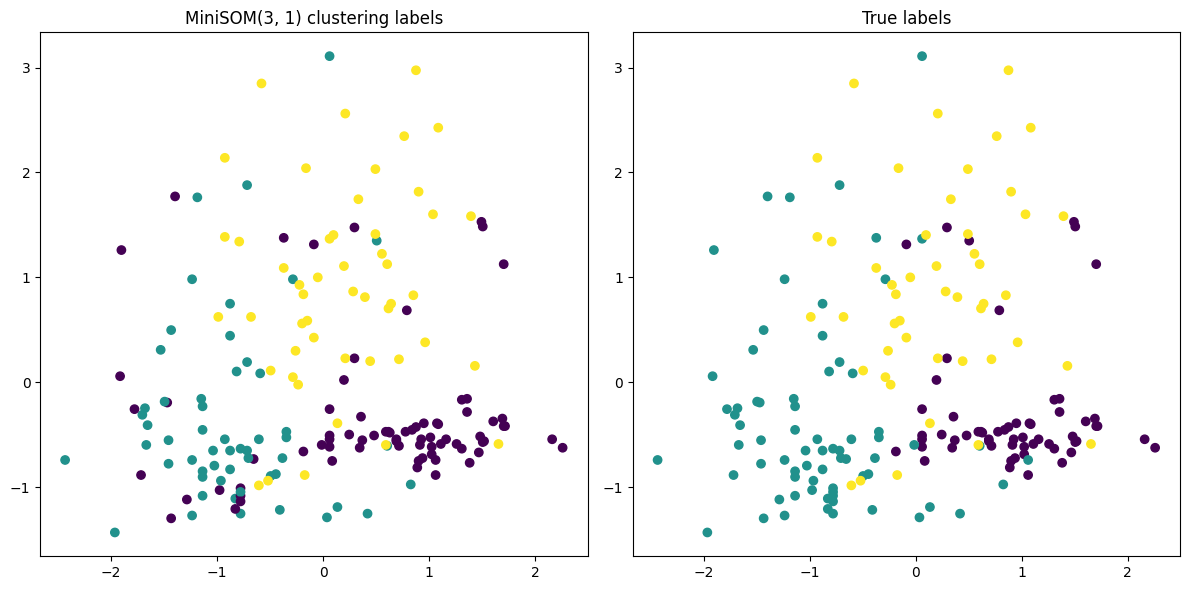
Now let's take a look at what we've got.
Contributing
This project follows Google Code Style guidelines.
There is already configured pre-commit hook which is also part of CI. Before commiting please make sure you have pre-commit installed and run:
pre-commit install
After that, formatter and basic linters will be run automatically before each commit.
1 maintainer

Release files for sklearn_minisom 0.1.0
For a detailed explanation of source distributions (sdists) and built distributions (wheels), please see the package formats documentation.
Source distribution (sdist)
| File | Size | Uploaded | |
|---|---|---|---|
| sklearn_minisom-0.1.0.tar.gz | 5.7 kB | Details |
Built distribution (wheel)
| File | Interpreter | ABI | Platform | Reset |
|---|---|---|---|---|
| sklearn_minisom-0.1.0-py3-none-any.whl | Python 3 | none | any | Details |
Total release size: 12.5 kB
Release files / sklearn_minisom-0.1.0.tar.gz
| Download URL | sklearn_minisom-0.1.0.tar.gz |
|---|---|
| Size | 5.7 kB |
| Tags | Source |
|
SHA-256 checksum How to use checksums |
991df63b9820eebaec34316b7ec2026f340e14c15d2f55f93b3521f17055c3ad
|
|
BLAKE2b-256 checksum How to use checksums |
1d575df597061693f06d2fcb91465ba1413fe6668b43272b79224e32dfa42c7e
|
| Upload date | |
|
Uploaded using Trusted Publishing? What is trusted publishing? |
Yes |
| Uploaded via |
uv/0.12.6 {"installer":{"name":"uv","version":"0.12.6","subcommand":["publish"]},"python":null,"implementation":{"name":null,"version":null},"distro":{"name":"Ubuntu","version":"24.04","id":"noble","libc":null},"system":{"name":null,"release":null},"cpu":null,"openssl_version":null,"setuptools_version":null,"rustc_version":null,"ci":true}
|
Release files / sklearn_minisom-0.1.0-py3-none-any.whl
| Download URL | sklearn_minisom-0.1.0-py3-none-any.whl |
|---|---|
| Size | 6.8 kB |
| Tags | Python 3 |
|
SHA-256 checksum How to use checksums |
475514a751c11c63464babf9f76be824d9bb1e0ed40e08721cbcb2b9c54684cd
|
|
BLAKE2b-256 checksum How to use checksums |
b86675a811deb2e9e1a6608039b18ee2bd8ecc09070c0430737d0840964e6d7d
|
| Upload date | |
|
Uploaded using Trusted Publishing? What is trusted publishing? |
Yes |
| Uploaded via |
uv/0.12.6 {"installer":{"name":"uv","version":"0.12.6","subcommand":["publish"]},"python":null,"implementation":{"name":null,"version":null},"distro":{"name":"Ubuntu","version":"24.04","id":"noble","libc":null},"system":{"name":null,"release":null},"cpu":null,"openssl_version":null,"setuptools_version":null,"rustc_version":null,"ci":true}
|














