
sktime-cli
The command line for sktime, built for AI agents and humans.
Search estimators, fetch datasets, inspect time series files, and run fit / predict / evaluate workflows straight from your shell.






Why a CLI
sktime is a Python library, so trying a forecaster usually means opening an editor:
import pandas as pd
from sktime.forecasting.naive import NaiveForecaster

y = pd.read_csv("airline.csv", index_col=0).squeeze()
y.index = pd.PeriodIndex(y.index, freq="M")

forecaster = NaiveForecaster(sp=12)
forecaster.fit(y)
print(forecaster.predict(fh=range(1, 13)))
The same forecast, from the shell:
sktime-cli run fit-predict "NaiveForecaster(sp=12)" --data airline.csv --fh 1:12
Both print the same twelve numbers. The difference is what you needed to know
first: that NaiveForecaster lives in sktime.forecasting.naive, and that
sktime wants a PeriodIndex rather than the strings the csv gave you. The
CLI works both of those out for you, from the file and the estimator name.
What you get
Every command is one process. It reads files or names, calls sktime, writes results, and exits with a meaningful code.
- Fitted models are ordinary files. No sessions, handles, or daemons.
run fitwrites a.zipyou can copy, commit, or delete, and any later command picks it up by path. Run something twice and you get the same answer. - Search for an estimator instead of looking one up.
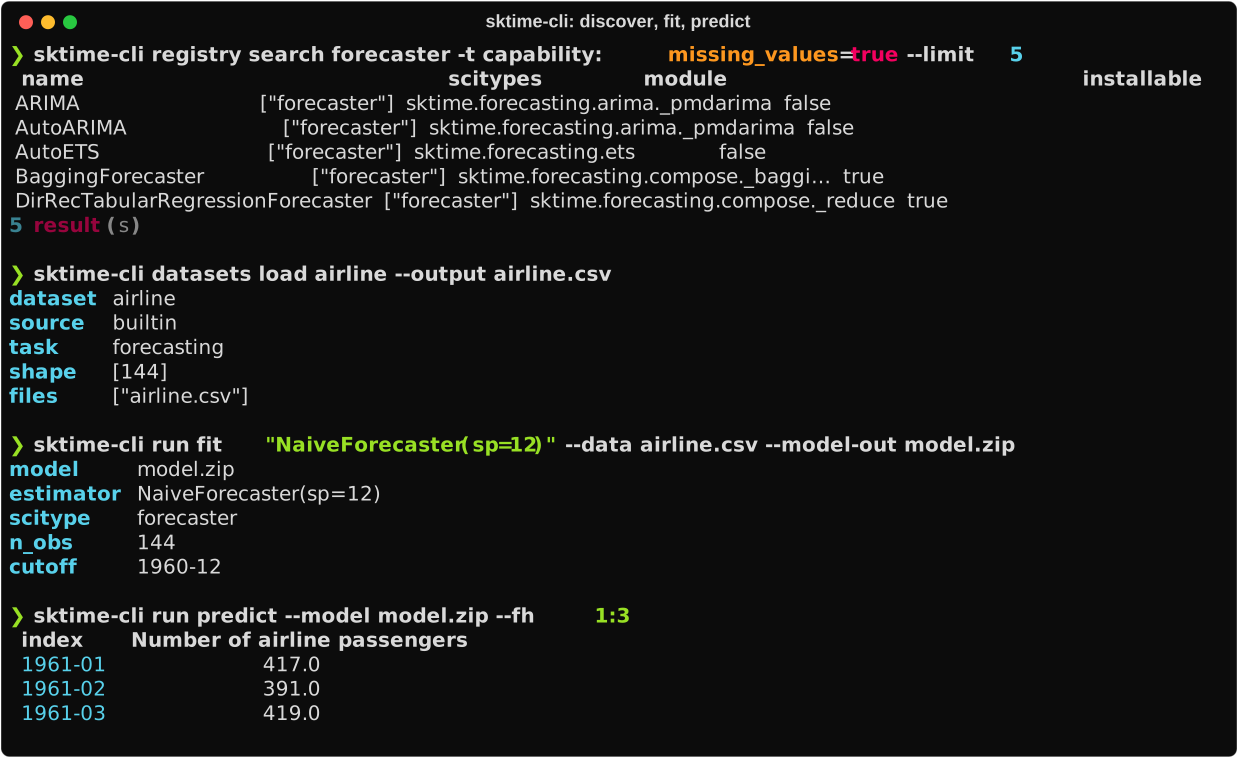
registry search forecaster -t capability:missing_values=truelists every forecaster that handles gaps, marking the ones whose dependencies you already have. Results come from a disk cache, so repeat searches are cheap. - Name a model instead of building one.
"NaiveForecaster(sp=12)"is the whole configuration.*composes a pipeline,|a multiplexer, and+a transformer union, so"Deseasonalizer() * NaiveForecaster()"is a model too. - Reads the files you already have. csv, parquet, json,
.ts,.tsf, and.arffgo in.--format human|agent|json|quietcomes out. - Failures say what to do next. A missing optional dependency exits
3with the install command in the error'shint. Nothing fails with a bare traceback.
Installation
uv tool install sktime-cli # or: pip install sktime-cli
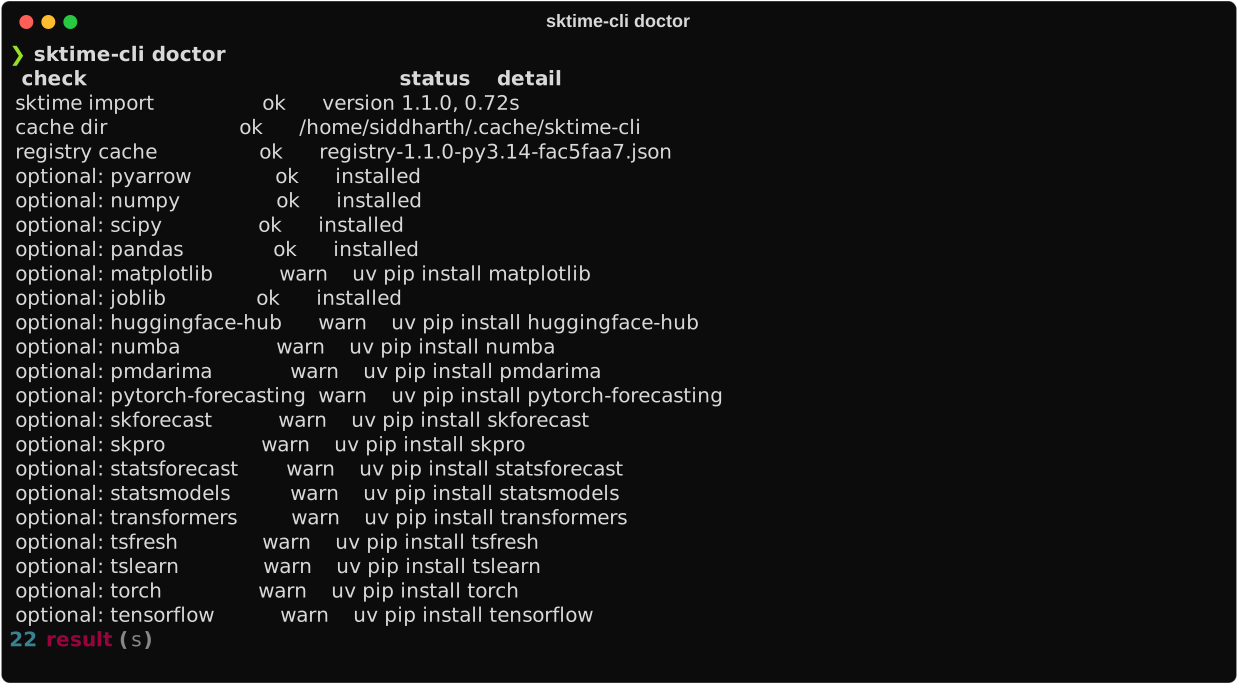
Check the setup and see which optional dependencies are available:
sktime-cli doctor
Quickstart
# What can I use?
sktime-cli registry search forecaster -t capability:missing_values=true
sktime-cli registry describe NaiveForecaster

# Get data.
sktime-cli datasets load airline --output airline.csv
sktime-cli data inspect airline.csv

# Fit, predict, evaluate. Estimators are given as sktime spec strings.
sktime-cli run fit "NaiveForecaster(sp=12)" --data airline.csv --model-out model.zip
sktime-cli run predict --model model.zip --fh 1:12
sktime-cli run evaluate "NaiveForecaster(sp=12)" --data airline.csv --fh 1:12 \
  --metric MeanAbsolutePercentageError
--data takes either a file path or a dataset name, so once you know the name
you can skip the download and pass --data airline directly. A path is read
wins, so a local airline.csv shadows the built-in airline dataset.
For a longer walkthrough, see the quickstart.
Commands
| Group | Commands | What it does |
|---|---|---|
registry |
search · describe · tags · types |
Find sktime estimators by scitype, name, and capability tag |
datasets |
list · describe · load |
Browse and fetch built-in, UCR/UEA, Monash, and fpp3 datasets |
catalogues |
list · get |
Browse sktime's benchmark catalogues |
data |
inspect · convert · split |
Detect mtypes and scitypes, convert formats, split temporally and into folds |
run |
fit · predict · fit-predict · transform · detect · evaluate |
One-shot workflows for forecasting, classification, transformation and detection |
model |
inspect |
Look inside a saved model artifact and round-trip its spec |
metrics |
list · score |
List metric objects and score predictions against observations |
| (top level) | check · version · env · doctor · cache |
Validate an object against sktime's API, environment info, health check, workspace |
Every option is listed in the CLI reference, which is generated from the application itself.
Built for AI agents
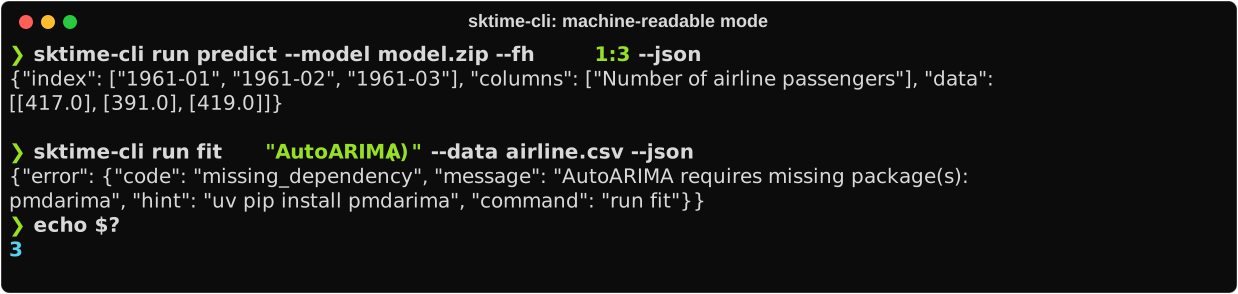
Add --json to any command and you get exactly one parseable JSON document on
stdout. Errors are JSON on stderr, with stable codes and a hint field that
usually contains the fix.
| Exit | Meaning |
|---|---|
0 |
Success |
1 |
Library or unexpected failure |
2 |
Usage error |
3 |
Missing optional dependency, and the hint says what to install |
4 |
Estimator, dataset, or model not found |
5 |
Data validation or spec error |
Install the skill
The full agent contract and task recipes live in an
agent skill
that ships inside the package, at the location package-bundled skills use. Add
sktime-cli to the project, then let
library-skills find it:
uv add sktime-cli                  # or: pip install sktime-cli
uvx library-skills --claude        # installs the skills you pick from your packages
That symlinks the skill into .agents/skills/, and --claude adds
.claude/skills/ for Claude Code. Your agent then knows how to drive the CLI.
To skip the prompt, name it: uvx library-skills --claude --skill sktime-cli.
If you installed the CLI as a standalone tool rather than as a project dependency, copy the file instead:
mkdir -p ~/.claude/skills/sktime-cli
curl -fsSL https://raw.githubusercontent.com/siddharth7113/sktime-cli/main/src/sktime_cli/.agents/skills/sktime-cli/SKILL.md \
  -o ~/.claude/skills/sktime-cli/SKILL.md
For the details, see using sktime-cli from an agent.
Documentation
Full documentation is at sktime-cli.readthedocs.io:
- Quickstart
- Finding estimators
- Working with data
- Fitting and evaluating models
- Output formats and errors
- CLI reference
- Architecture and design decisions
Status
sktime-cli is an independent, unofficial command-line client for sktime. It
is not maintained by or affiliated with the sktime project.
Version 0.0.2 is an early alpha release. Discovery and one-shot runs work, and the roadmap lists what comes next.
Contributing
Issues and pull requests are welcome. To set up a development environment, run the checks, and build the docs, see Contributing.
License
BSD 3-Clause, matching sktime.
1 maintainer

Download files
Download the file for your platform. If you're not sure which to choose, learn more about installing packages.
Source Distribution
Built Distribution
Filter files by name, interpreter, ABI, and platform.
If you're not sure about the file name format, learn more about wheel file names.
Copy a direct link to the current filters
File details
Details for the file sktime_cli-0.0.2.tar.gz.
File metadata
- Download URL: sktime_cli-0.0.2.tar.gz
- Upload date:
- Size: 224.8 kB
- Tags: Source
- Uploaded using Trusted Publishing? Yes
- Uploaded via:
twine/7.0.0 CPython/3.13.14
File hashes
| Algorithm | Hash digest | |
|---|---|---|
| SHA256 |
27ca7bae0860896920e89e27f085f666e5720810bdec0402d46c6d38a6a211e5
|
|
| MD5 |
6a81b735f60fafff996daeb2b0b88e10
|
|
| BLAKE2b-256 |
0a9dea7aab9be4c39852e2848d32328af65bbe322d4d718dd539ea211887b4ef
|
Provenance
The following attestation bundles were made for sktime_cli-0.0.2.tar.gz:
Publisher:
release.yml on siddharth7113/sktime-cli
-
Statement:
-
Statement type:
https://in-toto.io/Statement/v1 -
Predicate type:
https://docs.pypi.org/attestations/publish/v1 -
Subject name:
sktime_cli-0.0.2.tar.gz -
Subject digest:
27ca7bae0860896920e89e27f085f666e5720810bdec0402d46c6d38a6a211e5 - Sigstore transparency entry: 2583267590
- Sigstore integration time:
-
Permalink:
siddharth7113/sktime-cli@77725572fe3150947f56a8156a7c03ca1a53974b -
Branch / Tag:
refs/tags/v0.0.2 - Owner: https://github.com/siddharth7113
-
Access:
public
-
Token Issuer:
https://token.actions.githubusercontent.com -
Runner Environment:
github-hosted -
Publication workflow:
release.yml@77725572fe3150947f56a8156a7c03ca1a53974b -
Trigger Event:
push
-
Statement type:
File details
Details for the file sktime_cli-0.0.2-py3-none-any.whl.
File metadata
- Download URL: sktime_cli-0.0.2-py3-none-any.whl
- Upload date:
- Size: 83.4 kB
- Tags: Python 3
- Uploaded using Trusted Publishing? Yes
- Uploaded via:
twine/7.0.0 CPython/3.13.14
File hashes
| Algorithm | Hash digest | |
|---|---|---|
| SHA256 |
16efc4c86a479eabb6367761c8afa5cd82ba6e7da80eef911ce5d413281f5ccd
|
|
| MD5 |
e3120afd8d11eaa48d9e8f304ad894b1
|
|
| BLAKE2b-256 |
9a499c767c0557918a4174be764b73a3e40419813872d9b4d15291f0dd94660e
|
Provenance
The following attestation bundles were made for sktime_cli-0.0.2-py3-none-any.whl:
Publisher:
release.yml on siddharth7113/sktime-cli
-
Statement:
-
Statement type:
https://in-toto.io/Statement/v1 -
Predicate type:
https://docs.pypi.org/attestations/publish/v1 -
Subject name:
sktime_cli-0.0.2-py3-none-any.whl -
Subject digest:
16efc4c86a479eabb6367761c8afa5cd82ba6e7da80eef911ce5d413281f5ccd - Sigstore transparency entry: 2583267602
- Sigstore integration time:
-
Permalink:
siddharth7113/sktime-cli@77725572fe3150947f56a8156a7c03ca1a53974b -
Branch / Tag:
refs/tags/v0.0.2 - Owner: https://github.com/siddharth7113
-
Access:
public
-
Token Issuer:
https://token.actions.githubusercontent.com -
Runner Environment:
github-hosted -
Publication workflow:
release.yml@77725572fe3150947f56a8156a7c03ca1a53974b -
Trigger Event:
push
-
Statement type:







