
   _____ _          _ ____  ___
  / ____| |        | | |  \/  |
  \ `--.| | ___   _| | | .  . | __ _ _ __
   `--. \ |/ / | | | | | |\/| |/ _` | '_ \
  /\__/ /   <| |_| | | | |  | | (_| | |_) |
  \____/|_|\_\\__,_|_|_\_|  |_/\__,_| .__/
                                     | |
                                     |_|
SkullMap v2.0.0
Multi-Cloud Attack Chain Intelligence Tool






"See the full attack chain before the attacker does — across every cloud."
🚀 Installation
pip install skullmap
Or from source:
git clone https://github.com/Talha-Imran-cloud/skullmap
cd skullmap
pip install -r requirements.txt
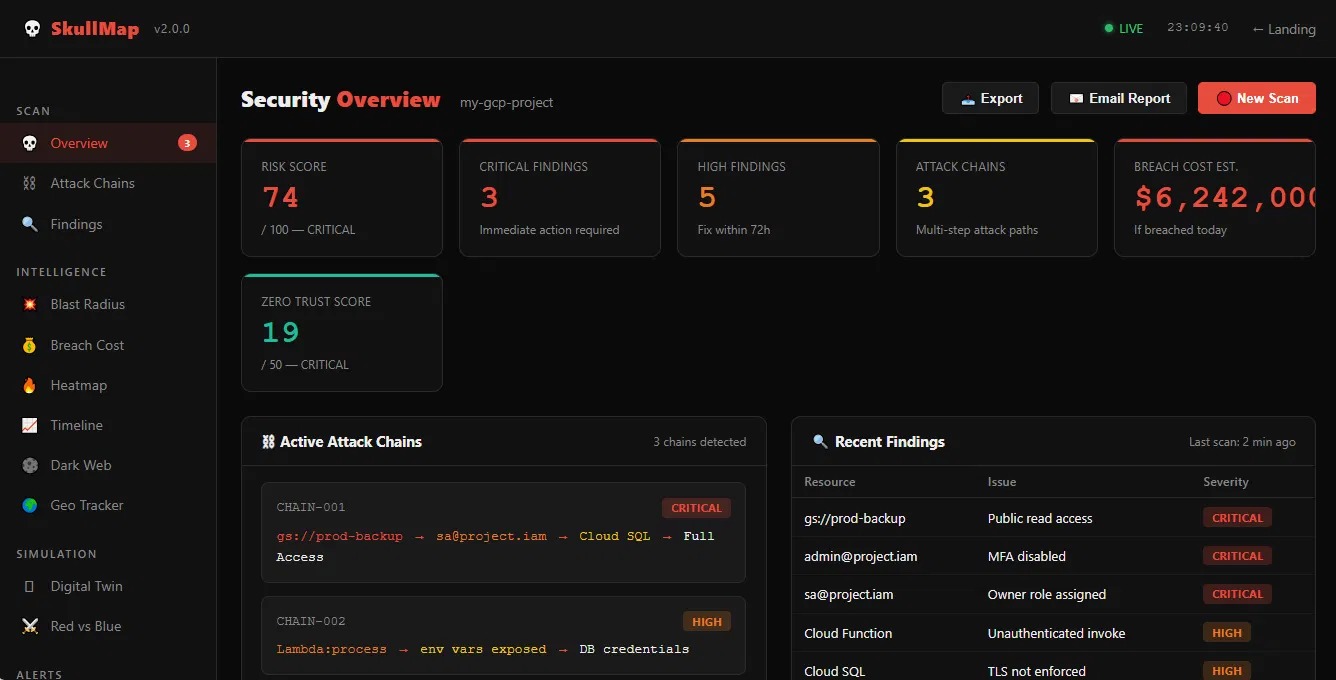
🖥️ Live Web Dashboard
# Start the web dashboard
python -m cli.main dashboard

# Or with custom port
python -m cli.main dashboard --port 8080

# Dashboard opens at: http://localhost:5000
Dashboard Features:
- 📊 Real-time security overview
- 🔗 Active attack chains visualization
- 🔍 Recent findings table
- 💥 Blast radius calculator
- 💰 Breach cost estimator
- 🗺️ Geo attack tracker
- 📈 Security timeline
- ⚔️ Red vs Blue simulation
- 🪞 Digital twin simulator
- 🌑 Dark web monitor
🔥 What is SkullMap?
SkullMap is the world's first Multi-Cloud Attack Chain Intelligence Tool with 50+ unique features that:
- 🔗 Discovers attack chains — not just individual misconfigurations
- 🧠 AI-powered narratives — tells the full attacker story in human language
- 💀 Multi-cloud coverage — GCP, AWS, Azure, Oracle Cloud, Kubernetes
- ⚡ Real-time monitoring — live watch mode with instant alerts
- 🎯 Bug bounty ready — CVSS scores and HackerOne/Bugcrowd format reports
- 🔐 Zero Trust assessment — NIST SP 800-207 based scoring
- 💥 Blast Radius Calculator — domino effect of any breach
- 💰 Breach Cost Estimator — financial impact in dollars
- 🪞 Digital Twin — simulate attacks on virtual copy, real infra untouched
- ⚔️ Red vs Blue Simulator — live battle simulation on your infra
No other tool combines all 50 features in one place.
☁️ Supported Clouds
| Cloud | Status | Features |
|---|---|---|
| ☁️ Google Cloud (GCP) | ✅ Full Support | Storage, IAM, Functions, Compute |
| 🟡 AWS | ✅ Full Support | S3, IAM, Lambda, Security Groups, CloudTrail |
| 🔵 Azure | ✅ Full Support | Storage, RBAC, Functions, Key Vault, NSG |
| 🟠 Oracle Cloud | ✅ Full Support | Object Storage, IAM, Network, Compute |
| ⚙️ Kubernetes | ✅ Full Support | Dashboard, RBAC, Pods, Secrets, Network |
| 🔴 Cross-Cloud | ✅ Full Support | GCP + AWS + Azure combined chains |
💀 All 50 Features + Commands
🔗 Core Engine — 5 Features
| # | Feature | Command | Description |
|---|---|---|---|
| 1 | Chain Discovery | scan --project (auto) |
Links misconfigs into multi-step attack paths |
| 2 | Visual Kill Chain Graph | scan --project (auto) |
S3 → Lambda → RDS → EC2 visual map |
| 3 | Risk Scoring | scan --project (auto) |
0-100 risk score per chain |
| 4 | Chain DNA Fingerprint | --dna |
SHA fingerprint + real-world breach matching |
| 5 | Smart Fix / Max Disruption | --optimize |
One fix that breaks maximum chains |
python -m cli.main scan --project my-gcp-project
python -m cli.main scan --project my-gcp-project --dna
python -m cli.main scan --project my-gcp-project --optimize
🧠 AI Features — 6 Features
| # | Feature | Command | Description |
|---|---|---|---|
| 6 | AI Attack Narrative | --ai |
Full attacker story in human language |
| 7 | Attacker Persona Mode | --ai --persona apt |
Script kiddie, APT, ransomware perspectives |
| 8 | Predictive AI | --predict |
Minority Report — next attack steps |
| 9 | Attacker Brain Simulator | --brain |
AI simulates attacker's actual thinking |
| 10 | AI Security Chat | chat |
Interactive AI security consultant |
| 11 | NLP Natural Language Scan | --nlp |
Ask security questions in plain English |
python -m cli.main scan --project my-gcp-project --ai
python -m cli.main scan --project my-gcp-project --ai --persona apt
python -m cli.main scan --project my-gcp-project --ai --persona ransomware
python -m cli.main scan --project my-gcp-project --ai --persona script_kiddie
python -m cli.main scan --project my-gcp-project --predict
python -m cli.main scan --project my-gcp-project --brain
python -m cli.main chat --project my-gcp-project
python -m cli.main scan --project my-gcp-project --nlp
💥 Unique Features — 10 Features
| # | Feature | Command | Description |
|---|---|---|---|
| 12 | Blast Radius Calculator | --blast-radius |
Domino effect — what else breaks after breach |
| 13 | Breach Cost Estimator | --breach-cost |
GDPR fines, downtime, legal costs in $ |
| 14 | Security Posture Timeline | --timeline |
ASCII graph of security score over time |
| 15 | Digital Twin Simulator | --twin |
Clone infra, simulate attacks safely |
| 16 | Red vs Blue Simulator | --simulate |
Live battle — see where defenses fail |
| 17 | Dark Web Monitor | dark-web |
Check emails, domain, IPs on dark web |
| 18 | Gamification / XP System | --gamify |
Level up security — XP, achievements, ranks |
| 19 | Geo Attack Tracker | --geo |
Real-time attacker IP location mapping |
| 20 | Evidence Generator | --evidence |
Court-ready HTML/PDF/JSON reports |
| 21 | GitHub PR Auto Review | pr-review |
Auto security scan — blocks dangerous PRs |
python -m cli.main scan --project my-gcp-project --blast-radius
python -m cli.main scan --project my-gcp-project --breach-cost
python -m cli.main scan --project my-gcp-project --timeline
python -m cli.main scan --project my-gcp-project --twin
python -m cli.main scan --project my-gcp-project --simulate
python -m cli.main dark-web --domain mycompany.com --emails admin@mycompany.com
python -m cli.main scan --project my-gcp-project --gamify
python -m cli.main scan --project my-gcp-project --geo
python -m cli.main scan --project my-gcp-project --evidence
python -m cli.main pr-review --repo owner/repo --pr 42
💰 Business Intelligence — 5 Features
| # | Feature | Command | Description |
|---|---|---|---|
| 22 | Attacker Economics Engine | --economics |
Financial ROI per attack chain |
| 23 | Executive Dashboard | --executive |
One-page CISO/CEO report |
| 24 | Industry Benchmark | --benchmark --industry |
Compare vs industry average |
| 25 | Bug Bounty Mode | --bounty --target |
CVSS + HackerOne/Bugcrowd format |
| 26 | Compliance Blast Radius | --blast-radius |
SOC2, ISO27001, GDPR, PCI DSS status |
python -m cli.main scan --project my-gcp-project --economics
python -m cli.main scan --project my-gcp-project --executive
python -m cli.main scan --project my-gcp-project --benchmark --industry fintech
python -m cli.main scan --project my-gcp-project --benchmark --industry healthcare
python -m cli.main scan --project my-gcp-project --benchmark --industry saas
python -m cli.main scan --project my-gcp-project --bounty --target "company-name"
python -m cli.main scan --project my-gcp-project --blast-radius
🔐 Advanced Security — 5 Features
| # | Feature | Command | Description |
|---|---|---|---|
| 27 | Zero Trust Score | --zero-trust |
NIST SP 800-207 — 6 pillars assessment |
| 28 | Dark Web Linker | --darkweb --emails |
Leaked creds merged into attack chains |
| 29 | Supply Chain Scanner | --supply-chain |
Secrets, packages, IaC, GitHub Actions |
| 30 | Attack Probability Heatmap | --heatmap |
Which resource gets attacked first (%) |
| 31 | Attack Replay Timeline | --replay |
Cinematic timeline — minute by minute |
python -m cli.main scan --project my-gcp-project --zero-trust
python -m cli.main scan --project my-gcp-project --darkweb --emails admin@company.com
python -m cli.main scan --project my-gcp-project --supply-chain
python -m cli.main supply --path ./my-project
python -m cli.main scan --project my-gcp-project --heatmap
python -m cli.main scan --project my-gcp-project --replay
📡 Monitoring & Alerts — 6 Features
| # | Feature | Command | Description |
|---|---|---|---|
| 32 | Live Watch Mode | watch |
Continuous scan every X minutes |
| 33 | Live Threat Intelligence | monitor |
Live threat feed + IP reputation |
| 34 | Slack War Room | --slack |
Real-time Slack notifications |
| 35 | Teams Alerts | --teams |
Microsoft Teams blast |
| 36 | Telegram Alerts | --telegram |
Instant mobile Telegram notifications |
| 37 | WhatsApp Alerts | --whatsapp |
Twilio WhatsApp alerts |
python -m cli.main watch --project my-gcp-project --interval 300
python -m cli.main monitor --project my-gcp-project --interval 60
python -m cli.main scan --project my-gcp-project --slack
python -m cli.main scan --project my-gcp-project --teams
python -m cli.main scan --project my-gcp-project --telegram
python -m cli.main scan --project my-gcp-project --whatsapp
python -m cli.main scan --project my-gcp-project --slack --teams --telegram --whatsapp
☁️ Cloud Coverage — 6 Features
| # | Feature | Command | Description |
|---|---|---|---|
| 38 | GCP Scanner | scan --project |
Storage, IAM, Functions, Compute |
| 39 | AWS Scanner | aws-scan --region |
S3, IAM, Lambda, Security Groups, CloudTrail |
| 40 | Azure Scanner | azure-scan --subscription |
Storage, RBAC, Functions, Key Vault, NSG |
| 41 | Oracle Cloud Scanner | oracle-scan --tenancy |
Object Storage, IAM, Network, Compute |
| 42 | Kubernetes Scanner | scan --project --k8s |
Dashboard, RBAC, Pods, Secrets, Network |
| 43 | Cross-Cloud Scanner | cross-scan |
GCP + AWS + Azure combined chains |
python -m cli.main scan --project my-gcp-project-id
python -m cli.main aws-scan --region us-east-1
python -m cli.main aws-scan --region eu-west-1 --profile my-profile
python -m cli.main azure-scan --subscription my-subscription-id
python -m cli.main oracle-scan --tenancy my-tenancy-id --region us-ashburn-1
python -m cli.main scan --project my-gcp-project --k8s
python -m cli.main cross-scan \
  --project my-gcp-project \
  --subscription my-azure-sub \
  --region us-east-1
🛠️ Tools — 5 Features
| # | Feature | Command | Description |
|---|---|---|---|
| 44 | Auto-Retest Engine | retest |
Before/after fix comparison — audit proof |
| 45 | Security Training Mode | train |
AI lessons + quiz on 8 security topics |
| 46 | Chain Evolution Tracker | watch (auto) |
How chains grow over time |
| 47 | Attack Simulation Timer | auto in results | Beginner → APT exploit time estimates |
| 48 | Attacker Economics ROI | --economics |
$ ROI per minute for attacker |
python -m cli.main retest --project my-gcp-project --cloud gcp
python -m cli.main retest --project my-aws --cloud aws
python -m cli.main train
python -m cli.main watch --project my-gcp-project --interval 300
python -m cli.main scan --project my-gcp-project --economics
📖 Complete Command Reference
python -m cli.main --help

Commands:
  scan          💀 Scan GCP project for attack chains
  aws-scan      🟡 Scan AWS account for attack chains
  azure-scan    🔵 Scan Azure subscription for attack chains
  oracle-scan   🟠 Scan Oracle Cloud for attack chains
  cross-scan    🔴 Cross-cloud scan — GCP + AWS + Azure
  dashboard     🖥️  Start live web dashboard
  watch         👁  Watch GCP project continuously
  monitor       📡 Live threat intelligence monitoring
  chat          🤖 AI security chat
  train         🎓 Security training mode
  retest        🔄 Auto-retest after applying fixes
  supply        🌐 Supply chain security scan
  pr-review     🔍 GitHub PR security review
  dark-web      🌑 Dark web asset monitor
  version       📌 Show version
Full scan Options
python -m cli.main scan --project PROJECT_ID [OPTIONS]

# ── Cloud Options ──────────────────────────────
  -p, --project TEXT          GCP Project ID [required]
  -w, --watch                 Enable watch mode
  -i, --interval INT          Watch interval seconds (default: 300)
  --k8s                       Include Kubernetes scan

# ── AI Options ────────────────────────────────
  --ai                        AI attack narrative
  --persona [script_kiddie|apt|ransomware]
  --predict                   Predict next attack steps
  --brain                     Attacker brain simulator
  --chat                      AI security chat
  --nlp                       Natural language scan

# ── Security Analysis ─────────────────────────
  --dna                       Chain DNA fingerprint
  --optimize                  Max chain disruption fix
  --replay                    Attack replay timeline
  --heatmap                   Attack probability heatmap
  --zero-trust                Zero trust assessment
  --supply-chain              Supply chain scan
  --darkweb                   Dark web credential check
  -e, --emails TEXT           Emails to check on dark web

# ── Unique Features ───────────────────────────
  --blast-radius              Blast radius calculator
  --breach-cost               Breach cost estimator
  --timeline                  Security posture timeline
  --twin                      Digital twin simulation
  --simulate                  Red vs Blue simulation
  --gamify                    Gamification / XP system
  --geo                       Geo attack tracker
  --evidence                  Evidence generator

# ── Business Intelligence ─────────────────────
  --economics                 Attacker economics engine
  --executive                 Executive dashboard
  --benchmark                 Industry benchmark
  --industry TEXT             Industry (fintech/healthcare/saas/ecommerce/government/general)
  --bounty                    Bug bounty mode
  -t, --target TEXT           Bounty target name
  --threat-intel              Live threat intelligence

# ── Alerts ────────────────────────────────────
  --slack                     Slack alerts
  --teams                     Teams alerts
  --telegram                  Telegram alerts
  --whatsapp                  WhatsApp alerts

# ── Other ─────────────────────────────────────
  --retest                    Auto retest after fix
  -o, --output TEXT           Output directory (default: reports)
💡 Power User Examples
# Full GCP scan — all features
python -m cli.main scan --project my-gcp-project \
  --ai --predict --brain --economics --dna \
  --executive --zero-trust --heatmap --replay \
  --blast-radius --breach-cost --evidence \
  --slack --telegram

# Bug bounty mode
python -m cli.main scan --project my-gcp-project \
  --bounty --target "company-name" --dna --evidence

# APT simulation
python -m cli.main scan --project my-gcp-project \
  --ai --persona apt --brain --replay --twin

# Full AWS scan
python -m cli.main aws-scan --region us-east-1 \
  --ai --economics --zero-trust --heatmap \
  --benchmark --industry fintech

# Cross-cloud everything
python -m cli.main cross-scan \
  --project my-gcp \
  --subscription my-azure-sub \
  --region us-east-1 \
  --ai --economics --executive \
  --blast-radius --zero-trust \
  --slack --telegram

# Live web dashboard
python -m cli.main dashboard

# Digital twin + Red vs Blue
python -m cli.main scan --project my-gcp-project --twin --simulate

# Dark web + supply chain
python -m cli.main scan --project my-gcp-project \
  --darkweb --emails admin@company.com \
  --supply-chain --evidence

# Security training
python -m cli.main train

# AI chat
python -m cli.main chat --project my-gcp-project

# Live threat monitoring
python -m cli.main monitor --project my-gcp-project --interval 60

# Industry benchmark
python -m cli.main scan --project my-gcp-project \
  --benchmark --industry fintech
⚙️ Configuration (.env)
# GCP
GCP_PROJECT_ID=your-project-id
GOOGLE_APPLICATION_CREDENTIALS=path/to/gcp-key.json

# AWS
AWS_ACCESS_KEY_ID=your-key-id
AWS_SECRET_ACCESS_KEY=your-secret-key
AWS_REGION=us-east-1

# Azure
AZURE_SUBSCRIPTION_ID=your-subscription-id
AZURE_TENANT_ID=your-tenant-id
AZURE_CLIENT_ID=your-client-id
AZURE_CLIENT_SECRET=your-client-secret

# Oracle
ORACLE_TENANCY_ID=your-tenancy-id
ORACLE_USER_ID=your-user-id
ORACLE_FINGERPRINT=your-fingerprint
ORACLE_KEY_FILE=path/to/oracle-key.pem
ORACLE_REGION=us-ashburn-1

# AI
GEMINI_API_KEY=your-gemini-key

# Alerts
SLACK_WEBHOOK_URL=https://hooks.slack.com/...
TEAMS_WEBHOOK_URL=https://outlook.office.com/...
TELEGRAM_BOT_TOKEN=your-bot-token
TELEGRAM_CHAT_ID=your-chat-id
TWILIO_ACCOUNT_SID=your-account-sid
TWILIO_AUTH_TOKEN=your-auth-token
TWILIO_WHATSAPP_FROM=+14155238886
TWILIO_WHATSAPP_TO=+923001234567

# GitHub
GITHUB_TOKEN=your-github-token

# Dark Web
HIBP_API_KEY=your-hibp-key

# New Features
TIMELINE_FILE=reports/.skull_timeline.json
PROFILE_FILE=reports/.skull_profile.json
EVIDENCE_DIR=reports/evidence
GEO_API_KEY=

# Scan Settings
WATCH_INTERVAL=300
OUTPUT_DIR=reports
📁 Project Structure
skullmap/
├── cli/
│   ├── scanner/
│   │   ├── gcp_scanner.py          # GCP scanner
│   │   ├── aws_scanner.py          # AWS scanner
│   │   ├── azure_scanner.py        # Azure scanner
│   │   ├── oracle_scanner.py       # Oracle scanner
│   │   ├── k8s_scanner.py          # Kubernetes scanner
│   │   └── live_watch.py           # Watch mode
│   ├── engine/
│   │   ├── chain_builder.py        # Attack chain discovery
│   │   ├── risk_scorer.py          # Risk scoring
│   │   ├── economics.py            # Attacker economics
│   │   ├── chain_dna.py            # DNA fingerprinting
│   │   ├── smart_fix.py            # Auto-remediation
│   │   ├── replay_timeline.py      # Attack replay
│   │   ├── supply_chain.py         # Supply chain
│   │   ├── executive_dashboard.py  # Executive report
│   │   ├── auto_retest.py          # Auto-retest
│   │   ├── bug_bounty.py           # Bug bounty
│   │   ├── zero_trust.py           # Zero trust
│   │   ├── attacker_brain.py       # Attacker brain
│   │   ├── threat_intel.py         # Threat intel
│   │   ├── heatmap.py              # Heatmap
│   │   ├── benchmarking.py         # Benchmarking
│   │   ├── ai_chat.py              # AI chat
│   │   ├── training_mode.py        # Training
│   │   ├── gamification.py         # XP system
│   │   ├── nlp_scan.py             # NLP scanner
│   │   ├── evidence_generator.py   # Evidence
│   │   ├── geo_tracker.py          # Geo tracker
│   │   ├── github_pr_review.py     # PR reviewer
│   │   ├── blast_radius.py         # Blast radius
│   │   ├── breach_cost.py          # Breach cost
│   │   ├── security_timeline.py    # Timeline
│   │   ├── digital_twin.py         # Digital twin
│   │   ├── darkweb_monitor.py      # Dark web
│   │   ├── redblue_sim.py          # Red vs Blue
│   │   └── web_dashboard.py        # Web dashboard
│   ├── ai/
│   │   ├── narrator.py             # AI narrative
│   │   ├── predictor.py            # Predictive AI
│   │   └── darkweb.py              # Dark web linker
│   ├── alerts/
│   │   ├── slack_alert.py          # Slack
│   │   ├── teams_alert.py          # Teams
│   │   ├── telegram_alert.py       # Telegram
│   │   └── whatsapp_alert.py       # WhatsApp
│   ├── config.py
│   └── main.py
├── web/                            # Web dashboard files
├── screenshots/
│   └── dashboard.png               # Dashboard screenshot
├── docs/
├── reports/
├── requirements.txt
├── setup.py
└── README.md
📄 License
MIT License — Free to use, modify, and distribute.
⭐ Support
- ⭐ Star this repo on GitHub
- 🐛 Report bugs via Issues
- 🔀 Submit PRs for improvements
💀 SkullMap — See the full attack chain before the attacker does
Talha Imran — SOC Analyst | Cloud Security | Pentesting




🔓 Feature #49 & #50 — Unauthenticated Access Tester
What it does:
Checks cloud resources accessible WITHOUT any credentials — finds exposed APIs, public buckets, unauthenticated endpoints before attackers do!
| # | Feature | Cloud | What it checks |
|---|---|---|---|
| 49 | GCP Auth Tester | GCP | Public buckets, unauthenticated APIs, Cloud Functions, Cloud Run, Firebase DB, Metadata server, Exposed service account keys |
| 50 | AWS Auth Tester | AWS | Public S3 buckets, EC2 metadata, API Gateway, Cognito misconfig, Public Lambda URLs, Exposed env variables |
Commands:
# GCP unauthenticated access test
python -m cli.main auth-test --project my-gcp-project

# AWS unauthenticated access test
python -m cli.main auth-test --region us-east-1

# Azure unauthenticated access test
python -m cli.main auth-test --subscription my-azure-sub

# Oracle unauthenticated access test
python -m cli.main auth-test --tenancy my-tenancy-id

# ALL clouds at once
python -m cli.main auth-test \
  --project my-gcp-project \
  --region us-east-1 \
  --subscription my-azure-sub \
  --tenancy my-tenancy-id \
  --all-clouds
What gets tested:
GCP:
- 🪣 Public GCS buckets — no auth required
- 🔌 Unauthenticated Cloud APIs
- ⚡ Cloud Functions — public invoke
- 🏃 Cloud Run — unauthenticated endpoints
- 🔥 Firebase DB — open read/write
- 🖥️ Metadata server — SSRF detection
- 🔑 Exposed service account keys
AWS:
- 🪣 Public S3 buckets — no sign required
- 🖥️ EC2 metadata — IMDSv1 exposure
- 🚪 API Gateway — public endpoints
- 👤 Cognito misconfiguration
- ⚡ Public Lambda URLs
- 🔐 Exposed environment variables
Azure:
- 📦 Public Blob storage
- 🔌 Unauthenticated REST APIs
- 🗝️ Exposed connection strings
Oracle:
- 🪣 Public Object Storage buckets
- 🔌 Unauthenticated OCI APIs
1 maintainer

Download files
Download the file for your platform. If you're not sure which to choose, learn more about installing packages.
Source Distribution
Built Distribution
Filter files by name, interpreter, ABI, and platform.
If you're not sure about the file name format, learn more about wheel file names.
Copy a direct link to the current filters
File details
Details for the file skullmap-2.0.1.tar.gz.
File metadata
- Download URL: skullmap-2.0.1.tar.gz
- Upload date:
- Size: 121.3 kB
- Tags: Source
- Uploaded using Trusted Publishing? No
- Uploaded via:
twine/7.0.0 CPython/3.14.6
File hashes
| Algorithm | Hash digest | |
|---|---|---|
| SHA256 |
0dd12f643eea213a727ba7236fff6789c16f6853d34144a2f3ffb7bdce2b08cc
|
|
| MD5 |
e67db2e410739a3a1368e101e2a2e3c2
|
|
| BLAKE2b-256 |
6262c0619595dc4826912594349795f4dcc34f7da0784fe5dc2c135c85b7a1ff
|
File details
Details for the file skullmap-2.0.1-py3-none-any.whl.
File metadata
- Download URL: skullmap-2.0.1-py3-none-any.whl
- Upload date:
- Size: 139.1 kB
- Tags: Python 3
- Uploaded using Trusted Publishing? No
- Uploaded via:
twine/7.0.0 CPython/3.14.6
File hashes
| Algorithm | Hash digest | |
|---|---|---|
| SHA256 |
ad0e3cc5ec2b3955ca8d4eb2a0400d21f76585493b7e1eee31472c1ac409bef1
|
|
| MD5 |
ab7c407e220fb878cfcc11701542b1f4
|
|
| BLAKE2b-256 |
bfa710be50a6c603483c6e7f95e291596a3e408c5e9805524d5c68f39e7e610e
|














