skyalmanacPP is a Python 3 program that creates the Planetary Phenomena data and charts that accompany a Nautical Almanac. The generated tables assist celestial navigation with a sextant. Although you are strongly advised to purchase the official Nautical Almanac, this program will reproduce the tables with no warranty or guarantee of accuracy.
skyalmanacPP employs multiprocessing (if your processor has multiple cores) reducing the processing time. (Single-processing is also available as an option.)
Functionality
skyalmanacPP (AKA “Planetary Phenomena”) includes:
the “DECLINATION OF SUN AND PLANETS” chart
the “Planet Diagram” (see “Americal Practical Navigator” originally by Nathaniel Bowditch, L.L.D., Volume 1, 2017 Edition, page 256; also any “Astronomical Phenomena” or “Nautical Almanac” from USNO/HMNAO)
“VISIBILITY OF PLANETS” text (see any “Astronomical Phenomena” or “Nautical Almanac” from USNO/HMNAO) with one notable exception: I assume that the data listed in official almanacs is based on latitude 51.5°N, whereas skyalmanacPP provides planet visibility text based on any latitude you choose (between 60°S and 72°N).
“VISIBILITY OF PLANETS IN MORNING AND EVENING TWILIGHT” table (see any “Astronomical Phenomena” or “Nautical Almanac” from USNO/HMNAO) based on your chosen latitude.
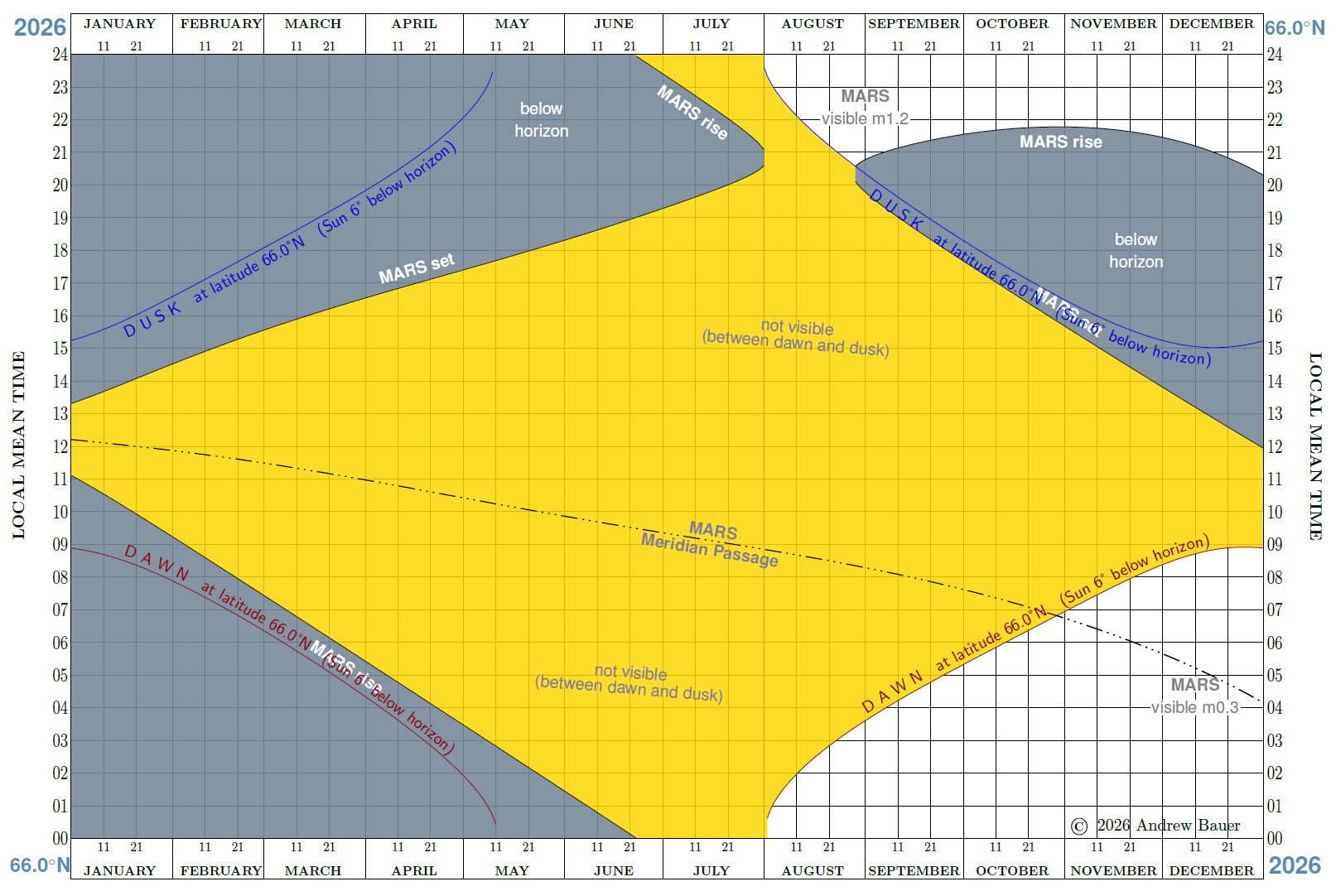
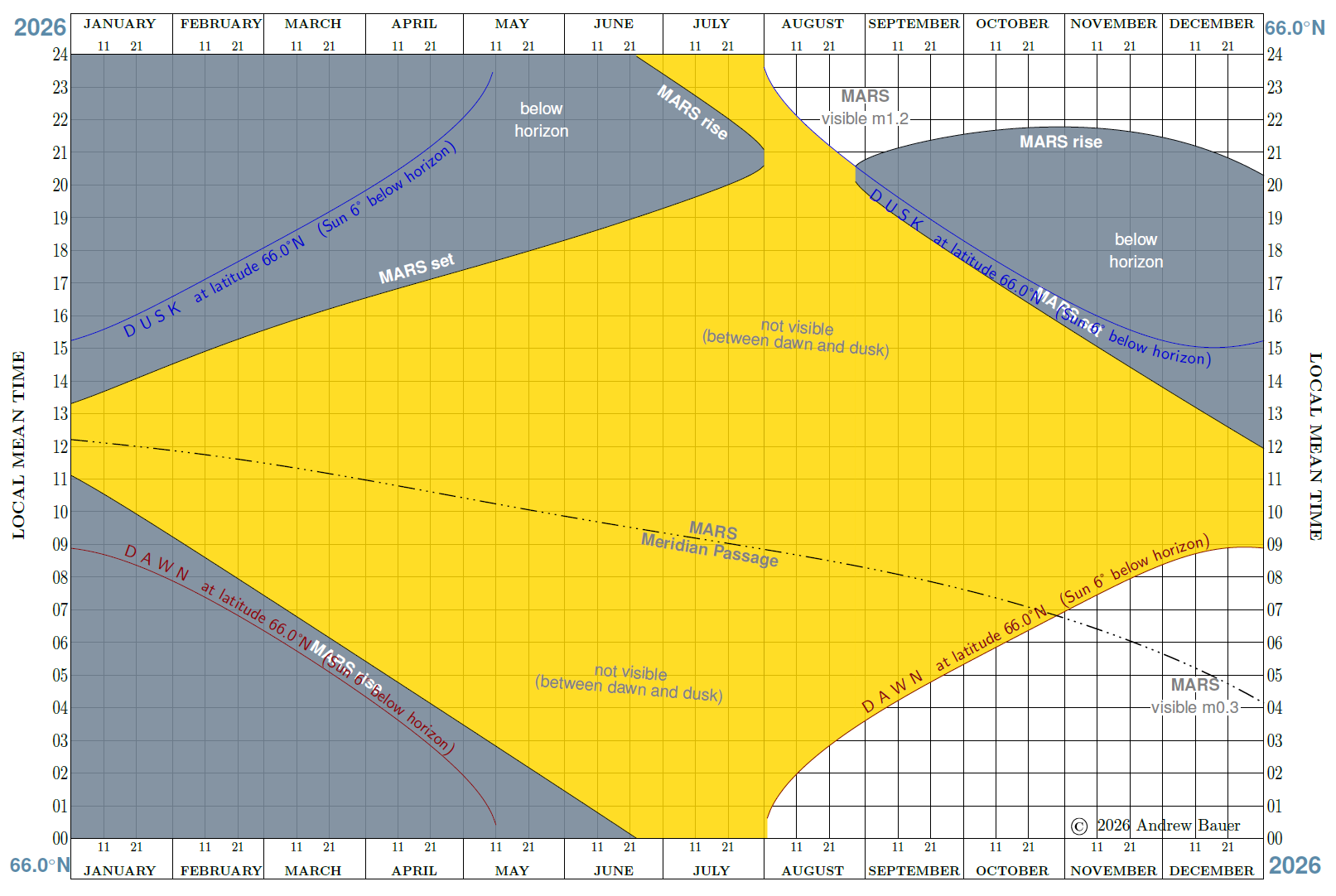
Planet Visibility charts, which I prefer to call “Planet Invisibility” charts, because they show whwn the planet is below the horizon (shaded grey) and when the Sun is higher than 6 degrees below the horizon (shaded gold), i.e. Civil Dawn to Civil Dusk, when it is generally too bright to see any planets. (Conversely I maintain that a planet is generally visible during Nautical and Astronomical twilight and night itself, when the Sun is more than 18 degrees below the horizon.) This chart provides the best latitude-specific picture of your chances to observe a given planet. It is based on the pioneering planet visibility work done by the astronomer Rainer Lange, whose web site is now only reachable as an archive: https://web.archive.org/web/20260106175348/https://www.alcyone.de/
Sample Planet Visibility chart: Mars in 2026 at latitude 66°N
User Documentation
Please read the following file (also in the ‘docs’ project folder): SkyAlmanacPP usage notes
Technical Note
This is the PyPI edition of SkyAlmanacPP-Py3. Version numbering follows the scheme Major.Minor.Patch, whereby the Patch number represents some small correction to the intended release.
The PyPI edition has the advantage of easier installation and source code files do not clutter the working folder. The PyPI edition is recommended for general users.
Software Requirements
python >= 3.4 (version 3.13 is recommended)
Skyfield >= v1.55
numpy >= 2.0.0 (valid for Skyfield versions >= 1.48)
scipy >= 1.14.1 (for Planet Visibiliy charts)
Skyfield version 1.55 or newer is recommended (versions 1.50 to 1.54 are known to have issues).
Installation on Windows 10/11; on Linux before Python 3.12; on Mac before MacOS 14
python -m pip install --upgrade skyalmanacPP
Installing skyalmanacPP ensures that Skyfield and scipy (and their dependencies) are also installed. If previous versions of skyalmanacPP were installed, consider upgrading Skyfield and scipy thus:
python -m pip install --upgrade skyfield scipy
Thereafter run it with:
python -m skyalmanacPP <options>
Installation on Linux with Python 3.12 and higher; on MacOS 14 and higher
More recent versions of Python (on specific operating systems) prevent users installating a PyPI package (such as Skyfield, skyalmanacPP, numpy, Pandas) in the Python system-wide area. The error message is “This environment is externally managed” and this is intended to avoid a conflict between the distribution’s package manager and Python package management tools as defined in the PEP-668 documentation.
The intention is to persuade users to install PyPI packages in a virtual environment instead, which functions very well. The downside: a virtual environment is typically created in a project folder, so you may require several vitrual environments. It is NOT wise to “break the rules” and force package installation in the Python system-wide area.
To assist users new to virtual environments, I have provided an Installation guide for Linux. (Package installation for MacOS is in principle the same.)
Guidelines for Linux & Mac OS
Quote from Chris Johnson:
It’s best to not use the system-provided Python directly. Leave that one alone since the OS can change it in undesired ways. The best practice is to configure your own Python version(s) and manage them on a per-project basis using venv. This eliminates all dependency on the system-provided Python version, and also isolates each project from other projects on the machine.
Each project can have a different Python point version if needed, and gets its own site_packages directory so pip-installed libraries can also have different versions by project. This approach is a major problem-avoider.
1 maintainer

Metadata
1 maintainer
Release files for skyalmanacPP 0.5
For a detailed explanation of source distributions (sdists) and built distributions (wheels), please see the package formats documentation.
Source distribution (sdist)
| File | Size | Uploaded | |
|---|---|---|---|
| skyalmanacpp-0.5.tar.gz | 31.6 MB | Details |
Built distribution (wheel)
| File | Interpreter | ABI | Platform | Reset |
|---|---|---|---|---|
| skyalmanacpp-0.5-py3-none-any.whl | Python 3 | none | any | Details |
Total release size: 63.8 MB
Release files / skyalmanacpp-0.5.tar.gz
| Download URL | skyalmanacpp-0.5.tar.gz |
|---|---|
| Size | 31.6 MB |
| Tags | Source |
|
SHA-256 checksum How to use checksums |
800611a5fa188e141f7d5144ddd3fb436135d55fae95c207249460ba14fc98f3
|
|
BLAKE2b-256 checksum How to use checksums |
d03957f114d23d90fa1adc0d80253c341d85f56111283174c27c5956673d5383
|
| Upload date | |
|
Uploaded using Trusted Publishing? What is trusted publishing? |
No |
| Uploaded via |
twine/7.0.0 CPython/3.13.14
|
Release files / skyalmanacpp-0.5-py3-none-any.whl
| Download URL | skyalmanacpp-0.5-py3-none-any.whl |
|---|---|
| Size | 32.2 MB |
| Tags | Python 3 |
|
SHA-256 checksum How to use checksums |
4263950f0640e283917c7c498c2cfd818942fc3c7f207d8206a30d4f35adede7
|
|
BLAKE2b-256 checksum How to use checksums |
c8e1a761fb58b50a28f0550be4833067572ecddbf120237a2421cdfe3a8e7a10
|
| Upload date | |
|
Uploaded using Trusted Publishing? What is trusted publishing? |
No |
| Uploaded via |
twine/7.0.0 CPython/3.13.14
|