

Skyborne



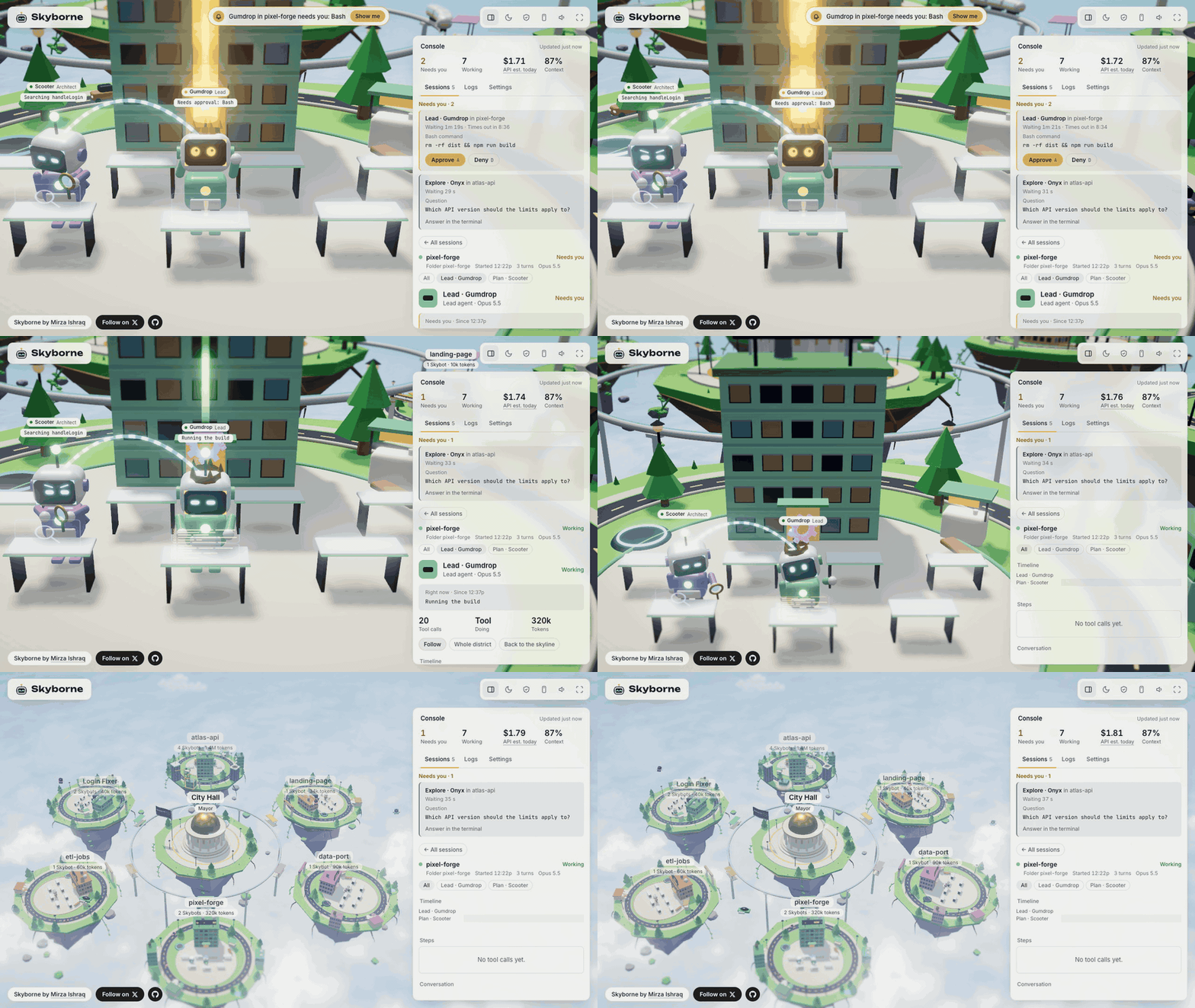
Watch your Claude Code agents work, live, in a 3D sky city. Each session is a floating district and each agent is a little robot, a Skybot. See at a glance who's working, who's stuck and who needs you, and approve or deny their requests right from the city.
Everything stays on your computer: no account, no cloud, and no telemetry (nothing is sent back to anyone).
Status: early.

 |
 |
| Morning | Night |
Why Skyborne?
Claude Code can run several sessions at once, and each can launch helper agents. From the terminal, it's hard to tell what they're all doing. Skyborne puts them in one place:
- See everything at once: which sessions are working, which are idle and which are waiting for you.
- Answer from one place: approve or deny permission requests without hunting through terminals.
- Know where time and tokens go: how long each step took and how many tokens (the units Claude's usage is counted in) each agent used.
- Look back: open any of your 60 most recent sessions and walk through it step by step, even ones from past days.
Features
The city
Skyborne turns your Claude Code sessions into a living city in the sky.
- A district per session: each session is a floating island around City Hall, named after its project folder or a name you give it. Its tower grows a floor as the session uses more tokens.
- Live, as it happens: the city changes the moment Claude Code does something. A quiet district dozes off after 3 minutes and wakes up when its session does.
- "Needs you" alerts: when Claude asks permission, a banner at the top says who is asking, and Show me takes you to that Skybot. Desktop alerts can tell you even when the city isn't in front (off by default).
- Morning, dusk and night: the sky follows your clock, or press
Tto pick a time. Hover cars, a monorail and a blimp keep the sky busy, with sound effects onM. - Reel mode and Safe to film: a portrait, phone-shaped view (9:16) for recording videos, and a switch that hides your prompts, files and project names.
- History: sessions are kept for 30 days, and the first run offers to bring in the last 7 days.
Skybots
Every agent is a Skybot: a small robot that acts out what its agent is doing, so you can read the city at a glance.
- One per agent: each session's lead, plus one for every helper it launches. Helpers beam down when they start (the lead waves hello if it's free) and beam back up shortly after they finish.
- Their own names: every Skybot gets a name, like Gumdrop or Onyx, and helpers show their role, like Explore or Plan.
- Props for the job: a book while reading, a magnifying glass while searching, orbiting lights while thinking, a spinning gear while using a tool.
- Eyes that show status: cyan while working, amber while waiting for you, red after an error, dim when asleep.
- Moods: in the zone after a few minutes of work, tired after 20 minutes, grumpy after repeated errors, bored when idle for a while, proud when they finish.
- Moments: when a lead finishes answering you, it does a victory dance in a burst of confetti and the free Skybots around it clap along. In quiet moments they wave to each other, stretch, yawn and take coffee breaks.
- Asking for you: a Skybot waiting for your approval shows an amber beam linked to City Hall, which turns green when you approve and red when you deny.
- Click one to see that agent's own steps, timeline and tokens.
The console
The panel beside the city (C shows or hides it) is where you read the details and act.
- At a glance: how many requests need you, how many Skybots are working, Usage (how much of your 5-hour limit you've used on a Pro or Max plan; on other plans, what today's sessions would cost at API prices) and Context (how close the fullest session is to filling Claude's working memory). Hover Usage to see where the tokens went, by session and by agent.
- "Needs you" cards: each request shows the exact command, file or address and how long it has
waited, with Approve (
A) and Deny (D). - Sessions: every live session, with what needs you first, then errors, then anything slow. Filter by state (working, needs you, idle, asleep), search by name or folder, bring back past sessions, and rename a district.
- Session detail: click a session for a timeline of every step (how long each took, agent by agent), the conversation, the files changed, every approval and the tokens per agent. Click a step for its full input and output.
- Logs: every session's newest steps in one list, filtered by kind (prompts, tools, errors, replies, helpers) or by session, with how long each step took.
- Settings: your name on City Hall, how long a session counts as live, desktop alerts, time of day, Safe to film, sound, sample districts and playing a recording.
Getting started
What you need
- Python 3.11 or newer (uv, below, gets one for you if you don't have it)
- Claude Code
curl(already on macOS, Windows 10 or newer and most Linux systems;skyborne doctorchecks)- A current browser: Chrome, Edge, Firefox or Safari
Install
Skyborne installs with uv, a fast installer for Python programs. If you don't have uv yet, install it first (then open a new terminal):
curl -LsSf https://astral.sh/uv/install.sh | sh                               # macOS or Linux
powershell -ExecutionPolicy ByPass -c "irm https://astral.sh/uv/install.ps1 | iex"   # Windows
(brew install uv and winget install --id=astral-sh.uv -e work too.) Then:
uv tool install skyborne
skyborne install
uv tool install puts Skyborne in a private Python environment of its own and the skyborne command
on your PATH (if the command isn't found, run uv tool update-shell and open a new terminal).
skyborne install then adds Skyborne's plugin to Claude Code. That asks whether to add Skyborne's
status line (the info line at the bottom of Claude Code); say yes to see Usage and Context in the
city. Use uv tool install as shown, not uvx: the status line remembers where Skyborne's Python
lives, and uvx keeps it in a cache that gets cleaned out.
Installed from a clone of this repository before? Run skyborne uninstall there first (as
.venv/bin/skyborne uninstall), then follow the steps above.
Run
skyborne
The city opens at http://127.0.0.1:7317. Start Claude Code in another terminal and its session appears as a new district. Sessions that were already open before you installed don't show up, so start a new one.
Update
Stop Skyborne first (Ctrl+C in its terminal), then:
uv tool upgrade skyborne
skyborne install
The second command makes the plugin match the new version (skyborne doctor tells you when it's
needed). Start Skyborne again afterwards.
Commands
| Command | What it does |
|---|---|
skyborne |
Starts Skyborne and opens the city |
skyborne import --days 7 |
Brings in past sessions from the history Claude Code keeps |
skyborne doctor |
Checks your setup and explains any problem |
skyborne record <id> --out demo.json --stand-ins |
Saves one session to a file the city can replay, with personal details scrubbed; read the text it lists before you share it |
skyborne uninstall |
Removes the plugin and puts your old status line back |
To remove Skyborne, run skyborne uninstall, then uv tool uninstall skyborne. Your history (prompts,
replies and tool calls, see Privacy) stays in ~/.skyborne: delete that folder too if you
want it gone, after skyborne uninstall, which needs what is in it.
Keyboard shortcuts
| Key | Action |
|---|---|
R |
Reel mode (9:16, for filming) |
S |
Safe to film (hides prompts, files and project names) |
T |
Time of day |
M |
Sound |
C |
Console |
F |
Full screen |
A / D |
Approve or deny the "Needs you" card in focus |
↑ ↓ Enter Esc |
In the console: move through a list, open, go back |
Approving from the city
When Claude Code asks permission to run something, a Needs you card shows what it wants to do. Click Approve or Deny. The terminal's own prompt still works at the same time, and whichever you answer first wins.
- Skyborne never answers on its own. If nobody answers in the city within 10 minutes, it leaves the request to the terminal.
- Questions Claude asks you, and plans waiting for your OK, are answered in the terminal.
- Every answer is logged: what was asked, the answer, and where it was given.
Privacy
Skyborne runs only on your computer. It listens on 127.0.0.1 (reachable from your machine only),
makes no requests to the internet and sends nothing back to anyone. The 3D engine and fonts come bundled.
It keeps what Claude Code reports, including your prompts, Claude's replies and every tool call, in
~/.skyborne/skyborne.db, in a folder only your account can open. Session data older than 30 days
is deleted. While Skyborne runs, other programs on this computer can reach it too, so don't run it
on a computer you share with people you don't trust. See SECURITY.md.
If Skyborne isn't running, Claude Code works as usual: nothing waits or breaks (Skyborne's status line, if you added it, still shows).
Platforms
Tested end to end on macOS. The automated tests also pass on Linux and Windows, but Skyborne hasn't been tried there with real Claude Code sessions yet. Details are in the guide.
Learn more
The guide covers the rest: every view in the console, approval details, recordings, settings, what is stored and known issues.
Development
git clone https://github.com/ishraq21/skyborne.git
cd skyborne
python3 -m venv .venv                             # on Windows, use `python` and `.venv\Scripts\` in place of `python3` and `.venv/bin/`
.venv/bin/pip install -e '.[dev]'
.venv/bin/python -m pytest                        # unit tests, reducer evals, server, import, scrub and record tests
SKYBORNE_LIVE=1 .venv/bin/python -m pytest tests/live -s   # drives real Claude Code sessions (macOS/Linux)

cd page
npm ci && npx playwright install chromium         # once: three.js, the fonts and the test browser (Node 24)
node build.js                                     # builds the city into skyborne/web/ and dist/preview.html (commit both)
node dev/serve.js                                 # a preview with a fake city at http://127.0.0.1:8000/
node dev/icons.js                                 # remakes the tab icon's PNGs after a change to src/icons/icon.svg
node tests/smoke.js && node tests/live-smoke.js   # browser tests: the preview, then the real server
This runs your checkout, not a version installed with uv: use .venv/bin/skyborne install and
.venv/bin/skyborne for it.
Contributing
Contributions are welcome. Skyborne is for Claude Code only, runs only on your computer and has no telemetry, so please read CONTRIBUTING.md before you start. Please follow the Code of Conduct, and report security problems privately, as SECURITY.md describes.
Author
Created by Mirza Ishraq. Blog: my-space.io · X: @myspaceio
License
Apache License 2.0. See NOTICE and TRADEMARK.md.
Skyborne and the Skybot logo are trademarks of Mirza Ishraq Yeahia. Forks must use a different name and logo.
Skyborne is an independent project. It is not made, endorsed or supported by Anthropic. Claude and Claude Code are trademarks of Anthropic, PBC.
1 maintainer

Metadata
1 maintainer
Release files for skyborne 0.1.0
For a detailed explanation of source distributions (sdists) and built distributions (wheels), please see the package formats documentation.
Source distribution (sdist)
| File | Size | Uploaded | |
|---|---|---|---|
| skyborne-0.1.0.tar.gz | 822.4 kB | Details |
Built distribution (wheel)
| File | Interpreter | ABI | Platform | Reset |
|---|---|---|---|---|
| skyborne-0.1.0-py3-none-any.whl | Python 3 | none | any | Details |
Total release size: 1.6 MB
Release files / skyborne-0.1.0.tar.gz
| Download URL | skyborne-0.1.0.tar.gz |
|---|---|
| Size | 822.4 kB |
| Tags | Source |
|
SHA-256 checksum How to use checksums |
052c3cacc20d0705840c4d7e29834ae198e8d21c35510da373d2265c51b1b4b9
|
|
BLAKE2b-256 checksum How to use checksums |
9802aaa78f211657861b856f47c7149495b72b1b3652158f9ce52ebf006b514e
|
| Upload date | |
|
Uploaded using Trusted Publishing? What is trusted publishing? |
Yes |
| Uploaded via |
twine/7.0.0 CPython/3.13.14
|
Provenance
Provenance describes where a file came from. On PyPI, provenance is shared via attestations, which provide a verifiable record of the build or publishing details. View details, limitations and caveats.


PyPI Publish Attestation
PyPI verified that this artifact, at this checksum, originated from the publisher listed below.
Signed by GitHub Actions, verified by PyPI on Oct 7, 2026.
Transparency logRelease files / skyborne-0.1.0-py3-none-any.whl
| Download URL | skyborne-0.1.0-py3-none-any.whl |
|---|---|
| Size | 797.7 kB |
| Tags | Python 3 |
|
SHA-256 checksum How to use checksums |
13e8145036d2ec9882408b49bbc57ac0579c34c350d5366471ea389745944ccc
|
|
BLAKE2b-256 checksum How to use checksums |
c4b2218e24240ebe901e179f3a100a648284962a2d9ea87a53425fc03c0ca147
|
| Upload date | |
|
Uploaded using Trusted Publishing? What is trusted publishing? |
Yes |
| Uploaded via |
twine/7.0.0 CPython/3.13.14
|
Provenance
Provenance describes where a file came from. On PyPI, provenance is shared via attestations, which provide a verifiable record of the build or publishing details. View details, limitations and caveats.
PyPI Publish Attestation
PyPI verified that this artifact, at this checksum, originated from the publisher listed below.
Signed by GitHub Actions, verified by PyPI on Oct 7, 2026.
Transparency log












