
Skyportal Agent




An open-source AI infrastructure engineer that explains what changed before production breaks.
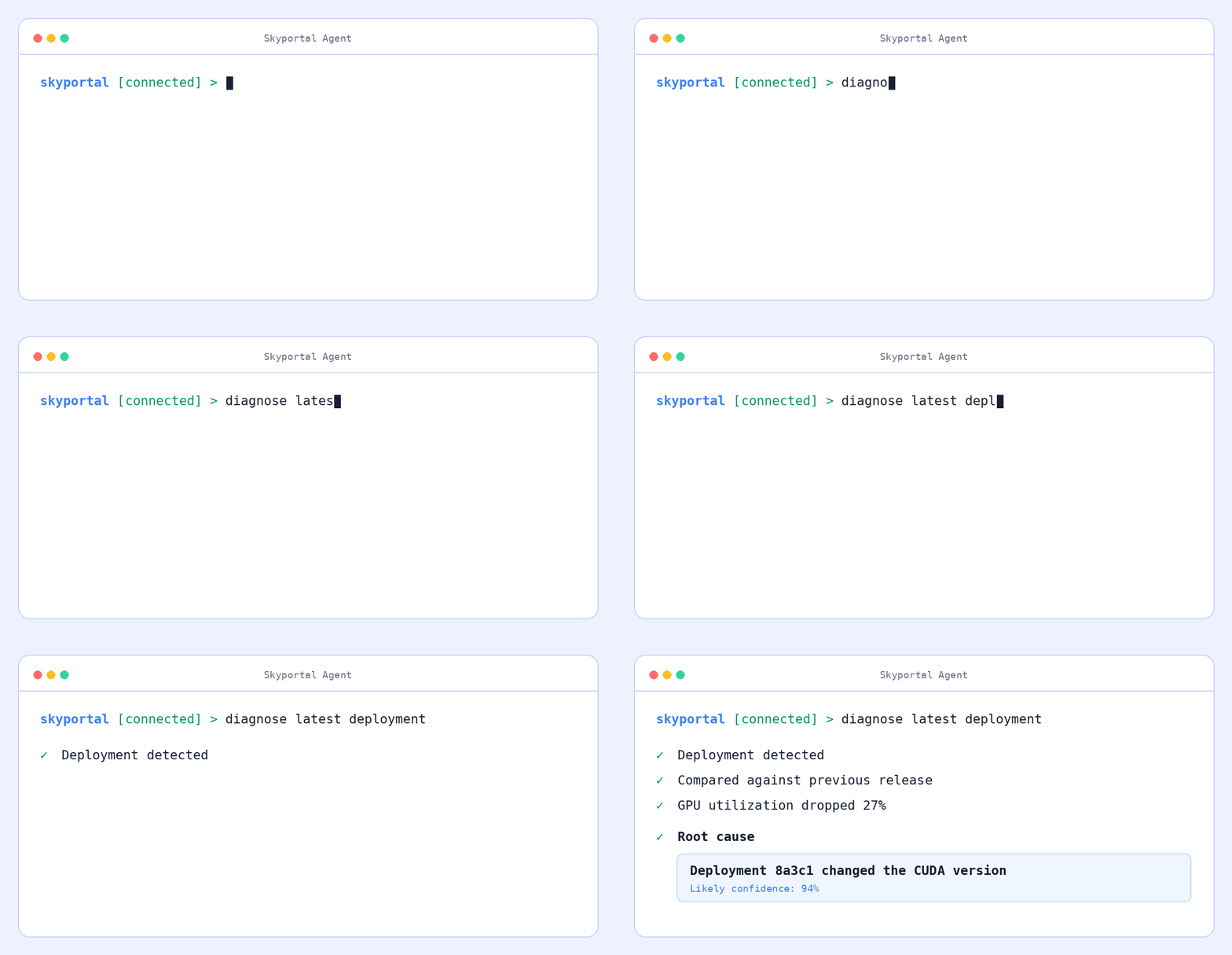
Skyportal continuously builds a timeline of your AI infrastructure by observing deployments, Kubernetes events, GPU metrics, configuration changes, logs, and infrastructure updates. It correlates those events across your stack and explains likely root causes.
Instead of searching through dozens of dashboards, ask:
- Why did GPU utilization suddenly drop?
- What changed before latency doubled?
- Which deployment caused this regression?
- Why is this model suddenly slower?
- Have we seen this incident before?
How it works
Observe infrastructure → Build a change timeline → Correlate regressions → Explain the likely cause
Skyportal connects a symptom to the changes that preceded it. A diagnosis can compare a deployment with its previous release, measure the impact, identify the most likely change, and report its confidence.
Works with






Get started
Requires Python 3.11 or newer.
pip install skyportalai
skyportalai
Or run from a checkout:
git clone https://github.com/SkyportalAi/skyportalai.git
cd skyportalai
./run.sh
Inside the terminal, run /login once, list infrastructure with /servers,
select one or more hosts with /server, and ask what changed:
skyportalai [connected] > diagnose the latest deployment
Useful commands:
/login          Connect your Skyportal account
/servers        List available infrastructure
/server <id> [id ...]  Select one or more servers; the first is the default
/permission [ask|autoapprove]  Show or change the shared approval setting
/status         Show the active context
/new            Start a new investigation
/resume         Continue the previous investigation
/help           Show every command
Python SDK
Use the SDK when you want to start or automate an investigation from Python:
from skyportalai import Skyportal

with Skyportal(api_key="sk-...") as client:
    client.set_permission_mode("autoapprove")
    chat = client.chat.create_chat(
        "What changed before GPU utilization dropped?",
        server_id=12,
    )
    result = chat.wait()
    print(result.status)
ask is the default. autoapprove submits each concrete approval through the
normal audited approval endpoint; it does not bypass read-only environments,
server scope, repository denials, or other backend safety policy. An explicit
on_approval callback takes precedence over the stored account setting. Waits
are indefinite by default so long-running single-host, multi-host, and
Kubernetes turns can finish; pass timeout= when an automation job needs a
finite deadline.
To make the full multi-host scope available to the first turn, create the chat with repeatable server scope and an active default:
with Skyportal(api_key="sk-...") as client:
    chat = client.chat.create_chat(
        "Compare GPU health on all selected hosts",
        server_ids=[12, 18],
        active_server_id=12,
        selected_namespaces={18: ["default", "vllm"]},
    )
    result = chat.wait(on_approval=lambda approval: True)
The scope is an allowlist: the active server handles an ambiguous command, and
the agent broadcasts only when the prompt explicitly targets all selected
hosts. Use {"18": ["__all__"]} for every Kubernetes namespace, omit
selected_namespaces when no Kubernetes scope is needed, and use
chat.select_servers(...) between turns to replace an existing chat's scope.
When replacing scope, omitting namespace data preserves retained selections
while {} clears them. The singular server_id=12 creation form remains
supported.
Set SKYPORTALAI_API_KEY instead of passing a key directly. The client also
supports SKYPORTALAI_BASE_URL for self-hosted deployments.
Automation
The skyportalai command provides stable JSON output for scripts and CI:
skyportalai chat send --server 12 --wait "Diagnose the latest regression"
skyportalai chat send --server 12 --server 18 \
  --namespace 18=default --namespace 18=vllm --wait \
  "Compare GPU health on all selected hosts"
skyportalai --json chat messages 123
Set the full scope of an existing chat between turns with repeatable --server
options:
skyportalai chat select-servers 123 \
  --server 12 --server 18 --active-server 12 \
  --namespace 18=default --namespace 18=vllm
skyportalai chat send --chat-id 123 --wait "Compare all selected hosts"
Use --clear-scope to remove every selected server explicitly.
Run skyportalai --help for the complete command reference.
Kubernetes clusters
Connect a cluster with its kubeconfig. The CLI sends the credential only to the authenticated SkyPortal API, where the same validation and encrypted storage as the web application are used; kubeconfigs are never returned by lifecycle APIs.
skyportalai kubernetes connect production --kubeconfig ~/.kube/config --environment Production
skyportalai kubernetes list
Use the returned cluster ID as a normal chat target. Namespace scope is an allowlist and every mutating command keeps the existing approval gate:
skyportalai chat send --server 17 --namespace 17=default --wait \
  "Restart the api deployment and verify the rollout"
Remove the stored cluster credential when it is no longer needed:
skyportalai kubernetes disconnect 17
Ansible playbooks
Store validated playbooks in SkyPortal and reuse them across account-owned SSH
targets. List responses omit YAML bodies; show retrieves one playbook when
you need to inspect or edit it.
skyportalai ansible create bootstrap --file playbook.yml --description "Base host setup"
skyportalai ansible list
skyportalai ansible show 4
skyportalai ansible update 4 --file playbook.yml
Deployments run through the ops agent and the normal command-approval policy.
The playbook executes on the selected SSH host with a temporary, mode-restricted
file that is removed after ansible-playbook exits.
skyportalai ansible deploy 4 --server 12
skyportalai chat wait 91
skyportalai chat approve 91 APPROVAL_ID --command "COMMAND_FROM_STATUS"
skyportalai ansible delete 4 --yes
The Python SDK exposes the same lifecycle as client.ansible.create(...),
.list(), .get(...), .update(...), .deploy(...), and .delete(...).
Observability agent
Install the collector dependencies and review the deployment guide before running the agent on experiment volumes:
pip install "skyportalai[agent]"
See agent deployment and data handling.
Development
poetry install --all-extras
poetry run pytest
poetry run ruff check .
poetry check --strict
See CONTRIBUTING.md to contribute, and RELEASING.md to cut a release. Report security issues privately using SECURITY.md.
License
1 maintainer

Metadata
1 maintainer
Release files for skyportalai 0.2.1
For a detailed explanation of source distributions (sdists) and built distributions (wheels), please see the package formats documentation.
Source distribution (sdist)
| File | Size | Uploaded | |
|---|---|---|---|
| skyportalai-0.2.1.tar.gz | 83.7 kB | Details |
Built distribution (wheel)
| File | Interpreter | ABI | Platform | Reset |
|---|---|---|---|---|
| skyportalai-0.2.1-py3-none-any.whl | Python 3 | none | any | Details |
Total release size: 186.0 kB
Release files / skyportalai-0.2.1.tar.gz
| Download URL | skyportalai-0.2.1.tar.gz |
|---|---|
| Size | 83.7 kB |
| Tags | Source |
|
SHA-256 checksum How to use checksums |
3e57c4ac291678e6f26d64bc492c280cfaee7e14f80c7cec57cd868d35f35d1a
|
|
BLAKE2b-256 checksum How to use checksums |
f11861ac933eaa2bd0487dfd0a93305b06a4d1b107f9f83557a66c0362677013
|
| Upload date | |
|
Uploaded using Trusted Publishing? What is trusted publishing? |
Yes |
| Uploaded via |
twine/7.0.0 CPython/3.13.14
|
Provenance
Provenance describes where a file came from. On PyPI, provenance is shared via attestations, which provide a verifiable record of the build or publishing details. View details, limitations and caveats.


PyPI Publish Attestation
PyPI verified that this artifact, at this checksum, originated from the publisher listed below.
Signed by GitHub Actions, verified by PyPI on Sep 1, 2026.
Transparency logRelease files / skyportalai-0.2.1-py3-none-any.whl
| Download URL | skyportalai-0.2.1-py3-none-any.whl |
|---|---|
| Size | 102.3 kB |
| Tags | Python 3 |
|
SHA-256 checksum How to use checksums |
3f28f3a0d08ffd6d2d086d30d1db8e01f4d5ddb7d4da95236e53d5d0f9e40e32
|
|
BLAKE2b-256 checksum How to use checksums |
056d8e97a3610111868d7854106a228a1825bb10045e4f2a9f526c1d61d7f2cd
|
| Upload date | |
|
Uploaded using Trusted Publishing? What is trusted publishing? |
Yes |
| Uploaded via |
twine/7.0.0 CPython/3.13.14
|
Provenance
Provenance describes where a file came from. On PyPI, provenance is shared via attestations, which provide a verifiable record of the build or publishing details. View details, limitations and caveats.
PyPI Publish Attestation
PyPI verified that this artifact, at this checksum, originated from the publisher listed below.
Signed by GitHub Actions, verified by PyPI on Sep 1, 2026.
Transparency log













