




A small Python library that generates the panels on a GitHub profile: a hero banner, a stack grid, a status strip, a system diagram, a contact footer. Everything comes out as a self-contained animated SVG with no external requests.
Every image above and below was generated by this library. If it could not document itself it would not be worth publishing.
Why this exists
GitHub is a hostile rendering target, and most of the rules only announce themselves once something silently breaks:
| Constraint | Consequence |
|---|---|
<style> is escaped to plain text |
No CSS. No :target, no :hover, no CSS-only toggles. |
| JavaScript is stripped | Nothing is interactive. |
| Images are proxied through camo | Webfonts never load. A font-family pointing at one silently falls back. |
SVG is served as <img> |
Pointer events never reach it, so links inside an SVG are dead. |
id is rewritten to user-content-id |
Anchor tricks lose their handle. |
What does survive is SMIL animation, filters, masks, gradients, and system fonts. slab
is built entirely inside that envelope, which is why it uses <animate> rather than CSS
keyframes and outlines display type to vector paths rather than linking a font.
Install
pip install slabkit
The distribution is slabkit because slab was already taken on PyPI by a DSP library,
and sharing an import name with it would break anyone who has both installed.
No runtime dependencies — the whole library is string formatting and arithmetic.
fonttools is an optional extra, needed only for outline(), which converts a wordmark
to paths so a non-system typeface survives camo:
pip install "slabkit[fonts]"
Quickstart
from slabkit import Theme, banner, chips, footer, write

t = Theme(158)                      # one hue derives the entire ramp

write("banner.svg", banner(
    t, "SVERRE", "building AI systems, fundamentals first",
    meta="TypeScript · Python · Next.js · Postgres",
    note="Ski · Norway"))

write("stack.svg", chips(t, [
    ("WRITE", ["TypeScript", "Python"]),
    ("RUN",   ["Linux", "Docker"]),
]))
Reference the result from your README by its raw.githubusercontent.com URL. Relative
paths are risky on profile READMEs, which render outside the repo's base path.
Theming
Theme(hue) derives ink, surface, text, muted, dim and accent in OKLCH from a single hue,
varying almost entirely in lightness. It then asserts the contrast ratios and raises if
any role falls below 4.5:1, so an unreadable palette fails at build time rather than
shipping.

Theme(158).report()     # audit any hue before committing to it
Theme(250, accent="#81C3FF")    # override individual roles when you must
Panels
banner(theme, wordmark, tagline, meta, note, font=...)
Pass font= a .ttf/.otf to outline the wordmark to paths. Any typeface works, because
the glyphs ship as geometry rather than as a font reference.
chips(theme, groups)

A raking light crosses the grid, brightening each chip as it passes. Two copies of the grid, the lit one revealed through a soft gradient mask — a clip would give a hard edge, which reads as a wipe rather than as light.
status(theme, label, state, word, headline, detail, right, stamp)

state is ok / warn / bad. Those colours are semantic rather than brand, which is
why they are exempt from the one-accent rule — but they are derived at the accent's OKLCH
lightness so they still belong to the same band.
Always pass stamp. A committed SVG behind camo is stale by design, and a status
panel implying real-time is simply lying.
diagram(theme, title, subtitle, nodes, edges, caption)
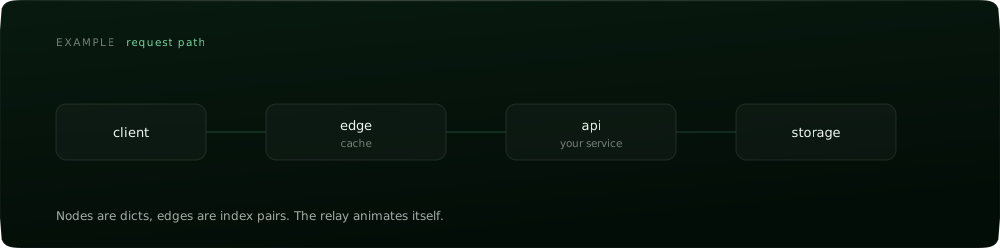
Nodes are dicts, edges are index pairs. A request relays along the edges and responses return, staggered by graph depth so parallel branches fire together instead of in series. Useful when the code is private and the shape is the only thing you can show.
footer(theme, headline, sub, right) · pill(theme, label, on)

pill() renders one small standalone pill — a language toggle, nav, a tag. One image per
pill on purpose: markdown hangs a single href off an <img>, so a combined toggle would
send both halves to the same place.
Design rules
These are the constraints the panels are built to, and they are the actual product. Most generated READMEs look identical because they all make the same handful of colour decisions; each rule below exists to refuse one of them.
- One accent. Hierarchy comes from lightness, not chroma.
Themekeeps the accent under 80% HSL saturation. - Never the default dark. Slate-indigo ink around
#0c0e15is the night-mode twin of the blue-to-purple gradient. Pick a hue and commit to it. - No gradient-clipped headline text. Solid ink; weight and size do the work.
- No coloured glow, no glow blobs. Depth is one hairline border and a rim light.
- Grain on every surface. A perfectly smooth gradient is the giveaway that nothing physical made it.
- Superellipse corners, not
border-radius. A radius corner has discontinuous curvature where the arc meets the edge; a superellipse does not. - One motion idea per panel, and stagger the timings across panels. Elements pulsing in unison is what makes motion look cheap.
Releasing
Publishing runs on Trusted Publishing, so
there is no API token anywhere in this repo — GitHub mints a short-lived credential for
the publish workflow and PyPI verifies it.
One-time setup on PyPI (Account → Publishing → add a pending publisher):
| Field | Value |
|---|---|
| PyPI project name | slabkit |
| Owner | hellosverre |
| Repository name | slab |
| Workflow name | publish.yml |
| Environment name | pypi |
After that, bump version in pyproject.toml and publish a GitHub release. The workflow
builds, runs twine check, installs the wheel into a clean venv and renders every panel
before it uploads anything.
Licence
MIT. See LICENSE.
1 maintainer

Metadata
1 maintainer
Release files for slabkit 0.1.0
For a detailed explanation of source distributions (sdists) and built distributions (wheels), please see the package formats documentation.
Source distribution (sdist)
| File | Size | Uploaded | |
|---|---|---|---|
| slabkit-0.1.0.tar.gz | 14.9 kB | Details |
Built distribution (wheel)
| File | Interpreter | ABI | Platform | Reset |
|---|---|---|---|---|
| slabkit-0.1.0-py3-none-any.whl | Python 3 | none | any | Details |
Total release size: 30.4 kB
Release files / slabkit-0.1.0.tar.gz
| Download URL | slabkit-0.1.0.tar.gz |
|---|---|
| Size | 14.9 kB |
| Tags | Source |
|
SHA-256 checksum How to use checksums |
4aa6cf6d4606e22665b8c8b6c6879868a7b3d9ef9324d8813380ae80d1350636
|
|
BLAKE2b-256 checksum How to use checksums |
abd363cd887d7f43307143fdf936702e33e456185b4822a2c1146cc0237914d9
|
| Upload date | |
|
Uploaded using Trusted Publishing? What is trusted publishing? |
Yes |
| Uploaded via |
twine/7.0.0 CPython/3.13.14
|
Provenance
Provenance describes where a file came from. On PyPI, provenance is shared via attestations, which provide a verifiable record of the build or publishing details. View details, limitations and caveats.


PyPI Publish Attestation
PyPI verified that this artifact, at this checksum, originated from the publisher listed below.
Signed by GitHub Actions, verified by PyPI on Aug 26, 2026.
Transparency logRelease files / slabkit-0.1.0-py3-none-any.whl
| Download URL | slabkit-0.1.0-py3-none-any.whl |
|---|---|
| Size | 15.6 kB |
| Tags | Python 3 |
|
SHA-256 checksum How to use checksums |
7dc59b511e12b235d049ea7ebe3e2384faff4bb5fa0df7bc02bf46993b69e7b6
|
|
BLAKE2b-256 checksum How to use checksums |
7ad729b495a600f6f2f2e7ff19b0662f02b75f968588cc7f240b96f8b11238d8
|
| Upload date | |
|
Uploaded using Trusted Publishing? What is trusted publishing? |
Yes |
| Uploaded via |
twine/7.0.0 CPython/3.13.14
|
Provenance
Provenance describes where a file came from. On PyPI, provenance is shared via attestations, which provide a verifiable record of the build or publishing details. View details, limitations and caveats.
PyPI Publish Attestation
PyPI verified that this artifact, at this checksum, originated from the publisher listed below.
Signed by GitHub Actions, verified by PyPI on Aug 26, 2026.
Transparency log













