

SLurm on vACC (slacc)
"Take it easy and let the VACC work for you." - the wise grad
Isn't it fun to have a nice GPU in your computer and to experiment left and right? You just write some python scripts and then launch them on your machine, wait, repeat. Life is simple and beautiful.
But then inevitably it happens. You want to launch more scripts, longer scripts, test different parameters...
So you have to go beg the SLURM gods to assist you. Evil bash scripts start popping up everywhere, requesting resources, launching jobs....
Wouldn't it be nice to just abstract that pain away and remain in python land?
Prerequisites
- Python >=3.9
That's it.
Installation
Step 1. Get the thing.
pip install slacc
Note: as of May 2023 the
spacksoftware on the VACC doesn't like python 3.10, so it is suggested to installslaccin a 3.9 environment If you are usingconda(recommended) you can use grab an installer for 3.9 from the miniconda page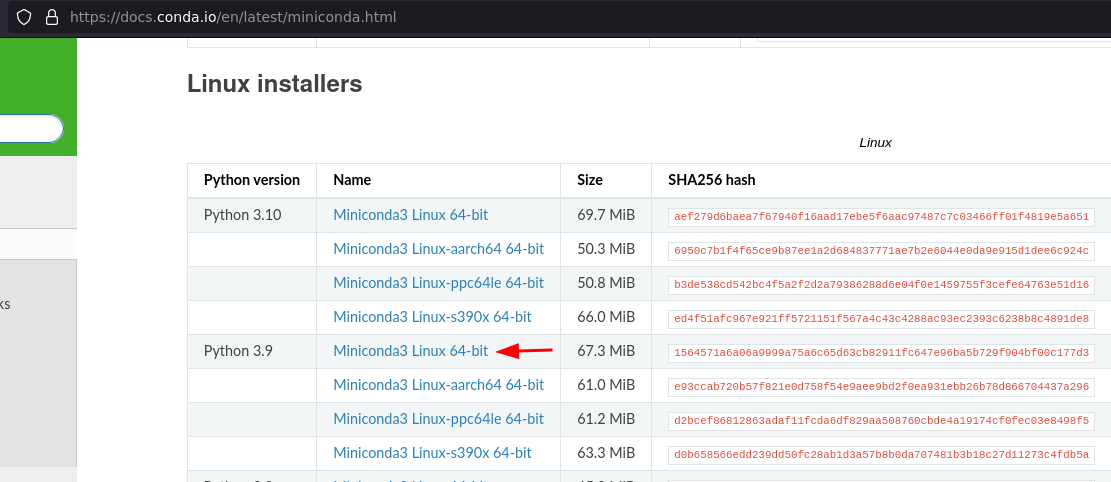
This will make your conda
baseenvironment use python 3.9Alternatively you can create an custom environment with
conda create -n <pick_a_name> python=3.9and runpip install slaccin this new environment.
Step 2. Customize the thing.
After installing slacc (it should be quick since there are no dependencies) run
sconfig
This will copy the default config.json file that ships with slacc, to $HOME/.config/slacc/config.json.
Feel free to customize it to your needs, or keep it as it is. The most important thing is to make sure that the conda environments declared in config.json
{
  "dggpu":{ "env": "conda activate dgenv",
            ...
}
match the ones available on your system.
How does it work?
This package provides 2 main commands you can use in your CLI: slaunch and sinteract (plus sconfig to make a copy default configs)
1. Slurm LAUNCH (slaunch)
This is a wrapper around SLURM's sbatch to make it way easier to launch python scripts asynchronously.
Let's say that you wanted to run this locally:
python train.py --lr=0.01
then to run the same thing on the VACC you would do:
slaunch dggpu train.py --lr=0.01
Voilá! Behind the scenes, the launcher created an sbatch script for you like:
#!/bin/bash
#SBATCH --time=2-00:00:00
#SBATCH --account=myproject
#SBATCH --partition=big-gpu
#SBATCH --gres=gpu:p100:1
#SBATCH --mem=8000

conda activate dgenv
python train.py --lr=0.01
Even better, it makes it easy to launch parameter sweeps as a job array.
Basic Usage
⚠️ Before using, you will want to edit the resource configs to suit your needs, as described in the Resource Configurations section.
It has the following syntax:
slaunch [-h] [--runs RUNS] [--argfile ARGFILE] [-d RUNDIR] [-f] RESOURCE SCRIPT [FLAGS...]
where RESOURCE is the name of an entry in config.json (see Resource Configurations).
For example, this:
slaunch dggpu --runs 2 dummy_gpujob.py --epochs=10 --seed 42
is equivalent to twice running this:
python dummy_gpujob.py --epochs=10 --seed 42
Furthermore, any settings accepted by sbatch may be supplied on the command line. These will override the options
provided by config.json, if given. For example, to add more memory to an existing config:
slaunch dggpu --mem=64G dummy_gpujob.py
NOTE: The sbatch options must be supplied in --name=value fashion, with an
equals sign; --name value will not parse correctly. For any other options
(including script flags) you may use either format.
Run Directory
A recommended way to run jobs is to isolate different experiments to separate folders, so that all the related inputs
and outputs can be stored in one place. This can be done with the -d/--rundir option:
slaunch dggpu -d experiments/my-next-breakthrough train.py --config train-config.yml
In this example, all experiments are stored in the corresponding repository, under the experiments/ folder. The script
runs in this folder, where it expects to find a train-config.yml file. Say the script also generates a
trained_models/ folder. After running, the experiment folder will contain:
__ experiments/my-next-breakthrough/
  |__ train-config.yml
  |__ slurm-12345678.out
  |__ trained_models/
     |__ model-1000.pth
     |__ model-2000.pth
     |__ ...
Running Job Arrays
slaunch can also run a full sweep of jobs as a single job array.
⚠️ Careful with program outputs when using this method! For instance, if you are running a program that outputs trained models, you will need to supply each run with a separate output folder so they don't overwrite each other.
You can run the same exact job N times via -r/--runs:
slaunch bdgpu --runs 10 eval.py --lr 0.01 --num-steps 10 --plots
Or you can run a sweep over different configurations, by providing each configuration as a separate line in an "argfile":
slaunch bdgpu --argfile sweep-args.txt eval.py --plots
Where the argfile looks something like this:
--lr 0.1  --num-steps 10 -o outfile1
--lr 0.1  --num-steps 15 -o outfile2
--lr 0.03 --num-steps 10 -o outfile3
--lr 0.03 --num-steps 15 -o outfile4
--lr 0.01 --num-steps 10 -o outfile5
--lr 0.01 --num-steps 15 -o outfile6
In both cases, these will be launched as a job array, making it easier to track and manage the jobs as a single unit.
2. Slurm INTERACTive (sinteract)
This is a wrapper around srun that allows you to easily start an interactive shell on one of the SLURM nodes. The
shell you launch will be granted the resources of the resource config you provide.
Example:
sinteract bdgpu
Resource Configurations
The config.json file provides a list of pre-defined resource configurations which the user can use to launch their
SLURM jobs. This is helpful to save sets of sbatch or srun options that the user uses frequently. You will want
to edit these to add your own configurations which are suitable for your common tasks. However, if you need to change
minor things like the amount of memory from job to job, you can always adjust that on the command line.
Each entry has the following structure:
{
  NAME:
    ENV
    RESOURCES
}
NAME: a unique identifier for the config.ENV: specifies how to set up virtual environments, if needed.RESOURCES: specifies the options to pass to SLURM.
Here is a concrete example:
{
  "dggpu": {
    "env": "conda activate dgenv",
    "resources": {
      "time": "2-00:00:00",
      "partition": "big-gpu",
      "cpus-per-task": 1,
      "gres": "gpu:v100:1",
      "mem": "8000"
    }
  },
  "bigcpu": {
    "env": "conda activate myenv",
    "device": "cpu",
    "resources": {
      "time": "1-00:00:00",
      "partition": "bluemoon",
      "cpus-per-task": 1,
      "mem": "8000"
    }
  }
}
A few default configurations are provided as part of the package config.json.
⚠️ There are 3 places where slacc looks for configuration files. If the same resource is defined in multiple places, only the one with highest priority is considered:
- (LOW PRIO) Defaults provided by slacc (use this if you are happy with the defaults and don't want to change anything)
- (MED PRIO) $HOME/.config/slacc/config.json (use this if you want to create custom configurations that you are planning to re-use)
- (MAX PRIO) Directory containing the job script, e.g. when launching ~/scratch/agi_net/train.py looks for ~/scratch/agi_net/config.json (use this if you want each individual run to use a different configuration)
🛠️ Use sconfig to copy the default settings to $HOME/.config/slacc/config.json.
1 maintainer

Metadata
1 maintainer
Release files for slacc 1.0.1
For a detailed explanation of source distributions (sdists) and built distributions (wheels), please see the package formats documentation.
Source distribution (sdist)
| File | Size | Uploaded | |
|---|---|---|---|
| slacc-1.0.1.tar.gz | 13.2 kB | Details |
Built distribution (wheel)
| File | Interpreter | ABI | Platform | Reset |
|---|---|---|---|---|
| slacc-1.0.1-py3-none-any.whl | Python 3 | none | any | Details |
Total release size: 23.7 kB
Release files / slacc-1.0.1.tar.gz
| Download URL | slacc-1.0.1.tar.gz |
|---|---|
| Size | 13.2 kB |
| Tags | Source |
|
SHA-256 checksum How to use checksums |
15681efb7ae1eecb9091637cdced31ecc6891fc8f80e5326943559785e034cef
|
|
BLAKE2b-256 checksum How to use checksums |
0d63add372e9dc71f35f9673be994d2e591458734f61c7b7743a316925b18102
|
| Upload date | |
|
Uploaded using Trusted Publishing? What is trusted publishing? |
No |
| Uploaded via |
twine/4.0.2 CPython/3.9.16
|
Release files / slacc-1.0.1-py3-none-any.whl
| Download URL | slacc-1.0.1-py3-none-any.whl |
|---|---|
| Size | 10.5 kB |
| Tags | Python 3 |
|
SHA-256 checksum How to use checksums |
96ba966f9080cbe70165c193ec2eea2ea42c738bd373a058aaa24e3b41206d67
|
|
BLAKE2b-256 checksum How to use checksums |
dbb0210177a8d02695615430e4c80e3530d3c014e7cd81c80dd1ee8d2d4d977e
|
| Upload date | |
|
Uploaded using Trusted Publishing? What is trusted publishing? |
No |
| Uploaded via |
twine/4.0.2 CPython/3.9.16
|














