
Daily Slack agent that sends jokes and trivia with MCP

Project description
Slack Joke Agent
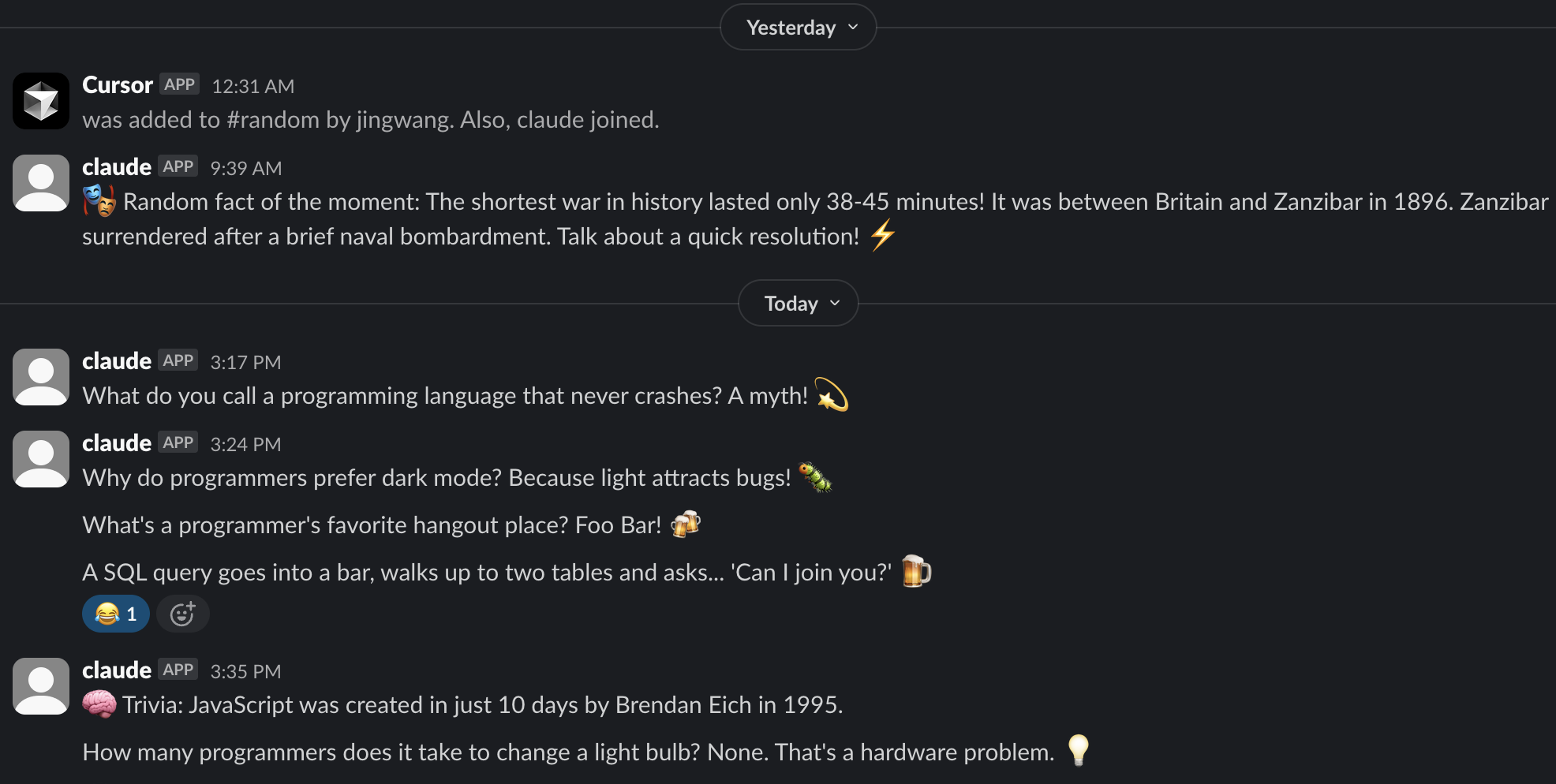
An agent that sends jokes and trivia to your Slack channel daily.
Features
- AI-Generated Content - Fresh jokes and trivia powered by Claude AI
- Science/tech jokes (60% of messages) and history trivia facts (40% of messages)
- Automated posting at 9:00 AM daily (configurable)
- Uses MCP Slack server integration
- Target channel configurable
Setup
-
Configure environment variables:
cp .env.example .env
# Edit .env with your Slack bot tokens
Create a Slack app at https://api.slack.com/apps to get the bot token.
-
Install dependencies:
pip install -e .
-
Or use the startup script:
./start-agent.sh
Usage
Start the daily agent:
python slack_agent.py
Start with custom time:
python slack_agent.py --time 12:00 # Daily at noon
Test with immediate message:
python slack_agent.py --test
Use custom channel:
python slack_agent.py --channel C1234567890
Enable verbose logging:
python slack_agent.py --verbose
How it Works
- Scheduling: Uses Python
schedulelibrary to trigger daily at 9:00 AM - AI Generation: Uses Anthropic's Claude AI to generate fresh content
- Content Selection: Randomly selects between jokes and trivia (60%/40% split)
- Fallback System: Uses predefined content if AI generation fails
- MCP Integration: Spawns the MCP Slack server process
- Channel: Posts to #random channel by default
- Logging: Logs to both console and
slack_agent.logfile
Configuration
Environment variables in .env file:
Required:
SLACK_BOT_TOKEN- Your Slack bot token (xoxb-...)SLACK_TEAM_ID- Your Slack team/workspace IDDEFAULT_CHANNEL_ID- Default channel to postANTHROPIC_API_KEY- Your Anthropic API key for Claude AI (sk-ant-...)
Optional:
SLACK_CHANNEL_IDS- Comma-separated list of allowed channels
Security:
- All secrets loaded from
.envfile (excluded from git) - No hardcoded API keys or tokens in source code
- Environment variable validation on startup
- Graceful handling of missing AI credentials
AI Features:
- Dynamic content freshly generated by Claude AI
- Workplace appropriate prompts ensure clean content
- Automatic fallback to predefined content if AI generation fails
- Smart logging tracks AI generation success/failure
Command Line Options
--test: Send a test message immediately--test-ai: Test AI generation without sending to Slack--channel CHANNEL_ID: Override the default channel--time HH:MM: Set daily schedule time (default: 09:00)--verbose, -v: Enable verbose debug logging
Logs
The agent creates comprehensive logs:
- Console output: Real-time status and messages
- File logging:
slack_agent.logwith detailed information - Timestamps: All log entries include precise timestamps
- Error tracking: Failed attempts are logged with details
Customization
Add more jokes/trivia:
Edit the jokes and trivia lists in slack_agent.py
Change schedule:
Modify the schedule configuration:
schedule.every().day.at("09:00").do(self.send_daily_message)  # Daily at 9 AM (current)
schedule.every().day.at("12:00").do(self.send_daily_message)  # Daily at noon
schedule.every().hour.at(":00").do(self.send_daily_message)   # Every hour
schedule.every().monday.at("09:00").do(self.send_daily_message)  # Weekly on Monday
Change channel:
Update the channel_id property or use --channel argument
Update Slack tokens:
Edit the .env file with your new tokens
Installation
From PyPI (Recommended):
pip install slack-joke-agent
slack-agent --help
From Source:
git clone <repository>
cd slack-joke-agent
pip install -e .
Quick Development Setup:
git clone https://github.com/wangjing0/slack-joke-agent.git
cd slack-joke-agent
./start-agent.sh
Running Tests:
python test_slack_agent.py
Contributing
Contributions are welcome! Please feel free to submit a pull request.
License
This project is licensed under the MIT License - see the LICENSE file for details.


Download files
Download the file for your platform. If you're not sure which to choose, learn more about installing packages.
Source Distribution
Built Distribution
Filter files by name, interpreter, ABI, and platform.
If you're not sure about the file name format, learn more about wheel file names.
Copy a direct link to the current filters
File details
Details for the file slack_joke_agent-1.1.4.tar.gz.
File metadata
- Download URL: slack_joke_agent-1.1.4.tar.gz
- Upload date:
- Size: 14.4 kB
- Tags: Source
- Uploaded using Trusted Publishing? No
- Uploaded via: twine/6.1.0 CPython/3.9.13
File hashes
| Algorithm | Hash digest | |
|---|---|---|
| SHA256 |
220ed6903d1375287f7e76fd99ad2a875a5e0abbcdae15ec4d3bccace3196a64
|
|
| MD5 |
62b04bc02623bb48dd8ceb7ea4ab144d
|
|
| BLAKE2b-256 |
b0932c1d2dbd6f38b14490471b2368c1e7c3e5ace83056f4ee78d1fe2ef3ec09
|
File details
Details for the file slack_joke_agent-1.1.4-py3-none-any.whl.
File metadata
- Download URL: slack_joke_agent-1.1.4-py3-none-any.whl
- Upload date:
- Size: 8.8 kB
- Tags: Python 3
- Uploaded using Trusted Publishing? No
- Uploaded via: twine/6.1.0 CPython/3.9.13
File hashes
| Algorithm | Hash digest | |
|---|---|---|
| SHA256 |
41458330f69b6b80f6b313b2522cc00269d203d8866822d76178e4b23abf4c25
|
|
| MD5 |
7707e56fcb230039f4e929dd6843bc84
|
|
| BLAKE2b-256 |
ae21e517a7e4239f065c08808cd34086f5a88421dbd4d6ef233a52fd4240cd51
|






