
SLALOM Explanations for transformer models.

Project description

SLALOM: High-Fidelity Token-Level Explanations for Transformers

Quickstart
A lightweight version of SLALOM can be installed using PIP:
pip install slalom-explanations
Note: The PIP installer contains a minimal version that allows only for computing explanations. To reproduce experiments, follow the extented setup with Conda described below.
Basic usage
SLALOM contains an easy-to-use interface. The main commands to compute SLALOM explanations for Huggingface transformer models (SequenceClassification) are as follows:
from slalom_explanations import SLALOMLocalExplanantions
from slalom_explanations import slalom_scatter_plot

# Initialize explainer with an initialized SequenceClassification model and corresponding tokenizer
slalom_explainer = SLALOMLocalExplanantions(model, tokenizer, modes=["value", "imp"])

# Compute SLALOM explanation
example_text = "This was an amazing movie!"
res_explanation = slalom_explainer.tokenize_and_explain(example_text)

# Scatter plot
slalom_scatter_plot(res_explanation, sizey=8, sizex=8)
We provide the notebook notebooks/0_Quickstart.ipynb, which fully runs all the steps with a pretrained model from the Huggingface hub.
What is special about SLALOM?
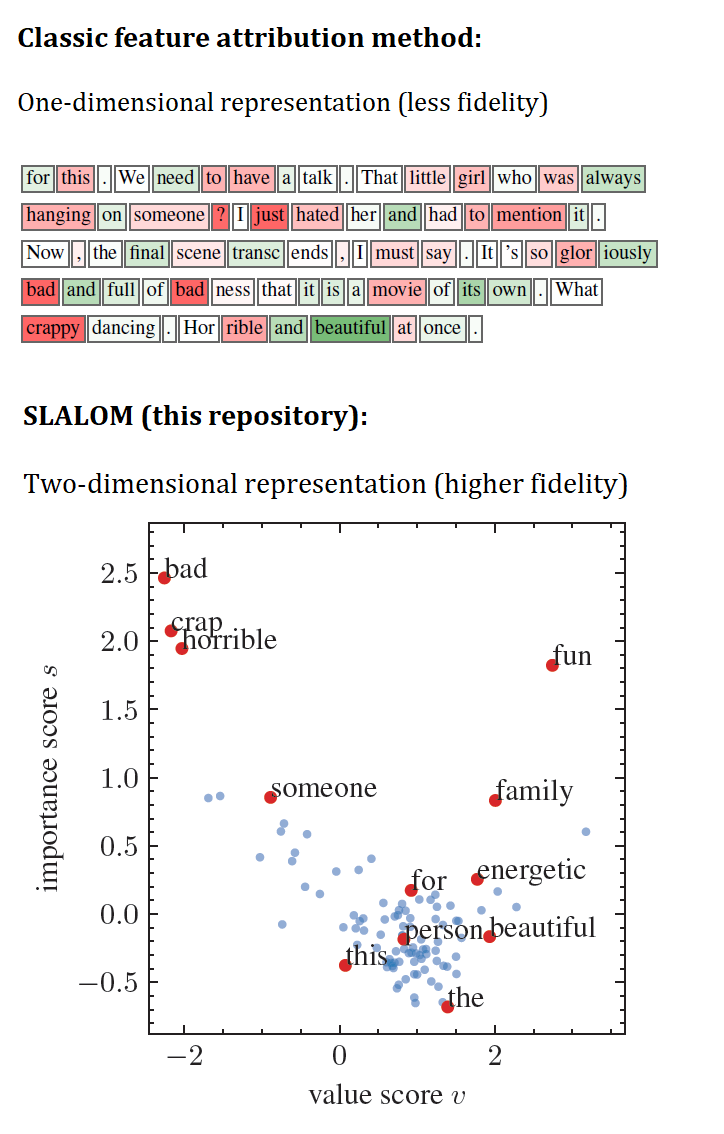
- SLALOM is a surrogate model explanation method that is specifically designed for the transformer architecture. It uses a surrogate model class that is specifically designed to model the non-linearies in attention-based models, resulting in high-fidelity explanations.
- The explanation can be visualized in a 2D-plane that contains a dot for each token in an input sequence. One axis describes the token value (its impact on the classification on its own) and the other describes the token importance (its interaction weight when seen in combination with other tokens).
This repository accompanies the TMLR Paper
Attention Mechanisms Don’t Learn Additive Models: Rethinking Feature Importance For Transformers
by Tobias Leemann, Alina Fastowski, Felix Pfeiffer, and Gjergji Kasneci. The technical details of the method are described in the paper.
Installing the full repository
To reproduce the experiments (including the competing explanation methods) you need to install additional dependencies. These cannot be installed via pip but we provide a environment file to set up a dedicated conda environment. First setup a new environment by installing the dependencies listed in the file and activate it.
conda env create -f environment.yml
conda activate slalom
You will additionally need to install the shap package by running
conda install -c conda-forge shap
Add the corresponding kernel to your existing JupyterLab installation by executing:
python -m ipykernel install --user --name slalom
Important files
The important code files for this project are located in the folder slalom_explanations.
The experiments in Sections 6.1. / 6.2. are organized as Jupyter Notebooks in the folder notebooks.
Follow the intructions in the notebooks to reproduce experiments. Here is an overview over the provided notebooks and where to find each individual experiment.
A_MotivationalExperiments.ipynb: The Recovery example with Shapley values in Appendix A.B_LearningLinearModels.ipynb: Code for Figure 3 showing that transformers do not learn linear models. Train models usingscripts/train_models_linear.shC_Explaining_SLALOM_synth.ipynb: Code to explain the outputs of the transformers trained on the linear model with SLALOM as well as training models on a SLALOM distribution and verifying recovery (Figure 4ab, Figure 4cd)D_ComputeGroundTruthOfflineCompute attribution scores for linear Naive Bayes models for different tokenizers offline. These are require to compute correlation with as well as correlation with linear scores (used in Table 1a)E_RealWorldPlots.ipynb: Create the qualitative plots in FigureF_Tables.ipynbto collect results from log-files for naive bayes and Human-Attention ROC and runtimes (Table 1a, 1b, Table 2)G_FidelityMetrics.ipynbto print tables with results for Fidelity metrics (Insertion/removal Table 1c, multiremoval in Figure 6)H_SLALOM_OpenAI.ipynb: Use SLALOM to explain an OpenAI model (Appendix F.7)I_CaseStudy.ipynb: A case study for how SLALOM can be used to identify vulnerability and spurious correlations and create adversarial examples (Appendix F.8)
Reference
Please cite our paper if you find the work or the code provided here helpful, e.g., using the following BibTeX entry:
@article{leemann2025attention,
    title={Attention Mechanisms Don{\textquoteright}t Learn Additive Models: Rethinking Feature Importance for Transformers},
    author={Tobias Leemann and Alina Fastowski and Felix Pfeiffer and Gjergji Kasneci},
    journal={Transactions on Machine Learning Research},
    issn={2835-8856},
    year={2025},
    url={https://openreview.net/forum?id=yawWz4qWkF},
}
Release history Release notifications | RSS feed


Download files
Download the file for your platform. If you're not sure which to choose, learn more about installing packages.
Source Distribution
Built Distribution
Filter files by name, interpreter, ABI, and platform.
If you're not sure about the file name format, learn more about wheel file names.
Copy a direct link to the current filters
File details
Details for the file slalom_explanations-0.1.2.tar.gz.
File metadata
- Download URL: slalom_explanations-0.1.2.tar.gz
- Upload date:
- Size: 25.7 kB
- Tags: Source
- Uploaded using Trusted Publishing? No
- Uploaded via: twine/6.1.0 CPython/3.10.11
File hashes
| Algorithm | Hash digest | |
|---|---|---|
| SHA256 |
942e35b202daf7d14668cb5ac57a9c496480a9c05622bac1c8133ffab5237c83
|
|
| MD5 |
0c8a164c247cb00c7049cb56a0ec82d2
|
|
| BLAKE2b-256 |
45a62b574147cf68e017080da6d9146d06e703953eabd4f4558bcd4299a3f78e
|
File details
Details for the file slalom_explanations-0.1.2-py3-none-any.whl.
File metadata
- Download URL: slalom_explanations-0.1.2-py3-none-any.whl
- Upload date:
- Size: 24.0 kB
- Tags: Python 3
- Uploaded using Trusted Publishing? No
- Uploaded via: twine/6.1.0 CPython/3.10.11
File hashes
| Algorithm | Hash digest | |
|---|---|---|
| SHA256 |
1c7e2d392adb014f1d75166ff1ec649a3be47b63e71b51c1e1da531dd44075e0
|
|
| MD5 |
523e49147947a3566703ea1c7f5673bf
|
|
| BLAKE2b-256 |
248b43c5297eb8217507c477f0e4988a52882801c08dac6ed63f54bfc8b6eaeb
|






