
slam_doctor
Is my SLAM healthy? Attach to any running ROS 2 SLAM (slam_toolbox, Cartographer, RTAB-Map, ORB-SLAM3) and get loop-closure and map-correction timestamps, tracking-lost flaps, map stalls, odometry drift and feature-poor camera views.
Companion to nav2_doctor (why isn't my robot moving?). Built from the rosnav project's mapping bugs.
Part of ros2-doctor-tools, an index of my ROS 2 diagnosis, fault injection and evaluation tools.
Install
Needs a sourced ROS 2 environment (CI builds it on Humble, Jazzy and Lyrical). With pip:
# ROS 2 sourced; if you use a venv, create it with --system-site-packages
pip install slam-doctor      # latest main instead: pip install git+https://github.com/darshmenon/slam_doctor
slam_doctor --help
A pip install puts the slam_doctor command on your PATH; run it directly. The ros2 run form needs the colcon build.
Or with colcon:
cd ~/ros2_ws/src && git clone https://github.com/darshmenon/slam_doctor.git
cd .. && colcon build --packages-select slam_doctor && source install/setup.bash
Quick start
ros2 run slam_doctor slam_doctor                                   # live report every 2 s
ros2 run slam_doctor slam_doctor --image /camera/image_raw --hints # + camera quality, next steps
ros2 run slam_doctor slam_doctor --once 30 --json                  # CI: exit 1 on ERROR
ros2 run slam_doctor slam_doctor --events loops.jsonl              # loop-closure timeline
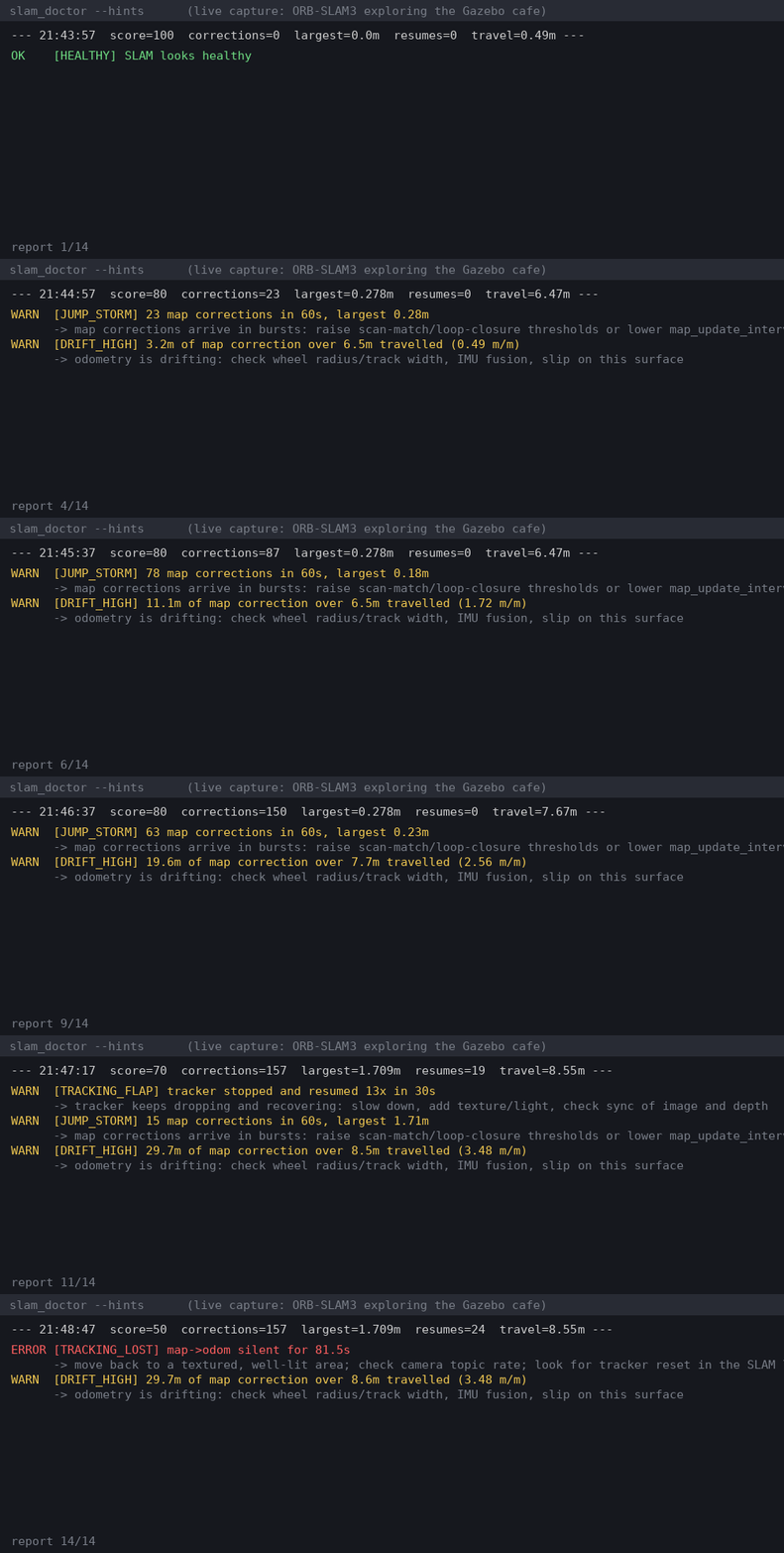
Real output from a slam_toolbox maze run (a 0.51 m map->odom correction) and an ORB-SLAM3 cafe run:
WARN  [BIG_JUMP] map jumped 0.51m / 0.0deg 7s ago
      -> large map correction: expect plan and costmap jumps; clear costmaps after it (costmap_ghost_clear)

WARN  [FEATURE_POOR] 5 consecutive frames: 74 keypoints, sharpness 52, mean 145
      -> few corners in view (blank wall/floor): a feature-based SLAM will lose tracking here
Checks
| Code | Level | Meaning |
|---|---|---|
TRACKING_LOST |
ERROR | map->odom silent for 5 s |
MAP_RESET |
ERROR | /map lost more than half its free cells (at least 500) in one update; shown for 60 s |
ODOM_STALE / SCAN_STALE |
ERROR | odometry or laser scans, once seen, silent for 5 s |
IMAGE_NONE |
WARN | --image given but no frame in 5 s |
IMAGE_STALE |
ERROR | camera frames stopped for 5 s |
TRACKING_FLAP |
WARN | tracker stopped and resumed 3+ times in 30 s |
MAP_STALL |
ERROR | no new free cells for 20 s while the robot moved 1 m |
JUMP_STORM / BIG_JUMP |
WARN | 4+ map corrections in 60 s / a correction of 0.5 m or more |
DRIFT_HIGH |
WARN | more than 0.10 m of map correction per metre travelled |
FEATURE_POOR, BLURRED, DARK, OVEREXPOSED |
WARN | camera frames a feature-based SLAM will struggle with (--image) |
NO_MAP_ODOM, MAP_NONE |
WARN | no map->odom or no /map seen |
A correction is a map->odom step over 0.10 m or 2 degrees, which is what a loop closure or scan-match jump looks like to the rest of the stack. --events writes each one with its time, distance and angle. --diagnostics also publishes /diagnostics, and the report carries a 0-100 health score.
Per-robot baselines
A 20 Hz map->odom is normal for one SLAM setup and a struggling tracker on another. Record normal once, then get warned on drift:
slam_doctor --learn 60 --baseline-file my_robot.json      # on a healthy run: writes the normal map->odom and odom rates
slam_doctor --baseline --baseline-file my_robot.json      # later: RATE_DROP / RATE_SPIKE below half or above double normal
The rate is the median messages per second: plain statistics, no model. A tracker that goes silent is still TRACKING_LOST, not a rate finding. Sparse streams such as /map (a few updates a minute) are not baselined.
How it works
Only topics: /tf (map->odom), /odom, /map and optionally a camera. No SLAM-specific plugin, so it works with any backend. Camera checks use OpenCV ORB when installed and a NumPy corner proxy otherwise, sampled at 1 Hz.
Limits
- Loop closures are inferred from
map->odomsteps, so a SLAM that publishes corrections smoothly will show smaller steps. - Camera thresholds were calibrated on 20 Gazebo cafe frames (ORB at
fastThreshold=7, ORB-SLAM3's own minimum: 681-1000 keypoints everywhere; default FAST gave as few as 8). Real cameras differ, so check your own frames; the first draft used default FAST and flagged a healthy ORB-SLAM3 run in 44 of 47 reports. - One robot per run; use
--nsonce per robot.
Roadmap
- per-camera calibration command (
slam_doctor --calibrate DIR) - live terminal view, multi-robot discovery
- score a rosbag offline
Apache-2.0
1 maintainer

Metadata
1 maintainer
Release files for slam-doctor 0.2.2
For a detailed explanation of source distributions (sdists) and built distributions (wheels), please see the package formats documentation.
Source distribution (sdist)
| File | Size | Uploaded | Provenance | Actions |
|---|---|---|---|---|
| slam_doctor-0.2.2.tar.gz | 24.7 kB | With provenance | Details for slam_doctor-0.2.2.tar.gz |
Built distribution (wheel)
| File | Interpreter | ABI | Platform | Actions Reset |
|---|---|---|---|---|
| slam_doctor-0.2.2-py3-none-any.whl | Python 3 | none | any | Details for slam_doctor-0.2.2-py3-none-any.whl |
Total release size: 44.7 kB
Release files / slam_doctor-0.2.2.tar.gz
| Download URL | slam_doctor-0.2.2.tar.gz |
|---|---|
| Size | 24.7 kB |
| Tags | Source |
|
SHA-256 checksum How to use checksums |
e87ddbc4fb82f913a969c75a5fd4a3f4333c413b173e14a477a2cd41658c5d6b
|
|
BLAKE2b-256 checksum How to use checksums |
9cd3a6603be9189216d520b3ad64a1f3c3da3d457448caa4e83a0c9d2955c02e
|
| Upload date | |
|
Uploaded using Trusted Publishing? What is trusted publishing? |
Yes |
| Uploaded via |
twine/7.0.0 CPython/3.13.16
|
Provenance
Provenance describes where a file came from. On PyPI, provenance is shared via attestations, which provide a verifiable record of the build or publishing details. View details, limitations and caveats.


PyPI Publish Attestation
PyPI verified that this artifact, at this checksum, originated from the publisher listed below.
Signed by GitHub Actions, verified by PyPI on Nov 29, 2026.
Transparency logRelease files / slam_doctor-0.2.2-py3-none-any.whl
| Download URL | slam_doctor-0.2.2-py3-none-any.whl |
|---|---|
| Size | 20.0 kB |
| Tags | Python 3 |
|
SHA-256 checksum How to use checksums |
bda6bf31f964089ac1c77905fb08d8c19ef9b396a8680c04f7d7096e0c1ae069
|
|
BLAKE2b-256 checksum How to use checksums |
7daa68f58853889ca31846f30de4ec0446c5597d52f6b6a62d4eb4fb22665d35
|
| Upload date | |
|
Uploaded using Trusted Publishing? What is trusted publishing? |
Yes |
| Uploaded via |
twine/7.0.0 CPython/3.13.16
|
Provenance
Provenance describes where a file came from. On PyPI, provenance is shared via attestations, which provide a verifiable record of the build or publishing details. View details, limitations and caveats.
PyPI Publish Attestation
PyPI verified that this artifact, at this checksum, originated from the publisher listed below.
Signed by GitHub Actions, verified by PyPI on Nov 29, 2026.
Transparency logSecurity for slam-doctor 0.2.2
Provenance
Provenance describes where a file came from. On PyPI, provenance is shared via attestations, which provide a verifiable record of the build or publishing details. View details, limitations and caveats.
Full provenance
Both files in this release have been uploaded with provenance metadata.
Attestation for slam_doctor-0.2.2.tar.gz
PyPI Publish Attestation
PyPI verified that this artifact, at this checksum, originated from the publisher listed below.
Signed by GitHub Actions, verified by PyPI on Nov 29, 2026.
Transparency logA note on package security
PyPI is a repository for distributing packages, not a service for auditing them. While third-party security researchers and our staff do their best to detect and remove malicious packages, PyPI cannot guarantee the quality, security or suitability of any given package.
To learn more about protecting yourself from malicious actors, visit our package security documentation.














