
Machine Learning-Guided Mapping Sleep-Promoting Volatiles in Aromatic Plants
Project Description
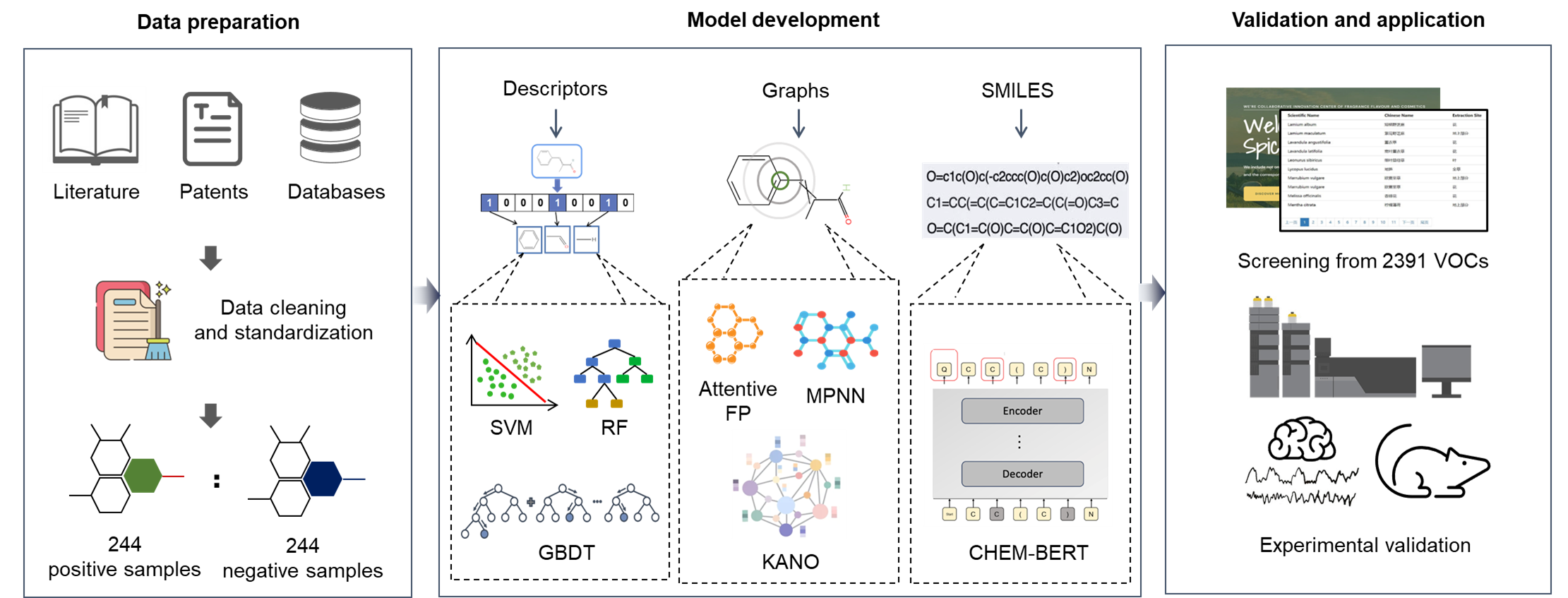
This repository provides a machine-learning pipeline for identifying sleep-promoting volatile organic compounds (VOCs) from aromatic plants, including pretrained base models and a stacking predictor for quick inference.
Dependency
The code has been tested in the following environment:
| Package | Version |
|---|---|
| Python | 3.8.16 |
| Conda | 23.5.0 |
| RDKit | 2023.3.1 |
| Scikit-learn | 1.0.2 |
How to Use
Installation
Option A: From PyPI (simplest)
pip install sleep-model
Option B: Conda environment (recommended for RDKit/DeepChem)
conda env create -f environment.yaml -n sleep_model
conda activate sleep_model
# install this project from source (editable or regular)
python -m pip install -e .
# python -m pip install .
Option C: uv (fast installer; lockfile included)
python -m pip install uv
py -m venv .venv
.\.venv\Scripts\Activate.ps1  # Windows PowerShell
uv sync
File Structure
├── data/                   # Input data files
├── data_analysis/          # Data processing and analysis
├── models/                 # Pretrained base model files for Stacking model training
│   ├── RF/
│   │   ├── rf_MACCSkeys_random_0.ipynb
│   │   ├── rf_RDkit_random_0.ipynb
│   ├── SVM/
│   │   ├── svm_MACCSkeys_random_3.ipynb
│   ├── XGB/
│   │   ├── xgb_MACCSkeys_random_0.ipynb
│   │── stacking_predict.ipynb
├── predict_smiles.py
└── README.md

These four models (rf_MACCSkeys, rf_RDkit, svm_MACCSkeys, xgb_MACCSkeys) are the base models that we use to train the final stacking model.
Predicting
Command-line (console script)
After installation, a console command is available:
sleep-predict --smiles "CC(=O)OC1=CC=CC=C1C(=O)O"
As a Python module
python -m predict_smiles --smiles "CC(=O)OC1=CC=CC=C1C(=O)O"
Batch prediction from CSV
Predict for a CSV file containing a SMILES column (default column name: smiles):
python predict_smiles.py --csv example/input.csv --out example/preds.csv
Customize the SMILES column name and encoding when needed (e.g., column SMILES):
python predict_smiles.py --csv example/input.csv --out example/preds.csv --smiles-column SMILES --input-encoding utf-8
Notes
- Models and training data are loaded from the installed package resources (project
models/anddata/GABAA.csv). Ensure they are present if running from source. - If the console command is not found on Windows, re-activate your environment or run the module form.
Troubleshooting
- RDKit/DeepChem wheels can be environment-specific. If installation via
pipfails, prefer the Conda-based installation. - If you see a file-not-found error for
models/ordata/GABAA.csv, run from the project root or install the project so resources are available in the environment.
1 maintainer

Metadata
1 maintainer
Release files for sleep-model 0.1.3
For a detailed explanation of source distributions (sdists) and built distributions (wheels), please see the package formats documentation.
Built distribution (wheel)
| File | Interpreter | ABI | Platform | Reset |
|---|---|---|---|---|
| sleep_model-0.1.3-py3-none-any.whl | Python 3 | none | any | Details |
Release files / sleep_model-0.1.3-py3-none-any.whl
| Download URL | sleep_model-0.1.3-py3-none-any.whl |
|---|---|
| Size | 102.3 MB |
| Tags | Python 3 |
|
SHA-256 checksum How to use checksums |
b5b802457e52bad4450673794ab8f04f0157fe2e883f7b74777c99cbac44b32b
|
|
BLAKE2b-256 checksum How to use checksums |
137b0c386c7c6fbe66af452a74d71d8d43a6e4dfdab584d6f59932709611d13c
|
| Upload date | |
|
Uploaded using Trusted Publishing? What is trusted publishing? |
No |
| Uploaded via |
twine/6.1.0 CPython/3.8.16
|














