
sliderplot

Turn a function into an interactive plot with a single line of code.
It is very similar to Holoviews DynamicMap but with multiple lines and plots capabilities, and with only sliders as interactive elements.
pip install sliderplot
Demo
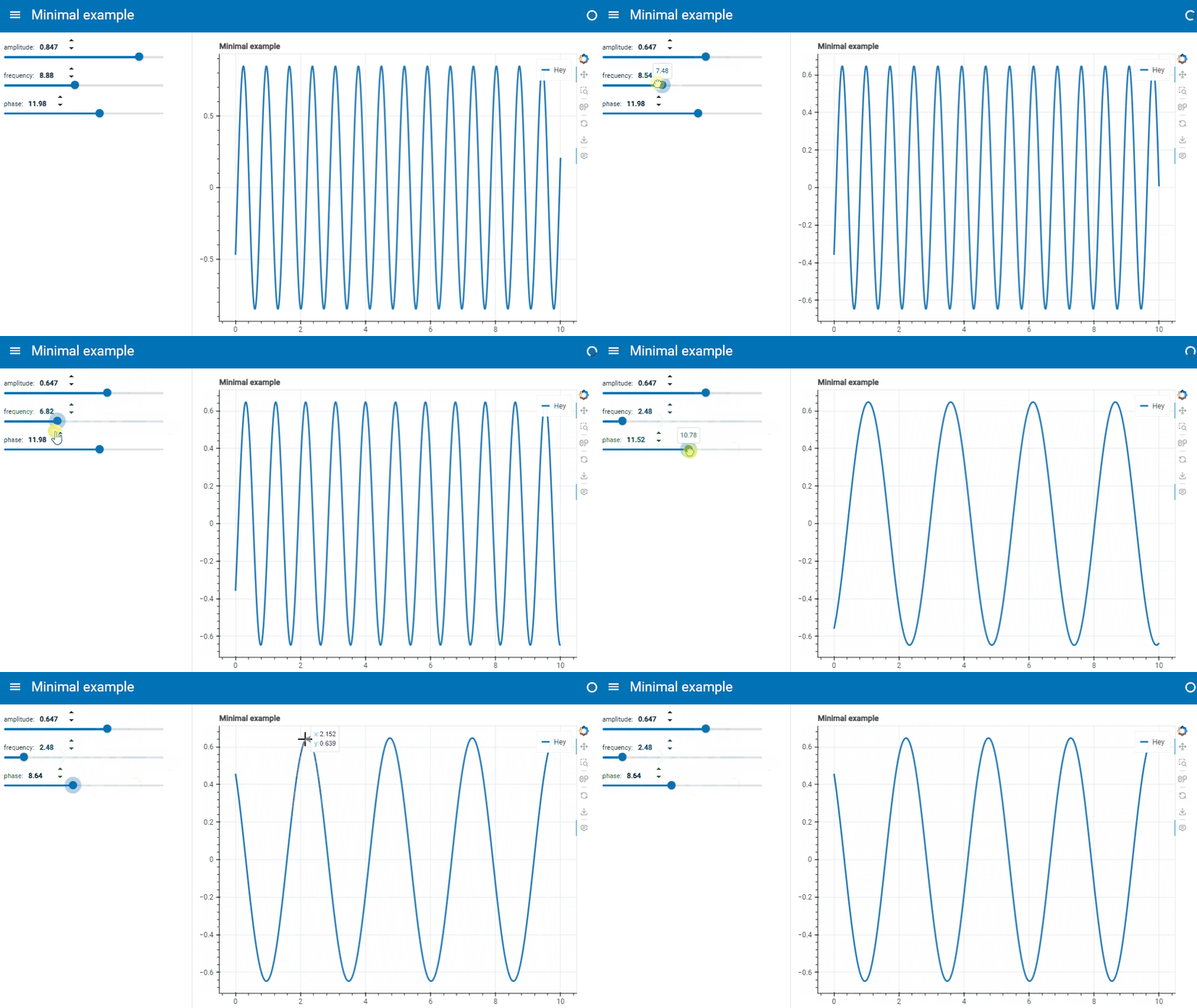
from sliderplot import sliderplot
import numpy as np


def f(amplitude=1, frequency=np.pi, phase=np.pi / 2):
    x = np.linspace(0, 10, 1000)
    y = amplitude * np.sin(frequency * x + phase)
    return x, y, "Hey"


sliderplot(
    f,
    params_bounds=((0, 1),),
    titles=("Minimal example",),
    page_title="Minimal example",
)
Features
- Single line
- Multiple lines
- Multiple subplots
- Line labels
- Initial slider position
- Slider bounds settings
- Axes labels
- Plot title
- Web page title
Single line
To create a sliderplot with a single line, pass into sliderplot() a function that returns same-length x and y
vectors.
Example
def f(amplitude, frequency, phase):
    x = np.linspace(0, 10, 1000)
    y = amplitude * np.sin(frequency * x + phase)
    return x, y


sliderplot(f)
Multiple lines
To create a sliderplot with multiple lines, pass into sliderplot() a function that returns multiple pairs of
same-length x and y vectors.
Example
def f(amplitude, frequency, phase):
    x = np.linspace(0, 10, 1000)
    y = amplitude * np.sin(frequency * x + phase)
    return (x, y), (x, 2 * y), (x, 3 * y)


sliderplot(f)
Multiple subplots
To create a sliderplot with multiple subplots, pass into sliderplot() a function that returns a list with the
following levels, top to bottom:
- List of subplots.
- List of lines.
- Line:
(x, y)pair of same-length vectors, or(x, y, label: str)to add a line label.
Example
def f(amplitude, frequency, phase):
    x = np.linspace(0, 10, 1000)
    y = amplitude * np.sin(frequency * x + phase)
    return ((x, y), (x, 2 * y)), ((x, 3 * y),)


sliderplot(f)
Line labels
To add a label to a line that will be displayed in the plot legend, return the line data with the following format:
(x, y, label: str)
Example
def f(amplitude, frequency, phase):
    x = np.linspace(0, 10, 1000)
    y = amplitude * np.sin(frequency * x + phase)
    return (x, y, "First"), (x, 2 * y), (x, 3 * y, "Third")


sliderplot(f)
Initial slider position
To set the slider initial value for a parameter, simply add a default argument to the function.
Example
In the following example, the initial slider values are:
amplitude = 1frequency = np.piphase = np.pi / 2
def f(amplitude=1, frequency=np.pi, phase=np.pi / 2):
    x = np.linspace(0, 10, 1000)
    y = amplitude * np.sin(frequency * x + phase)
    return x, y


sliderplot(f)
Slider bounds settings
Use the param_bounds argument of the sliderplot() function to specify the slider bounds of each parameter. It takes
a list of pairs of (min_value, max_value).
The first pair contains the bounds of the first argument, the second pair contains the bounds of the second argument, etc...
Example
In the following example, the slider bounds are:
amplitude = (0, 1)frequency = (1, 1000)phase = (0, np.pi)
def f(amplitude, frequency, phase):
    x = np.linspace(0, 10, 1000)
    y = amplitude * np.sin(frequency * x + phase)
    return x, y


sliderplot(f, params_bounds=((0, 1), (1, 1000), (0, np.pi)))
Axes labels
To add axes labels to the subplots, set the axes_labels argument with a sequence of (x_label, y_label) pair of
strings. The first
pair will set the axis labels of the first subplot, the second pair the axis labels of the second subplot, etc...
Example
def f(amplitude, frequency, phase):
    x = np.linspace(0, 10, 1000)
    y = amplitude * np.sin(frequency * x + phase)
    return ((x, y), (x, 2 * y)), ((x, 3 * y),)


sliderplot(f, axes_labels=(("x1", "y1"), ("x2", "y2")))
Plot title
To add plot titles to subplots, set the titles argument with a sequence of strings. The first
string will be the title of the first subplot, the second string the title of the second subplot, etc...
Example
def f(amplitude, frequency, phase):
    x = np.linspace(0, 10, 1000)
    y = amplitude * np.sin(frequency * x + phase)
    return ((x, y), (x, 2 * y)), ((x, 3 * y),)


sliderplot(f, titles=("Subplot 1", "Subplot2"))
Web page title
To set the title of the web page that show the sliderplot, use the page_title argument.
def f(amplitude=1, frequency=np.pi, phase=np.pi / 2):
    x = np.linspace(0, 10, 1000)
    y = amplitude * np.sin(frequency * x + phase)
    return x, y


sliderplot(f, page_title="Page title")
1 maintainer

Download files
Download the file for your platform. If you're not sure which to choose, learn more about installing packages.
Source Distribution
Built Distribution
Filter files by name, interpreter, ABI, and platform.
If you're not sure about the file name format, learn more about wheel file names.
Copy a direct link to the current filters
File details
Details for the file sliderplot-0.1.1.tar.gz.
File metadata
- Download URL: sliderplot-0.1.1.tar.gz
- Upload date:
- Size: 7.4 kB
- Tags: Source
- Uploaded using Trusted Publishing? Yes
- Uploaded via:
twine/6.1.0 CPython/3.12.9
File hashes
| Algorithm | Hash digest | |
|---|---|---|
| SHA256 |
427a69dfdf3b48adc3bff1ff0c771923bd4eb3c897f2efbf5d31102efb336523
|
|
| MD5 |
332ae150aa5d6202f7d3e753f7629d82
|
|
| BLAKE2b-256 |
747b8df949779d289166cc481cb292d62a47286775a7acb0b3b7a133d553ffcf
|
Provenance
The following attestation bundles were made for sliderplot-0.1.1.tar.gz:
Publisher:
publish-to-pypi.yml on ngripon/sliderplot
-
Statement:
-
Statement type:
https://in-toto.io/Statement/v1 -
Predicate type:
https://docs.pypi.org/attestations/publish/v1 -
Subject name:
sliderplot-0.1.1.tar.gz -
Subject digest:
427a69dfdf3b48adc3bff1ff0c771923bd4eb3c897f2efbf5d31102efb336523 - Sigstore transparency entry: 194363661
- Sigstore integration time:
-
Permalink:
ngripon/sliderplot@4fb2c97b8e7678aa4e0eb48e1e881e725982d1e2 -
Branch / Tag:
refs/tags/v0.1.1 - Owner: https://github.com/ngripon
-
Access:
public
-
Token Issuer:
https://token.actions.githubusercontent.com -
Runner Environment:
github-hosted -
Publication workflow:
publish-to-pypi.yml@4fb2c97b8e7678aa4e0eb48e1e881e725982d1e2 -
Trigger Event:
release
-
Statement type:
File details
Details for the file sliderplot-0.1.1-py3-none-any.whl.
File metadata
- Download URL: sliderplot-0.1.1-py3-none-any.whl
- Upload date:
- Size: 6.9 kB
- Tags: Python 3
- Uploaded using Trusted Publishing? Yes
- Uploaded via:
twine/6.1.0 CPython/3.12.9
File hashes
| Algorithm | Hash digest | |
|---|---|---|
| SHA256 |
38fdeb56bbf26f60e9ff1ab472c722256c3aafe2d97473d18a82df326680efab
|
|
| MD5 |
760e76c388ecf79dd8003377bd549304
|
|
| BLAKE2b-256 |
2ba3b5bdc7501476d00a17c0e97cc20d26b483cf4bcfe0fc557917f4777d6156
|
Provenance
The following attestation bundles were made for sliderplot-0.1.1-py3-none-any.whl:
Publisher:
publish-to-pypi.yml on ngripon/sliderplot
-
Statement:
-
Statement type:
https://in-toto.io/Statement/v1 -
Predicate type:
https://docs.pypi.org/attestations/publish/v1 -
Subject name:
sliderplot-0.1.1-py3-none-any.whl -
Subject digest:
38fdeb56bbf26f60e9ff1ab472c722256c3aafe2d97473d18a82df326680efab - Sigstore transparency entry: 194363666
- Sigstore integration time:
-
Permalink:
ngripon/sliderplot@4fb2c97b8e7678aa4e0eb48e1e881e725982d1e2 -
Branch / Tag:
refs/tags/v0.1.1 - Owner: https://github.com/ngripon
-
Access:
public
-
Token Issuer:
https://token.actions.githubusercontent.com -
Runner Environment:
github-hosted -
Publication workflow:
publish-to-pypi.yml@4fb2c97b8e7678aa4e0eb48e1e881e725982d1e2 -
Trigger Event:
release
-
Statement type:














