
SlideTwin

Research prototype. Not for clinical use or diagnosis.
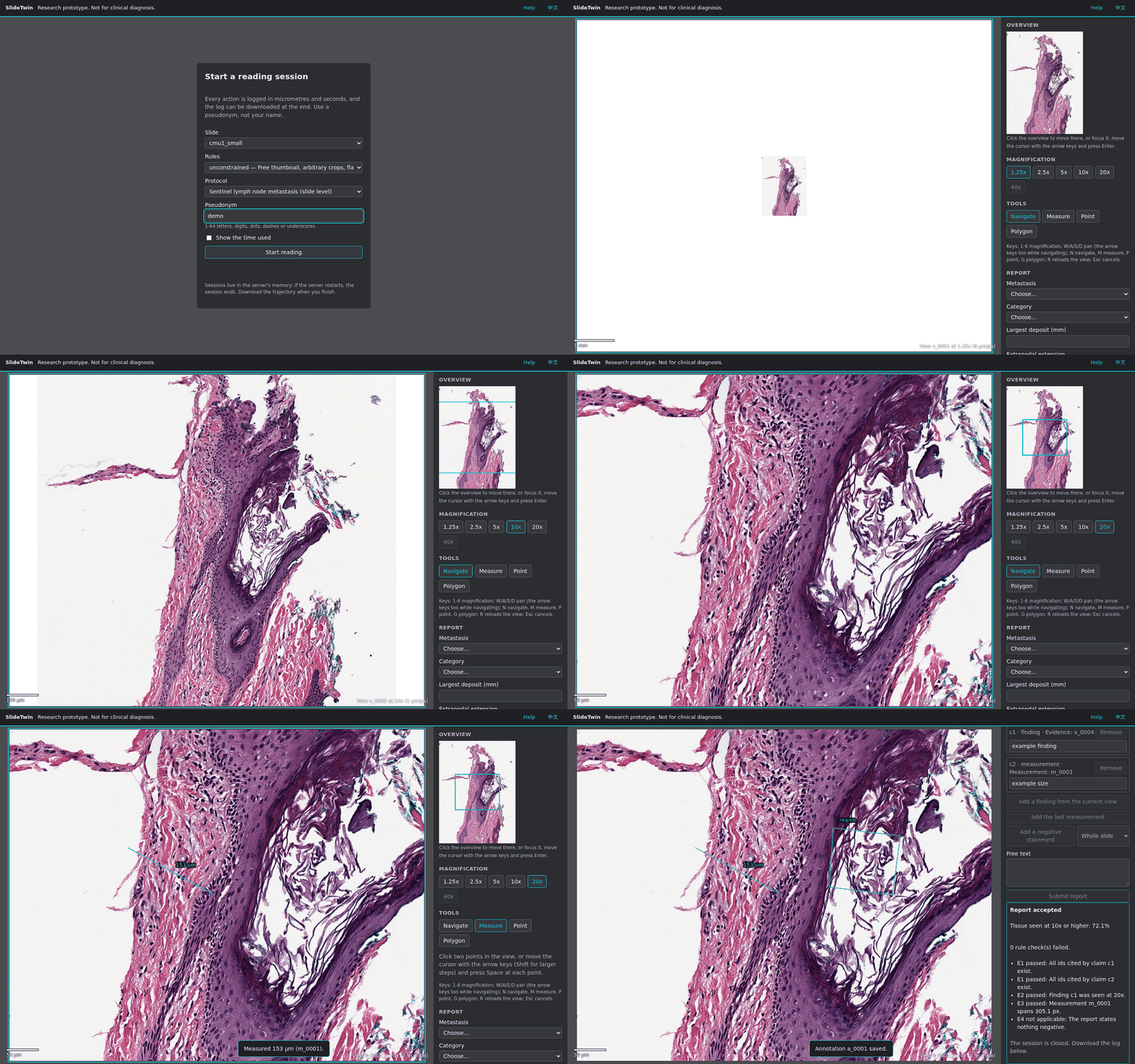
SlideTwin is a digital pathology slide viewer that AI agents and people operate under the same rules.
Every pixel shown in a session comes from a logged action (view, thumbnail or crop).
Positions and distances are in micrometres and time is a virtual clock in seconds, so a session can be
replayed exactly from its log.
It supports three kinds of experiments:
- Faithfulness: a conclusion may depend only on the fields of view that were logged.
- Negative coverage: a "no metastasis" claim must come with a proof of coverage.
- Spatial measurement: sizes and distances must be measured on the physical scale.
中文说明见 README_zh.md.
Status
| Milestone | Content | State |
|---|---|---|
| M0 | Scaffold, tooling, CI, health endpoint | done |
| M1 | Core engine: geometry, slide access, session, ledger, trajectory, replay | done |
| M2 | REST API for every action in SPEC section 7 | done |
| M5 | Rule checks E1-E4, tissue coverage, enforced and advisory protocols | done |
| M3 | Web reading UI (keyboard and pointer, English and Chinese) | done |
| M4 | MCP tools at /mcp; serpentine, random, crop and LLM agents |
done |
| M6 | Lesion metrics, trajectory pictures, profile comparison, evaluation report | done |
| M7 | Docker image, slide download, rate limit, pilot guide and feedback, cost calibration | done; demo in GitHub Codespaces |
| M8 | Every common WSI format: content-based router, readers, file sets, provenance | done |
| M10 | A small demo: three public slides, 0.9 GB | done |
| M9 | pip package, slidetwin command, Python training interface |
done; on PyPI |
Install and run
SlideTwin needs Python 3.12 or later on Linux.
python3 -m venv .venv && . .venv/bin/activate
pip install "slidetwin[all]"        # with every reader
The slidetwin command:
slidetwin serve --demo                              # download the demo's slides (0.9 GB), serve them
slidetwin check /path/to/slide.svs                  # what SlideTwin reads in a slide
slidetwin manifest /path/to/slides -o manifest.yaml # opaque ids, hashes, formats; refusals listed
slidetwin serve --slides /path/to/slides --manifest manifest.yaml
slidetwin mcp --slides /path/to/slides --manifest manifest.yaml   # MCP over stdio
slidetwin replay --demo logs/sessions/<id>.jsonl    # replay a reading, report differences
slidetwin fetch --demo                              # download only
--demo downloads into ./data/slides (--slides names another folder); serve --demo starts
listening once the download is done. serve listens on 127.0.0.1:7860: open
http://localhost:7860/ to read a slide in the browser. To serve other machines, add
--host 0.0.0.0 and set SLIDETWIN_ALLOWED_HOSTS to the name or address they use. replay takes
the slide options the reading was served with: --demo, or --slides and --manifest.
For a local agent, e.g. Claude Code: claude mcp add slidetwin -- /path/to/.venv/bin/slidetwin mcp --slides /path/to/slides --manifest /path/to/manifest.yaml --log-dir /path/to/logs. Use
absolute paths, slidetwin included: the agent may start it in any folder and without your
virtual environment. Readings are logged under ./logs unless --log-dir or
SLIDETWIN_LOG_DIR says otherwise. The profiles, the protocol and the demo manifest come with the
package; SLIDETWIN_CONFIG_DIR or a configs/ folder in the working directory replace them.
Development
git clone https://github.com/wenhaozhang0066/SlideTwin.git && cd SlideTwin
pip install -e ".[dev]"
python scripts/fetch_test_data.py           # five small CC0 test slides (11 MB) in data/testdata
pytest -q
slidetwin fetch --only cmu1_small           # the CC0 slide the API example below opens
uvicorn slidetwin.api.main:app --reload --port 7860 --no-access-log
bash scripts/ci_local.sh runs most of CI on your machine: it downloads the larger test slides
(about 300 MB), then runs ruff, mypy, the UI unit tests (they need Node.js and are skipped
without it) and pytest with the 100% coverage gate. CI also runs the browser tests and checks the
wheel and the Docker image. The browser tests need pip install -e ".[dev,e2e]" and
python -m playwright install chromium; without them they are skipped.
Slide formats
SlideTwin picks the reader from the file's content. A format without a reader it can trust is
refused with a message that says how to convert the slide; it never guesses. "Experimental" formats
were checked on synthetic files only and are served when the slide's manifest entry sets
experimental: true. Readers marked (openslide), (slideio) or (isyntax) need that extra, e.g.
pip install "slidetwin[openslide]"; "slidetwin[all]" installs them all.
| Format | Files | Served | Refused or experimental |
|---|---|---|---|
| Aperio SVS, and SVS exports (Grundium, KFBio) | .svs |
JPEG, JPEG 2000 | |
| Philips TIFF | .tiff |
brightfield | |
| Huron TIFF | .tif |
brightfield | |
| Generic pyramidal TIFF (libvips and others) | .tif |
a clean pyramid with a plausible resolution | otherwise mpp_override is needed |
| Hamamatsu NDPI (openslide) | .ndpi |
brightfield JPEG, focal plane 0 | fluorescence, other planes |
| Hamamatsu VMS / VMU (openslide) | .vms/.vmu and the files they name |
VMS, single layer | VMU experimental |
| 3DHistech MIRAX (openslide) | .mrxs and its folder |
brightfield, one focal plane | fluorescence, JPEG XR tiles |
| Sakura SVSlide (openslide) | .svslide |
experimental | |
| DICOM WSI | a series folder, or one level file | JPEG and JPEG 2000 (YBR_FULL_422) | JPEG XL, HTJ2K experimental |
| Zeiss CZI | .czi |
brightfield (JPEG XR, zstd), one slide per scene | fluorescence, z-stacks, multi-file |
| Leica SCN | .scn |
one brightfield region | several regions, z-stacks experimental; fluorescence refused |
| Trestle TIFF | .tif |
the layout checked on CMU-1 | |
| Ventana BIF | .bif |
VENTANA DP 200, one area | older iScan files |
| ARGOS AVS | .avs |
brightfield, a focal plane of a z-stack | |
| OME-TIFF | .ome.tif |
interleaved RGB | multichannel, planar, z-stacks |
| Akoya QPTIFF | .qptiff |
brightfield | fluorescence |
| Olympus VSI (slideio) | .vsi and its _<name>_ folder |
brightfield 8-bit RGB, one plane; one slide per scene | fluorescence, 16-bit, z-stacks |
| Philips iSyntax (isyntax) | .isyntax |
version 1 with a known pixel size | iSyntax 2 |
| Zeiss ZVI (slideio) | .zvi |
refused for now (no brightfield sample validated) |
Not supported: fluorescence and multiplex images, plain images (JPEG, PNG, JPEG 2000), and
formats without an open reader (SQRAY SDPC, UNIC TMAP, KFBio KFB, Motic MDS/MDSX, DYJ). Labels,
macro photos and embedded thumbnails are never read, whatever the format. A format SlideTwin has
no reader for can be added on your own machine with a reader plugin: see
slidetwin/readers/plugins.py (experimental until 1.0).
The API in one minute
Every action of a reading session is one HTTP call. Interactive docs are at /docs. With a
server from slidetwin serve --demo or from the Development steps:
# open a slide (returns the first view, the slide geometry, the task and the rules)
curl -s -X POST localhost:7860/api/sessions -H 'content-type: application/json' \
  -d '{"slide_id": "cmu1_small", "actor": "agent:demo"}' > session.json
SID=$(python -c 'import json; print(json.load(open("session.json"))["session_id"])')

# act: every response carries cost_s, elapsed_s and the new state; a move returns the new view
# (base64 JPEG), a measurement the length in micrometres
curl -s -X POST localhost:7860/api/sessions/$SID/magnification -H 'content-type: application/json' -d '{"mag": 10}'
curl -s -X POST localhost:7860/api/sessions/$SID/pan -H 'content-type: application/json' -d '{"dx": 0, "dy": 0.5}'
curl -s -X POST localhost:7860/api/sessions/$SID/measure -H 'content-type: application/json' \
  -d '{"p1_px": [100, 100], "p2_px": [400, 100]}'

# the log: a header line, then one JSON line per action (this export too); slidetwin replay reads it
curl -s localhost:7860/api/sessions/$SID/trajectory > session.jsonl
| Action | Route |
|---|---|
| create_session | POST /api/sessions |
| get_state | GET /api/sessions/{id}/state |
| get_thumbnail | POST /api/sessions/{id}/thumbnail |
| set_magnification | POST /api/sessions/{id}/magnification |
| pan / move_to / view | POST /api/sessions/{id}/pan, /move_to, /view |
| measure / annotate | POST /api/sessions/{id}/measure, /annotations |
crop (unconstrained only) |
POST /api/sessions/{id}/crop |
| submit_report | POST /api/sessions/{id}/report |
| export_trajectory | GET /api/sessions/{id}/trajectory |
| report schema | GET /api/report_schema |
Settings come from environment variables, with the defaults listed in
slidetwin/api/settings.py: SLIDETWIN_CONFIG_DIR, SLIDETWIN_MANIFEST, SLIDETWIN_SLIDE_DIR,
SLIDETWIN_LOG_DIR (default logs; trajectories are written there as they happen, so it cannot
be empty), SLIDETWIN_CACHE_DIR, SLIDETWIN_MAX_SESSIONS, SLIDETWIN_SESSION_TTL_S,
SLIDETWIN_SESSION_MAX_AGE_S, SLIDETWIN_SESSION_EVICT_IDLE_S, SLIDETWIN_MAX_BODY_BYTES,
SLIDETWIN_ALLOWED_HOSTS, SLIDETWIN_ALLOWED_ORIGINS, SLIDETWIN_RATE_LIMIT_PER_S,
SLIDETWIN_RATE_LIMIT_BURST, SLIDETWIN_RATE_LIMIT_CLIENT_HEADER. The download at start reads
SLIDETWIN_FETCH_SLIDES (1 downloads) and SLIDETWIN_FETCH_ONLY (slide ids). The default viewport
is 1280 x 1024 px (see docs/DECISIONS.md).
MCP and agents
Every session action is also an MCP tool at /mcp (streamable HTTP). Any MCP client can read
slides with it, Claude Code included:
claude mcp add --transport http slidetwin http://localhost:7860/mcp
Other clients have their own commands; see their documentation. On a public host name, set
SLIDETWIN_ALLOWED_HOSTS to that name (the default accepts localhost only).
Baseline agents run on your machine against a server, through REST or MCP:
python -m slidetwin.agents serpentine --env http://localhost:7860 --slide cmu1_small
python -m slidetwin.agents random --env http://localhost:7860 --transport mcp --slide cmu1_small
python -m slidetwin.agents crop --env http://localhost:7860 --slide cmu1_small   # unconstrained profile

# a vision LLM: the Anthropic API (pip install "slidetwin[llm]"; ANTHROPIC_API_KEY or `ant auth login`) ...
python -m slidetwin.agents llm --env http://localhost:7860 --slide cmu1_small --out reading.jsonl
# ... or any OpenAI-compatible endpoint, e.g. a local vLLM
python -m slidetwin.agents llm --backend openai --base-url http://localhost:8000/v1 \
  --model Qwen/Qwen2.5-VL-7B-Instruct --env http://localhost:7860 --slide cmu1_small
Training interface
For training, slidetwin.env runs sessions inside your own process: no HTTP and no JPEG round trip,
with the same rules, costs and logs as REST and MCP. An action is a dict naming the action plus its
REST request body; a step returns the view as an RGB array. This script reads a demo slide: run it
in the folder where slidetwin fetch --demo put the slides (./data/slides).
from slidetwin.env import Env, VecEnv, demo_manifest

if __name__ == "__main__":  # VecEnv's workers import this script: keep everything under the guard
    with Env(demo_manifest()) as env:
        step = env.reset("c16_29f5ca")  # the first view, slide, task and rules
        step = env.step({"action": "set_magnification", "mag": 10})
        step.image, step.cost_s, step.elapsed_s, step.done  # (1024, 1280, 3) uint8 array, ...
        step = env.step({"action": "pan", "dx": 0.5, "dy": 0})
        step = env.step({"action": "set_magnification", "mag": 7})
        step.error  # refused (MAG_NOT_PRESET), as REST reports it

    with VecEnv(8, manifest=demo_manifest()) as vec:  # one worker process per environment
        steps = vec.reset(["c16_29f5ca"] * 8)
        steps = vec.step([{"action": "view"}] * 8)
The environment gives no reward: ground truth never enters a step, and training code scores a
reading itself (for example with slidetwin.eval). Nothing is logged unless log_dir is set;
with it, each episode writes the trajectory a web session would. image="jpeg" returns the JPEG
that REST and MCP serve instead of the array. scripts/bench_env.py measures the speed: on a
CAMELYON16 slide, one environment ran 32 actions per second and eight workers 182 (a shared
64-core node).
Evaluation
Offline tools in slidetwin/eval score readings against the CAMELYON16 annotations, which are used
for evaluation only. docs/EVALUATION.md reports the baseline agents on the
five CAMELYON16 slides of configs/slides/manifest.yaml (5.3 GB; the demo has one of them). To
reproduce it:
SLIDES=c16_fa751c,c16_aba3ae,c16_2abf4f,c16_f606e8,c16_683d2d
slidetwin fetch --only $SLIDES
mkdir -p xml && for n in tumor_082 tumor_093 tumor_081 tumor_058; do
  curl -fsSo xml/$n.xml https://camelyon-dataset.s3.amazonaws.com/CAMELYON16/annotations/$n.xml
done
python -m slidetwin.eval convert --xml-dir xml          # the annotations, as GeoJSON
python -m slidetwin.eval run --out data/eval/RUN --slides $SLIDES
python -m slidetwin.eval evaluate --out data/eval/RUN   # metrics, report table, pictures
Deployment
docker build -t slidetwin --build-arg GIT_SHA=$(git rev-parse --short HEAD) .
docker run -p 7860:7860 slidetwin           # downloads the demo's public slides (0.9 GB), then serves
To read your own slides, mount them and a manifest, and skip the download. The container runs as
uid 1000, which must be able to read the slides. It writes the readings' logs to
/tmp/slidetwin/logs, which go with the container unless a folder is mounted there (writable by
uid 1000):
docker run -p 7860:7860 -e SLIDETWIN_FETCH_SLIDES=0 \
  -v /path/to/slides:/data/slides \
  -v /path/to/manifest.yaml:/data/manifest.yaml -e SLIDETWIN_MANIFEST=/data/manifest.yaml \
  -v /path/to/logs:/tmp/slidetwin/logs slidetwin
The demo's slides (configs/slides/demo.yaml) are a small CC0 sample and two CAMELYON16
lymph-node slides, one negative and one with a micro-metastasis. configs/slides/manifest.yaml
holds the CC0 sample and the five slides of the evaluation in
docs/EVALUATION.md.
The image reads every format but VSI and ZVI (slideio is left out, see
docs/THIRD_PARTY.md); it carries the licence notices of everything it
installs and the source of OpenSlide and openslide-python under /usr/share/slidetwin/. It
limits each client address to 20 requests per second (SLIDETWIN_RATE_LIMIT_PER_S). On a
Hugging Face Space, set as Space variables SLIDETWIN_ALLOWED_HOSTS (the Space's host name),
and, since the Space's proxy names the client in X-Forwarded-For,
SLIDETWIN_RATE_LIMIT_CLIENT_HEADER=x-forwarded-for and FORWARDED_ALLOW_IPS=*; without a proxy,
leave those two unset, or any client could choose its own rate limit. Sessions live in memory, so
a restart ends them: download the trajectory at the end. If the download does not start inside
the Hugging Face page, open the Space in its own tab.
GitHub Codespaces

The dev container in .devcontainer/ runs the demo in a codespace. When the codespace is
created, it installs SlideTwin and downloads the demo's slides (0.9 GB). Each time the codespace
starts, it starts the server on port 7860; the terminal then shows the server log.
- Optional, before creating the codespace: under Settings > Codespaces, raise Default idle timeout (30 minutes; at most 240). The setting applies only to codespaces created afterwards.
- On the repository page, choose Code > Codespaces > Create codespace on main. The first start takes a few minutes.
- Wait for the terminal to print
SlideTwin is running: https://<name>-7860.app.github.dev, then open that address. At first only you can open it. If it also says that the slides are still downloading, each slide opens once its download is complete (a minute or two). - To share it, open the Ports panel, right-click port 7860 and choose Port Visibility > Public. Anyone with the address can then use the demo. The port turns private again whenever the codespace restarts, so repeat this before each demo.
On their first visit, visitors see a GitHub page warning that they are opening a port of
someone's codespace; Continue leads to the demo. MCP clients use
https://<name>-7860.app.github.dev/mcp. When the codespace is stopped, the address returns an
empty page.
Visitors' requests do not count as activity: the codespace stops when the idle timeout has passed
since your own last input, and after 12 hours at most. Starting it again (github.com/codespaces)
starts the server at the same address, and the slides are not downloaded again. A new codespace
gets a new address. The server log is logs/server.log.
A codespace counts against your account's monthly quota: 120 core hours on GitHub Free (60 hours of the default 2-core machine) and 180 on Pro. It also uses about 4 GB of the storage quota (15 GB-month on Free) for as long as it exists. Closing the browser tab does not stop it; stop it after a demo, and delete it when it is no longer needed. GitHub's terms allow a codespace for developing and testing, such as a short demo, not as a permanent public service.
For a pathologist pilot, see docs/PILOT.md. The cost model can be fitted from
human logs with python scripts/calibrate_costs.py LOGS --fitted fitted.yaml.
Documentation
- Specification: docs/SPEC.md (Chinese)
- Architecture and contract: docs/ARCHITECTURE.md
- Decision log: docs/DECISIONS.md
- Evaluation report: docs/EVALUATION.md
- Pilot guide: docs/PILOT.md
- Data sources and licenses: docs/DATA_LICENSES.md
- Third-party software and licences: docs/THIRD_PARTY.md
- Release steps: docs/RELEASE.md
- Contributing, security, changes: CONTRIBUTING.md, SECURITY.md, CHANGELOG.md; citation: CITATION.cff
Data
No slides, patient data or company data are stored in this repository. Slides are read from
SLIDETWIN_SLIDE_DIR and listed in a manifest (configs/slides/demo.yaml,
configs/slides/manifest.yaml). Each public slide's source and license are recorded in
docs/DATA_LICENSES.md.
License
Code: Apache-2.0 (see LICENSE). Data keep their own licenses.
1 maintainer

Metadata
1 maintainer
Release files for slidetwin 0.1.0
For a detailed explanation of source distributions (sdists) and built distributions (wheels), please see the package formats documentation.
Source distribution (sdist)
| File | Size | Uploaded | |
|---|---|---|---|
| slidetwin-0.1.0.tar.gz | 2.5 MB | Details |
Built distribution (wheel)
| File | Interpreter | ABI | Platform | Reset |
|---|---|---|---|---|
| slidetwin-0.1.0-py3-none-any.whl | Python 3 | none | any | Details |
Total release size: 2.7 MB
Release files / slidetwin-0.1.0.tar.gz
| Download URL | slidetwin-0.1.0.tar.gz |
|---|---|
| Size | 2.5 MB |
| Tags | Source |
|
SHA-256 checksum How to use checksums |
72a8eccb56f19e1a889240dc002fd464a2eba580be5d5119a0ec0dfa37eb7a4e
|
|
BLAKE2b-256 checksum How to use checksums |
70228f0a5d00f86c55deeefdfb69bee1c65791bacaa7ec22133b26a180dc0591
|
| Upload date | |
|
Uploaded using Trusted Publishing? What is trusted publishing? |
Yes |
| Uploaded via |
twine/7.0.0 CPython/3.13.14
|
Provenance
Provenance describes where a file came from. On PyPI, provenance is shared via attestations, which provide a verifiable record of the build or publishing details. View details, limitations and caveats.


PyPI Publish Attestation
PyPI verified that this artifact, at this checksum, originated from the publisher listed below.
Signed by GitHub Actions, verified by PyPI on Oct 17, 2026.
Transparency logRelease files / slidetwin-0.1.0-py3-none-any.whl
| Download URL | slidetwin-0.1.0-py3-none-any.whl |
|---|---|
| Size | 239.8 kB |
| Tags | Python 3 |
|
SHA-256 checksum How to use checksums |
44ec22c48ee646f982c5b30822abce34a549fda19eea4459705cb9f67d5097da
|
|
BLAKE2b-256 checksum How to use checksums |
45dc2b6f4730d5319973f85e930c06f6ba08080ed972744718cfa2b7c4a6b254
|
| Upload date | |
|
Uploaded using Trusted Publishing? What is trusted publishing? |
Yes |
| Uploaded via |
twine/7.0.0 CPython/3.13.14
|
Provenance
Provenance describes where a file came from. On PyPI, provenance is shared via attestations, which provide a verifiable record of the build or publishing details. View details, limitations and caveats.
PyPI Publish Attestation
PyPI verified that this artifact, at this checksum, originated from the publisher listed below.
Signed by GitHub Actions, verified by PyPI on Oct 17, 2026.
Transparency log












