
SLIM Best Practices Leaderboard
Tool to generate a scan report of SLIM best practices compliance.


This repository serves to create a leaderboard report that ranks and showcases how well a given set of GitHub repositories follow SLIM best practices.
Features
- Script to query a set of GitHub repositories and create a report showcasing compliance to SLIM best practices, sorted by most to least compliant, printed to standard out.
- Best practices scanned for include all checklist items specified in the SLIM Getting Started Checklist
- Specification of repositories via a config file - where repositories can be listed individually or automatically scanned from a parent organization.
- Works with GitHub.com or GitHub Enterprise repositories.
- GraphQL and parallelized queries to GitHub for optimization
- Logging to share the status of repository compliance as the script runs.
- Output format modes including: tree, table, and markdown
- Verbose mode for additional statistical details and explanations
Contents
- Features
- Contents
- Quick Start
- Changelog
- Frequently Asked Questions (FAQ)
- Contributing
- License
- Support
Quick Start
Use this quick start guide to generate a fresh leaderboard report.
Setup Instructions
This script requires a configuration file to operate. This file specifies the repositories and organizations to scan.
Below is an example of a configuration file named slim-config.json:
{
  "targets": [
      {
        "type": "repository",
        "name": "https://github.com/nasa-ammos/slim"
      }
  ]
}
Additional examples can be found in the examples/ sub-folder within the source repository.
Run Instructions
Requirements:
This software requires Python 3.7 or later. Usually, you'll want to create a virtual environment in order to isolate the dependencies of SLIM Leaderboard from other Python-using applications. Install SLIM Leaderboard into that environment using pip:
pip install slim-leaderboard
This installs the latest SLIM Leaderboard and its dependencies from the Python Package Index. The new console script slim-leaderboard is now ready for use. Confirm by running either:
slim-leaderboard --version
slim-leaderboard --help
To upgrade:
pip install --upgrade slim-leaderboard
Or select a specific version, such as X.Y.Z:
pip install slim-leaderboard==X.Y.Z
You'll also need a GitHub personal access token (classic). Ensure that all permissions under the "repo" group are enabled for this token, including security_events. Set the environment variable GITHUB_TOKEN with your token.
Execution:
👉 Note: the below example outputs will change as the tool evolves and adds more checks. This is for demonstration purposes only.
To generate a fresh leaderboard report, use the following command format:
slim-leaderboard --output_format FORMAT --unsorted --verbose --emoji CONFIG_FILE
The arguments above are as follows:
CONFIG_FILE: Path to the JSON configuration file.- (Optional)
--output_format FORMAT: ReplaceFORMATwithTREE,TABLE,MARKDOWN, orPLAIN. Default isTREE. - (Optional)
--unsorted: If included, the results will not be sorted. - (Optional)
--verbose: If included, outputs verbose information, including detailed statistics and explanations for each check performed. - (Optional)
--emoji: If included, outputs emojis for statuses rathe than pure text (e.g. ✅ ❌ ⚠️ etc.)
Examples:
Generate a report using default settings:
slim-leaderboard slim-config.json
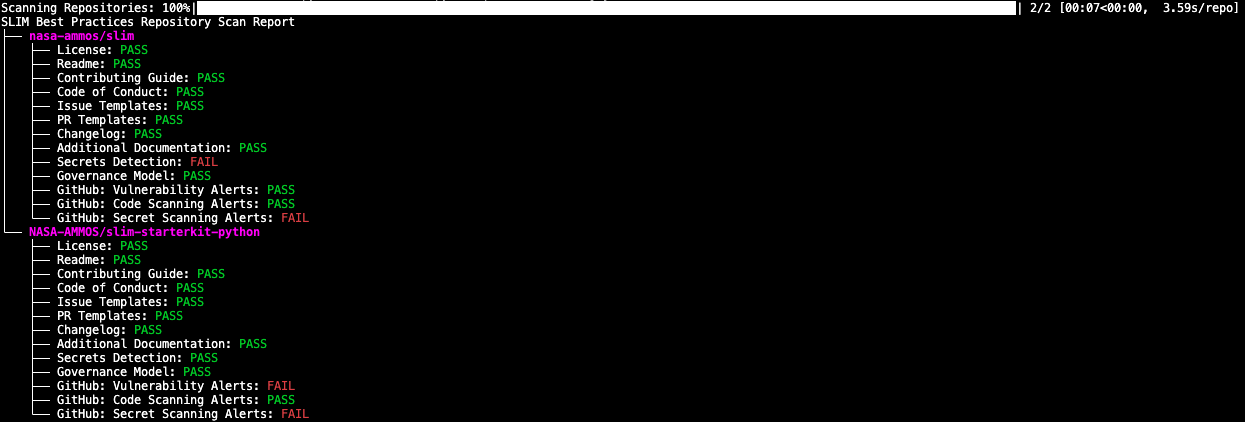
Generate a report in table format:
slim-leaderboard --output_format TABLE slim-config.json

Verbose output in tree format:
slim-leaderboard --output_format TREE --verbose slim-config.json
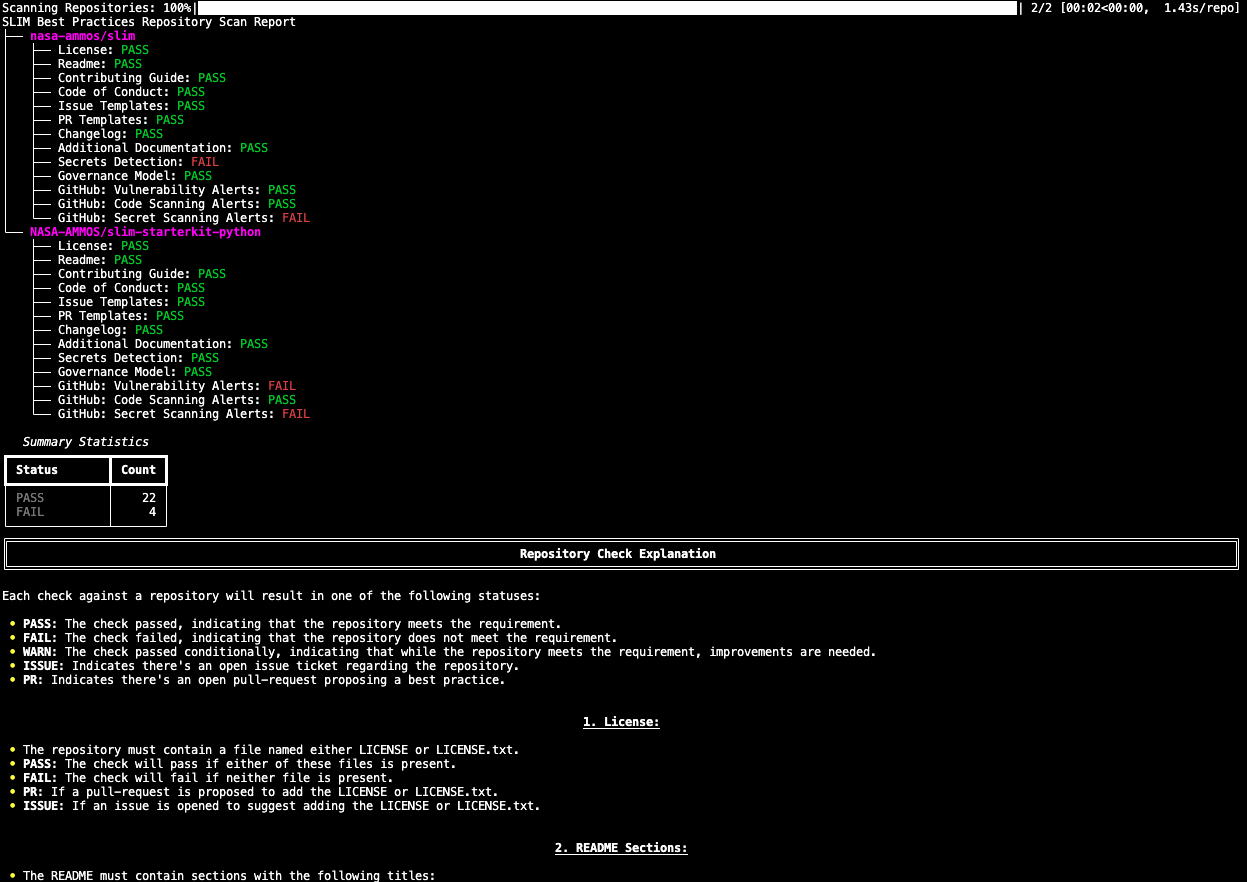
Markdown format without sorting and with emojis:
slim-leaderboard --output_format MARKDOWN --unsorted --emoji slim-config.json
Scanning Repositories: 100%|█████████████████████████████████████████████████████████████████████████████████████████████████████████████████████| 2/2 [00:02<00:00,  1.15s/repo]

# SLIM Best Practices Repository Scan Report
| Owner | Repository | License | Readme | Contributing Guide | Code of Conduct | Issue Templates | PR Templates | Changelog | Additional Documentation | Secrets Detection | Governance Model | GitHub: Vulnerability Alerts | GitHub: Code Scanning Alerts | GitHub: Secret Scanning Alerts |
| --- | --- | --- | --- | --- | --- | --- | --- | --- | --- | --- | --- | --- | --- | --- |
| nasa-ammos | slim | ✅ | ✅ | ✅ | ✅ | ✅ | ✅ | ✅ | ✅ | ❌ | ✅ | ✅ | ✅ | ❌ |
| NASA-AMMOS | slim-starterkit-python | ✅ | ✅ | ✅ | ✅ | ✅ | ✅ | ✅ | ✅ | ✅ | ✅ | ❌ | ✅ | ❌ |
Changelog
See our root CHANGELOG.md for a history of our changes.
Frequently Asked Questions (FAQ)
None. Please post a PR for this section to ask your question and the development team will add an answer.
Contributing
Interested in contributing to our project? Please see our: CONTRIBUTING.md
Local Development
For local development of SLIM Leaderboard, clone the GitHub repository, create a virtual environment, and then install the package in editable mode into it. For example:
$ git clone --quiet https://github.com/NASA-AMMOS/slim-leaderboard.git
$ cd slim-leaderboard
$ python3 -m venv .venv
$ source .venv/bin/activate
$ pip install --editable .
The slim-leaderboard console-script is now ready in editable mode; changes you make to the source files under src are immediately reflected when run.
License
See our: LICENSE
Support
Key points of contact are: @riverma
1 maintainer

Metadata
1 maintainer
Release files for slim-leaderboard 0.0.0
For a detailed explanation of source distributions (sdists) and built distributions (wheels), please see the package formats documentation.
Source distribution (sdist)
| File | Size | Uploaded | |
|---|---|---|---|
| slim_leaderboard-0.0.0.tar.gz | 35.6 kB | Details |
Built distribution (wheel)
| File | Interpreter | ABI | Platform | Reset |
|---|---|---|---|---|
| slim_leaderboard-0.0.0-py3-none-any.whl | Python 3 | none | any | Details |
Total release size: 57.5 kB
Release files / slim_leaderboard-0.0.0.tar.gz
| Download URL | slim_leaderboard-0.0.0.tar.gz |
|---|---|
| Size | 35.6 kB |
| Tags | Source |
|
SHA-256 checksum How to use checksums |
0100c86698a42bb7d46e30deed3336b2b7c32c6ffe26d61209619eb0457a381b
|
|
BLAKE2b-256 checksum How to use checksums |
12030fea02ee71f3415ba5a3dac73ab40672da4ba740e1481267d2332e1efaac
|
| Upload date | |
|
Uploaded using Trusted Publishing? What is trusted publishing? |
No |
| Uploaded via |
twine/6.1.0 CPython/3.11.8
|
Release files / slim_leaderboard-0.0.0-py3-none-any.whl
| Download URL | slim_leaderboard-0.0.0-py3-none-any.whl |
|---|---|
| Size | 21.9 kB |
| Tags | Python 3 |
|
SHA-256 checksum How to use checksums |
bc01cc73c2a52bdfa9470ff35f0d7099945045189cdae63848107bbee607b18a
|
|
BLAKE2b-256 checksum How to use checksums |
83c5dc8e04a1998a4692a5618aba2176f5232cc92d1358c324ed01375f19bba6
|
| Upload date | |
|
Uploaded using Trusted Publishing? What is trusted publishing? |
No |
| Uploaded via |
twine/6.1.0 CPython/3.11.8
|













