
Slipwai




Slipwai creates product repositories and runs a delivery loop in them with coding agents. Say the name as "slipway".
$ slipwai install typescript
typescript installed from the slipwai chandlery 1.0.0, published by ROBCOATVG (verified)

$ slipwai generate
Create a new product monorepo. Press Enter to accept a shown default.
Project name: bookings
Start from (none/laptop-trial/internal-tool/…) [none]:
Use Event Modeling? [Y/n]:
  …   the target, the service and its contexts, how it stores data, who signs in
Product requirements document (a path; Enter for none): ~/briefs/bookings.md
created: /Users/you/code/bookings

$ cd bookings   # ./init ran where the project was made; start your coding agent here

> /verify
verify: all gates passed
These steps take about ten minutes. Your first feature takes about five more. In those five minutes, one feature is specified, modelled, charted, split, built and demoed to you.
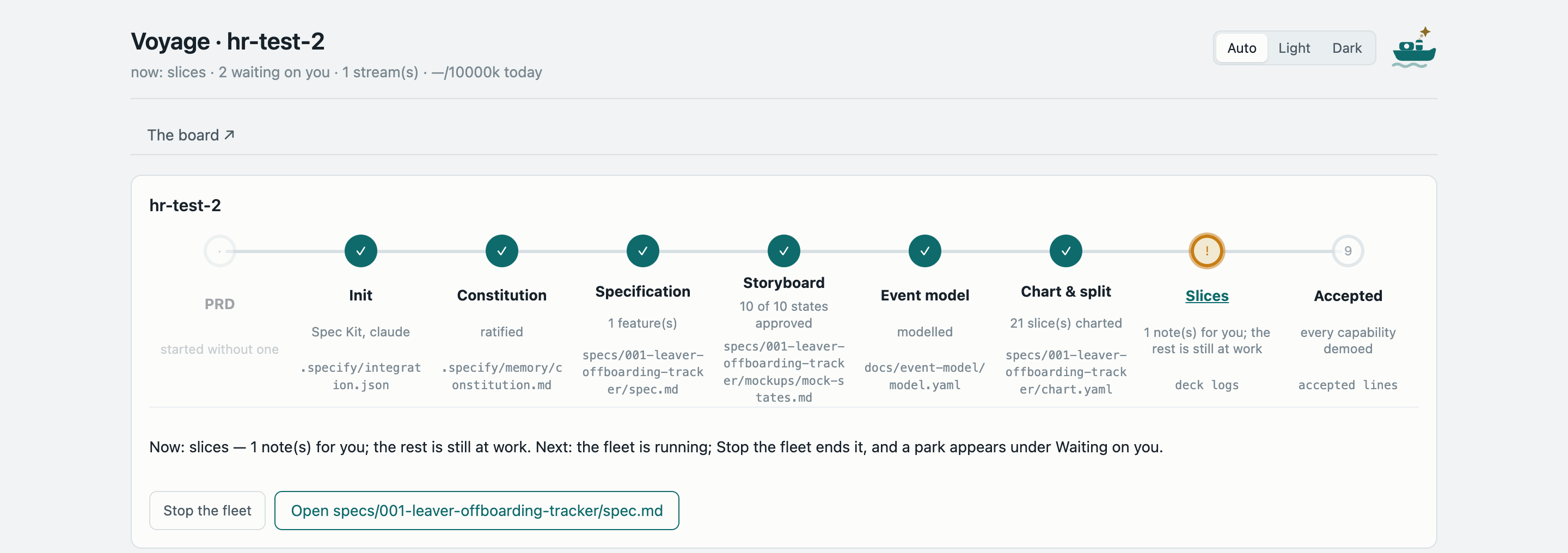
The picture above is the board's Voyage tab for one project, part way through. Its feature is
specified, storyboarded, modelled and charted into 21 slices, and the fleet is building them. Each tick on
the strip comes from a file in the repository. Nobody typed a status. Run slipwai with no arguments to open the board.
Only this machine can open it.
The development loop
Every project that slipwai makes runs the same loop. A feature goes in at the top as a sentence or a requirements document. It comes out at the bottom as a capability that a person watched work and accepted.
ONCE PER FEATURE                                         ● = stops for you, by default
  principles → specification ● → storyboard ● → event model ● → chart and split
                                                                       │
ONCE PER SLICE, in its own fairway, berth and worktree                 ▼
  clearance → claim → example map → gaps, plan, tasks → analyze
            → implement: red, green, refactor, one example at a time
            → review of the whole diff → merge, after the full gate passes on trunk
                                                                       │
ONCE PER CAPABILITY, when its last slice merges                        ▼
  the capability's gates → demo to you, as the actor ● → accepted
Once per feature. The agent writes the constitution and the specification. It then draws a wireframe
for each screen and puts them into a storyboard. You approve the storyboard, or disapprove it with a reason.
On the event-modelling profile, the agent then models the feature in docs/event-model/model.yaml. The
chart comes last. It splits the feature into slices, puts each slice in a fairway, and names the one
slice that owns each contract between fairways. That contract is a mark.
Once per slice. A captain runs each fairway. A slice is cleared when every mark that it depends on is set. The captain claims the next cleared slice, and the slice goes through its stages in its own worktree. Implementation is test-first and commits one example at a time. The captain never merges. It asks the harbourmaster, which rebases the branch onto trunk, runs the whole gate there, and merges. Then the captain takes the next cleared slice.
Once per capability. When the last slice of a capability merges, its gates run: converge, a gaps trace
over the whole diff, the design review, an adversary pass where a slice widened the attack surface, and
mutation testing. Then you see a demo as the actor. Say yes, and an accepted line goes into the log. Say no
with notes, and the notes go back into the slice.
The loop starts where the files say it is. Each stage writes a file, and a stage is done when its file exists. Close the terminal half way through a slice, and the next run starts at the first file that is missing. Run it in an empty repository, and it starts at the principles.
There are three ways to drive it. All three run the same stages.
/sail in your coding agent |
One person, one session. It runs the stage you are at, then takes the next ready slice without being asked |
| The Voyage tab | A button for each stop. Each button runs a make target, and where the stop has a slash command, that command runs the same one |
/cruise in your coding agent |
Casts off the fleet: one captain per fairway, working in parallel, until something needs a person. /cruise-status, /cruise-tell and /cruise-stop watch, steer and stop it |
By default the specification, the storyboard and the model each wait for you. Set Who answers to advance on their own and the board starts each of those steps when the one before it ends well. The demo always waits for you. The workflow lists every step, with who does it and the file it writes. Your first feature walks one slice through the loop.
New to this — start here
| Runsheet: generate a new project | You want a new repository. Every step in order, from installing the command to a fleet that cruises, and every release after that |
| Runsheet: adopt an existing repository | You already have a codebase. Every step in order, from slipwai adopt through /ground to the first slice |
The runsheets give the sequence of steps. The five guide pages below give the reasons, one page for each subject.
Do you use version 1? Read What is new since version 1. It lists every change that affects you, the purpose of each change, and the one command that moves your project to version 2.
What it is for
Coding agents write code quickly. They are bad at three things around the code:
- knowing what to build next
- not interfering with each other's work
- reporting honestly what they did
Slipwai is the repository around the agents. It fixes those three problems.
One rule makes the rest possible. Two workers each deliver a slice, and neither waits for the other's branch. This works because a chart gives each contract between fairways a type and exactly one owner. A slice can start when the contract that it needs is set. The slice that owns the contract sets it at its first stage, in its own worktree, before anything merges.
Slipwai does not believe a status because something reported it. Slipwai calculates status from append-only logs each time it shows the status. It stores the status nowhere. A stage that writes no log line and makes no commit has made no progress. This is true even if the stage reports that it is nearly done. This rule corrects two specific failures:
- In the first attempt, a runner was the only source of status. It stopped at iteration two, and twenty slices continued to merge without it.
- A model file said
plannedfor eight slices that had already shipped.
The five pages
| Start here | Install the command, answer its questions, and see the gate pass |
| Your first feature | A specification, a model, a chart, a slice, and a demo that you accept |
| A second person joins | Fairways, berths, and why neither of you waits |
| Let it cruise | Captains, the telegraph, and the decisions that a person still makes |
| Bring an existing codebase | The other way in: survey the repository, then wrap it |
Each page ends where the next page starts. Stop when you have what you need.
Two more pages are maps, not steps. The workflow lists every step on one page: who does the step, what the step writes, and where the step stops. The board describes every screen and control, and the file that each control writes.
What it looks like when it runs
waiting on you: 2
  billing    told    should a refund be its own capability?

berths: 2, 2 working
  fairway   feature  slice   state    last line  tokens  merged  marks
  --------  -------  ------  -------  ---------  ------  ------  -----
  billing   model    BIL-01  working  12s ago    42      0       1
  ordering  model    ORD-02  working  31s ago    84      1       1

telegraph: half-ahead  boilers 3  fanout 2  bunker 126/10000k today
/cruise-statusin your coding agent shows the view above. It runsslipwai fleet./cruise-status <fairway>shows the log of one fairway, one line at a time.slipwai bridgeshows the same information as a page, and you can answer questions from that page.
docs/captures has more examples. They come from real runs. Nobody drew them by hand.
The board
Run slipwai with no arguments to open one page. The page has a tab for each of these:
- starting a project
- adopting a repository
- the packages that this machine can install
- the fleet
- the Voyage
The Voyage tab shows:
- The stages, from PRD (product requirements document) to accepted. Each stage is done, working, waiting on you or to do, and shows the file that proves it. The board reads each stage from the files. Nobody types a status.
- The stops, each as a button: open the specification, draw and approve the storyboard, continue the build, cast off or stop the fleet, and continue to the next feature.
- The work: the event model in the draw.io viewer, coloured by slice; the mock-ups and the screens that each slice has rendered; the slices by state; and the questions that wait for you, each with a box for your answer.
- One Settings box, with tabs for speed, fine tune, who answers, delegation and models. The project's own scripts write these settings. The board never writes them itself.
Each button runs a make target, and where the stop has a slash command, that command runs the same one.
slipwai bridge install starts the board each time you log in. Your first feature goes through the
page, and the board describes every control on it.
Languages, and everything else
The command knows how to build a repository. It does not know any languages. Languages come from the chandlery. The chandlery is an index of packages. Each package has a version, a compatibility range, a checksum and a publisher.
slipwai search postgres        # by what a package answers, not by its name
slipwai show python
slipwai install python
Six languages are published at https://robcoatvg.github.io/slipwai-index/. When you install from a
publisher for the first time, slipwai asks you to confirm that publisher once. Slipwai checks the checksum
every time, for every publisher. To publish your own package, use four verbs — slipwai package new,
check, version and release — and then open a pull request. Clouds (slipwai target install aws) and
developer tooling (slipwai extension) are packages in the same way.
The command includes six quickstarts. A quickstart is a set of answers that somebody has already
decided. Each quickstart is described by what the product is like. Run slipwai quickstart list to see
them, then slipwai generate <name> --quickstart <name> to use one.
Reference
The vocabulary · extensions · the backend protocol · the rules, in detail · the plan this was built to
Status
This is slipwai 2, and it is still under construction. On 2026-10-06 the tree was cleared. Since then,
version 2 has been brought back one module at a time. docs/slipwai-2-plan.md gives the order of the work
and what is left to do. The 1.x working contract came back with phase 8: slipwai migrate moves a version
1 project to version 2, and what is new since version 1 says what that costs. Version
2 is developed in ROBCOATVG/slipwai on GitHub, which is the
canonical repository.
1 maintainer

Metadata
1 maintainer
Release files for slipwai 2.0.0
For a detailed explanation of source distributions (sdists) and built distributions (wheels), please see the package formats documentation.
Source distribution (sdist)
| File | Size | Uploaded | Provenance | Actions |
|---|---|---|---|---|
| slipwai-2.0.0.tar.gz | 2.7 MB | With provenance | Details for slipwai-2.0.0.tar.gz |
Built distribution (wheel)
| File | Interpreter | ABI | Platform | Actions Reset |
|---|---|---|---|---|
| slipwai-2.0.0-py3-none-any.whl | Python 3 | none | any | Details for slipwai-2.0.0-py3-none-any.whl |
Total release size: 6.0 MB
Release files / slipwai-2.0.0.tar.gz
| Download URL | slipwai-2.0.0.tar.gz |
|---|---|
| Size | 2.7 MB |
| Tags | Source |
|
SHA-256 checksum How to use checksums |
3942422f5db9d630a566b55ee98af82d0c8e9abe2d629348a08574ae78bfa6e5
|
|
BLAKE2b-256 checksum How to use checksums |
0e23b5003f27e5f2dd7d9157e0dc9def7e404c2d2d97751fc9b9a268e720f861
|
| Upload date | |
|
Uploaded using Trusted Publishing? What is trusted publishing? |
Yes |
| Uploaded via |
twine/7.0.0 CPython/3.13.16
|
Provenance
Provenance describes where a file came from. On PyPI, provenance is shared via attestations, which provide a verifiable record of the build or publishing details. View details, limitations and caveats.


PyPI Publish Attestation
PyPI verified that this artifact, at this checksum, originated from the publisher listed below.
Signed by GitHub Actions, verified by PyPI on Oct 26, 2026.
Transparency logRelease files / slipwai-2.0.0-py3-none-any.whl
| Download URL | slipwai-2.0.0-py3-none-any.whl |
|---|---|
| Size | 3.3 MB |
| Tags | Python 3 |
|
SHA-256 checksum How to use checksums |
ff105cb33ba56311d9a8b5acf8ad50442ab31637655d7f3254161e9165d5ce8d
|
|
BLAKE2b-256 checksum How to use checksums |
b78f4a232f15c862758428ea22dcaca9b47b51a92dfd94358d75dd6cb3842644
|
| Upload date | |
|
Uploaded using Trusted Publishing? What is trusted publishing? |
Yes |
| Uploaded via |
twine/7.0.0 CPython/3.13.16
|
Provenance
Provenance describes where a file came from. On PyPI, provenance is shared via attestations, which provide a verifiable record of the build or publishing details. View details, limitations and caveats.
PyPI Publish Attestation
PyPI verified that this artifact, at this checksum, originated from the publisher listed below.
Signed by GitHub Actions, verified by PyPI on Oct 26, 2026.
Transparency logSecurity for slipwai 2.0.0
Provenance
Provenance describes where a file came from. On PyPI, provenance is shared via attestations, which provide a verifiable record of the build or publishing details. View details, limitations and caveats.
Full provenance
Both files in this release have been uploaded with provenance metadata.
Attestation for slipwai-2.0.0.tar.gz
PyPI Publish Attestation
PyPI verified that this artifact, at this checksum, originated from the publisher listed below.
Signed by GitHub Actions, verified by PyPI on Oct 26, 2026.
Transparency logA note on package security
PyPI is a repository for distributing packages, not a service for auditing them. While third-party security researchers and our staff do their best to detect and remove malicious packages, PyPI cannot guarantee the quality, security or suitability of any given package.
To learn more about protecting yourself from malicious actors, visit our package security documentation.














