
Local usage heatmaps and web viewer for AI coding tools.
Verified details
These details have been verified by PyPIProject links
GitHub Statistics
Maintainers

Project description
slopmeter
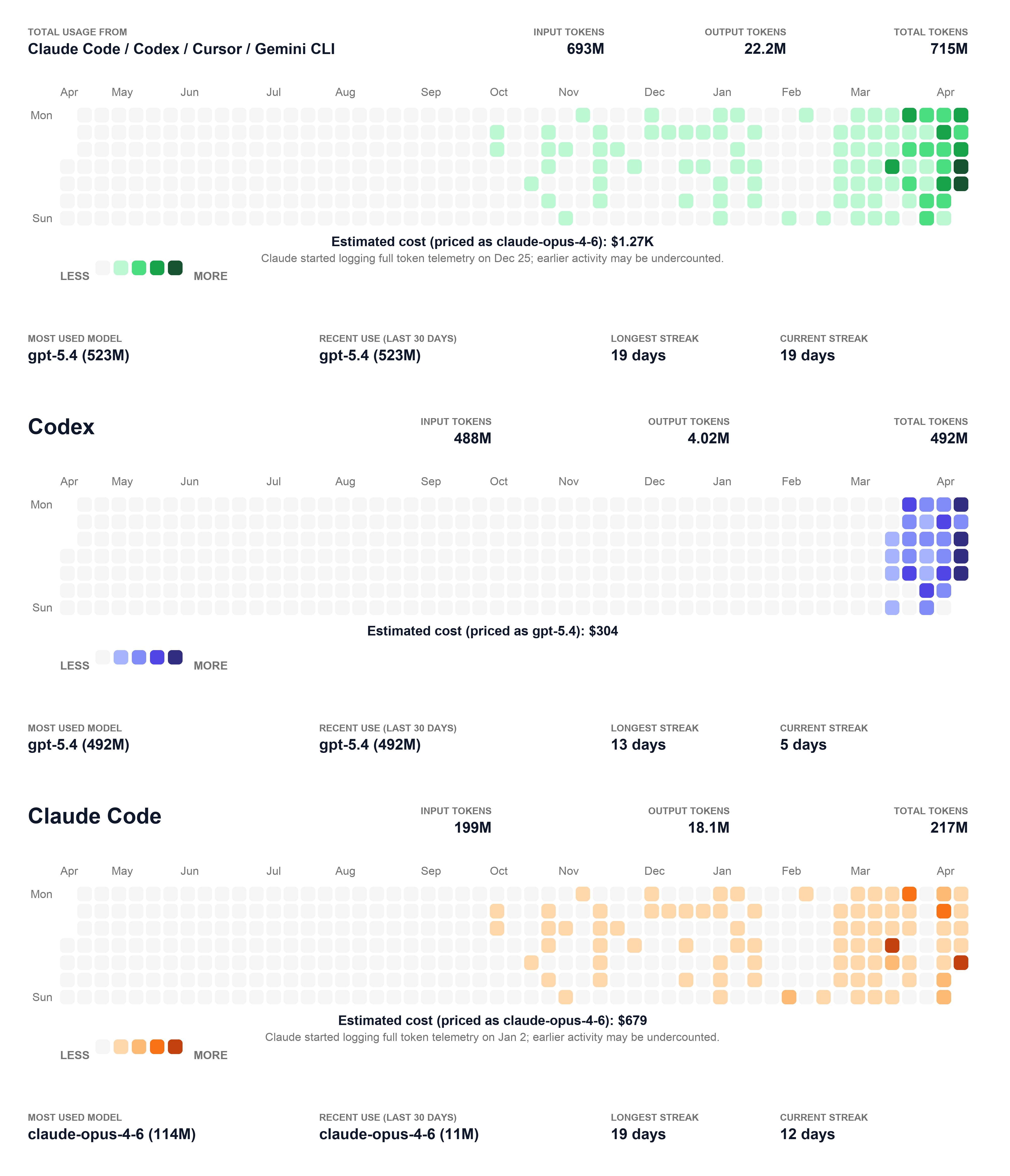
Local usage heatmaps and a web viewer for AI coding tools.
Install
Option 1: Install the published package from PyPI (recommended)
Use this when you want to install the released version directly from PyPI. This is the easiest way to get started.
uv tool install slopmeter
Upgrade later with:
uv tool upgrade slopmeter
Option 2: Run from this repo
Use this when you are developing locally or just want to try the project from source.
uv sync
Then run commands through uv run:
uv run slopmeter
Option 3: Install the CLI into your current Python environment
Use this when you want the slopmeter command available inside an existing virtualenv.
uv pip install .
Option 4: Install it as a standalone CLI tool from source
Use this when you want slopmeter available on your shell PATH, built from a local checkout.
uv tool install .
After installing with uv pip install . or uv tool install ., you can run slopmeter directly without uv run.
Quick Start
Start the local web UI:
slopmeter
This starts a local HTTP server on 127.0.0.1:8000 by default and prints the final URL in the terminal. If port 8000 is already in use, it automatically picks the next available port.
Common variants:
slopmeter --codex --dark
slopmeter --provider all,claude,codex
slopmeter serve --host 127.0.0.1 --port 9000
slopmeter export --format html --output ./out/heatmap.html
slopmeter export --codex --format json --output ./out/codex.json
slopmeter export --provider all,claude,codex --format png --output ./out/custom.png
slopmeter export --all --dark --format png --output ./out/all.png
CLI Behavior
slopmeterStarts the local web server.slopmeter serveExplicit form of the same local server command.slopmeter exportWrites a file to disk instead of starting a server.
When you run slopmeter or slopmeter serve:
- the app scans provider data once at startup
- it renders one HTML snapshot in memory
- it serves that snapshot over HTTP
- it shows
allfirst, then all available provider cards - provider cards can be drag-sorted in the page
- the current page order and export selection are saved in local browser storage
- the page can export the currently selected cards as one PNG
- it does not save an HTML file unless you explicitly use
slopmeter export --format html
Ordered provider selection can be used with either slopmeter or slopmeter export:
slopmeter --provider all,claude,codex
slopmeter export --provider all,opencode,codex --format png --output ./out/custom.png
Legacy provider flags are still supported:
slopmeter --claude
slopmeter --codex
slopmeter export --cursor --format svg --output ./out/cursor.svg
Selection Notes
allalways means the aggregate of every detected provider that currently has data. It does not mean “the sum of the other providers named in the same command”.- If you pass
--providerwith a mix of existing and missing providers, missing providers are skipped. The command fails only when none of the selected providers have usable data. - In the web UI, drag sorting starts from the
Draghandle, and the current order plus checked cards are whatExport PNGuses.
Parameters
slopmeter / slopmeter serve
These options control the local web server.
-
--hostBind address for the local HTTP server. Default:127.0.0.1Example:slopmeter serve --host 0.0.0.0 -
--portPort for the local HTTP server. Default:8000Behavior: If you do not pass--port,slopmeterstarts from8000and automatically moves to the next free port if needed. If you do pass--port, that exact port is required; if it is already in use, the command fails. Example:slopmeter serve --port 9000 -
--darkRender the web UI in dark mode. Example:slopmeter --dark -
--provider,-pAdd one provider or one ordered provider list to the render/export selection. You can pass a single provider such as--provider codex, or a comma-separated list such as--provider all,claude,codex. Repeating--providerstill works and appends more providers in order. Supported values:all,amp,claude,codex,cursor,gemini,opencode,piIf any--provideris passed, it takes priority over the legacy--alland per-provider boolean flags. Example:slopmeter --provider all,claude,codex -
--allLegacy compatibility flag. Merge all detected providers into a single combined heatmap. Use--provider allwhen you wantallto appear alongside other providers and participate in ordering.allalways means the total across every detected provider with data, not just the other providers named in the same command. Example:slopmeter --all -
--ampOnly render Amp usage. Example:slopmeter --amp -
--claudeOnly render Claude Code usage. Example:slopmeter --claude -
--codexOnly render Codex usage. Example:slopmeter --codex -
--cursorOnly render Cursor usage. Example:slopmeter --cursor -
--geminiOnly render Gemini CLI usage. Example:slopmeter --gemini -
--opencodeOnly render Open Code usage. Example:slopmeter --opencode -
--piOnly render Pi Coding Agent usage. Example:slopmeter --pi
If you do not pass any provider selector, slopmeter shows all available cards in this order:
allClaude CodeCodexOpen CodeCursor- then the remaining available providers
slopmeter export
These options control file export.
-
--output,-oOutput file path. If omitted, a default file name is used such as./heatmap-last-year.pngor./heatmap-last-year_codex.json. Example:slopmeter export --format html --output ./out/heatmap.html -
--format,-fExport format. Supported values:png,svg,json,htmlIf omitted, the format is inferred from the output extension when possible; otherwise it defaults topng. Example:slopmeter export --format svg --output ./out/heatmap.svg -
--darkExport using dark theme colors. Example:slopmeter export --dark --format png --output ./out/dark.png -
--provider,-pAdd one provider or one ordered provider list to the export selection. You can pass a single provider such as--provider codex, or a comma-separated list such as--provider all,opencode,codex. Repeating--providerstill works and appends more providers in order. Supported values:all,amp,claude,codex,cursor,gemini,opencode,piMissing providers are skipped as long as at least one requested provider has data. Example:slopmeter export --provider all,opencode,codex --format png --output ./out/custom.png -
--allLegacy compatibility flag. Merge all detected providers into one combined export. Use--provider allwhen you wantallto be exported together with other providers.allalways means the total across every detected provider with data, not just the other providers named in the same command. Example:slopmeter export --all --format html --output ./out/all.html -
--ampExport Amp usage only. -
--claudeExport Claude Code usage only. -
--codexExport Codex usage only. -
--cursorExport Cursor usage only. -
--geminiExport Gemini CLI usage only. -
--opencodeExport Open Code usage only. -
--piExport Pi Coding Agent usage only.
Examples:
slopmeter export --codex --format json --output ./out/codex.json
slopmeter export --cursor --format svg --output ./out/cursor.svg
slopmeter export --provider all,opencode,codex --format png --output ./out/custom.png
slopmeter export --all --dark --format png --output ./out/all.png
slopmeter export --claude --format html --output ./out/claude.html
Output Formats
pngsvgjsonhtml
The HTML export is self-contained and includes hover tooltips for each day cell.
Help
slopmeter --help
slopmeter serve --help
slopmeter export --help
Credits
This project is a Python adaptation of JeanMeijer/slopmeter. Credit to the original author for the idea and implementation.
Roadmap
- Privacy-first multi-device usage aggregation for the same user, without requiring a central server.
- The intended direction is explicit, user-controlled sync only: for example encrypted export/import bundles or merge through a user-owned sync folder.
- Default behavior should remain local-only, with no background sync, no telemetry, and no automatic upload to any server.
- The main challenges are deduplication, clock skew, and keeping a stable merge format across providers and devices.
Project details
Verified details
These details have been verified by PyPIProject links
GitHub Statistics
Maintainers
Release history Release notifications | RSS feed


Download files
Download the file for your platform. If you're not sure which to choose, learn more about installing packages.
Source Distribution
Built Distribution
Filter files by name, interpreter, ABI, and platform.
If you're not sure about the file name format, learn more about wheel file names.
Copy a direct link to the current filters
File details
Details for the file slopmeter-0.1.2.tar.gz.
File metadata
- Download URL: slopmeter-0.1.2.tar.gz
- Upload date:
- Size: 418.7 kB
- Tags: Source
- Uploaded using Trusted Publishing? Yes
- Uploaded via: uv/0.11.6 {"installer":{"name":"uv","version":"0.11.6","subcommand":["publish"]},"python":null,"implementation":{"name":null,"version":null},"distro":{"name":"Ubuntu","version":"24.04","id":"noble","libc":null},"system":{"name":null,"release":null},"cpu":null,"openssl_version":null,"setuptools_version":null,"rustc_version":null,"ci":true}
File hashes
| Algorithm | Hash digest | |
|---|---|---|
| SHA256 |
f40b14ecb330ec0790c5038ef76a8806e3048e6f80b6556b42ae1daf585a6099
|
|
| MD5 |
d09b0527b86843c55c951d3bd1750fd2
|
|
| BLAKE2b-256 |
c03e2125c86c76767e8db3994770c177496dfa17e26a59a337a99019a6b9a9d7
|
File details
Details for the file slopmeter-0.1.2-py3-none-any.whl.
File metadata
- Download URL: slopmeter-0.1.2-py3-none-any.whl
- Upload date:
- Size: 56.8 kB
- Tags: Python 3
- Uploaded using Trusted Publishing? Yes
- Uploaded via: uv/0.11.6 {"installer":{"name":"uv","version":"0.11.6","subcommand":["publish"]},"python":null,"implementation":{"name":null,"version":null},"distro":{"name":"Ubuntu","version":"24.04","id":"noble","libc":null},"system":{"name":null,"release":null},"cpu":null,"openssl_version":null,"setuptools_version":null,"rustc_version":null,"ci":true}
File hashes
| Algorithm | Hash digest | |
|---|---|---|
| SHA256 |
ced30988d091ba471c4c38ca7a157250999edce3bed96a6f9049ba6aeebdc230
|
|
| MD5 |
0b14d9f4335ea95c552f17fa0fc88ae1
|
|
| BLAKE2b-256 |
abcfa550e2f0ecd60e74d80be48655dbf8563dcb9a2c5bcc19a6aea50831052f
|






