

🐢 slowLang – Slower is Better
🌐 Try it in your browser, no install: https://sebin-gg.github.io/slowlang/
More work by the same author: sebin-gg.vercel.app.
Read the story behind it: I built a programming language that punishes you for typing too fast.
A sarcastic programming language and IDE that throws errors if you type too fast.
Complete with a screaming ASCII turtle, poetic output, and a sassy, minimalistic Python IDE.
Why rush, when your code can feel... meaningful?
🏆 Winner — TinkerHub Useless Projects 2.0 hackathon, built by CS students at College of Engineering Chengannur, Kerala, India.
🧠 Basic Details
Team Name: XYZ
Team Members
- Team Lead: Sebin Mathew – College of Engineering Chengannur
- Abin Zachariah Abraham – College of Engineering Chengannur
🚫 The Problem (that doesn't exist)
Most programming languages focus on speed, efficiency, and productivity,
leading to stressful coding habits and unrealistic expectations on typing speed.
✅ The Solution (that nobody asked for)
slowLang introduces a language and IDE that enforces slow, mindful typing.
Typing too fast results in errors and angry turtle ASCII feedback.
It promotes "patience-oriented programming" with haikus, delays, and sarcastic praise.
🔧 Technologies / Components Used
Software:
- Python (for IDE and core logic)
- Tkinter (for the fake IDE UI)
Libraries:
- keyboard
- time
- rich
- os, sys, re, argparse (optional)
- VS Code + Extensions
⚙️ Installation
pip install -r requirements.txt
Tkinter comes with Python by default on Windows/macOS. On Linux, install via
sudo apt install python3-tk.
▶️ How to Run
Try the web demo (easiest):
Open https://sebin-gg.github.io/slowlang/ — the full IDE in your browser, same turtle, same rage, zero install. The desktop and web versions enforce identical rules.
Start the desktop IDE:
python ui-fakeide.py
IDE Features:
- Live typing speed enforcement:
Type too fast and a turtle rage window will pop up with sarcastic feedback — and count down your 2-second lockout. - Live WPM readout:
The status line shows your rolling typing speed next to the turtle's verdict. - Line numbers:
A gutter tracks every line, so "near line N" politeness errors point somewhere real. - Run code like Python:
Use the "Run (like Python)" button to execute your code directly in the IDE. Rude code (noplease()calls) is refused, just like the CLI. - Load sample:
One click fills the editor with a polite starter program. - Gentle streak:
Consecutive rage-free runs build a streak. Rage resets it. The turtle keeps score. - Python color scheme and smart indentation:
The editor highlights Python keywords, strings, comments, and builtins, and auto-indents after colons for blocks. - Turtle moods:
Different ASCII turtles for "too fast", "just right", and "too slow" typing. - Intro popup:
Shows a summary of features before you start coding.- Wisdom: • The compiler will sometimes pop words of wisdom after execution.
Web demo extras (https://sebin-gg.github.io/slowlang/):
- Mood face in the header, rage diary of the session, copy output/haiku buttons.
- Offline mode: no network means the tiny fallback runner steps in and says so.
- Randomness (lazy refusals, moods, haikus, loader jokes) is a feature, drawn from secure sources.
🐢 Language & IDE Features
- Python-like syntax: Write and run code just like Python.
- Speed enforcement: Typing too fast triggers sarcastic errors and turtle rage (in a popup window in the IDE).
- Sarcastic feedback: Get sassy remarks and poetic haikus if you break the rules.
- Fake IDE: Includes a Tkinter-based IDE with live feedback, Python color scheme, and smart indentation.
- No PDF export, no .slow interpreter: All code is written and run directly in the IDE for a seamless, fun experience.
🧪 How to Test the IDE
-
Start the IDE:
python ui-fakeide.py -
Type your code in the editor window.
- If you type too fast, a turtle rage popup will appear and sarcastic feedback will be shown.
- If you slow down, the turtle will be happy.
-
Run your code:
- Click "Run (like Python)" to execute your code in the IDE.
To preview the web demo locally: python3 -m http.server --directory demo,
then open http://localhost:8000.
📝 Example Code
print("Hello, world!")
for i in range(3):
    print(i)
print("Done!")
🖼️ Screenshots
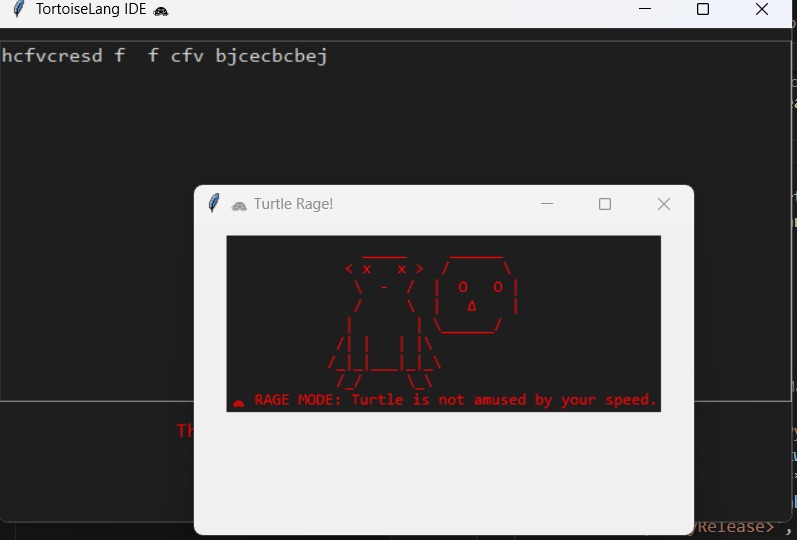
Fake IDE window with turtle ASCII reacting to fast typing.
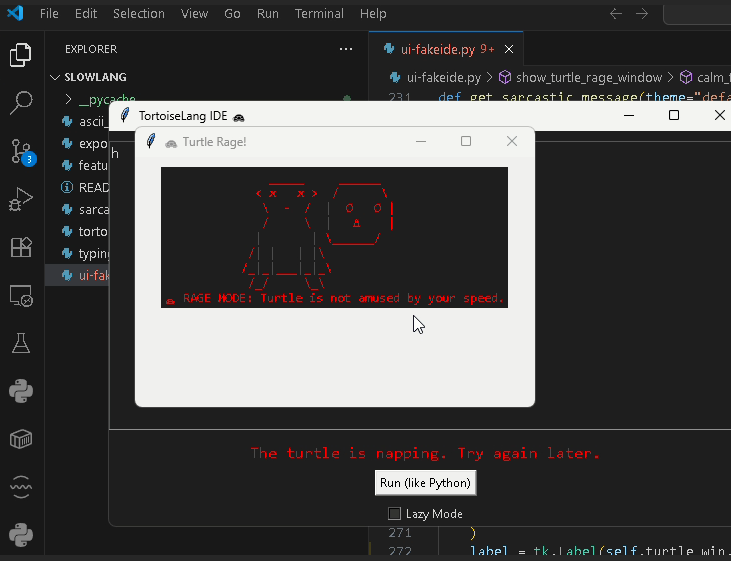
Sarcastic error: "Whoa there, Shakespeare. Try again... slower."
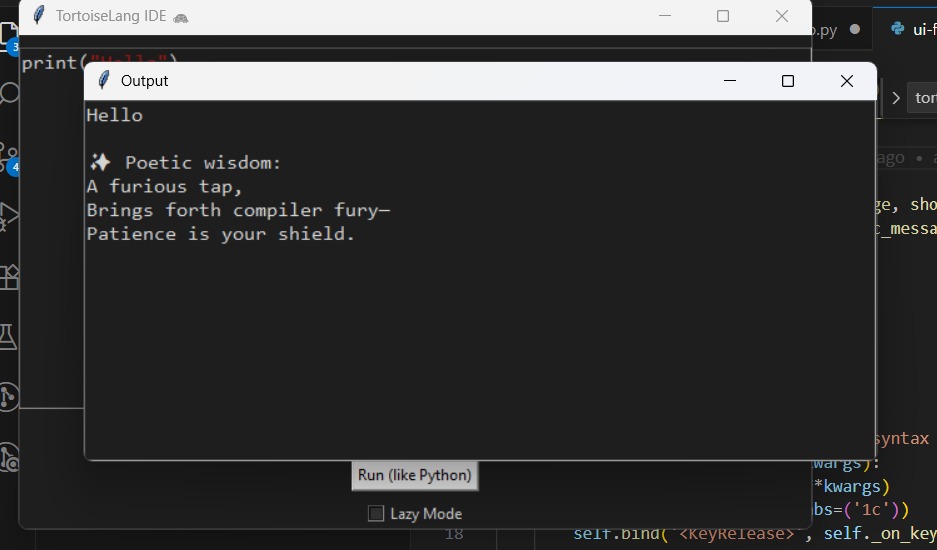
"Compiled" poetic output of slow-written code.
📹 Video
Demo Video Link
🧑🤝🧑 Team Contributions
- Sebin Mathew – Typing speed engine, sarcasm handler, turtle rage ASCII
- Abin Zachariah Abraham – Fake IDE window UI, poetic output, emoji benchmark spoof
🧑🎓 What We Learned
- UI/UX matters, even for joke projects:
Making a fun, interactive, and visually engaging IDE (with popups, color schemes, and ASCII art) is as important as the core logic. - Python’s Tkinter is powerful and flexible:
We learned how to build a custom code editor with syntax highlighting, smart indentation, and dynamic feedback using only standard libraries. - Injecting humor into code is a design challenge:
Balancing sarcasm, fake delays, and playful feedback without frustrating the user too much required careful tuning. - Code structure and modularity:
Separating sarcasm, ASCII art, and UI logic into different files made the project easier to maintain and extend. - Testing for edge cases:
We had to handle cases like re-enabling the editor after errors, and making sure the turtle’s moods always matched the user’s typing speed. - Collaboration and version control:
Using GitHub for collaboration, code reviews, and version management helped us work efficiently as a team.
Made with ❤️ at TinkerHub Useless Projects


📐 System Architecture
slowlang uses a real-time event-driven engine to monitor keystroke velocity and enforce cadence:
graph LR
    Key[Keystrokes] --> Engine[Typing Velocity Engine]
    Engine --> Check{WPM > Limit?}
    Check -- Yes --> Penalty[ASCII Rage & Delay]
    Check -- No --> Zen[Haiku & Execution]
Detailed state machine diagrams and runtime architecture documented in ARCHITECTURE.md.
🔒 Security
This repository uses gitleaks for automatic secret scanning on every commit.
Pre-commit Hook
A pre-commit hook is configured to scan for secrets before each commit. This helps prevent accidentally committing sensitive information like:
- API keys
- Passwords
- Tokens
- Private keys
Setup
To enable the pre-commit hook locally:
# Install pre-commit
pip install pre-commit

# Install hooks
pre-commit install
Bypass (Emergency Only)
In case of emergency, you can bypass the hook:
git commit --no-verify -m "emergency commit"
⚠️ Only use
--no-verifyin emergency situations. Regular commits should always be scanned.
1 maintainer

Metadata
1 maintainer
Release files for slowlang 1.0.0
For a detailed explanation of source distributions (sdists) and built distributions (wheels), please see the package formats documentation.
Source distribution (sdist)
| File | Size | Uploaded | Provenance | Actions |
|---|---|---|---|---|
| slowlang-1.0.0.tar.gz | 16.1 kB | Without provenance | Details for slowlang-1.0.0.tar.gz |
Built distribution (wheel)
| File | Interpreter | ABI | Platform | Actions Reset |
|---|---|---|---|---|
| slowlang-1.0.0-py3-none-any.whl | Python 3 | none | any | Details for slowlang-1.0.0-py3-none-any.whl |
Total release size: 29.5 kB
Release files / slowlang-1.0.0.tar.gz
| Download URL | slowlang-1.0.0.tar.gz |
|---|---|
| Size | 16.1 kB |
| Tags | Source |
|
SHA-256 checksum How to use checksums |
045885150e75ee1063551d86a2683990643f7aa8c19b9bd633b979e675198cbe
|
|
BLAKE2b-256 checksum How to use checksums |
cb1ced1dd5e7f7a22735100b43e8a6ba1db5ab175687938919d4b23e7ad1cf21
|
| Upload date | |
|
Uploaded using Trusted Publishing? What is trusted publishing? |
No |
| Uploaded via |
twine/7.0.0 CPython/3.14.10
|
Release files / slowlang-1.0.0-py3-none-any.whl
| Download URL | slowlang-1.0.0-py3-none-any.whl |
|---|---|
| Size | 13.5 kB |
| Tags | Python 3 |
|
SHA-256 checksum How to use checksums |
8cf6bd8b8ca0cbf6f053d3b4af176c4bc3c214fe7a6900df2438098873deabf4
|
|
BLAKE2b-256 checksum How to use checksums |
d0c1e5e4a99d46f6690ba777e2932103adbd0003cfda4f1adb0ff3c8263e9800
|
| Upload date | |
|
Uploaded using Trusted Publishing? What is trusted publishing? |
No |
| Uploaded via |
twine/7.0.0 CPython/3.14.10
|
Security for slowlang 1.0.0
Provenance
Provenance describes where a file came from. On PyPI, provenance is shared via attestations, which provide a verifiable record of the build or publishing details. View details, limitations and caveats.
No provenance found
None of the files in this release were uploaded with provenance metadata.
A note on package security
PyPI is a repository for distributing packages, not a service for auditing them. While third-party security researchers and our staff do their best to detect and remove malicious packages, PyPI cannot guarantee the quality, security or suitability of any given package.
To learn more about protecting yourself from malicious actors, visit our package security documentation.













