

Turn a web page into structured data. No model, no API key, no bill.





Documentation · In your agent · Scoreboards · Why Sluicer · Discussions · Changelog
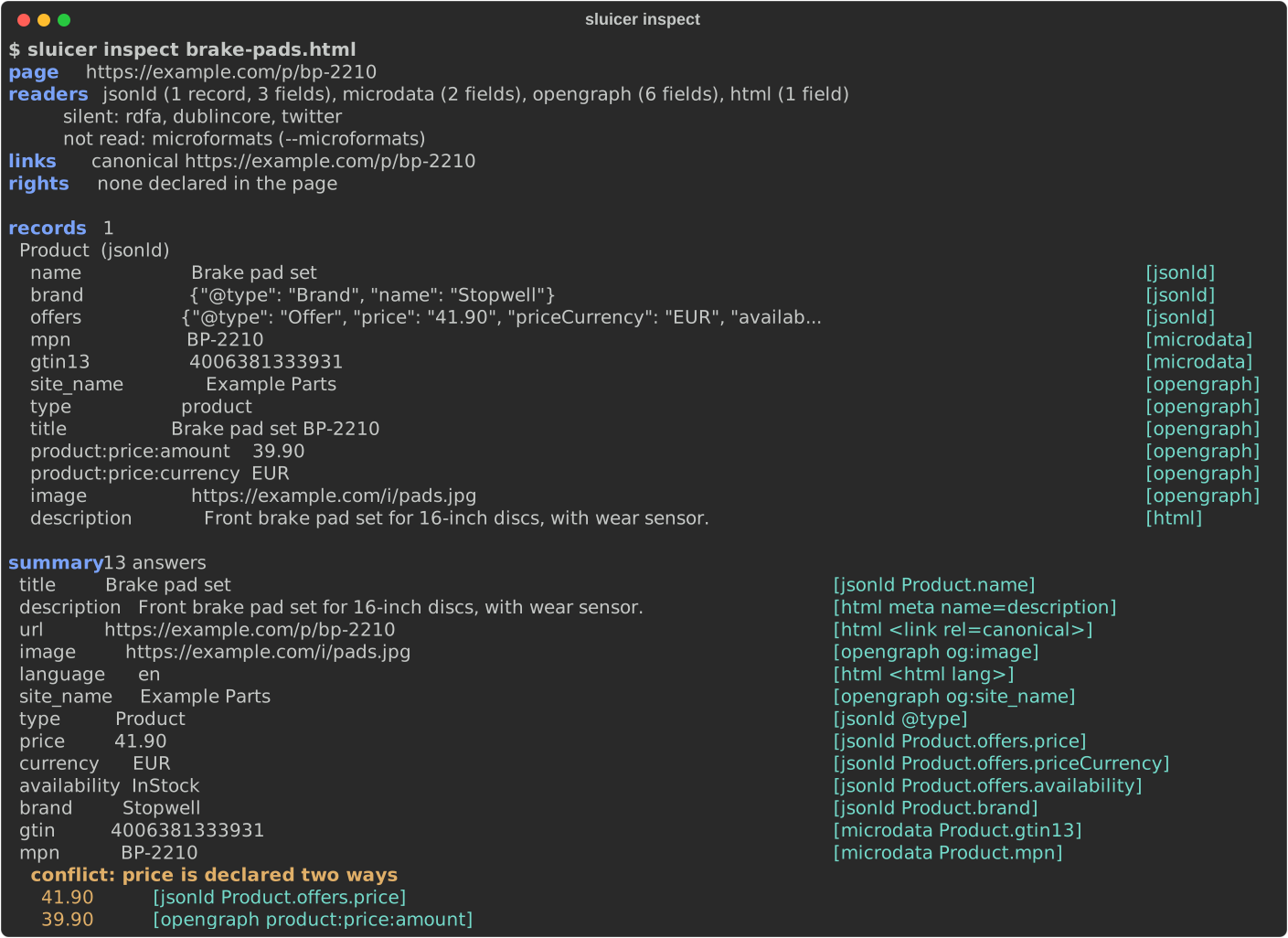
Sluicer reads the structured data a web page already declares -- JSON-LD, microdata, RDFa, OpenGraph and more -- and merges it into one record per thing, every value naming the vocabulary and the place on the page it came from. No model reads the page, so the same page always gives the same answer.
Highlights
- Eight vocabularies, one record. JSON-LD, microdata, RDFa, Dublin Core, OpenGraph, the Twitter card, HTML's meta names and microformats2, merged into one record per thing.
- Provenance for every value. The vocabulary, the key, and the place on the page: an XPath, and inside JSON-LD a pointer to the very value.
- A summary of 25 questions -- title, author, date, price, currency, availability, GTIN and the rest -- each answer naming where it came from, and a conflict reported when the page answers one of them two ways.
- Extractors that fail loudly. Learn one from a few pages of a template; a
page that drifted exits 3 instead of returning nulls for weeks, and
healsays what moved where. - Deterministic and light. No model and no key: the 511 pages of the WCXB test set are read in 1.4 s, and the base install is three packages.
- Polite by construction. It announces itself, obeys robots.txt and
Crawl-delay, waits a site'sRetry-Afterin a crawl, and honours TDMRep reservations when asked. - Made for agents. An MCP server with ten read-only tools, tried in Claude Code, Codex and Gemini CLI, and the same tools over HTTP for any language.
- Measured in public, losses included. Five scoreboards against trafilatura, newspaper4k, metascraper, extruct, Zyte and Diffbot.
Install
uv pip install "sluicer[fetch,markdown,mcp]"
With pip, pip install "sluicer[fetch,markdown,mcp]"; as a command in an
environment of its own, uv tool install "sluicer[fetch,markdown,mcp]". The
base install, uv pip install sluicer, reads HTML you already have with lxml
and click alone. Each extra adds one job:
| extra | adds |
|---|---|
fetch |
fetching: plain HTTP first, a browser only when a measurement says the page needs one |
markdown |
a page's main content as markdown, by trafilatura |
mcp |
the MCP server, with fetch and markdown |
api |
the HTTP API, with mcp |
microformats |
microformats2, which is off by default |
For the browser rung, once: uvx --from "sluicer[fetch]" scrapling install.
Without it, plain HTTP still works, and a page that wanted a browser comes back
from the HTTP rung with the failed climb recorded.
Quick start
The product page in the picture above is
examples/brake-pads.html.
>>> import sluicer
>>> page = open("examples/brake-pads.html", "rb").read()
>>> result = sluicer.extract(page, url="https://example.com/p/bp-2210")
>>> price = result.summary["price"]
>>> price.value, price.source, price.key
('41.90', 'jsonld', 'Product.offers.price')
>>> price.where
'/html/head/script[1]#/offers/price'
>>> result.normalised
{'price': '41.90', 'currency': 'EUR', 'gtin': '4006381333931'}
>>> [(answer.value, answer.source) for answer in result.conflicts[0].answers]
[('41.90', 'jsonld'), ('39.90', 'opengraph')]
The page describes one product in three vocabularies; result.records holds it
once, each field with its source and place. The same reading from the command
line is sluicer extract for JSON, or sluicer inspect for the picture above.
See it meet a redesign

A real site's software directory, as the Wayback Machine kept it. An extractor
learnt from two pages of January 2016 replays a page of February 2016 and exits
0; on the page of June 2024, after the site's redesign, it fails loudly and
exits 3, where a selector would have returned nulls. heal then says where the
listing and each field went, and on how many of the values it learnt each move
rests. Every command ran for real; scripts/demo.py records them again.
Use it
From the command line
sluicer extract page.html                           # a file, a URL, or - for stdin
sluicer inspect https://example.com/product         # the same, for a person to read
sluicer extract listing.html --induce               # rows of a page that declares nothing
sluicer markdown https://example.com/article        # the readable content
sluicer diff yesterday.html https://shop.example/p  # what changed, and where from
sluicer diff URL URL --at 2024-01                   # since the Wayback Machine's capture
sluicer extract URL --cache ~/.cache/sluicer        # ask the site if it changed (304)
sluicer audit https://example.com/product           # its markup against Google's documentation

sluicer compile page1.html page2.html -o shop.json  # learn an extractor
sluicer compile p1.html p2.html -o shop.json --want price=41.90 --want title="Brake pads"
sluicer run shop.json https://shop.example/c?p=7    # replay it, checked
sluicer heal shop.json https://shop.example/c -o shop.json  # after a redesign

sluicer map https://shop.example/                   # a site's addresses, from its sitemaps
sluicer crawl https://shop.example/ -o shop.jsonl   # follow its links, politely; --resume
sluicer batch urls.txt -o pages.jsonl               # read a list, one JSON line per page
sluicer warc crawl.warc.gz > pages.jsonl            # the pages a web archive holds
sluicer feed https://blog.example/                  # a feed's items, from the page that declares it
Exit codes follow grep: 0 found, 1 nothing declared, 2 could not read, and 3 for a page that broke its extractor, a heal that lost a field, or an audit that found a documented rule broken. A drifted page never exits 0.
In your agent
claude mcp add sluicer -- uvx --with "sluicer[mcp]" sluicer mcp   # Claude Code
codex mcp add sluicer -- uvx --with "sluicer[mcp]" sluicer mcp    # Codex
Cursor, VS Code, Gemini CLI, Claude Desktop and Zed, and LangChain, the OpenAI Agents SDK and Pydantic AI, are in In your agent. The repository is also a Claude Code plugin, with a skill in the open Agent Skills format that Codex reads too. The server has ten tools:
| tool | answers |
|---|---|
extract_declared |
what a page declares, with provenance, the summary and its conflicts |
page_markdown |
the page's main content as markdown |
fetch_page |
the page's HTML, and whether it took plain HTTP or a browser |
compile_extractor |
an extractor learnt from pages of one template |
run_extractor |
an extractor replayed on a page, checked against what it learnt |
heal_extractor |
the extractor learnt again after a redesign, and what moved |
audit_page |
the page's markup against what Google documents |
read_feed |
a feed's items: RSS, Atom or JSON Feed |
map_site |
a site's addresses, from its sitemaps or its start page's links |
crawl_site |
a site's pages, following its links, each summarised |
Every answer carries ok, true exactly when it can be used as it is, and an
output schema; every tool says in its annotations that it only reads. The
server fetches nothing on localhost, a private network or a cloud's metadata
endpoint -- redirects and a browser's requests included -- unless started with
SLUICER_ALLOW_PRIVATE=1.
From any other language
sluicer serve answers the same tools over HTTP, POST /v1/tools/<name> with
the tool's arguments as JSON, and describes them at /openapi.json. It listens
on loopback; anywhere else it needs SLUICER_API_TOKEN. See
the HTTP API.
sluicer serve                                       # 127.0.0.1:8000
curl -s http://127.0.0.1:8000/v1/tools/extract_declared \
  -H 'Content-Type: application/json' -d '{"html_or_url": "https://example.com/p"}'
How it compares
| Sluicer | extruct | trafilatura, newspaper4k | CSS-selector scrapers | LLM extraction | |
|---|---|---|---|---|---|
| Structured data merged into one record per thing | yes | no, one list per vocabulary | for a few metadata fields | no | depends on the prompt |
| Where each value came from | vocabulary, key and place | no | no | no | no |
| Bylines and dates from the visible text | no, by design | no | yes | where you write selectors | yes |
| The same answer for the same page | yes | yes | yes | yes | not guaranteed |
| A site's changed layout noticed | fails loudly, then heal |
-- | -- | not by itself | not by itself |
| A model or an API key needed | no | no | no | no | yes |
from sluicer.compat import extruct answers extruct's own calls in its own
shapes, for code written against it: see
moving from extruct.
Why Sluicer has the
full comparison, and says when another tool is the better choice.
Measured, losses included
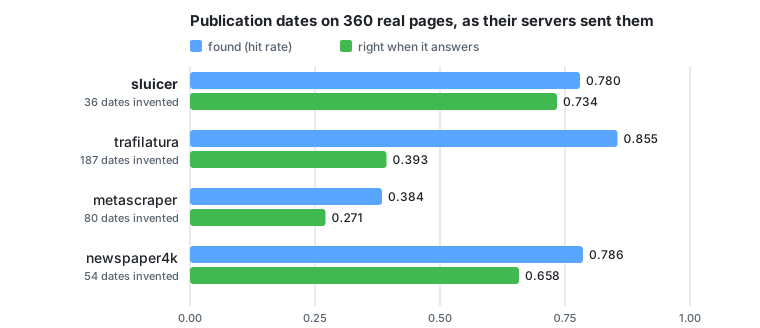
Sluicer reads only what a page declares, so it answers less often than tools that also read the visible page, and is wrong less often when it answers. The summary beside them on the 511 annotated test pages of the public WCXB corpus, where hit rate is right answers over the pages that carry a label and an invention is an answer on a page whose label is empty:
| title | author | date | dates invented | seconds | packages | |
|---|---|---|---|---|---|---|
| sluicer 0.6.0 | 0.727 | 0.532 | 0.581 | 8 | 1.4 | 3 |
| trafilatura 2.2.0 | 0.745 | 0.750 | 0.838 | 216 | 16.2 | 17 |
| newspaper4k 0.9.6 | 0.768 | 0.532 | 0.645 | 52 | 29.6 | 22 |
| metascraper 5.58.1 | 0.654 | 0.787 | 0.374 | 84 | 2.5 | 125 |
WCXB strips every <script>, and with it JSON-LD, the vocabulary Sluicer reads
first. The same labels on the 360 of those pages a web archive holds as their
servers sent them, scripts intact:
| as served | title | author | date | right when it answers a date | dates invented |
|---|---|---|---|---|---|
| sluicer 0.6.0 | 0.708 | 0.690 | 0.780 | 0.734 | 36 |
| trafilatura 2.2.0 | 0.756 | 0.860 | 0.855 | 0.393 | 187 |
| newspaper4k 0.9.6 | 0.767 | 0.705 | 0.786 | 0.658 | 54 |
| metascraper 5.58.1 | 0.667 | 0.845 | 0.384 | 0.271 | 80 |
33 of Sluicer's 36 invented dates are dates the page declares in its own JSON-LD and does not show a reader, which is what the labels describe. The other scoreboards, each with its method and the commands that regenerate it:
- Products, Zyte's benchmark of 140 pages scored by Zyte's evaluator: price F1 0.750 and availability F1 0.907, against 0.685 and 0.626 for the extruct baseline Zyte published, and 0.918 and 0.957 for Zyte's paid API, which reads the visible page with trained models.
- News in many languages, 263 pages from 42 countries' publishers in 21 languages: the most titles right of the four tools, 0.871, and never a wrong date when it answers one. trafilatura finds more authors, 0.879 against 0.829, and 12 of the 17 it finds and Sluicer does not are the paper's own name, which Sluicer does not count an author.
- trafilatura's evaluation set, 990 pages it annotated to measure itself: the most titles right again, 0.776 against 0.738, and fewer of the bylines and dates the annotators read off the visible page, 0.468 and 0.584 against 0.669 and 0.865.
- Drift: extractors learnt on Wayback Machine captures of 25 sites and replayed on later ones, 44 pairs; none failed silently and none raised a false alarm.
FAQ
Does Sluicer use an LLM anywhere?
No. A test fails the build if a model client is ever imported, and no feature needs anybody's API key. That is what makes the same page give the same answer, and a run cost only CPU.
What if a page declares nothing?
sluicer extract --induce reads the rows the page's markup repeats, a listing's
cards or a table's lines, marked source="induced". And
sluicer compile --want price=41.90 learns where values sit from examples of
them, on listings and on product pages that declare nothing; what it learns is
checked on every page it reads, so a price slot that starts saying "Add to
basket" fails instead of being returned.
Will it get past a site's bot protection?
It is not built to. Every request says Sluicer/<version> with the project's
address, robots.txt is obeyed, and a crawl never climbs to the one rung that
does not announce itself, which a single-page command reaches only with
--stealth. In a crawl, a site that answers 429 or 503 is asked again only
after its Retry-After.
Does it work in my language?
Declared data is the same in every language, and the news scoreboard measures 21 of them; no miss there was down to a page's language. Dates written in words are read with the month names of the 430 languages and regions the Unicode CLDR covers at its modern level, and the numbers with units Chinese, Japanese and Korean write.
Can I get a guess from the visible page when nothing is declared?
Not in the summary: there such an answer would look exactly like a declared one.
examples/04_a_guess_from_the_visible_page.py
puts trafilatura's guess beside what the page declares, named a guess, and the
known limits say how often it is right.
Is it ready for production?
It is Beta: the interface may still change before 1.0, and every change is in the changelog. Each release passes the full test suite on Python 3.10 to 3.14 and property tests that draw thousands of hostile pages, and is measured again on every scoreboard, before it is tagged. Known limits lists what it does not do, measured.
Principles
- No LLM call, anywhere in the path. A test fails the build if a model client is ever imported.
- No paid API. A feature that needs somebody's key does not ship.
- Deterministic. The same page always gives the same answer, which is what makes the scoreboards reproducible.
- Honest about failure. A page that cannot be read says so, and nothing returns a plausible answer where the truth was unavailable.
Documentation
At https://gi0tto.github.io/sluicer/, or in the repository: Why Sluicer · Extractors · In your agent · HTTP API · Audit · Crawling · Scoreboard · Scoreboard, as served · Scoreboard, products · Scoreboard, news · Scoreboard, trafilatura's set · Drift · Moving from extruct · Known limits · Design notes · Examples · Roadmap · Changelog · Security · Contributing
Community
Questions, ideas and what you built with Sluicer go to Discussions. A page Sluicer read wrong is an issue, with the page attached, so that the fix comes with a test. A vulnerability is reported privately, as SECURITY.md says. CONTRIBUTING.md says how to set up, what CI checks and where each part of the code lives.
Sluicer is built and kept up by one person. If it saves you time or a bill, sponsoring it keeps the scoreboards measured and the extractors honest as the web changes.
Licence
MIT, with no vendored code, and two exceptions: sluicer/audit/schema_org.py
holds schema.org's type and enumeration names, which schema.org publishes
under CC BY-SA 3.0, and sluicer/calendar_names.py holds CLDR's month and
weekday names, which Unicode publishes under the Unicode License v3; each of
the two files is distributed under its own (the package's licence expression
is MIT AND CC-BY-SA-3.0 AND Unicode-3.0). The base install needs lxml
and click, both BSD-3-Clause. The extras pull a wider tree that is not all
permissive: tld is tri-licensed MPL-1.1, GPL-2.0-only or LGPL-2.1-or-later,
orjson is MPL-2.0 alongside Apache-2.0 or MIT, and certifi is MPL-2.0. CI
lists every licence in that tree and fails on one nobody has read; see
the licence notes.
1 maintainer

Release files for sluicer 0.6.0
For a detailed explanation of source distributions (sdists) and built distributions (wheels), please see the package formats documentation.
Source distribution (sdist)
| File | Size | Uploaded | |
|---|---|---|---|
| sluicer-0.6.0.tar.gz | 1.9 MB | Details |
Built distribution (wheel)
| File | Interpreter | ABI | Platform | Reset |
|---|---|---|---|---|
| sluicer-0.6.0-py3-none-any.whl | Python 3 | none | any | Details |
Total release size: 2.3 MB
Release files / sluicer-0.6.0.tar.gz
| Download URL | sluicer-0.6.0.tar.gz |
|---|---|
| Size | 1.9 MB |
| Tags | Source |
|
SHA-256 checksum How to use checksums |
440b4c9b673e4e0b7f8fe880d9c0f2872de3b9eba58dad4fcf1ddedad584c98a
|
|
BLAKE2b-256 checksum How to use checksums |
915048c7d0be961a9032e92790c23f31f437d636784ceb96a5ff9ac56706a2a7
|
| Upload date | |
|
Uploaded using Trusted Publishing? What is trusted publishing? |
Yes |
| Uploaded via |
twine/7.0.0 CPython/3.13.14
|
Provenance
Provenance describes where a file came from. On PyPI, provenance is shared via attestations, which provide a verifiable record of the build or publishing details. View details, limitations and caveats.


PyPI Publish Attestation
PyPI verified that this artifact, at this checksum, originated from the publisher listed below.
Signed by GitHub Actions, verified by PyPI on Sep 24, 2026.
Transparency logRelease files / sluicer-0.6.0-py3-none-any.whl
| Download URL | sluicer-0.6.0-py3-none-any.whl |
|---|---|
| Size | 322.5 kB |
| Tags | Python 3 |
|
SHA-256 checksum How to use checksums |
7984a9751025150e59605635f4880b88b9111716bedd618a1c85ba4bb4303d86
|
|
BLAKE2b-256 checksum How to use checksums |
56f3511971fb4ee2f38a6e1d4c255bf6485c1dc2dcb93cb3ff59929fa65a009a
|
| Upload date | |
|
Uploaded using Trusted Publishing? What is trusted publishing? |
Yes |
| Uploaded via |
twine/7.0.0 CPython/3.13.14
|
Provenance
Provenance describes where a file came from. On PyPI, provenance is shared via attestations, which provide a verifiable record of the build or publishing details. View details, limitations and caveats.
PyPI Publish Attestation
PyPI verified that this artifact, at this checksum, originated from the publisher listed below.
Signed by GitHub Actions, verified by PyPI on Sep 24, 2026.
Transparency log













