
Add your description here

Project description
slurm_mcp

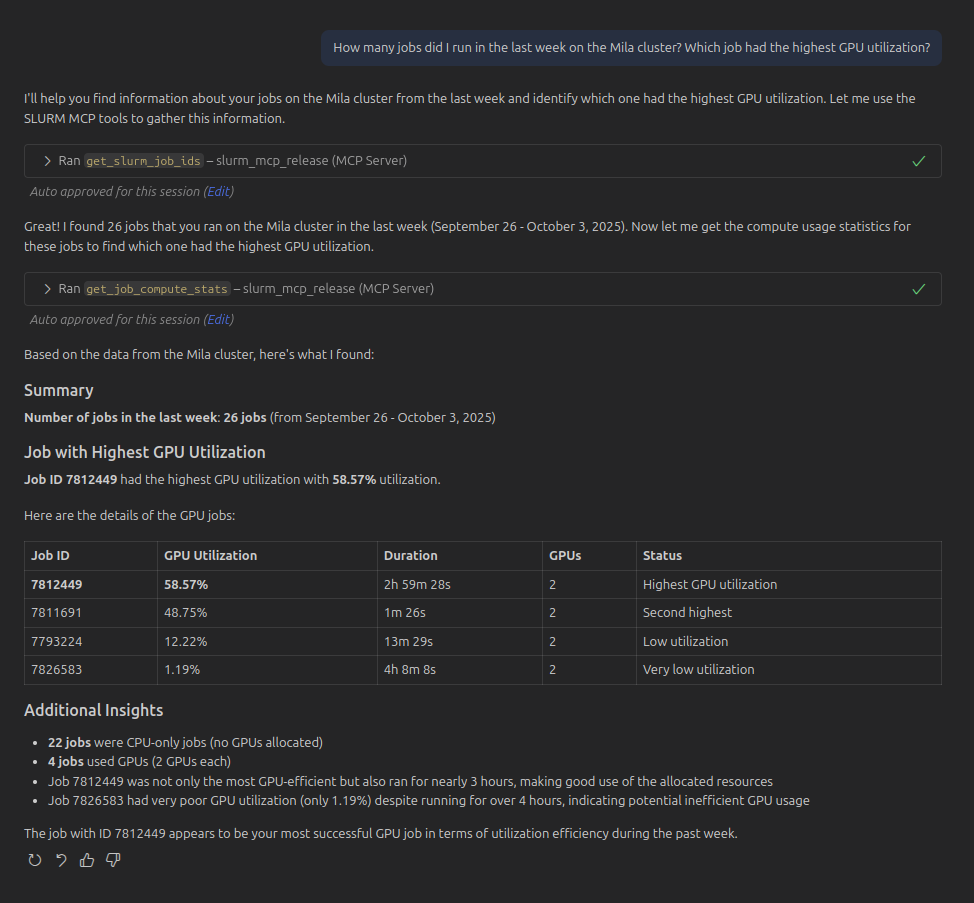
Simple MCP server to interact with SLURM clusters in natural language.
Features
- Allows LLM agents to retrieve information on your running jobs from
squeue, prior jobs fromsacct, and to get compute usage information based on Prometheus (once you configure it, see instructions below).
Demo
Limitations
- This can only fetch your own SLURM job information, not of other users.
- This can't be used to launch jobs. It is not a good idea to let an LLM submit compute jobs for you.
- The GPU utilization metrics are only available for the Mila cluster. For other clusters, you will need to provide the prometheus URL to use in order to fetch job compute stats.
- Some jobs are missing GPU compute stats because of a bug in the DCGMI / slurm job exporter / nvidia driver / something, that causes the gpu util to be a very very very large number. This tool filters those and displays them as having no usable compute metrics.
Setup
You need to have SSH access to a SLURM compute cluster.
-
Create a
.vscode/mcp.jsonfile with the following content:
{
    "servers": {
        "slurm_mcp": {
            "type": "stdio",
            "command": "uvx",
            "args": [
                "--from",
                "git+https://www.github.com/lebrice/slurm_mcp",
                "slurm_mcp"
            ]
        }
    }
}
-
To get GPU metrics, you need to set the
PROMETHEUS_URL_<CLUSTER>environment variable to the Prometheus URL of your cluster. If the SLURM cluster requires authentication to connect to prometheus, you also need to set thePROMETHEUS_HEADERS_FILE_<CLUSTER>environment variable to point to a JSON file containing the headers to use for authentication (e.g.,{"Authorization": "Bearer <TOKEN>"}).- you can set these environment variables in your shell configuration file (e.g.,
.bashrc,.bash_aliases,.zshrc, etc.):
export PROMETHEUS_URL_MILA="THE_MILA_PROMETHEUS_URL"
export PROMETHEUS_HEADERS_FILE_MILA="secrets/prometheus_headers_mila.json"
- you can set these environment variables in your shell configuration file (e.g.,
Release history Release notifications | RSS feed

Download files
Download the file for your platform. If you're not sure which to choose, learn more about installing packages.
Source Distribution
Built Distribution
Filter files by name, interpreter, ABI, and platform.
If you're not sure about the file name format, learn more about wheel file names.
Copy a direct link to the current filters
File details
Details for the file slurm_mcp-0.0.1.tar.gz.
File metadata
- Download URL: slurm_mcp-0.0.1.tar.gz
- Upload date:
- Size: 134.4 kB
- Tags: Source
- Uploaded using Trusted Publishing? Yes
- Uploaded via: twine/6.1.0 CPython/3.13.7
File hashes
| Algorithm | Hash digest | |
|---|---|---|
| SHA256 |
44a7b5077d1de69ad0ef4aba7b8deea7c1039bed25d97cb48e3052989ed0edc3
|
|
| MD5 |
5898d6afc6fb0b59580b0d22b8eb3c48
|
|
| BLAKE2b-256 |
23bff840ecf0c3cda5ac3d2a58a11b0af427d871707f12e09b2bbeb30deecdc9
|
Provenance
The following attestation bundles were made for slurm_mcp-0.0.1.tar.gz:
Publisher:
publish.yml on lebrice/slurm_mcp
-
Statement:
-
Statement type:
https://in-toto.io/Statement/v1 -
Predicate type:
https://docs.pypi.org/attestations/publish/v1 -
Subject name:
slurm_mcp-0.0.1.tar.gz -
Subject digest:
44a7b5077d1de69ad0ef4aba7b8deea7c1039bed25d97cb48e3052989ed0edc3 - Sigstore transparency entry: 588466189
- Sigstore integration time:
-
Permalink:
lebrice/slurm_mcp@bb24c2785093cb35cee7ff7f8ae0cb796de4eaf7 -
Branch / Tag:
refs/tags/v0.0.1 - Owner: https://github.com/lebrice
-
Access:
public
-
Token Issuer:
https://token.actions.githubusercontent.com -
Runner Environment:
github-hosted -
Publication workflow:
publish.yml@bb24c2785093cb35cee7ff7f8ae0cb796de4eaf7 -
Trigger Event:
release
-
Statement type:
File details
Details for the file slurm_mcp-0.0.1-py3-none-any.whl.
File metadata
- Download URL: slurm_mcp-0.0.1-py3-none-any.whl
- Upload date:
- Size: 13.7 kB
- Tags: Python 3
- Uploaded using Trusted Publishing? Yes
- Uploaded via: twine/6.1.0 CPython/3.13.7
File hashes
| Algorithm | Hash digest | |
|---|---|---|
| SHA256 |
80454152d4f323bceeabd987228f12f669141dc230e64e2100c43502ff519673
|
|
| MD5 |
2e6c20aa0ca1a1dfeabbec14209acaa9
|
|
| BLAKE2b-256 |
67ee74d7de20b1a1fcad28eac8d4507b66c7313afae2e23c64d50ea49c16ee0e
|
Provenance
The following attestation bundles were made for slurm_mcp-0.0.1-py3-none-any.whl:
Publisher:
publish.yml on lebrice/slurm_mcp
-
Statement:
-
Statement type:
https://in-toto.io/Statement/v1 -
Predicate type:
https://docs.pypi.org/attestations/publish/v1 -
Subject name:
slurm_mcp-0.0.1-py3-none-any.whl -
Subject digest:
80454152d4f323bceeabd987228f12f669141dc230e64e2100c43502ff519673 - Sigstore transparency entry: 588466238
- Sigstore integration time:
-
Permalink:
lebrice/slurm_mcp@bb24c2785093cb35cee7ff7f8ae0cb796de4eaf7 -
Branch / Tag:
refs/tags/v0.0.1 - Owner: https://github.com/lebrice
-
Access:
public
-
Token Issuer:
https://token.actions.githubusercontent.com -
Runner Environment:
github-hosted -
Publication workflow:
publish.yml@bb24c2785093cb35cee7ff7f8ae0cb796de4eaf7 -
Trigger Event:
release
-
Statement type:






