
Terminal GUI for easier Slurm experience
Verified details
These details have been verified by PyPIProject links
GitHub Statistics
Maintainers

Project description
Slurman
Enhanced command-line GUI to ease working with Slurm. Written in Python, derived from SlurmUI.
Viewing and managing
- GPUs
- Jobs in the history
- Jobs in the queue
- Logs for current and past jobs
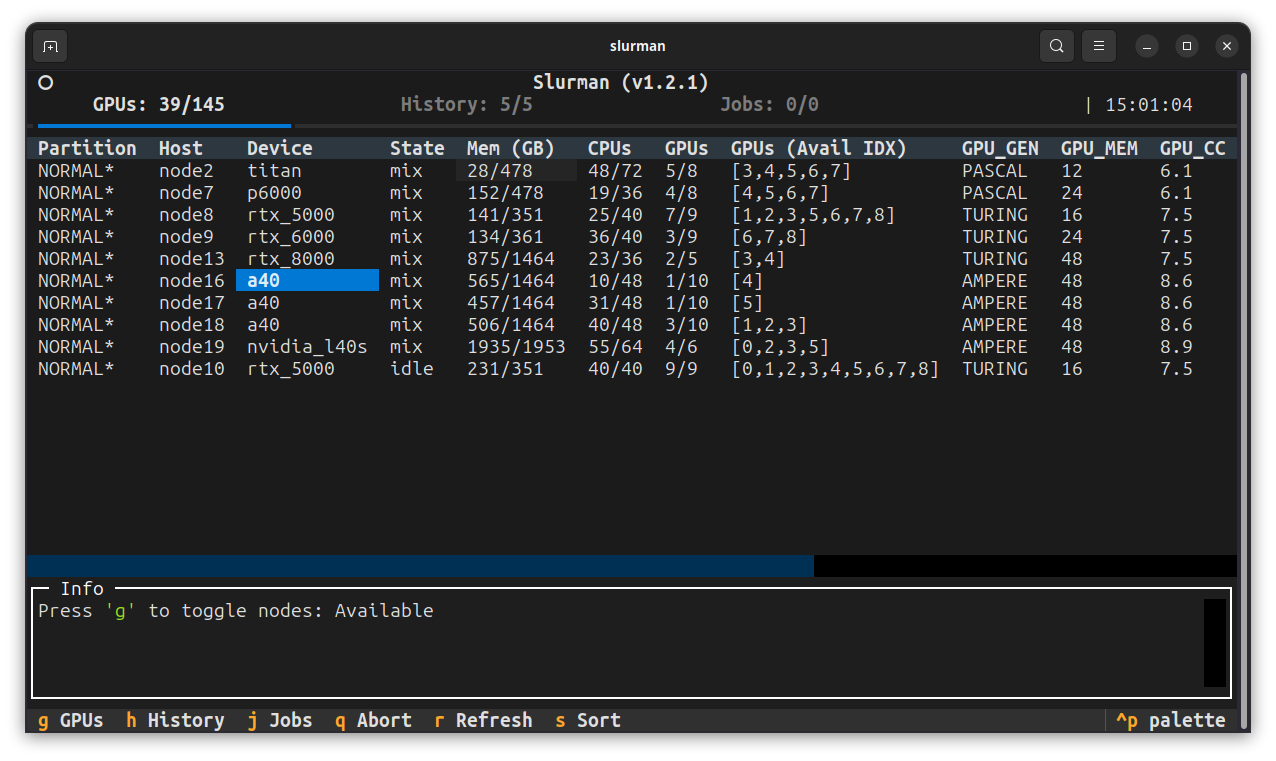
Install and run
pip install slurman
slurman
Optional arguments:
-hshow help message and exit.-irefreshing interval in seconds. (10 by default. Set to 0 to disable).-vverbose mode (printing info and error to the info panel).
Basics
Under the interface of Slurman we rely on three basic slurm commands:
sinfofor information of nodes, GPUs, etc.squeuefor current jobs in the queuesacctfor history jobs
Make sure you can get meaningful output from these commands on your cluster before trying Slurman.
To debug, you could run slurman -i 0 -v to disable auto update and force verbose logging. Then you will see the full commands that Slurman sends to Slurm in the info panel.

Tested Clusters
[!NOTE] If Slurman does not work on your cluster, try the debugging suggestions in Basics and feel free to open an issue.
Contributions
Open to contribution including but not limited to:
- Improving startup/launch speed
- Enhancing multithreading and concurrency handling
- Strengthening crash recovery and process resiliency
- Expanding features or addressing edge cases
Project details
Verified details
These details have been verified by PyPIProject links
GitHub Statistics
Maintainers
Release history Release notifications | RSS feed


Download files
Download the file for your platform. If you're not sure which to choose, learn more about installing packages.
Source Distribution
Built Distribution
Filter files by name, interpreter, ABI, and platform.
If you're not sure about the file name format, learn more about wheel file names.
Copy a direct link to the current filters
File details
Details for the file slurman-1.2.2.tar.gz.
File metadata
- Download URL: slurman-1.2.2.tar.gz
- Upload date:
- Size: 185.0 kB
- Tags: Source
- Uploaded using Trusted Publishing? Yes
- Uploaded via: twine/6.1.0 CPython/3.13.7
File hashes
| Algorithm | Hash digest | |
|---|---|---|
| SHA256 |
e89a2f6db55866381faac3b0d77eacfd7be13ee120ca429128e8a9a07b547f7a
|
|
| MD5 |
faee6eb8446d3f9de03e82674485c04d
|
|
| BLAKE2b-256 |
1daa2b4293b7d0fba35d7dd724d92bdaf4aa43f251210ee26a833ab7b8e4629c
|
Provenance
The following attestation bundles were made for slurman-1.2.2.tar.gz:
Publisher:
publish.yml on ShenhanQian/slurman
-
Statement:
-
Statement type:
https://in-toto.io/Statement/v1 -
Predicate type:
https://docs.pypi.org/attestations/publish/v1 -
Subject name:
slurman-1.2.2.tar.gz -
Subject digest:
e89a2f6db55866381faac3b0d77eacfd7be13ee120ca429128e8a9a07b547f7a - Sigstore transparency entry: 1115559912
- Sigstore integration time:
-
Permalink:
ShenhanQian/slurman@9114beabc866f7c18c1361ab93d65a2d3867cf3e -
Branch / Tag:
refs/tags/v1.2.2 - Owner: https://github.com/ShenhanQian
-
Access:
public
-
Token Issuer:
https://token.actions.githubusercontent.com -
Runner Environment:
github-hosted -
Publication workflow:
publish.yml@9114beabc866f7c18c1361ab93d65a2d3867cf3e -
Trigger Event:
push
-
Statement type:
File details
Details for the file slurman-1.2.2-py3-none-any.whl.
File metadata
- Download URL: slurman-1.2.2-py3-none-any.whl
- Upload date:
- Size: 12.0 kB
- Tags: Python 3
- Uploaded using Trusted Publishing? Yes
- Uploaded via: twine/6.1.0 CPython/3.13.7
File hashes
| Algorithm | Hash digest | |
|---|---|---|
| SHA256 |
24ee44275d2a4c1b538d235beb1fe72be6100d179d9e376c8d73a5e4348c0864
|
|
| MD5 |
941067c0019915c0d443777c4e7a48e6
|
|
| BLAKE2b-256 |
95b04e78b5f26eb93d2d7bc34908c3ab745eebbc310591b44376a4003ca51713
|
Provenance
The following attestation bundles were made for slurman-1.2.2-py3-none-any.whl:
Publisher:
publish.yml on ShenhanQian/slurman
-
Statement:
-
Statement type:
https://in-toto.io/Statement/v1 -
Predicate type:
https://docs.pypi.org/attestations/publish/v1 -
Subject name:
slurman-1.2.2-py3-none-any.whl -
Subject digest:
24ee44275d2a4c1b538d235beb1fe72be6100d179d9e376c8d73a5e4348c0864 - Sigstore transparency entry: 1115559950
- Sigstore integration time:
-
Permalink:
ShenhanQian/slurman@9114beabc866f7c18c1361ab93d65a2d3867cf3e -
Branch / Tag:
refs/tags/v1.2.2 - Owner: https://github.com/ShenhanQian
-
Access:
public
-
Token Issuer:
https://token.actions.githubusercontent.com -
Runner Environment:
github-hosted -
Publication workflow:
publish.yml@9114beabc866f7c18c1361ab93d65a2d3867cf3e -
Trigger Event:
push
-
Statement type:






