
SlurmDeck
SlurmDeck is a local command-line tool and terminal UI for running code on a remote Slurm cluster. You keep editing your project on your workstation; SlurmDeck snapshots the exact files needed for a run, transfers them over SSH, submits a command or parameter sweep, combines Slurm and per-task status, follows logs, and downloads results.
It is intended for researchers and engineers who already have SSH access to a
Slurm cluster and want a reproducible alternative to repeatedly assembling
rsync, sbatch, squeue, sacct, and result-copy commands by hand.
SlurmDeck works with the cluster's existing accounts, partitions, and policies.
It does not replace Slurm, and it does not require a service or SlurmDeck
package to be installed on the cluster.
A typical workflow is:
- Register a cluster once on your workstation.
- Initialize SlurmDeck inside a local project.
- Review the exact files that will be included.
- Plan and submit a command or parameter sweep.
- Check task status, follow logs, and pull results back locally.
Installation
pipx is the simplest option if it is already installed:
pipx install slurmdeck
Otherwise, create a dedicated virtual environment:
mkdir -p "$HOME/.venvs"
python3 -m venv "$HOME/.venvs/slurmdeck"
source "$HOME/.venvs/slurmdeck/bin/activate"
python -m pip install --upgrade pip
python -m pip install slurmdeck
slurmdeck --version
When using the virtual-environment method, run the source command again in
each new shell before using slurmdeck.
| Location | Requirements |
|---|---|
| Local workstation | POSIX system, Python 3.11+, git, OpenSSH, and rsync |
| Remote login node | Python 3.8+ and sbatch, squeue, sacct, and scancel |
| Remote filesystem | A base directory visible from the login and compute nodes |
Quick start
The example below uses:
hpcas a local nickname for the cluster;user@login.example.comas the SSH destination;$HOME/slurmdeckas the remote base directory; and/path/to/my-projectas the local project.
Replace those values with your own. If the compute nodes cannot access your
remote home directory, use a shared project, data, or scratch path for
--base instead.
1. Verify SSH and Slurm
Connect with OpenSSH before configuring SlurmDeck. Review the host fingerprint when SSH asks, then confirm that Python and the Slurm client commands are available:
ssh user@login.example.com

# These commands run on the remote login node.
python3 --version
command -v sbatch
command -v squeue
command -v sacct
command -v scancel
exit
2. Register and connect to the cluster
Add the cluster once on this workstation. The single quotes around
$HOME/slurmdeck prevent your local shell from expanding $HOME; the path
is resolved on the remote instead.
slurmdeck remote add hpc \
  --host user@login.example.com \
  --base '$HOME/slurmdeck' \
  --use
slurmdeck remote connect hpc
slurmdeck remote status hpc
If you already have a Host entry in ~/.ssh/config, use
--ssh-alias your-alias instead of --host user@login.example.com.
If python3 on the remote is older than 3.8, but a newer interpreter is
installed at a path shared by login and compute nodes, register that path with
--agent-python /shared/path/to/python3. This setting applies only to
SlurmDeck's remote helpers and job agent.
3. Initialize a local project
Run init from the project directory that contains the code you want to
submit:
cd /path/to/my-project
slurmdeck init --remote hpc
slurmdeck doctor
init creates local SlurmDeck state under .slurmdeck/. doctor checks
the local tools, SSH connection, Slurm commands, and project configuration. A
missing ClusterProfile warning is expected unless you plan to let SlurmDeck
build managed environments.
4. Review the snapshot
Before the first submission, inspect the exact project files SlurmDeck would upload:
slurmdeck snapshot preview
Check that required source/configuration files are present and that datasets,
credentials, private keys, and generated outputs are absent. Adjust the sync
rules in .slurmdeck/project.yaml if needed, then preview again.
5. Plan, review, and submit the first run
Everything after -- belongs to your program. Replace python train.py
with a command that exists in your project:
slurmdeck submit --plan-only --time 00:10:00 -- python train.py

# Copy the Run value printed above.
RUN_ID="paste-the-run-id-here"
slurmdeck run show "$RUN_ID"
slurmdeck run submit "$RUN_ID"
--plan-only creates the local immutable run and snapshot but does not call
sbatch. Once the plan looks right, run submit submits that exact run.
For later runs, the two steps may be combined:
slurmdeck submit --time 04:00:00 --gres gpu:1 -- python train.py
Clusters that allocate nodes through named Slurm reservations can set
resources.reservation in .slurmdeck/project.yaml or pass
--reservation <name> for one run.
6. Follow the run and download results
Use the same Run ID printed during planning or submission:
slurmdeck run status "$RUN_ID"
slurmdeck run status "$RUN_ID" --watch
slurmdeck run logs "$RUN_ID" --follow
slurmdeck run pull "$RUN_ID" --into "./results/$RUN_ID"
Press Ctrl+C to stop --watch or --follow; this does not cancel the
Slurm job. Use slurmdeck run cancel "$RUN_ID" when cancellation is intended.
7. Open the terminal UI
The TUI provides the same project runs, environments, remotes, logs, and operations in a full-screen interface:
slurmdeck ui
Use 1, 2, and 3 to switch between Runs, Environments, and Remotes;
press ? for the keys available on the current screen.
The basic flow above uses the batch job's default remote environment. Managed
or existing environments are configured explicitly in .slurmdeck/project.yaml
as described in Environments.
Use one project on multiple clusters
Schema v1 also supports named project targets. A target keeps the remote, resources, and environment together, so switching from (for example) a ROCm cluster to a CUDA cluster cannot accidentally reuse the other cluster's account, reservation, or environment prefix:
schema_version: 1
project_id: 4d3c39c8-1f44-44ce-ae77-a1f295f2fdca
display_name: my-project
default_target: jade
targets:
  jade:
    remote: jade
    resources:
      time: "12:00:00"
      cpus: 8
      mem: 64G
      gres: gpu:1
      partition: long
      account: jade-beta
      qos: standard
      reservation: jade
      max_parallel: 24
    env:
      type: existing
      name: rocm
      prefix: /shared/envs/my-project-rocm
  htc:
    remote: htc
    resources:
      time: "12:00:00"
      cpus: 8
      mem: 64G
      gres: gpu:1
      partition: gpu
      account: my-account
      max_parallel: 24
    env:
      type: existing
      name: cuda
      prefix: /shared/envs/my-project-cuda
Inspect or change the workstation-local current target, or select one for a single operation:
slurmdeck target list
slurmdeck target show jade
slurmdeck target use jade
slurmdeck doctor --target jade
slurmdeck env prepare --target jade
slurmdeck submit --target htc -- python train.py
Resolution order is an explicit --target, then this project's locally saved
current target, then default_target. target use does not edit the shared
project YAML. The older top-level remote/resources/env layout remains
supported; --remote is retained only for those legacy single-target
projects and cannot be combined with named targets. The one diagnostic
exception is slurmdeck doctor --remote NAME: it checks that registered remote
by itself and deliberately skips target resources and environment. Use
doctor --target NAME to diagnose that target's remote and configured
environment intent. Doctor does not verify environment readiness; use
env plan --target NAME and env prepare --target NAME for that.
Core concepts
- Remote — an SSH destination and a remote base directory. An optional ClusterProfile records user-supplied site policy: permitted environment executors, login-node policy, shared-filesystem guarantees, modules, conda, network/channel access, Slurm defaults/dependency behavior, and platform.
- Target — a project-scoped, named bundle of one remote, its resources, and its environment intent. The selected target is resolved atomically for Doctor, environment operations, and submission.
- Project — a local directory initialized with
slurmdeck init. The generated config has a UUIDproject_id, adisplay_name, resource/env intent, and sync rules. Run/task state is stored locally in SQLite. - Run — one immutable materialized run. Planning is validated in memory, then committed atomically to the local run directory and database. A retry creates a new run and preserves the source target, remote, resources, environment binding/activation, and task templates.
- Snapshot — the content hash of the exact selected code files. Snapshots upload once, are reference-derived from manifests/receipts, and are garbage collected only by an explicit, lock-protected command.
- Environment — either a managed conda environment with immutable generations or an external prefix owned by the user. Remote registry records attempts, receipts, provenance, scheduler state, errors, and the active generation.
- Agent — one of two stdlib-only Python helpers: the run agent executes and scans tasks; the environment agent owns registry/executor operations.
Environments
Project intent belongs in .slurmdeck/project.yaml:
env:
  type: conda
  name: ml
  spec_file: environment.yml
  modules: [cuda/12.1]
  smoke_test: "python -c 'import torch'"
  channel_priority: strict
  solver: libmamba
  build_resources:
    time: "01:00:00"
    mem: 8G
Managed environment attempts stage the environment specification, not the
project source snapshot. Therefore relative requirements and post-install
commands that need a checkout, such as -e . or pip install -e ., are not
valid here. Put installable dependencies in the specification by immutable
package or VCS URL (including a remotely accessible wheel URL), and run
synchronized project source from the materialized run snapshot.
This top-level form is the legacy single-target layout. In a named-target
project, put the complete env block inside each applicable target alongside
that target's remote and resources.
Managed environment builds also require an explicit ClusterProfile describing site policy and capabilities. Adapt the complete ClusterProfile example, then validate it before preparing the environment:
slurmdeck remote profile set hpc --file cluster-profile.yaml
slurmdeck remote profile show hpc
slurmdeck doctor
slurmdeck env plan
slurmdeck env prepare
environment.yml is the sole channel declaration source. The environment ID
is <safe-name>-<hash12>; the full SHA-256 covers spec bytes, modules,
post-install/smoke commands, and solver/channel policy, but not scheduler
resources.
slurmdeck env plan                         # no writes
slurmdeck env prepare --no-wait            # start once, return QUEUED/BUILDING
slurmdeck env list
slurmdeck env status <env_id>
slurmdeck env logs <env_id> --follow
slurmdeck env cancel <env_id> --yes
slurmdeck env prepare --rebuild            # new immutable generation
slurmdeck env remove <env_id> --yes
slurmdeck env gc                           # dry run; add --yes to delete
The default run policy is --env-wait ready. --env-wait afterok may submit a
run while a Slurm environment build is queued, but only when the ClusterProfile
explicitly guarantees both afterok support and invalid-dependency
termination. The run is shown as WAITING_FOR_ENV; a failed or cancelled
build becomes ENV_BUILD_FAILED or ENV_BUILD_CANCELLED without executing
tasks. Login builds never qualify for afterok.
Login-node builds are available only when a user explicitly declares them allowed. They are not a queue-avoidance shortcut: login nodes can have a different OS, CPU, filesystem, network policy, and acceptable-use policy from compute nodes. On clusters that forbid sustained work on login nodes, use the Slurm executor for environment builds.
Sweeps and placeholders
# sweep.yaml
version: 1
parameters:
  lr: [1.0e-3, 1.0e-4]
  model: [small, large]
exclude:
  - {lr: 1.0e-4, model: large}
config:
  training:
    lr: "{lr}"
    model: "{model}"
env:
  RUN_TAG: "{model}-lr{lr}"
arg_style: posix
slurmdeck sweep validate sweep.yaml
slurmdeck sweep preview sweep.yaml
slurmdeck submit --sweep sweep.yaml -- python train.py {args}
Commands, sweep args, environment values, and generated configs share these
locally resolved placeholders: {config}, {output}, {task_id},
{task_name}, {run}, {index}, {args}, and sweep parameters. Literal
braces are {{ and }}. Unknown placeholders fail before materialization.
CLI contracts
slurmdeck init | doctor | ui | --version
slurmdeck remote add|list|use|remove|connect|disconnect|status|exec
slurmdeck remote profile show|set
slurmdeck target list|show|use
slurmdeck env plan|prepare|list|show|status|logs|cancel|remove|gc
slurmdeck snapshot preview|list|gc
slurmdeck sweep validate|preview
slurmdeck submit [--target NAME] [--plan-only] [--env-wait ready|afterok] [resources...] -- CMD...
slurmdeck run list|show|submit|reconcile|status|logs|cancel|retry|pull|clean
Project-aware doctor, env, and submit commands accept --target NAME.
The --remote option remains available for legacy single-target project
configs. doctor --remote NAME additionally remains available as a
remote-only diagnostic in named-target projects; it does not select or combine
a project target.
Machine-readable commands emit exactly one JSON document:
{"schema_version": 1, "ok": true, "data": {}, "meta": {}, "error": null}
Application errors use the same envelope on stdout with empty stderr. Typer
usage errors remain native. --json is rejected with --watch/--follow.
Exit codes are 0 success, 1 user/configuration error, 2 usage, 3
transport, and 4 partial or empty completion. Partial pull/clean reports
preserve retryable paths and per-location outcomes.
CLI layouts adapt at 120 and 80 columns without truncating identifiers or
timestamps. SLURMDECK_THEME=dark|light|mono selects the shared semantic
theme; slurmdeck ui --theme ... overrides it for one TUI session, and
NO_COLOR forces the monochrome/plain contract.
Safety and recovery
- Submission uses a full token, a remote lock, an atomic receipt, a token in
the Slurm comment, and a short job-name suffix. An unknown
sbatchoutcome is never automatically resubmitted; useslurmdeck run reconcile. - Status merges live scheduler observations, task artifacts, and local lifecycle state. A failed refresh returns the last good snapshot as stale when one exists.
- Environment prepare locks the full hash. Lost responses attach to the same
attempt; a possibly submitted build stays
BUILD_UNKNOWN; a provably interrupted pre-sbatch staging attempt becomes safely retryable. - Managed environment promotion changes the registry's active pointer only after build, activation, smoke, and package-channel verification succeed.
run cleanreports local, remote, receipt, and snapshot-reference outcomes. A partial remote clean retains the local run as a recovery handle.- SlurmDeck only modifies paths within its documented local and remote layouts; unrecognized paths are left untouched.
- Snapshot selection refuses common secret-bearing files and private-key
content by default. Run
slurmdeck snapshot previewto inspect the exact local files before submission.
TUI
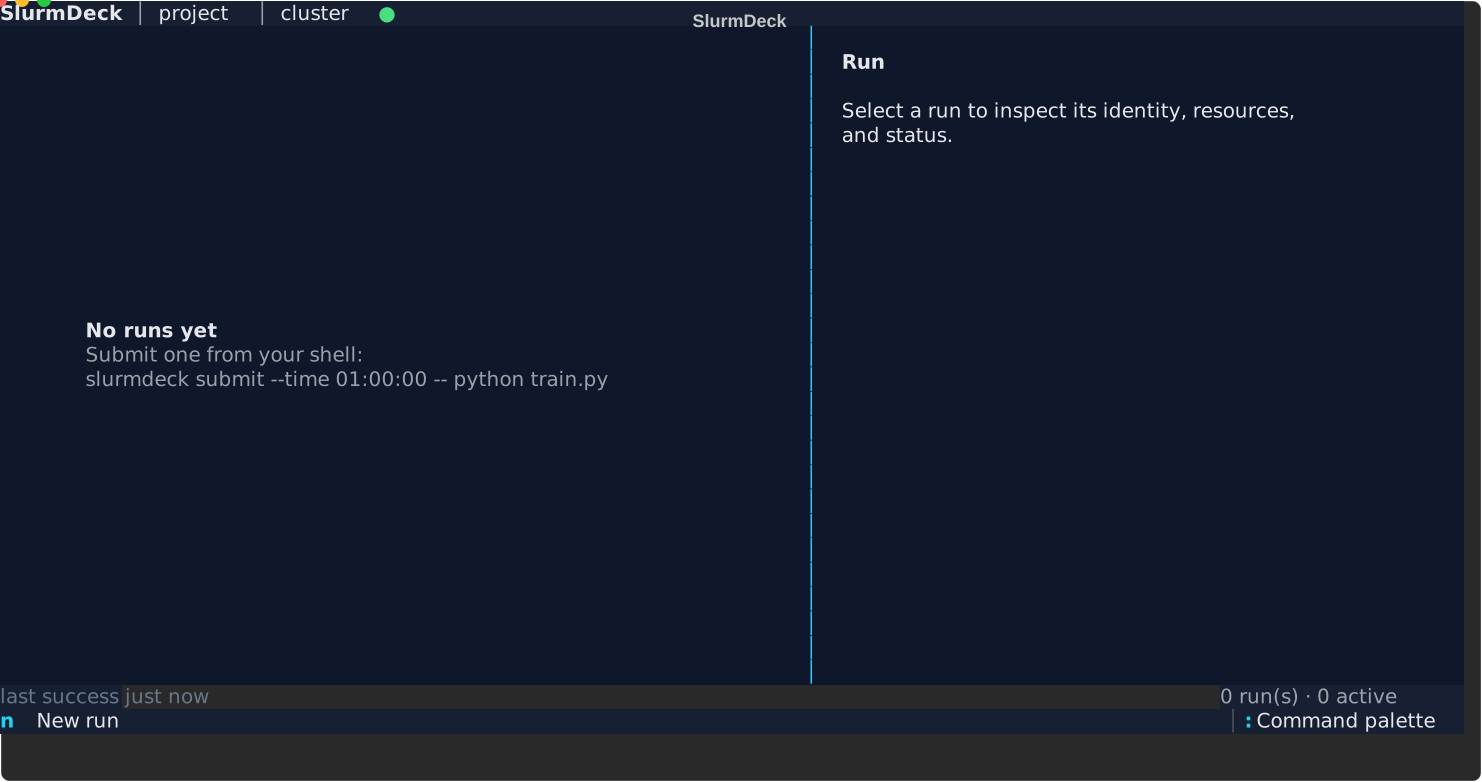
The wide layout keeps the run list and detail pane side by side. At compact terminal widths, the same information moves to a dedicated detail screen.
The TUI supports New Run (simple command or existing Sweep YAML), Add Remote
(host or SSH alias), explicit ClusterProfile import/edit/diff/save,
environment prepare/attach/log/cancel/rebuild/remove/GC, responsive
master-detail screens, persistent dismissible errors, stale status, elapsed
operations, and shared dark/light/mono styling. At 80 columns, Enter opens a
dedicated detail page; at 100 columns and above, lists and details share the
screen. For named-target projects, it uses the project's locally selected
target (or default_target). Switch inside the TUI from the command palette,
or run slurmdeck target use NAME before opening/reopening it. See the
TUI documentation.
Documentation
Development
git clone https://github.com/dejay-vu/slurmdeck.git
cd slurmdeck
python -m pip install -e ".[dev]"
See CONTRIBUTING.md for the complete development workflow.
License
MIT.
1 maintainer

Metadata
1 maintainer
Release files for slurmdeck 0.4.0
For a detailed explanation of source distributions (sdists) and built distributions (wheels), please see the package formats documentation.
Source distribution (sdist)
| File | Size | Uploaded | Provenance | |
|---|---|---|---|---|
| slurmdeck-0.4.0.tar.gz | 311.6 kB | With provenance | Details |
Built distribution (wheel)
| File | Interpreter | ABI | Platform | Reset |
|---|---|---|---|---|
| slurmdeck-0.4.0-py3-none-any.whl | Python 3 | none | any | Details |
Total release size: 532.1 kB
Release files / slurmdeck-0.4.0.tar.gz
| Download URL | slurmdeck-0.4.0.tar.gz |
|---|---|
| Size | 311.6 kB |
| Tags | Source |
|
SHA-256 checksum How to use checksums |
8b66530cd9c8ad7eca8f9b5799524e9a3a530c1185b7943b4252d3908b84837e
|
|
BLAKE2b-256 checksum How to use checksums |
007eba4716076d77f42c6b600088b9c3dd42c263ce913082ea3bbf91331bb74f
|
| Upload date | |
|
Uploaded using Trusted Publishing? What is trusted publishing? |
Yes |
| Uploaded via |
twine/6.1.0 CPython/3.13.13
|
Provenance
Provenance describes where a file came from. On PyPI, provenance is shared via attestations, which provide a verifiable record of the build or publishing details. View details, limitations and caveats.


PyPI Publish Attestation
PyPI verified that this artifact, at this checksum, originated from the publisher listed below.
Signed by GitHub Actions, verified by PyPI on Aug 6, 2026.
Transparency logRelease files / slurmdeck-0.4.0-py3-none-any.whl
| Download URL | slurmdeck-0.4.0-py3-none-any.whl |
|---|---|
| Size | 220.5 kB |
| Tags | Python 3 |
|
SHA-256 checksum How to use checksums |
ddc2c1d8b40c119b193e139775dcaa059638c55d9739e39c8978f11f9f257063
|
|
BLAKE2b-256 checksum How to use checksums |
cb4edab70f3316787413d27c0f08f06482a2897fcc8abb9ca48cf0f4f9947224
|
| Upload date | |
|
Uploaded using Trusted Publishing? What is trusted publishing? |
Yes |
| Uploaded via |
twine/6.1.0 CPython/3.13.13
|
Provenance
Provenance describes where a file came from. On PyPI, provenance is shared via attestations, which provide a verifiable record of the build or publishing details. View details, limitations and caveats.
PyPI Publish Attestation
PyPI verified that this artifact, at this checksum, originated from the publisher listed below.
Signed by GitHub Actions, verified by PyPI on Aug 6, 2026.
Transparency logSecurity for slurmdeck 0.4.0
Provenance
Provenance describes where a file came from. On PyPI, provenance is shared via attestations, which provide a verifiable record of the build or publishing details. View details, limitations and caveats.
Full provenance
All 2 files in this release have been uploaded with provenance metadata.
Attestation for slurmdeck-0.4.0.tar.gz
PyPI Publish Attestation
PyPI verified that this artifact, at this checksum, originated from the publisher listed below.
Signed by GitHub Actions, verified by PyPI on Aug 6, 2026.
Transparency logA note on package security
PyPI is a repository for distributing packages, not a service for auditing them. While third-party security researchers and our staff do their best to detect and remove malicious packages, PyPI cannot guarantee the quality, security or suitability of any given package.
To learn more about protecting yourself from malicious actors, visit our package security documentation.














