
Minimal Slurm experiment runner with persistent SSH, YAML configs, and log streaming

Project description
slurmster
A minimal Python tool to run parameter-grid experiments on a Slurm cluster with persistent SSH, log streaming, and simple YAML configs.
Install
pip install slurmster
Features
- CLI with subcommands:
submit,monitor,status,fetch,cancel,gui - YAML config (explicitly provided via
--config) - Persistent SSH connection for low latency
- Per-run working directories on the remote side
- Automatic log redirection to
stdout.loginside each run directory - Live log streaming (and re-attach later)
- Local workspace to track runs and "fetched" state
- Cancel jobs from local machine
- Web-based GUI for easy management
CLI Usage
All commands follow this pattern:
slurmster --config <config.yaml> --user <username> --host <hostname> [options] <command>
Basic Commands
Submit experiments:
slurmster --config config.yaml --user myuser --host myhost submit
Monitor logs:
# Monitor by job ID:
slurmster --config config.yaml --user myuser --host myhost monitor --job 1234567
Check status:
slurmster --config config.yaml --user myuser --host myhost status
Fetch completed runs:
# Fetch all completed runs:
slurmster --config config.yaml --user myuser --host myhost fetch
# Or fetch a specific job:
slurmster --config config.yaml --user myuser --host myhost fetch --job 1234567
Cancel jobs:
# Cancel specific job:
slurmster --config config.yaml --user myuser --host myhost cancel --job 1234567
# or cancel all:
slurmster --config config.yaml --user myuser --host myhost cancel --all
Additional Options
--password-env ENV_VAR: Use password from environment variable--key /path/to/key: Use SSH key file instead of password--port 22: Specify SSH port (default: 22)
For submit:
--no-monitor: Don't automatically start monitoring after submission
For monitor:
--from-start: Stream from beginning instead of last 100 lines--lines N: Number of trailing lines when attaching (default: 100)
For status:
--all: Show all runs (default: only non-fetched)
For fetch:
--job <job_id>: Only fetch a specific job by ID
Configuration File
Create a YAML config file (see example/config.yaml):
remote:
  base_dir: ~/experiments            # remote working root

files:
  push:
    - example/train.py               # any code/data files you need on remote
  fetch:
    - "model.pth"                   # optional; if omitted we fetch the entire run dir
    - "log.txt"

slurm:
  directives: |                      # SBATCH lines; placeholders allowed
    #SBATCH --job-name={base_dir}
    #SBATCH --partition=gpu
    #SBATCH --time=00:10:00
    #SBATCH --cpus-per-gpu=40
    #SBATCH --nodes=1
    #SBATCH --gres=gpu:1
    #SBATCH --mem=32G

run:
  command: |                         # your run command; placeholders allowed
    source venv/bin/activate
    python example/train.py --lr {lr} --epochs {epochs} --save_model "{run_dir}/model.pth" --log_file "{run_dir}/log.txt"

  # ONE of the following:
  grid:
    lr: [0.1, 0.01, 0.001]
    epochs: [1, 2, 5, 10]
  # experiments:
  #   - { lr: 0.1, epochs: 1 }
  #   - { lr: 0.001, epochs: 10 }
Placeholders
{base_dir}: resolved remote base directory (e.g./home/you/experiments)- Any run parameter placeholder, e.g.
{lr},{epochs} {remote_dir}: the configuredremote.base_dir{run_dir}: the per-run directory (underremote.base_dir/runs/{exp_name})
Local workspace
Under the .slurmster directory next to your config.yaml (<config-dir>/.slurmster/<user>@<host>/<sanitized-remote-base>), we store:
runs.json— run registry (job id, exp name, fetched flag, etc.)results/<exp_name>_<job_id>/...— fetched run directories
GUI Usage
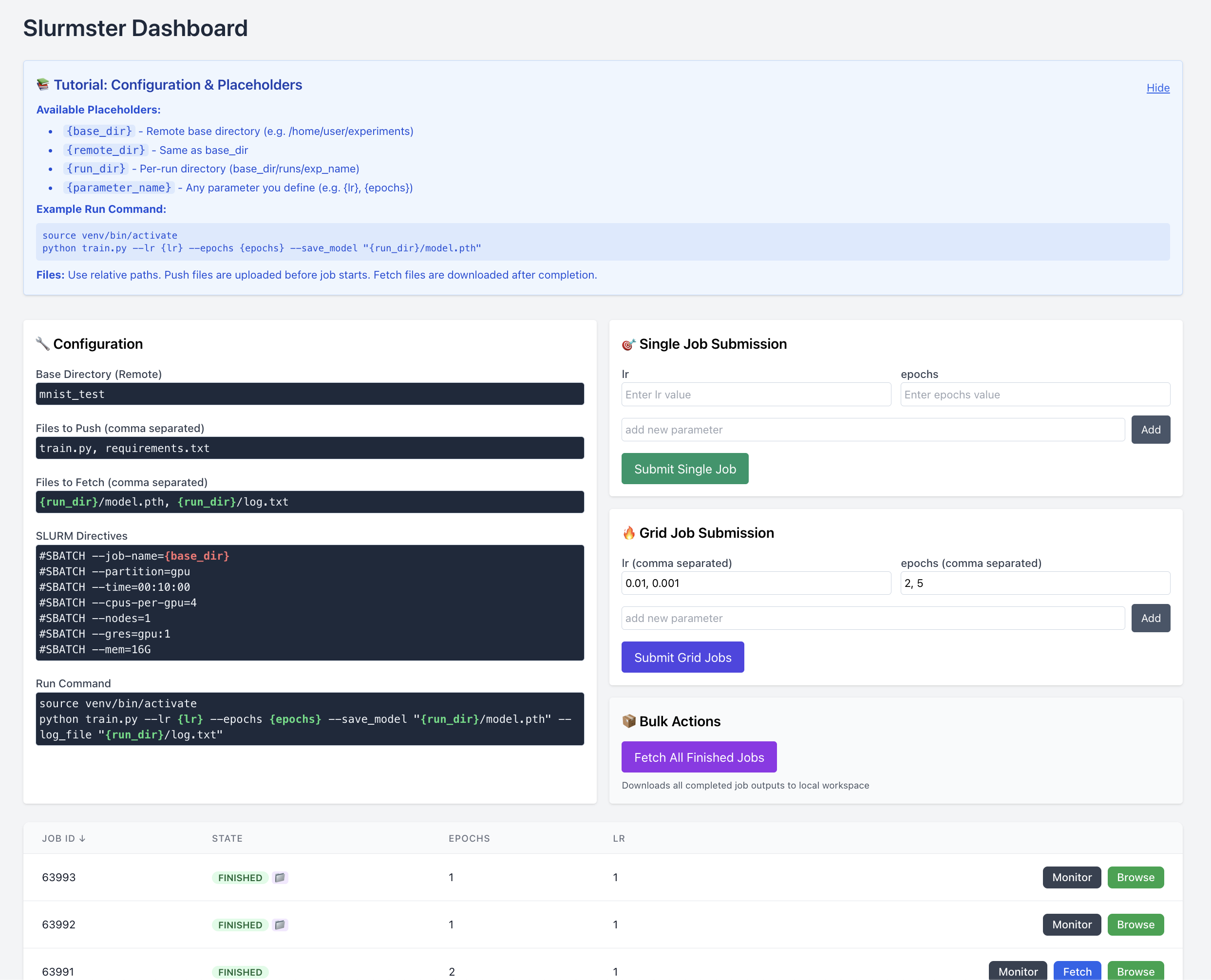
For a more user-friendly experience, you can use the web-based GUI:
slurmster --config config.yaml --user myuser --host myhost gui
Additional GUI options:
--gui-port 8000: Set the HTTP port (default: 8000)--gui-bind 0.0.0.0: Set the bind interface (default: 0.0.0.0)--no-browser: Don't automatically open browser
The GUI provides:
Configuration Management:
- View and edit your current configuration
- See resolved placeholders and SLURM directives
- Modify files to push/fetch and run commands
Job Submission:
- Submit single jobs with custom parameters
- Submit grid jobs with parameter combinations
- Real-time parameter validation
Job Monitoring:
- View all jobs with their current status
- Monitor and browse job outputs in real-time
- Access job logs directly in the browser
Bulk Operations:
- Fetch all completed jobs at once
- Cancel multiple jobs
- Track job progress and completion status
The GUI automatically opens in your browser at http://localhost:8000 (or your specified port) and provides an intuitive interface for all slurmster functionality.
License
MIT — see LICENSE.
Release history Release notifications | RSS feed


Download files
Download the file for your platform. If you're not sure which to choose, learn more about installing packages.
Source Distribution
Built Distribution
Filter files by name, interpreter, ABI, and platform.
If you're not sure about the file name format, learn more about wheel file names.
Copy a direct link to the current filters
File details
Details for the file slurmster-0.2.5.tar.gz.
File metadata
- Download URL: slurmster-0.2.5.tar.gz
- Upload date:
- Size: 24.1 kB
- Tags: Source
- Uploaded using Trusted Publishing? Yes
- Uploaded via: twine/6.1.0 CPython/3.12.9
File hashes
| Algorithm | Hash digest | |
|---|---|---|
| SHA256 |
dc2423af2adb219d3da299c09982455104e106ebb77aaee03b6b29ebd1cfd940
|
|
| MD5 |
9c2d97a09e31bfa6204ed07d0a92e536
|
|
| BLAKE2b-256 |
cefdbf97d3ce02e6e53881f4c348f9f014046feee79f1082a9676e21ba511641
|
Provenance
The following attestation bundles were made for slurmster-0.2.5.tar.gz:
Publisher:
python-publish.yml on dyigitpolat/slurmster
-
Statement:
-
Statement type:
https://in-toto.io/Statement/v1 -
Predicate type:
https://docs.pypi.org/attestations/publish/v1 -
Subject name:
slurmster-0.2.5.tar.gz -
Subject digest:
dc2423af2adb219d3da299c09982455104e106ebb77aaee03b6b29ebd1cfd940 - Sigstore transparency entry: 351739113
- Sigstore integration time:
-
Permalink:
dyigitpolat/slurmster@4f1bfc0b8040876d8a7d8d890f69555f6bddd332 -
Branch / Tag:
refs/heads/main - Owner: https://github.com/dyigitpolat
-
Access:
public
-
Token Issuer:
https://token.actions.githubusercontent.com -
Runner Environment:
github-hosted -
Publication workflow:
python-publish.yml@4f1bfc0b8040876d8a7d8d890f69555f6bddd332 -
Trigger Event:
push
-
Statement type:
File details
Details for the file slurmster-0.2.5-py3-none-any.whl.
File metadata
- Download URL: slurmster-0.2.5-py3-none-any.whl
- Upload date:
- Size: 28.1 kB
- Tags: Python 3
- Uploaded using Trusted Publishing? Yes
- Uploaded via: twine/6.1.0 CPython/3.12.9
File hashes
| Algorithm | Hash digest | |
|---|---|---|
| SHA256 |
63bad58a6ae9346552105ddf50ba540f76880cd13c65296b95de1dc201e6a31e
|
|
| MD5 |
9b350ee28775a85bfb08c0c5fcbbdfa7
|
|
| BLAKE2b-256 |
490c1d57f900b6a4cac42f5271b6e16cd46c66139ea1a29880d7756e46b1f156
|
Provenance
The following attestation bundles were made for slurmster-0.2.5-py3-none-any.whl:
Publisher:
python-publish.yml on dyigitpolat/slurmster
-
Statement:
-
Statement type:
https://in-toto.io/Statement/v1 -
Predicate type:
https://docs.pypi.org/attestations/publish/v1 -
Subject name:
slurmster-0.2.5-py3-none-any.whl -
Subject digest:
63bad58a6ae9346552105ddf50ba540f76880cd13c65296b95de1dc201e6a31e - Sigstore transparency entry: 351739143
- Sigstore integration time:
-
Permalink:
dyigitpolat/slurmster@4f1bfc0b8040876d8a7d8d890f69555f6bddd332 -
Branch / Tag:
refs/heads/main - Owner: https://github.com/dyigitpolat
-
Access:
public
-
Token Issuer:
https://token.actions.githubusercontent.com -
Runner Environment:
github-hosted -
Publication workflow:
python-publish.yml@4f1bfc0b8040876d8a7d8d890f69555f6bddd332 -
Trigger Event:
push
-
Statement type:






