
SlurmTUI


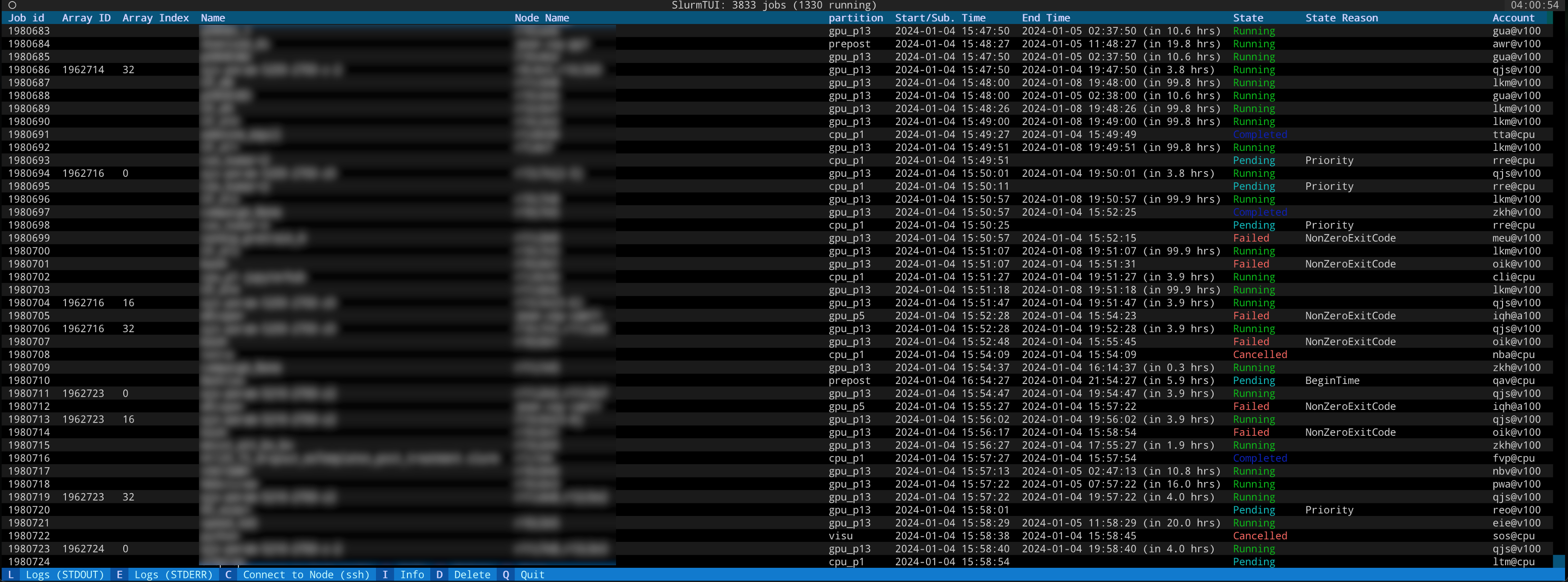
A terminal user interface for monitoring and managing Slurm jobs. Instead of running squeue, sacct, and scancel over and over, you get a live-updating table of your jobs with colors, sorting, filtering, and shortcuts to tail logs, SSH into nodes, or delete jobs — all without leaving the TUI.
Note: SlurmTUI requires Slurm 21.08 or later for JSON output support.
Note: Viewing old jobs requires Slurm 24.05 or later.
Installation
pip install slurmtui
Usage
Just run slurmtui / slurmui / sui in your terminal.
Command-line options
Filter by account at launch:
slurmtui --acc my_account1,my_account2
View all users' jobs:
slurmtui --check_all_jobs
Override the update interval:
slurmtui --update-interval 5
Pass extra arguments to squeue:
slurmtui -- --partition=gpu
Settings
All preferences are stored in ~/.config/slurmtui/settings.json and persist across sessions. You can override the settings path by setting the SLURMTUI_SETTINGS environment variable.
Features
Live Job Table
The main view auto-refreshes every few seconds, showing your jobs with colored states (green for running, red for failed, etc.). Filter jobs by account, partition, or any column.
Keybindings
| Key | Action |
|---|---|
L |
Tail stdout log |
E |
Tail stderr log |
Ctrl+L |
Open stdout in secondary text viewer |
Ctrl+E |
Open stderr in secondary text viewer |
C |
SSH into the job's node |
D |
Delete a job (with confirmation, works with array jobs) |
I |
View detailed job info |
O |
Toggle old jobs history (completed/failed via sacct) |
R |
Open hardware resources view |
The log viewer can be configured to use tail -f, less, or any command you want.
Old Jobs History
View completed/failed job history via sacct. Press O to toggle. For more info see the linked blog post
Hardware Resources View
See node allocation and availability across the cluster. Press R to open. For more info see the linked blog post.
Roadmap
- View old jobs
- Filtering jobs when launching
- Sorting
- Options other than tail for logs
- Faster launch
- Remove Array columns if no job array exists
- Display used/available resources
- Search
Have a feature request? Suggest it here
FAQ
How to select text in the App?
SlurmTUI runs a Textual app which puts your terminal into application mode, disabling clicking and dragging to select text. Most terminal emulators offer a modifier key which you can hold while you click and drag to restore normal selection:
- iTerm — Hold the OPTION key.
- Gnome Terminal — Hold the SHIFT key.
- Windows Terminal — Hold the SHIFT key.
Refer to the documentation for your terminal emulator if it is not listed above.
License
MIT
Contact
1 maintainer

Metadata
1 maintainer
Release files for slurmtui 0.6.3
For a detailed explanation of source distributions (sdists) and built distributions (wheels), please see the package formats documentation.
Source distribution (sdist)
| File | Size | Uploaded | |
|---|---|---|---|
| slurmtui-0.6.3.tar.gz | 30.1 kB | Details |
Built distribution (wheel)
| File | Interpreter | ABI | Platform | Reset |
|---|---|---|---|---|
| slurmtui-0.6.3-py3-none-any.whl | Python 3 | none | any | Details |
Total release size: 64.0 kB
Release files / slurmtui-0.6.3.tar.gz
| Download URL | slurmtui-0.6.3.tar.gz |
|---|---|
| Size | 30.1 kB |
| Tags | Source |
|
SHA-256 checksum How to use checksums |
047df2954f7ae1de076d87bebdcf70dd2ddc42fbbfdae05c0ad2bb81e1a5285b
|
|
BLAKE2b-256 checksum How to use checksums |
2dd3ff6f992ba1ed1ff2663e1a96c9ef87ad2c25c77867e063ef254e6109b6d4
|
| Upload date | |
|
Uploaded using Trusted Publishing? What is trusted publishing? |
Yes |
| Uploaded via |
twine/6.1.0 CPython/3.13.7
|
Provenance
Provenance describes where a file came from. On PyPI, provenance is shared via attestations, which provide a verifiable record of the build or publishing details. View details, limitations and caveats.


PyPI Publish Attestation
PyPI verified that this artifact, at this checksum, originated from the publisher listed below.
Signed by GitHub Actions, verified by PyPI on Mar 27, 2026.
Transparency logRelease files / slurmtui-0.6.3-py3-none-any.whl
| Download URL | slurmtui-0.6.3-py3-none-any.whl |
|---|---|
| Size | 34.0 kB |
| Tags | Python 3 |
|
SHA-256 checksum How to use checksums |
ebbd7a2a40f8ad07846e30c321e028038b6714b72fc92d472db6e95c5fdb208b
|
|
BLAKE2b-256 checksum How to use checksums |
dd51b4b1d8e6583345b105c74e1ef16ac7efddbf4b119106b5b65c1272f8fe77
|
| Upload date | |
|
Uploaded using Trusted Publishing? What is trusted publishing? |
Yes |
| Uploaded via |
twine/6.1.0 CPython/3.13.7
|
Provenance
Provenance describes where a file came from. On PyPI, provenance is shared via attestations, which provide a verifiable record of the build or publishing details. View details, limitations and caveats.
PyPI Publish Attestation
PyPI verified that this artifact, at this checksum, originated from the publisher listed below.
Signed by GitHub Actions, verified by PyPI on Mar 27, 2026.
Transparency log













