
AI CLI
A (yet another) GNU Readline-based application for interacting with chat-oriented AI models.
🔥 Features
This application is designed with a focus on minimizing code size. As a Unix-style program, it can be used both as an interactive terminal with command completion or as a shebang script runner.
Supported model providers:
- OpenAI via REST API. We tested the text
gpt-4omodel and the graphicdall-e-2anddall-e-3models for both image creation and editing. - GPT4All via Python bindings
The scripting language allows basic processing involving buffer variables and file manipulaitons. For advanced scripting, we suggest using text session management tools such as Expect or Litrepl (by the same author).
📚 Contents
⚙️ Install
The following installation options are available:
Stable release
You can install the stable release of the project using Pip, a default package manager for Python.
$ pip install sm_aicli
Latest or development version
Latest version using Pip
To install the latest version of sm_aicli directly from the GitHub repository, you can use Pip
with the Git URL.
$ pip install git+https://github.com/sergei-mironov/aicli.git
Latest version using Nix
To install the latest version of aicli using Nix, you first need to clone the repository. Nix will
automatically manage and bring in all necessary dependencies, ensuring a seamless installation
experience.
$ git clone --depth=1 https://github.com/sergei-mironov/aicli && cd aicli
# Optionally, change the 'nixpkgs' input of the flake.nix to a more suitable
$ nix profile install ".#python-aicli"
Development shell
Set up a development environment using Nix to work on the project. Clone the repository and activate the development shell with the following commands:
$ git clone --depth=1 https://github.com/sergei-mironov/aicli && cd aicli
$ nix develop
🚀 Quick start
Basics
Below is a simple OpenAI terminal session. Commands start with /, and comments following # are
ignored. Any other text is collected into a buffer and sent to the configured AI model using the
/ask command. For the OpenAI model, YOUR_API_KEY needs to be replaced with your user API key.
$ aicli
>>> /model openai:"gpt-4o"
>>> /set model apikey verbatim:YOUR_API_KEY # <--- Your OpenAI API key goes here
# Other option here is:
# /set model apikey file:"/path/to/your/openai/apikey"
>>> Tell me about monkeys
>>> /ask

Monkeys are fascinating primates that belong to two main groups: New World monkeys and
Old World monkeys. Here's a brief overview of ...
To save time on model setup, it's a good idea to store standard initialization details in
configuration files. Aicli will automatically read any files named _aicli, .aicli, _sm_aicli,
or _sm_aicli from the home directory all the way down to the current working directory. Before
reading each configuration file, the working directory is changed to the directory containing the
file.
For instance, the ~/_aicli file might include the configuration displayed below. The
~/.openai-apikey.txt file mentioned is expected to contain the personal API key provided by
OpenAI.
/model openai:dall-e-2
/set model apikey file:"~/.openai-apikey.txt"
/model openai:gpt-4o
/set model apikey file:"~/.openai-apikey.txt"
You are a helpful assistant. You use 2-space indent in all Python code you produce.
Also, you hate inserting spaces between Python arguments and type annotations.
/read model prompt
Data manipulation
The interpreter manages both text and binary data. The primary commands for data manipulation are
/cp, which copies data from one location to another; /append, which appends data from one
location to another; /cat which prints the location to the standard output; and /clear, which
empties the specified data location.
To specify a location, the interpreter accepts file names (either text or binary), memory buffers, and read-only unnamed string constants.
To reference a file, use the file:"/path/to/file.txt" or bfile:"/path/to/file.png" schemes. To
reference a memory buffer, use buffer:name. String constants are defined using the
verbatim:"string" scheme. If strings or file names do not contain spaces, quotes can be omitted.
The input language is very flexible, so you can usually copy and paste text directly into a terminal
without much issues. To prevent the text from being misinterpreted as commands or comments, use the
/paste on and /paste off commands. Activating /paste on turns off the command parser entirely
until it sees the /paste off sequence.
All user input is directed to a special input buffer named in. The last model response is stored
in a buffer named out. Additional buffers are created on demand when referenced.
Below, we illustrate some common use-cases:
>>> /clear buffer:in                    # Clear the "in" memory buffer
>>> /clear in                           # Shortcut for `/clear buffer:in`
>>> /cat in                             # Print the contents of the "in" buffer.
>>> /append file:source.py buffer:in    # Adds the contents of a file to the "in" buffer
>>> /cp buffer:out file:monkey.txt      # Saves the contents of the "out" buffer to a text file
>>> /cp buffer:out bfile:fish.png       # Saves the contents of the "out" buffer to a binary file
For the full list of commands, refer to the grammar reference below. Additionally, the ./ai folder in this repository contains example scripts.
Graphic manipulation
Aicli offers support for OpenAI's API to create and edit images. When using a graphic model, or if
the model's modality option is set to img (as configured by the /set model modality command),
the model "driver" switches to image mode. In this mode, it can either create a new image or modify
an existing one. Please note that input images currently require at least one transparent area. You
can add this with a graphic tool like Gimp, or by using our ./sh/transpreg.sh script to place a
rectangular transparent area on the picture.
>>> /model openai:"dall-e-2"
>>> /set model apikey file:"~/.openai-apikey.txt"
>>> /set model imgnum 5
>>> transpreg.sh landscape.png task.png
>>> /shell buffer:in
>>> The UFO emits a beam of blue light that stretches from its base to the ground, illuminating a
    COW that is suspended in mid-air between the UFO and the ground.
>>> /append bfile:task.png buffer:in
>>> /ask
d344eaaf9b.png
0c6e7e745a.png
eb6ca85810.png
9490ce8448.png
ee42768230.png
>>> fim /append out in /shell buffer:in

Python extensions
Aicli can be customized by creating actor classes in Python. To accomplish this, you can write a
custom main script and include new or modified actors through the providers dictionary.
Consider the challenge of converting copied PDF math formulas back into its original LaTeX source form. With the help of a tiny dataset, pastebugs.tex, we train GPT to guess the original tex markup.
#!/usr/bin/env python
from sm_aicli.types import Conversation, Utterance, Intention, UserName
from sm_aicli.main import main, AICLI_PROVIDERS, OpenAIActor
from textwrap import dedent
from copy import deepcopy

class OpenAIActorPaster(OpenAIActor):
  def react(self, actors, cnv:Conversation) -> Utterance:
    # Set a custom system prompt describing the problem
    self.opt.prompt = dedent('''
      Your task is restore ill-formed math text back to its LaTeX source. You will get the
      ill-formed text as input, you must provide the text with restored math formulas as output. Do
      not really answer the questions, if any. Just output the text with restored LaTeX tags.''')
    # Load the dataset by creating fake dialog utterances
    dataset = []
    with open("pastebugs.tex") as f:
      for line in f.readlines():
        src,dst = line.split('=====>')
        dataset.extend([
          Utterance.init(UserName(), Intention.init(self.name), [src.strip()]),
          Utterance.init(self.name, Intention.init(UserName()), [dst.strip()]),
        ])
    # Copy the conversation and prepend our dataset
    cnv = deepcopy(cnv)
    cnv.utterances[0:0] = dataset
    # Call the parent reaction on a modified conversation
    return super().react(actors, cnv)

# Replace the original openai actor with the custom one
AICLI_PROVIDERS["openai"] = OpenAIActorPaster
if __name__ == "__main__":
  main(providers=AICLI_PROVIDERS)
With this script named aicli-pastefixer.py, we can run it and talk to our model.
$ chmod +x ./aicli-pastefixer.py
$ ./aicli-pastefixer.py
>>> /model openai:gpt-4o(PASTER)
>>> /set model apikey file:"_openai-apikey.txt"
>>> Let A “ t1, 2, 3, 4, 5u and B “ ta, b, cu. Draw them and choose an
>>> arbitrary function f : A Ñ B and draw it.
>>> /ask
Let $A = \{1, 2, 3, 4, 5\}$ and $B = \{a, b, c\}$. Draw them and choose an
arbitrary function $f : A \to B$ and draw it.
>>>
🔍 Reference
Command-line
usage: aicli [-h] [--model-dir MODEL_DIR] [--image-dir IMAGE_DIR]
             [--model [STR1:]STR2] [--num-threads NUM_THREADS]
             [--model-apikey STR] [--model-temperature MODEL_TEMPERATURE]
             [--device DEVICE] [--readline-key-send READLINE_KEY_SEND]
             [--readline-prompt READLINE_PROMPT] [--readline-history FILE]
             [--verbose NUM] [--revision] [--version] [--rc RC] [-K] [-C CD]
             [filenames ...]

Command-line arguments

positional arguments:
  filenames             List of filenames to process

options:
  -h, --help            show this help message and exit
  --model-dir MODEL_DIR
                        Model directory to prepend to model file names
  --image-dir IMAGE_DIR
                        Directory in which to store images
  --model [STR1:]STR2, -m [STR1:]STR2
                        Model to use. STR1 is 'gpt4all' (the default) or
                        'openai'. STR2 is the model name
  --num-threads NUM_THREADS, -t NUM_THREADS
                        Number of threads to use
  --model-apikey STR    Model provider-specific API key
  --model-temperature MODEL_TEMPERATURE
                        Temperature parameter of the model
  --device DEVICE, -d DEVICE
                        Device to use for chatbot, e.g. gpu, amd, nvidia,
                        intel. Defaults to CPU
  --readline-key-send READLINE_KEY_SEND
                        Terminal code to treat as Ctrl+Enter (default: \C-k)
  --readline-prompt READLINE_PROMPT, -p READLINE_PROMPT
                        Input prompt (default: >>>)
  --readline-history FILE
                        History file name, disabled by default.
  --verbose NUM         Set the verbosity level 0-no,9-full
  --revision            Print the revision
  --version             Print the version
  --rc RC               List of config file names (','-separated, use empty or
                        'none' to disable)
  -K, --keep-running    Open interactive shell after processing all positional
                        arguments
  -C CD, --cd CD        Change to this directory before execution
Interpreter commands
| Command | Arguments | Description |
|---|---|---|
| /append | REF REF | Append a file, a buffer or a constant to a file or to a buffer. |
| /ask | Ask the currently-active actor to repond. | |
| /cat | REF | Print a file or buffer to STDOUT. |
| /cd | REF | Change the current directory to the specified path |
| /clear | Clear the buffer named ref_string. |
|
| /cp | REF REF | Copy a file, a buffer or a constant into a file or into a buffer. |
| /dbg | Run the Python debugger | |
| /echo | Echo the following line to STDOUT | |
| /exit | Exit | |
| /help | Print help | |
| /model | PROVIDER:NAME | Set the current model to model_string. Allocate the model on first use. |
| /paste | BOOL | Enable or disable paste mode. |
| /read | WHERE | Reads the content of the 'IN' buffer into a special variable. |
| /reset | Reset the conversation and all the models | |
| /set | WHAT | Set terminal or model option, check the Grammar for a full list of options. |
| /shell | REF | Run a system shell command. |
| /pipe | REF REF REF | Run a system shell command, piping its input and output |
| /version | Print version | |
| /pwd | Print the current working directory. | |
| /ref | STR STR | Insert a reference to a remote object |
where:
PROVIDERis the name of AI model provider:openai,gpt4all, ...REFhas the(buffer|file|bfile|verbatim):"VALUE"format. If the value has no spaces, quotes can be omitted.WHATandWHEREare special locations. Please check the below grammar reference for details.
Grammar reference
The console accepts a language defined by the following grammar:
start: (escape | command | comment | text)? (escape | command | comment | text)*
# Escape disable any special meaning of one next symbol.
escape: ESCAPE
# Comments start from `#` and last until the end of the line.
comment: COMMENT
# Commands are `/` followed by one of the pre-defined words:
command.1: /\/version/ | \
           /\/dbg/ | \
           /\/reset/ | \
           /\/echo/ | \
           /\/ask/ | \
           /\/help/ | \
           /\/exit/ | \
           /\/model/ / +/ model_ref | \
           /\/read/ / +/ /model/ / +/ /prompt/ | \
           /\/set/ / +/ (/model/ / +/ (/apikey/ / +/ ref | \
                                            (/t/ | /temp/) / +/ (FLOAT | DEF) | \
                                            (/nt/ | /nthreads/) / +/ (NUMBER | DEF) | \
                                            /imgsz/ / +/ string | \
                                            /imgdir/ / +/ (string | DEF) | \
                                            /modeldir/ / +/ (string | DEF) | \
                                            /verbosity/ / +/ (NUMBER | DEF) | \
                                            /seed/ / +/ (NUMBER | DEF) | \
                                            /replay/ / +/ (BOOL | DEF) | \
                                            /modality/ / +/ (MODALITY | DEF) | \
                                            /proxy/ / +/ (string | DEF) | \
                                            /imgnum/ / +/ (NUMBER | DEF)) | \
                             (/term/ | /terminal/) / +/ (/rawbin/ / +/ BOOL | \
                                                         /prompt/ / +/ string | \
                                                         /recording/ / +/ ref | \
                                                         /width/ / +/ (NUMBER | DEF) | \
                                                         /verbosity/ / +/ (NUMBER | DEF))) | \
           /\/cp/ / +/ ref / +/ ref | \
           /\/append/ / +/ ref / +/ ref | \
           /\/cat/ / +/ ref | \
           /\/clear/ / +/ ref | \
           /\/shell/ / +/ ref | \
           /\/pipe/ / +/ ref / +/ ref / +/ ref | \
           /\/cd/ / +/ ref | \
           /\/paste/ / +/ BOOL | \
           /\/ref/ / +/ string / +/ string | \
           /\/pwd/
# Everything else is a regular text.
text: TEXT

# Strings can start and end with a double-quote. Unquoted strings should not contain spaces.
string:  "\"" "\"" | "\"" STRING_QUOTED "\"" | STRING_UNQUOTED

# Model references are strings with the provider prefix
model_ref: (PROVIDER ":")? string ("(" ID ")")?

# References mention locations which could be either a file (`file:path/to/file`), a binary file
# (`bfile:path/to/file`), a named memory buffer (`buffer:name`) or a read-only string constant
# (`verbatim:ABC`).
ref: (SCHEMA ":")? string -> ref | \
     (/file/ | /bfile/) (/\(/ | /\(/ / +/) ref (/\)/ | / +/ /\)/) -> ref_file

# Base token types
ESCAPE.5: /\\./
SCHEMA.4: /verbatim/|/file/|/bfile/|/buffer/
PROVIDER.4: /openai/|/gpt4all/|/dummy/
STRING_QUOTED.3: /[^"]+/
STRING_UNQUOTED.3: /[^"\(\)][^ \(\)\n]*/
TEXT.0: /([^#](?![\/]))*[^\/#]/
ID: /[a-zA-Z_][a-zA-Z0-9_]*/
NUMBER: /[0-9]+/
FLOAT: /[0-9]+\.[0-9]*/
DEF: "default"
BOOL: /true/|/false/|/yes/|/no/|/on/|/off/|/1/|/0/
MODALITY: /img/ | /text/
COMMENT: "#" /[^\n]*/
🏗️ Architecture
Conversation | Utterance | Actor | Intention | Stream
In this project, we aim to keep the codebase as compact as possible. All data types are defined in a single file, types.py, while the rest of the project is dedicated to implementing algorithms. The Conversation abstraction plays a central role.
The main loop of the program manages Actors, who add utterances to the stack of existing ones. The entire design emulates Free Monad evaluation, with Utterance representing the Free Monad itself. Most of the monad constructors are represented as flags within the Intention part of the Utterance. By using these flags, an actor can request the introduction of additional actors into the conversation.

The user-facing terminal actor utilizes the same API to generate utterances during the interpretation of input language. The language parser is generated by the Lark library from a predefined grammar.
Each actor receives a read-only view of the Conversation, identifies the related Utterance, and then
takes responsibility for decoding it into the appropriate third-party format, computing the
response, and encoding it back into the Utterance. A popular choice is the
{'role':'system'|'assistant'|'user', 'content': str} structure used by the OpenAI API.

📝 Vim integration
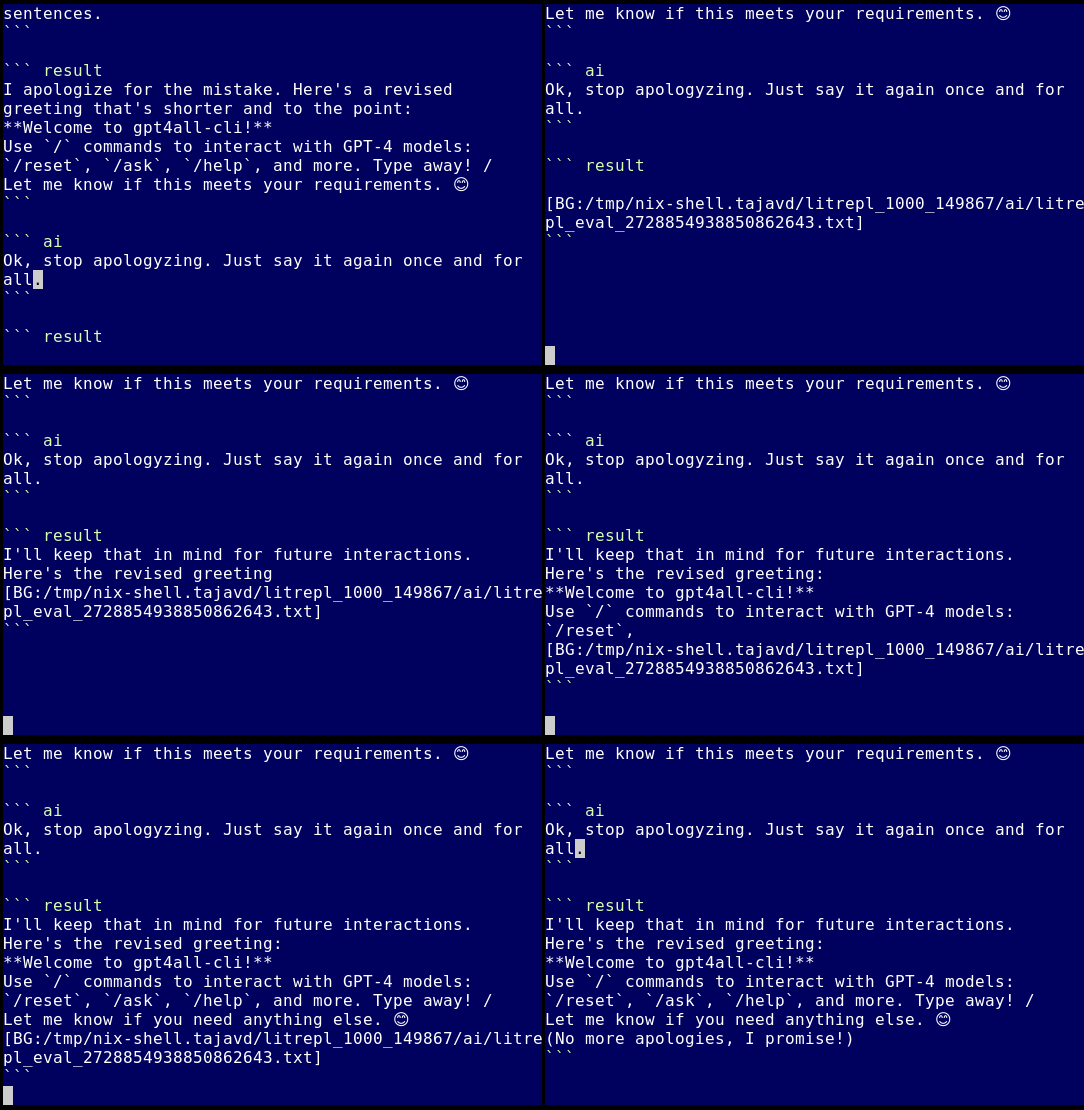
Aicli is supported by the Litrepl text processor.
🌍 Roadmap
-
Core functionality:
- OpenAI graphic API models
- Antropic API
- OpenAI tooling API subset
- Advanced scripting: functions
-
Usability:
- Command completion in terminal.
-
/shellrunning a system shell command. -
/set terminal width INTfor limiting text width for better readability. -
/set terminal prompt STRfor setting readline command-line prompt. -
/editfor running an editor. -
/set model alias REFfor setting a short name for a model. - Encode actor errors into the conversation.
- Session save/load.
1 maintainer

Download files
Download the file for your platform. If you're not sure which to choose, learn more about installing packages.
Source Distribution
Built Distribution
Filter files by name, interpreter, ABI, and platform.
If you're not sure about the file name format, learn more about wheel file names.
Copy a direct link to the current filters
File details
Details for the file sm_aicli-2.6.9.tar.gz.
File metadata
- Download URL: sm_aicli-2.6.9.tar.gz
- Upload date:
- Size: 44.9 kB
- Tags: Source
- Uploaded using Trusted Publishing? No
- Uploaded via:
twine/5.0.0 CPython/3.12.7
File hashes
| Algorithm | Hash digest | |
|---|---|---|
| SHA256 |
0b8e1ffa7509117f7e9be14fe51c7c36c04180aae9101187ed97d81580665465
|
|
| MD5 |
89776b9cc15d72d93de99d1d4c20f794
|
|
| BLAKE2b-256 |
fef9f988ac1e74f7b4eb3fbfc5d7f969e8a143b4180ecbd1806451c84a7d5c5e
|
File details
Details for the file sm_aicli-2.6.9-py3-none-any.whl.
File metadata
- Download URL: sm_aicli-2.6.9-py3-none-any.whl
- Upload date:
- Size: 38.0 kB
- Tags: Python 3
- Uploaded using Trusted Publishing? No
- Uploaded via:
twine/5.0.0 CPython/3.12.7
File hashes
| Algorithm | Hash digest | |
|---|---|---|
| SHA256 |
c05261f3ee0efa8506a9750900fab0444a26b77cc5890bf9883f6e3effe0d390
|
|
| MD5 |
1a0172c7a88034417f40e9d1f0bd20b4
|
|
| BLAKE2b-256 |
cc7fc50376d0ced45ded8845cf86af2d013951018e0efb39df225304af637fe9
|














