
README
SMAH the SMart As Hell SysteM Admin Helper.
Welcome to SMAH the SysteM Admin Helper that just so happens to be SMart As Hell, an early prototype of a suite of tools designed to assist system administrators, data scientists, developers, and power users with system operations.
SMAH helps simplify tasks by providing command generation, pipe processing and other tasks tailored to your background and operating system.
Purpose
SMAH is designed to:
- Generate Commands: Avoid endless searches through documentation. Simply describe what you want to do, and SMAH generates the necessary command and explains its potential impact. SMAH prints suggested commands for you to review and run yourself — it never executes them. You just want to use ffmpeg(tm) to convert a mp4 into a gif.
- Assisted Pipe Generation: Take advantage of SMAH’s ability to assist in generating complex pipes and chaining commands in Unix environments.
- AI-Assisted Monitoring (pending): Set up system monitoring tasks quickly with AI guidance, allowing you to keep track of critical metrics and thresholds without manual configuration.
Key Features
- Interactive Command Generation: SMAH can guide you through setting up environments, managing packages, configuring system services, and more, by generating commands and explaining their implications; you review and run them yourself. And ask questions as it (pending) process your query.
- User Preferences and Personalization: SMAH remembers your preferences for certain tools (e.g., package managers, environment management tools) and uses those to generate optimal commands, saving time and reducing repetitive configuration.
- Print-Only Commands (Safety): For safety, SMAH never runs commands. Each suggested command is printed in a clearly delimited block with an explanation of what it does and its expected impact, ready for you to copy and run yourself. If pyperclip is installed the command is also copied to your clipboard.
- Model Planning/Prompt Planning: A fast model is used to look at a sample of pipe data or your inquiry in order to decide the best output format, runner model, additional instructions nad other details.
Installation
Pip Install
pip install smah
## call smah to begin setup.
smah config
or
Local Build
@see Contributing - Local Build Setup
- git checkout code
- install poetry and python env.
- setup python env (conda, venv, etc.)
- navigate to smah folder and run
poetry install - set SMAH_OPENAI_API_KEY env variable or set key in your smah config file
~/.smah/config.yaml - run smah config
Commands
smah ask "<question>"     one-shot question; piped stdin is the data
smah chat                 interactive session (not implemented yet — exits 2 with a notice)
smah history              list recent sessions
smah resume [ID|--last]   resume a session
smah config [show|path|edit|set]   run setup, or inspect/edit the config (secrets masked)
smah models list          list configured models and defaults
smah doctor               check the installation (config, key presence, models, database)
All older flags (-q, -i, --continue, --session, --history, --interactive,
--configure, --openai-api-key) still work and map to the commands above; each
prints a one-line [deprecation] notice on stderr. They are removed in 0.4.
Examples
Pipe Input Processing
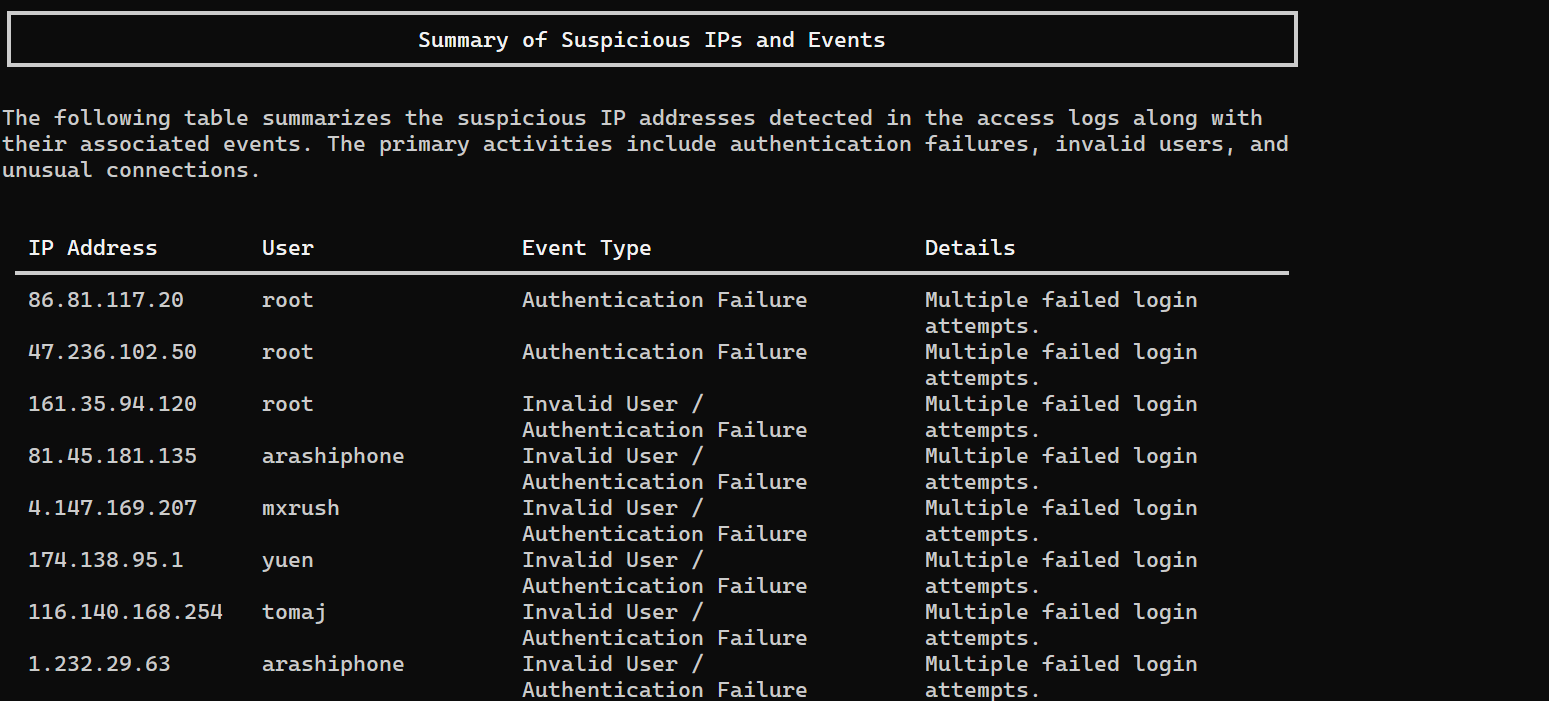
Log Audit to Pipe Output Format
Analyze Access Log Entries
tail -n 500 /var/log/auth.log | smah ask "Analyze these access log entries and output a markdown summary with tables of suspicious ips and events."
System Control Summary
systemctl status | smah ask --instructions ~/SCAN-SYSTEMCTL.md

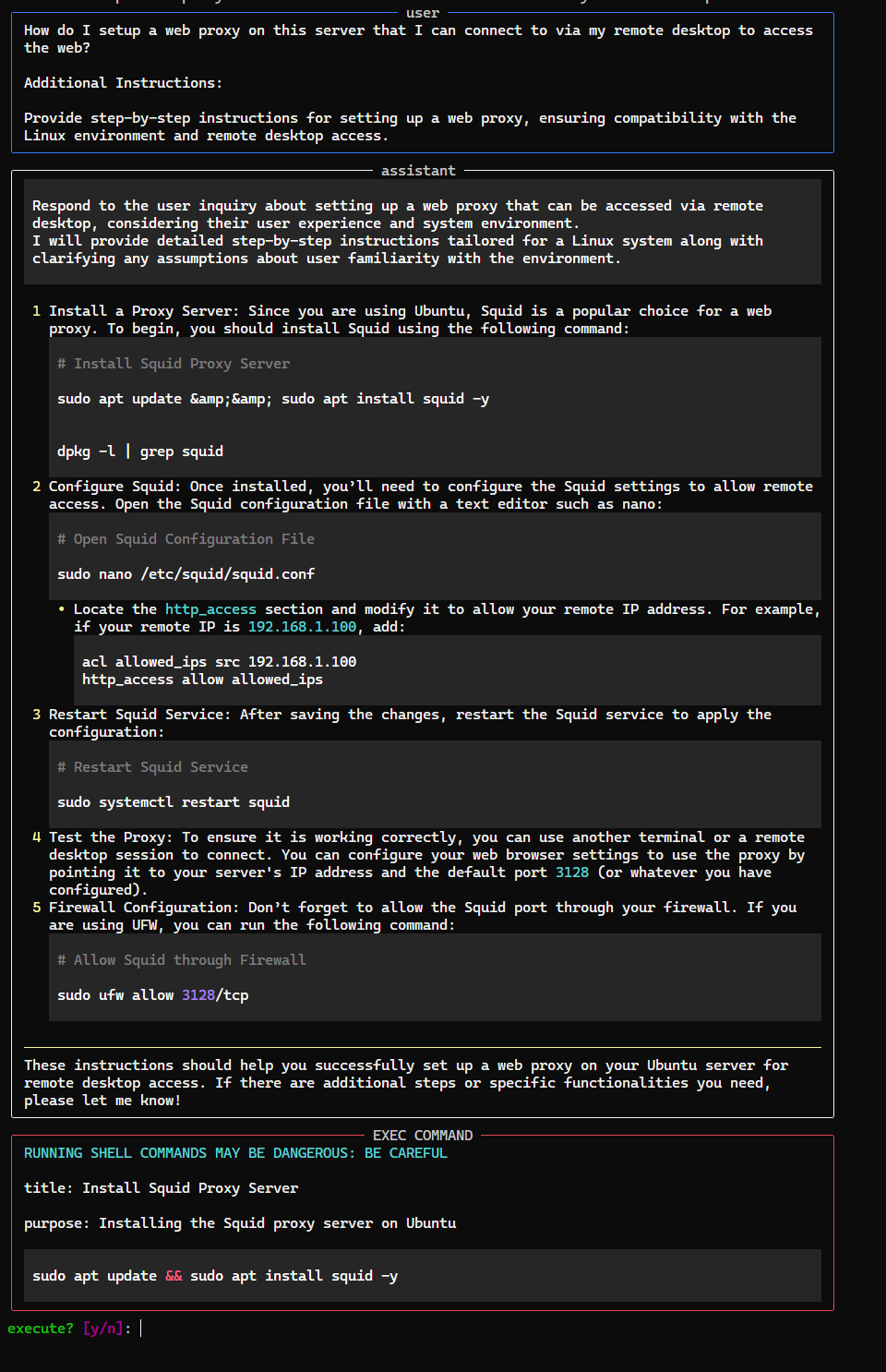
System Task
smah ask "How do I setup a web proxy on this server that I can connect to via my remote desktop to access the web?"
Resume last chat
smah resume --last
Resume recent or (pending) search old conversations to pick up from.
smah history
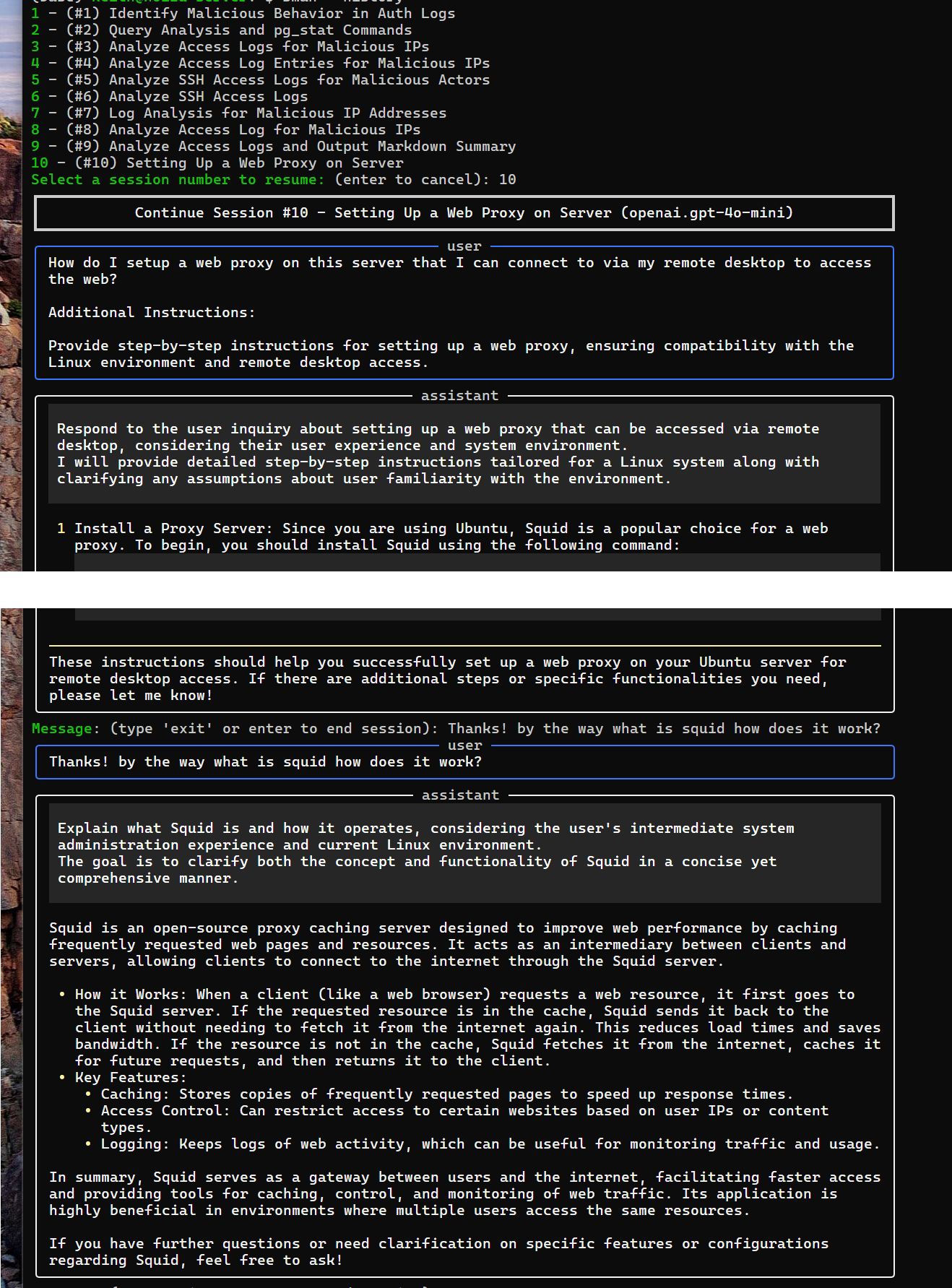
Resume by id.
smah resume ID
Saved Prompt
systemctl status | smah ask --instructions ~/.scan-status.md
Check the installation
smah doctor
See configured models and defaults
smah models list
Print the config with secrets masked
smah config show
Help
usage: smah [<global flags>] <command> [<args>]

SMAH — the sysadmin helper. SMAH does not run commands: it drafts
them, explains them, and hands them off for you to review and run.

options:
  -h, --help            show this help message and exit

global flags:
  -c, --config CONFIG   Config file (default: ~/.smah/config.yaml)
  --database DATABASE   Session database (default: ~/.smah/smah.db)
  -v, --verbose         Repeatable: -v plans, -vv payloads, -vvv settings dump
                        (all output to stderr)
  --model MODEL         Override the model for this run (fully qualified, e.g.
                        openai.gpt-4o-mini)
  --model-query MODEL_QUERY
                        Model used for the query planning stage
  --model-pipe MODEL_PIPE
                        Model used for the pipe planning stage
  --api-key API_KEY     API key for the active provider (else env/config)
  --rich, --no-rich     Force formatting on/off (default: TTY detection)

commands:
  Run 'smah <command> --help' for per-command options and examples.

  <command>
    ask                 Ask a one-shot question (argument or piped stdin)
    chat                Start an interactive session (NOT IMPLEMENTED yet)
    history             List recent sessions
    resume              Resume a saved session (default: most recent)
    config              Run setup, or show/edit the config
    models              List configured models
    doctor              Check the installation and report problems

legacy flags (deprecated — still accepted, notice on stderr):
  -q, --query QUERY     DEPRECATED: prefer 'smah ask "<query>"'
  -i, --instructions INSTRUCTIONS
                        DEPRECATED: prefer 'smah ask --instructions'
  --continue, --no-continue
                        DEPRECATED: prefer 'smah resume' — resume the most
                        recent conversation
  --session SESSION     DEPRECATED: prefer 'smah resume N' — resume a specific
                        conversation by id
  --history, --no-history
                        DEPRECATED: prefer 'smah history' — pick one of the 10
                        most recent conversations to resume
  --interactive, --no-interactive
                        DEPRECATED (NOT IMPLEMENTED): use 'smah chat'
  --configure, --no-configure
                        DEPRECATED: prefer 'smah config' — run the interactive
                        setup wizard
  --openai-api-key OPENAI_API_KEY
                        DEPRECATED: prefer '--api-key' (applies to the active
                        provider)

exit codes:
  0 ok · 2 usage · 3 config · 4 auth or no models · 5 provider

Data & config live under ~/.smah/ — see 'smah doctor' for exact paths.

examples:
  # summarize the tail of an auth log (pipe processing)
  tail -n 500 /var/log/auth.log | smah ask "Analyze these access log entries and output a markdown summary with tables of suspicious ips and events."

  # process piped output using a saved instruction file
  systemctl status | smah ask --instructions ~/SCAN-SYSTEMCTL.md

  # ask a plain question
  smah ask "How do I setup a web proxy on this server that I can connect to via my remote desktop to access the web?"

  # resume your most recent conversation
  smah resume --last
input piping: When stdin is not a terminal its full contents are captured and sent along with the query as the data to process.
Setup
pip install smah
Getting Started
When you run smah for the first time, it will guide you through a setup process to configure the necessary settings. Here is a step-by-step walkthrough of what the first run setup flow looks like:
1. First Run
smah
First Run Setup Flow
On the first run you will be asked about your background, experience, and system details will be extracted or manually provided to reference future requests.
system details will be extracted or manually provided, and the chance to set a optional instruction statement to include in every request.
After completing these steps, your smah tool will be configured and ready to use.
3. Fine Tuning
You can tweak model setting rules/weighthing currently by
manually editing the generated ~/.smah/config.yaml file.
You can try differnt config options out with the --config arg
vsn: 0.0.1
user:
  vsn: 0.0.1
  name: Your Name
  system_admin_experience: Intermediate
  role: Administrator
  about: |
    I prefer detailed responses. I am well versed in biology, mathematics, and software testing and engineering, as well as relational database design and tuning. I am an INTP personality type.
system:
  vsn: 0.0.1
  operating_system:
    type: Linux
    name: posix
    version: '#1 SMP Thu Oct 5 21:02:42 UTC 2023'
    release: 5.15.133.1-microsoft-standard-WSL2
    info:
      vsn: 0.0.1
      kind: Linux
      source: os-release
      details:
        bug-report-url: https://bugs.launchpad.net/ubuntu/
        home-url: https://www.ubuntu.com/
        id: ubuntu
        id-like: debian
        name: Ubuntu
        pretty-name: Ubuntu 22.04.4 LTS
        privacy-policy-url: https://www.ubuntu.com/legal/terms-and-policies/privacy-policy
        support-url: https://help.ubuntu.com/
        ubuntu-codename: jammy
        version: 22.04.4 LTS (Jammy Jellyfish)
        version-codename: jammy
        version-id: '22.04'
    vsn: 0.0.1
inference:
  vsn: 0.0.1
  instructions: null # Optional additional instructions to include in each request.
  model_picker:
    default:
    - anthropic.claude-haiku-5-5
    - openai.gpt-4o-mini
    - openai.gpt-4o
  providers:
    openai:
      name: OpenAI
      description: OpenAI Models
      enabled: true
      vsn: 0.0.1
      settings: {}
      models:
      - name: gpt-4-turbo
        model: gpt-4-turbo
        description: GPT-4 Turbo
        enabled: false
        training_cutoff: 2023-12-01 00:00:00
        license: OpenAI License
        model_type: LLM
        context:
          window: 128000
          out: 4096
        strengths:
        - Highly accurate
        - Fast
        weaknesses:
        - Expensive
        - Multimodal capabilities limited
        modalities:
          text:
            in: true
            out: true
          image:
            in: true
            out: false
        settings: {}
        attributes:
          speed: 5
          reasoning: 5
          planning: 5
          creativity: 5
          conciseness: 5
          coding: 5
        cost:
          million_tokens_in: 10.0
          million_tokens_out: 30.0
        use_cases:
        - name: Code Generation
          score: 0.5
        - name: Text Generation
          score: 0.6
        - name: Translation
          score: 0.5
        - name: Planning
          score: 0.5
        - name: Reasoning
          score: 0.5
        - name: Creativity
          score: 0.5
        - name: Data Analysis
          score: 0.5
        vsn: 0.0.1
## ...
      - name: o1-mini
        model: o1-mini
        description: o1 (mini)
        enabled: false
        training_cutoff: 2023-12-01 00:00:00
        license: OpenAI License
        model_type: LLM
        context:
          window: 128000
          out: 32768
        strengths:
        - Highly accurate
        - Advanced Reasoning
        weaknesses:
        - Expensive
        - Multimodal capabilities limited
        modalities:
          text:
            in: true
            out: true
        settings:
          max_completion_tokens: true
        attributes:
          speed: 5
          reasoning: 7
          planning: 7
          creativity: 4
          conciseness: 7
          coding: 7
        cost:
          million_tokens_in: 3.0
          million_tokens_out: 12.0
        use_cases:
        - name: Code Generation
          score: 0.7
        - name: Text Generation
          score: 0.7
        - name: Translation
          score: 0.7
        - name: Planning
          score: 0.7
        - name: Reasoning
          score: 0.7
        - name: Creativity
          score: 0.4
        - name: Data Analysis
          score: 0.7
        vsn: 0.0.1
Security
Do not pass sensitive data/details to Smah if your LLM will persist/track it, use a (pending) local model instead. Double check exec commands they may have errors and require edits prior to execution.
Future Enhancements
SMAH is in its early alpha stage, and we are actively working on the following enhancements:
- Expanded Command Generation Use Cases: Increase the range of commands that SMAH can generate, including more complex system operations and integrations with additional tools.
- Enhanced AI-Assisted Monitoring: Improve the AI's ability to set up and manage system monitoring tasks, including more advanced metrics and alerting capabilities.
- Interactive Rich Terminal Interface: Develop a terminal-based user interface for managing and interacting with the system, providing a richer user experience.
- Multi-User Support: Implement support for multiple user accounts with shared global configuration options, allowing for seamless management across different users.
- Advanced Security Features: Strengthen security measures, especially when running commands with elevated privileges, and enhance guardrail enforcement.
- Integration with External Tools: Enable integration with other popular tools and services to streamline workflows and improve productivity.
- Data Visualization: Add capabilities for visualizing data trends and analysis results, making it easier to interpret and present findings.
- Automated Reporting: Develop features for generating automated reports based on data analyses, saving time on repetitive tasks.
- Enhanced Logging and Monitoring: Improve the logging and monitoring system to provide more detailed insights and better auditability.
- Secrets Management: Implement secure storage and management of sensitive information, such as API keys and passwords.
1-Year Roadmap
Q1
- Release Beta Version: Transition from alpha to beta, incorporating initial user feedback and stabilizing core features.
- Expand Command Generation: Add support for more complex commands and integrations with additional tools.
- Improve AI-Assisted Monitoring: Enhance the AI's capabilities for setting up and managing system monitoring tasks.
Q2
- Develop Interactive Terminal Interface: Create a rich terminal-based user interface for better user interaction.
- Implement Multi-User Support: Enable support for multiple user accounts with shared global configuration options.
- Strengthen Security Features: Enhance security measures, especially for commands requiring elevated privileges.
Q3
- Integrate with External Tools: Enable seamless integration with other popular tools and services.
- Add Data Visualization: Develop features for visualizing data trends and analysis results.
- Automate Reporting: Implement automated reporting capabilities to save time on repetitive tasks.
Q4
- Enhance Logging and Monitoring: Improve the logging and monitoring system for better insights and auditability.
- Implement Secrets Management: Develop secure storage and management of sensitive information.
- Prepare for General Availability: Finalize features and prepare for a general availability release, ensuring stability and robustness.
Contributing
We welcome contributions to help improve SMAH. Here are some guidelines to get you started:
How to Contribute
Feature Requests, Feedback and Bug Reports
- Use the GitHub issues tracker to report bugs or suggest features.
- Provide as much detail as possible, including steps to reproduce the issue. _ When use user-story style at the openning of feature/change requests.
Bug Fixes and Code Changes
- Fork the Repository: Create a personal fork of the repository on GitHub.
- Create a Feature: Create a new branch for your feature or bugfix.
- Make Changes: Make your changes in the new branch.
- Commit Changes: Use descriptive commit changes orgnanize work, rebase/group related items together for complex multi part changes and split into sub branches/pull requests.
- Make A Pull Request - give details on what you've changed/fixed.
Code Style
- When Possible Follow the existing code style and conventions unless overhauling format/layout only (I suggest asking first.)
- Write clear, concise, and descriptive commit messages.
- Use Type Hints and Doc Tags.
- Ensure your code is well-documented. Consider md and mermaid diagrams for complax/major changes.
Testing
- Write pytests for any new features or bug fixes.
- Ensure all tests pass before submitting a pull request.
Code of Conduct
Be Kind.
License
1 maintainer

Metadata
1 maintainer
Release files for smah 0.2.0
For a detailed explanation of source distributions (sdists) and built distributions (wheels), please see the package formats documentation.
Source distribution (sdist)
| File | Size | Uploaded | Provenance | |
|---|---|---|---|---|
| smah-0.2.0.tar.gz | 68.7 kB | With provenance | Details |
Built distribution (wheel)
| File | Interpreter | ABI | Platform | Reset |
|---|---|---|---|---|
| smah-0.2.0-py3-none-any.whl | Python 3 | none | any | Details |
Total release size: 156.0 kB
Release files / smah-0.2.0.tar.gz
| Download URL | smah-0.2.0.tar.gz |
|---|---|
| Size | 68.7 kB |
| Tags | Source |
|
SHA-256 checksum How to use checksums |
6fc1cf6c43e1b50ab5068580184b9a94edad7af0bce16135ea6d771167f07486
|
|
BLAKE2b-256 checksum How to use checksums |
dafa78755f8e58dbd210b3fb35a8813a6ae1fe369949b2aa63e98e5dbc4cee87
|
| Upload date | |
|
Uploaded using Trusted Publishing? What is trusted publishing? |
Yes |
| Uploaded via |
twine/7.0.0 CPython/3.13.14
|
Provenance
Provenance describes where a file came from. On PyPI, provenance is shared via attestations, which provide a verifiable record of the build or publishing details. View details, limitations and caveats.


PyPI Publish Attestation
PyPI verified that this artifact, at this checksum, originated from the publisher listed below.
Signed by GitHub Actions, verified by PyPI on Oct 11, 2026.
Transparency logRelease files / smah-0.2.0-py3-none-any.whl
| Download URL | smah-0.2.0-py3-none-any.whl |
|---|---|
| Size | 87.3 kB |
| Tags | Python 3 |
|
SHA-256 checksum How to use checksums |
1a46345f8f78e385380902fdb6f9c662d5308a3b53560d2d8a6dfa01db1e3719
|
|
BLAKE2b-256 checksum How to use checksums |
af3108ca78cb65eebc9ed9844625f9cf7aff85a9b37559e33b84d8d3b5950de8
|
| Upload date | |
|
Uploaded using Trusted Publishing? What is trusted publishing? |
Yes |
| Uploaded via |
twine/7.0.0 CPython/3.13.14
|
Provenance
Provenance describes where a file came from. On PyPI, provenance is shared via attestations, which provide a verifiable record of the build or publishing details. View details, limitations and caveats.
PyPI Publish Attestation
PyPI verified that this artifact, at this checksum, originated from the publisher listed below.
Signed by GitHub Actions, verified by PyPI on Oct 11, 2026.
Transparency logSecurity for smah 0.2.0
Provenance
Provenance describes where a file came from. On PyPI, provenance is shared via attestations, which provide a verifiable record of the build or publishing details. View details, limitations and caveats.
Full provenance
All 2 files in this release have been uploaded with provenance metadata.
Attestation for smah-0.2.0.tar.gz
PyPI Publish Attestation
PyPI verified that this artifact, at this checksum, originated from the publisher listed below.
Signed by GitHub Actions, verified by PyPI on Oct 11, 2026.
Transparency logA note on package security
PyPI is a repository for distributing packages, not a service for auditing them. While third-party security researchers and our staff do their best to detect and remove malicious packages, PyPI cannot guarantee the quality, security or suitability of any given package.
To learn more about protecting yourself from malicious actors, visit our package security documentation.














