
Smart Cloud Tag
Automatically tag cloud files across AWS, Azure, and Google Cloud with the least amount of effort.
Use Case
smart-cloud-tag is a multi-cloud tagging solution that automatically applies tags to objects in batch across AWS S3, Azure Blob Storage, and Google Cloud Storage using LLMs (GenAI). It provides end-to-end automation, from reading file content to applying tags. As expected, LLMs do a great job in predicting tags. This tool eradicates the need to manually go through files one by one to add metadata to them, or to build your own custom solution. Now the work you would need to do to tag several objects in the cloud of your choice, would take less time and effort than making your morning cup of coffee.
Architecture
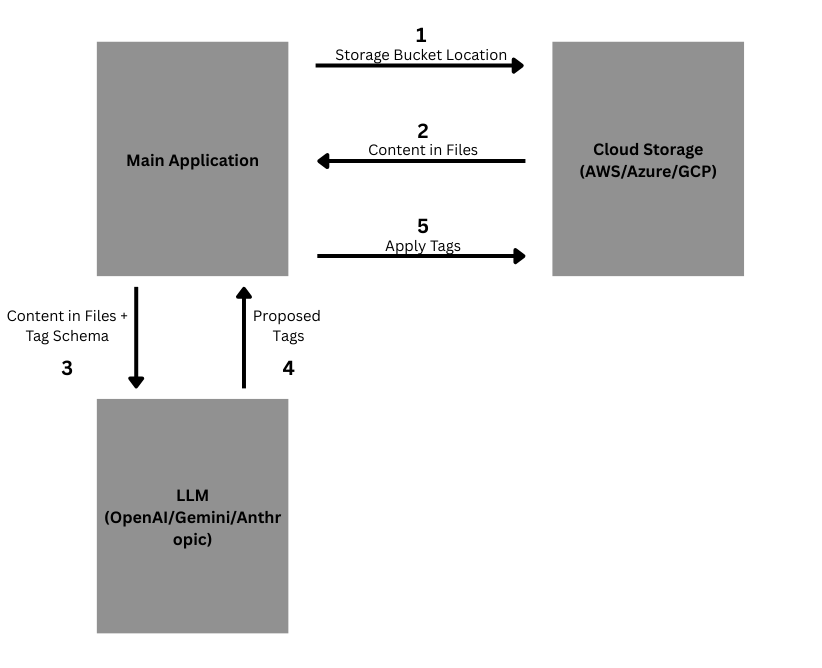
Features
- Multi-Cloud Support: AWS S3, Azure Blob Storage, Google Cloud Storage
- AI-Powered: Uses OpenAI, Anthropic Claude, or Google Gemini for intelligent tagging
- File Type Support: Currently supports .txt, .json, .csv, and .md files
- Simple & Flexible: Designed to work out-of-the-box while remaining flexible for custom requirements
- Auto-Detection: Automatically detects storage provider from URI prefix
- Batch Processing: Process multiple files with one command
- Preview Mode: Preview tags before applying them (optional)
- Custom Prompts: Ability to use your own custom LLM prompt templates (optional)
Quick Start
Installation
Basic Installation
pip install smart_cloud_tag
Note: Basic installation includes AWS S3 and OpenAI support. For other cloud providers or LLM providers, use the optional dependencies below.
Installation with Optional Dependencies
You can install additional dependencies based on your needs:
# Install with all optional dependencies (recommended)
pip install smart_cloud_tag[all]

# Install with specific cloud providers
pip install smart_cloud_tag[aws]      # AWS S3 (included by default)
pip install smart_cloud_tag[azure]    # Azure Blob Storage
pip install smart_cloud_tag[gcp]      # Google Cloud Storage

# Install with specific LLM providers
pip install smart_cloud_tag[openai]   # OpenAI (included by default)
pip install smart_cloud_tag[anthropic] # Anthropic Claude
pip install smart_cloud_tag[gemini]   # Google Gemini

# Combine multiple options
pip install smart_cloud_tag[azure,anthropic]  # Azure + Anthropic
pip install smart_cloud_tag[gcp,gemini]       # GCP + Gemini
Installation Options:
[all]- Installs all optional dependencies (all cloud providers + LLM providers)[aws]- AWS S3 support (included by default)[azure]- Azure Blob Storage support[gcp]- Google Cloud Storage support[openai]- OpenAI LLM support (included by default)[anthropic]- Anthropic Claude LLM support[gemini]- Google Gemini LLM support[dev]- Development dependencies (testing, linting, formatting)
Basic Usage
from smart_cloud_tag import SmartCloudTagger

# Initialize the tagger
tagger = SmartCloudTagger(
    storage_uri="az://telehealthcanada",  # target bucket location
    tags={
        "protected_health_information": ["T", "F"],  # allowed values are T/F
        "document_type": ["chat_transcript", "lab_summary", "claim"],
    },  # tag schema
)

# Preview tags before applying (optional)
preview_result = tagger.preview_tags()
print(f"Preview: {preview_result.summary}")

# Apply tags
result = tagger.apply_tags()
print(f"Applied tags to {result.summary['applied']} objects")
Configuration
Environment Variables
Create a .env file:
# LLM Provider API Key (used for all providers)
API_KEY=your_api_key_here

# AWS (if using S3)
AWS_ACCESS_KEY_ID=your_access_key
AWS_SECRET_ACCESS_KEY=your_secret_key
AWS_REGION=us-east-1

# Azure (if using Blob Storage)
AZURE_STORAGE_CONNECTION_STRING=your_connection_string

# Google Cloud (if using GCS)
GOOGLE_APPLICATION_CREDENTIALS=path/to/service-account.json
Supported Storage Providers
| Provider | URI Format | Example |
|---|---|---|
| AWS S3 | s3://bucket |
s3://my-documents |
| Azure Blob | az://container |
az://documents |
| Google Cloud | gs://bucket |
gs://my-files |
Supported LLM Providers
| Provider | Default Model | Environment Variable |
|---|---|---|
| OpenAI | gpt-5 |
API_KEY |
| Anthropic | claude-3-opus-4.1 |
API_KEY |
| Google Gemini | gemini-1.5-pro |
API_KEY |
Advanced Usage
SmartCloudTagger Parameters
| Parameter | Type | Required | Default | Description |
|---|---|---|---|---|
storage_uri |
str |
Yes | - | Storage location URI (s3://, az://, or gs://) |
tags |
Dict[str, Optional[List[str]]] |
Yes | - | Tag schema with keys and allowed values. If allowed values are missing for a key, LLM will deduce appropriate values |
llm_model |
str |
No | Provider-specific | LLM model to use (see supported models below) |
llm_provider |
str |
No | "openai" |
LLM provider: "openai", "anthropic", or "gemini" |
max_bytes |
Optional[int] |
No | 5000 |
Maximum bytes to read from each object/file |
custom_prompt_template |
Optional[str] |
No | config.py |
Custom prompt template. Must include placeholders: {content}, {filename}, {tags} (see config.py for default) |
Default Models by Provider
| Provider | Default Model |
|---|---|
| OpenAI | gpt-5 |
| Anthropic | claude-3-opus-4.1 |
| Google Gemini | gemini-1.5-pro |
Different LLM Providers
# Using Anthropic Claude
tagger = SmartCloudTagger(
    storage_uri="s3://my-bucket",
    tags=tags,
    llm_provider="anthropic"
)

# Using Google Gemini
tagger = SmartCloudTagger(
    storage_uri="s3://my-bucket",
    tags=tags,
    llm_provider="gemini"
)
Development
Installation from Source
git clone https://github.com/yourusername/smart_cloud_tag.git
cd smart_cloud_tag
pip install -e ".[all]"
Note: Use quotes around ".[all]" to prevent shell expansion issues in zsh and other shells.
Running Tests
python -m pytest tests/
License
MIT License - see LICENSE file for details.
Support
- 📧 Email: dawarwaqar71@gmail.com
- 🐛 Issues: GitHub Issues
1 maintainer

Release files for smart-cloud-tag 0.1.2
For a detailed explanation of source distributions (sdists) and built distributions (wheels), please see the package formats documentation.
Source distribution (sdist)
| File | Size | Uploaded | |
|---|---|---|---|
| smart_cloud_tag-0.1.2.tar.gz | 118.0 kB | Details |
Built distribution (wheel)
| File | Interpreter | ABI | Platform | Reset |
|---|---|---|---|---|
| smart_cloud_tag-0.1.2-py3-none-any.whl | Python 3 | none | any | Details |
Total release size: 139.5 kB
Release files / smart_cloud_tag-0.1.2.tar.gz
| Download URL | smart_cloud_tag-0.1.2.tar.gz |
|---|---|
| Size | 118.0 kB |
| Tags | Source |
|
SHA-256 checksum How to use checksums |
5060a98c626fa2d30f53386a5d6f7be1221e6347197543cc93f3f534e07db65b
|
|
BLAKE2b-256 checksum How to use checksums |
3302ab2287364ddf09924abe943ceecc2e2e50ef5c88d53726dcea6cd21473cd
|
| Upload date | |
|
Uploaded using Trusted Publishing? What is trusted publishing? |
No |
| Uploaded via |
twine/6.1.0 CPython/3.11.5
|
Release files / smart_cloud_tag-0.1.2-py3-none-any.whl
| Download URL | smart_cloud_tag-0.1.2-py3-none-any.whl |
|---|---|
| Size | 21.6 kB |
| Tags | Python 3 |
|
SHA-256 checksum How to use checksums |
1044f94da3f991366b2df85a9f6f37ce510afbd0a7ed055a42e672d6bdc7b1c0
|
|
BLAKE2b-256 checksum How to use checksums |
4c80045d1298d99fafd2e578963e795f6c5067e5bdf09dfe0f3c290f45147465
|
| Upload date | |
|
Uploaded using Trusted Publishing? What is trusted publishing? |
No |
| Uploaded via |
twine/6.1.0 CPython/3.11.5
|














