
Smart RDS Viewer
Your terminal companion for monitoring Amazon RDS instances with real-time data, pricing, and interactive insights!

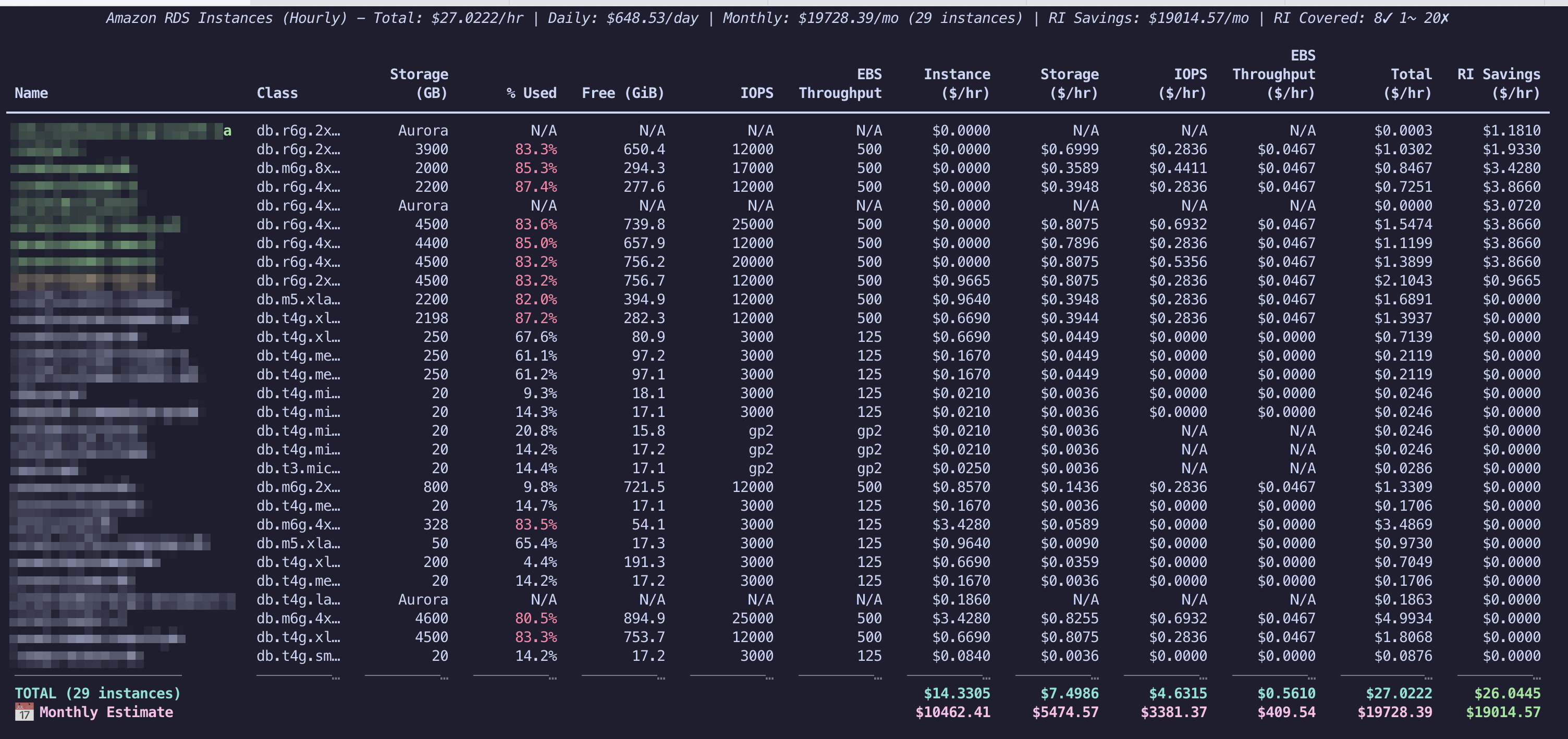
A powerful, full-screen terminal CLI that fetches and displays all your Amazon RDS instances with live metrics, pricing, and interactive sorting - all from the comfort of your terminal.

✨ Features
- 🔧 Backup & Maintenance View: Complete operational monitoring with backup windows, retention policies, and maintenance schedules
- 🎯 Smart Column Sorting: Intuitive 1-9 then a-z shortcuts with visual indicators for active sort column and direction
- 🎨 Visual Sort Feedback: Colorful underlines and directional arrows show exactly what's being sorted and how
- 📏 Dynamic Responsive Design: Adaptive column widths that automatically optimize for your terminal size
- 🕐 Intelligent Time Handling: Local timezone conversion and chronological sorting for time-based columns
- ⚡ Enhanced Performance: Optimized sorting algorithms for numeric, time-based, and special value handling
✨ Core Features
🔍 Real-time Data Fetching
- RDS Metadata: Fetches all RDS instances using
boto3 - CloudWatch Metrics: Live storage usage from CloudWatch APIs
- Live Pricing: On-demand hourly and monthly pricing from AWS Pricing API
- Smart Caching: 24-hour pricing cache in
/tmpfor faster subsequent runs
📊 Rich Interactive Table
- Full-screen Terminal: Professional full-screen interface like
eks-node-viewer - Comprehensive Columns: 12+ metrics including all pricing components
- Smart Highlighting: Targeted red highlighting for storage issues (≥80% usage)
- Multi-AZ Support: 👥 indicators with accurate 2x pricing for Multi-AZ instances
- Aurora Compatible: Special handling for Aurora instances and pricing
- Real-time Updates: Live data refresh with loading spinners
🎮 Interactive Controls
- Intuitive Shortcuts: Simple 1-9 then a-z keys for column sorting (1=Name, 2=Class, etc.)
- Visual Sort Indicators: Colorful underlines and arrows (↑↓) show active sort column and direction
- Smart Sorting: Toggle ascending/descending with same key, handles time-based and numeric data intelligently
- Multi-View Interface: Three integrated views accessible via keyboard shortcuts
- Pricing View (
V): Cost analysis with hourly/monthly toggle - Backup & Maintenance View (
B): Backup windows, retention, maintenance schedules - RI Utilization View (
R): Reserved Instance coverage and utilization
- Pricing View (
- Dynamic Spacing: Responsive column widths that adapt to terminal size
- Pricing Toggle: Press
mto switch between hourly and monthly cost views - Help System: Press
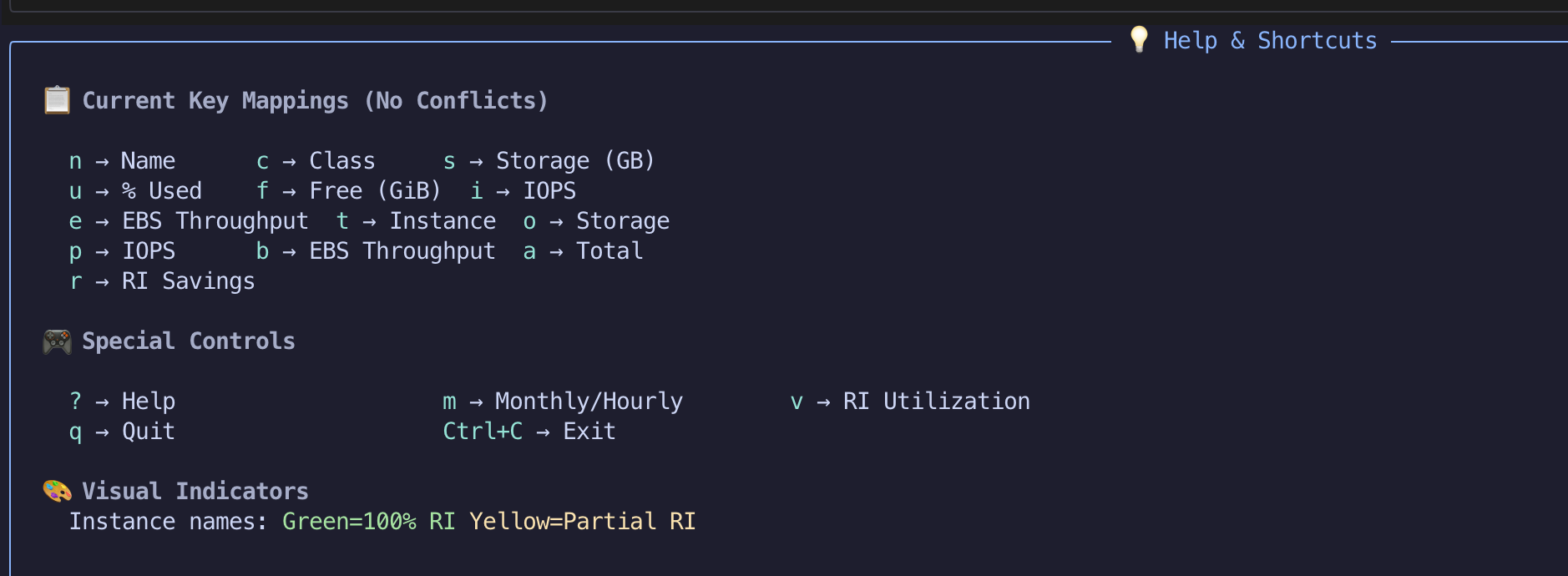
?for interactive help overlay with context-aware shortcuts - Clean Exit:
qorCtrl+Cto exit with terminal cleanup - Arrow Key Navigation: Use
←/→orTab/Shift+Tabfor seamless view cycling
📈 Comprehensive Metrics
- Instance Details: Name, class, Multi-AZ indicators (👥)
- Storage Analytics: Used percentage, free space in GiB
- Performance: IOPS, EBS throughput (with GP2/GP3 awareness)
- Complete Cost Breakdown: Instance, Storage, IOPS, and EBS Throughput pricing
- Flexible Cost Views: Toggle between hourly and monthly pricing with daily/monthly estimates
- Backup & Maintenance: Backup windows, retention periods, maintenance schedules with local timezone display
- Operational Insights: Next maintenance timing, pending actions, and maintenance urgency indicators
💰 Reserved Instance (RI) Analysis
- Comprehensive RI Support: Automatic RI discovery with size flexibility matching
- Cost Optimization: Real-time coverage analysis and savings calculations
- Visual Indicators: Color-coded instance names based on RI coverage
📖 Detailed RI Documentation: See docs/RESERVED-INSTANCES.md for complete RI feature documentation, size flexibility algorithms, and implementation details.
🛠️ Installation
Prerequisites
- Python 3.8+
- AWS credentials configured (environment variables or IAM profile)
- Required AWS permissions for RDS, CloudWatch, Pricing, and Reserved Instance APIs
AWS Configuration
Set your AWS profile and region (recommended):
export AWS_PROFILE=your-profile-name
export AWS_REGION=your-region  # e.g., us-east-1, ap-south-1
Required AWS Permissions:
rds:DescribeDBInstances- Fetch RDS instance metadatards:DescribeReservedDBInstances- Reserved Instance informationrds:DescribePendingMaintenanceActions- Maintenance and backup informationcloudwatch:GetMetricStatistics- Storage usage metricspricing:GetProducts- Live pricing data
Quick Start
Option 1: Install via pip (Recommended)
# Install the package
pip install smart-rds-viewer

# Run the viewer
smart-rds-viewer
Option 2: Development/Local Installation
# Clone and setup
git clone <your-repo>
cd smart-rds-viewer

# Create virtual environment
python3 -m venv venv
source venv/bin/activate  # On Windows: venv\Scripts\activate

# Install in development mode
pip install -e .

# Run the viewer
smart-rds-viewer
Option 3: Run as Python Script
# Clone and setup
git clone <your-repo>
cd smart-rds-viewer

# Create virtual environment
python3 -m venv venv
source venv/bin/activate  # On Windows: venv\Scripts\activate

# Install dependencies
pip install -r requirements.txt

# Run the viewer
python rds_viewer.py
🎯 Usage
Basic Usage
# Standard run
smart-rds-viewer

# Alternative command (shorter)
rds-viewer

# Check version
smart-rds-viewer --version

# Force fresh pricing data (bypass cache)
smart-rds-viewer --nocache

# Legacy method (if running from source)
python rds_viewer.py --nocache
Interactive Controls
- Column Sorting: Press number keys (1-9) then letters (a-z) to sort by any column
- Visual Feedback: Active sort column shows colorful underline and direction arrows (↑↓)
- View Navigation:
Shift+V- Pricing View (main cost analysis)Shift+B- Backup & Maintenance ViewShift+R- Reserved Instance Utilization View
- Pricing Toggle: Press
mto switch between hourly and monthly costs - Help: Press
?to toggle context-aware help overlay - Quit: Press
qorCtrl+Cto exit
Column Shortcuts (Consistent across all views)
Pricing View
| Key | Column | Description |
|---|---|---|
1 |
Name | Instance identifier (👥 = Multi-AZ) |
2 |
Class | Instance type (db.r5.large, etc.) |
3 |
Storage (GB) | Allocated storage |
4 |
% Used | Storage utilization percentage |
5 |
Free (GiB) | Available storage space |
6 |
IOPS | Provisioned IOPS |
7 |
EBS Throughput | Storage throughput (MB/s) |
8 |
Instance ($/hr or $/mo) | Instance pricing (toggles with m) |
9 |
Storage ($/hr or $/mo) | Storage pricing (toggles with m) |
a |
IOPS ($/hr or $/mo) | IOPS pricing (toggles with m) |
b |
EBS Throughput ($/hr or $/mo) | Throughput pricing (toggles with m) |
c |
Total ($/hr or $/mo) | Total cost (toggles with m) |
Backup & Maintenance View
| Key | Column | Description |
|---|---|---|
1 |
Name | Instance identifier (👥 = Multi-AZ) |
2 |
Class | Instance type |
3 |
Engine | Database engine (MySQL, PostgreSQL) |
4 |
Storage | Allocated storage |
5 |
Backup Window | Daily backup time window (local TZ) |
6 |
Retention | Backup retention period (days) |
7 |
Maintenance Window | Weekly maintenance window (local TZ) |
8 |
Next | Next maintenance timing |
9 |
Pending Actions | Pending maintenance actions |
Special Controls
| Key | Function | Description |
|---|---|---|
m |
Pricing Toggle | Switch between hourly/monthly view |
Shift+V |
Pricing View | Go to main pricing/cost view |
Shift+B |
Backup View | Go to backup & maintenance view |
Shift+R |
RI View | Go to Reserved Instance view |
? |
Help | Show/hide interactive help overlay |
q |
Quit | Exit application |
Navigation Controls
| Key | Function | Description |
|---|---|---|
← |
Previous Tab | Cycle to previous view (infinite) |
→ |
Next Tab | Cycle to next view (infinite) |
Tab |
Cycle Forward | Navigate between views sequentially |
Shift+Tab |
Cycle Backward | Navigate between views in reverse |
Visual Indicators
- 🔵 Cyan Underline ↑: Column sorted ascending
- 🟣 Magenta Underline ↓: Column sorted descending
- 👥: Multi-AZ instance (2x pricing)
- 🟢 Green: Low urgency maintenance (>7 days)
- 🟡 Yellow: Medium urgency maintenance (1-7 days)
- 🔴 Red: High urgency maintenance (overdue/today)
🔧 Technical Details
Architecture
- Modular Design: Separate modules for fetching, metrics, pricing, and UI
- Error Handling: Graceful fallbacks for API failures
- Caching: Smart pricing cache with 24-hour expiration
- Full-screen UI: Rich-based terminal interface
AWS APIs Used
- RDS:
describe_db_instancesfor metadata,describe_reserved_db_instancesfor RI data,describe_pending_maintenance_actionsfor maintenance info - CloudWatch:
get_metric_statisticsfor storage metrics - Pricing:
get_productsfor live pricing data
Cache System
- Location:
/tmp/rds_pricing_cache.json - Duration: 24 hours
- Auto-refresh: Expired cache triggers fresh API calls
- Manual override: Use
--nocacheflag to force fresh data - Error Recovery: Corrupted cache falls back to API
🤖 Built with AI Assistance
This tool was collaboratively developed with the help of Claude Sonnet 4, an AI coding assistant. The development process involved:
- Architecture Design: Modular structure with separate modules for different concerns
- Feature Implementation: Real-time data fetching, caching, interactive UI
- Problem Solving: Debugging pricing API issues, fixing cache serialization
- User Experience: Full-screen terminal interface, dynamic shortcuts, help system
- Documentation: Comprehensive README with all features and future roadmap
The AI assistant helped transform a simple concept into a comprehensive, production-ready RDS monitoring tool with advanced features like smart caching, interactive sorting, and professional terminal UI.
📁 Project Structure
The project follows a modular architecture with separate modules for different concerns:
- Core modules:
rds_viewer.py,ui.py,fetch.py,metrics.py,pricing.py - Documentation: Comprehensive docs in
docs/directory - Development tools: Debug scripts in
scripts/and performance benchmarks inbenchmarks/
📖 Performance Details: See docs/BENCHMARKING.md for detailed performance optimizations, benchmarking results, and optimization techniques.
🛠️ Development & Contributing
The project includes comprehensive development tools and documentation:
- Debug Tools: Pricing analysis and debugging scripts in
scripts/directory - Performance Testing: Benchmarking tools in
benchmarks/directory - Development Setup: Complete setup instructions and guidelines
📖 Development Documentation:
- CONTRIBUTING.md - Contribution guidelines and development setup
- docs/BENCHMARKING.md - Performance testing and optimization
- docs/PUBLISHING.md - PyPI publishing workflow
- SECURITY.md - Security policy and vulnerability reporting
📦 Publishing to PyPI
For maintainers: To publish this package to PyPI, see the detailed publishing guide in docs/PUBLISHING.md with complete workflows, testing procedures, and troubleshooting tips.
🤝 Contributing
We welcome contributions! Please see CONTRIBUTING.md for detailed guidelines on development setup, code standards, and contribution workflows.
📄 License
This project is licensed under the MIT License - see the LICENSE file for details.
🙏 Acknowledgments
- Built with Rich for beautiful terminal UI
- Powered by boto3 for AWS integration
- Inspired by modern CLI tools like
eks-node-viewer - AI Development Partner: Claude Sonnet 4 for collaborative coding and problem-solving
- @sachincool for the cool logo 🫡
- @kutumbtech for everything 🙏
Happy RDS monitoring! 🎉
Your terminal is now your RDS command center!
1 maintainer

Metadata
1 maintainer
Release files for smart-rds-viewer 0.1.22
For a detailed explanation of source distributions (sdists) and built distributions (wheels), please see the package formats documentation.
Source distribution (sdist)
| File | Size | Uploaded | |
|---|---|---|---|
| smart_rds_viewer-0.1.22.tar.gz | 44.7 kB | Details |
Built distribution (wheel)
| File | Interpreter | ABI | Platform | Reset |
|---|---|---|---|---|
| smart_rds_viewer-0.1.22-py3-none-any.whl | Python 3 | none | any | Details |
Total release size: 86.8 kB
Release files / smart_rds_viewer-0.1.22.tar.gz
| Download URL | smart_rds_viewer-0.1.22.tar.gz |
|---|---|
| Size | 44.7 kB |
| Tags | Source |
|
SHA-256 checksum How to use checksums |
e2929c5eabe0ba9f1b0645ef248b1aaaac31606bccac760f76410d1c41ea7994
|
|
BLAKE2b-256 checksum How to use checksums |
0fec698055c6d88c679829f419f51d48daf4129a77cd3a7c2c536baeb067ae77
|
| Upload date | |
|
Uploaded using Trusted Publishing? What is trusted publishing? |
Yes |
| Uploaded via |
twine/6.1.0 CPython/3.12.9
|
Provenance
Provenance describes where a file came from. On PyPI, provenance is shared via attestations, which provide a verifiable record of the build or publishing details. View details, limitations and caveats.


PyPI Publish Attestation
PyPI verified that this artifact, at this checksum, originated from the publisher listed below.
Signed by GitHub Actions, verified by PyPI on Aug 11, 2025.
Transparency logRelease files / smart_rds_viewer-0.1.22-py3-none-any.whl
| Download URL | smart_rds_viewer-0.1.22-py3-none-any.whl |
|---|---|
| Size | 42.1 kB |
| Tags | Python 3 |
|
SHA-256 checksum How to use checksums |
8ce3d2e66e6ba4e0bf452e97ccd134b94efc1d830d04df606e1875728601a4bd
|
|
BLAKE2b-256 checksum How to use checksums |
a1589f4010c44d1d094f0a251145547b13f0273371678e4cdcb93e61894d5f76
|
| Upload date | |
|
Uploaded using Trusted Publishing? What is trusted publishing? |
Yes |
| Uploaded via |
twine/6.1.0 CPython/3.12.9
|
Provenance
Provenance describes where a file came from. On PyPI, provenance is shared via attestations, which provide a verifiable record of the build or publishing details. View details, limitations and caveats.
PyPI Publish Attestation
PyPI verified that this artifact, at this checksum, originated from the publisher listed below.
Signed by GitHub Actions, verified by PyPI on Aug 11, 2025.
Transparency log













