
Smart-Shell





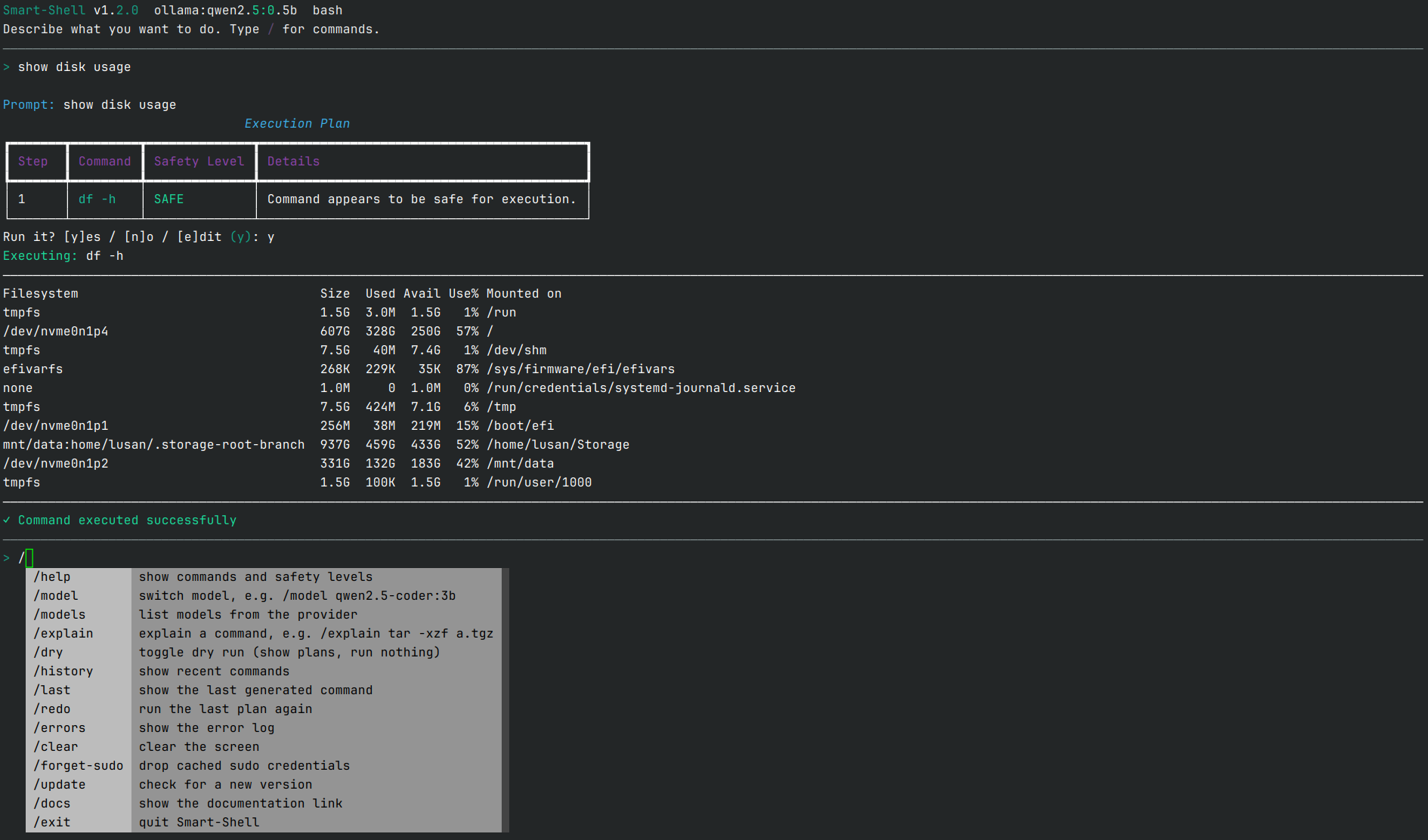
Smart-Shell turns plain English into Bash or Zsh commands, checks them for risk, and runs them after you confirm. It runs on a local AI model through Ollama or LM Studio, fully offline with no API key, or on any OpenAI-compatible API: Gemini, OpenAI, DeepSeek, OpenRouter, Groq.
Features
- Natural language to commands for Bash and Zsh, with the shell detected automatically.
- Local AI first. Ollama or LM Studio: no API key, nothing leaves your machine.
- Or any OpenAI-compatible API. Presets for gemini, openai, deepseek, openrouter and groq, plus
customfor any base URL. - Safety checks on every command: blocked, high, medium, info_leak and safe. Blocked commands never run; everything else asks yes / no / edit first.
- Fix on failure. If a command fails, ask the AI to fix it using the error output.
- Multi-step plans run in one shell, joined with
&&, stopping at the first failure, with live output. - Dry-run mode (
--dry-run) to preview without executing. - Interactive prompt like Claude Code or Gemini CLI:
/command menu with completion, status bar, multi-line input and searchable history. - Modes (Shift+Tab):
ask,auto(read-only plans run on their own;sudo,rm, file writes and anything else still ask) andplan(show only). - Notifications when it's waiting for you, including a desktop notification in Konsole and other terminals.
- No stored sudo password.
sudoprompts in your terminal as usual. - Self-update with
/update, a desktop entry, and Bash/Zsh tab completion from the installer.
Install
pipx install smart-shell-cli # or: uv tool install smart-shell-cli
Or use the install script, which picks uv or pipx for you and also adds tab completion and a desktop entry:
curl -sSL https://raw.githubusercontent.com/Lusan-sapkota/smart-shell/main/install.sh | bash
Then:
smart-shell setup   # pick a provider, enter a key if needed, choose a default model
smart-shell         # start the interactive shell
smart-shell "find files over 100MB in my home folder" --dry-run
To run fully offline with a local model, see Using local models (Ollama). For a manual or development install, see Development.
Uninstall
pipx uninstall smart-shell-cli    # or: uv tool uninstall smart-shell-cli
rm -rf ~/.config/smart-shell ~/.local/share/smart-shell   # optional: config and history
If you used the install script, remove its completion and desktop entry too:
curl -sSL https://raw.githubusercontent.com/Lusan-sapkota/smart-shell/main/install.sh | bash -s -- --uninstall
Details in Uninstall.
Documentation
- Features
- Installation
- Usage
- Safety
- Uninstall
- Development
- API Reference
- FAQ
- Changelog
- Future Changes
- Contributing
- Author
Full documentation: smart-shell.lusansapkota.com.np.
License
Apache 2.0. See LICENSE.
Author
Created by Lusan Sapkota.
Disclaimer
Smart-Shell is an AI assistant and can generate wrong or unsafe commands. Always read a command before you confirm it, especially anything that modifies the system or touches sensitive data.
1 maintainer

Metadata
1 maintainer
Release files for smart-shell-cli 1.2.0
For a detailed explanation of source distributions (sdists) and built distributions (wheels), please see the package formats documentation.
Source distribution (sdist)
| File | Size | Uploaded | |
|---|---|---|---|
| smart_shell_cli-1.2.0.tar.gz | 39.2 kB | Details |
Built distribution (wheel)
| File | Interpreter | ABI | Platform | Reset |
|---|---|---|---|---|
| smart_shell_cli-1.2.0-py3-none-any.whl | Python 3 | none | any | Details |
Total release size: 74.7 kB
Release files / smart_shell_cli-1.2.0.tar.gz
| Download URL | smart_shell_cli-1.2.0.tar.gz |
|---|---|
| Size | 39.2 kB |
| Tags | Source |
|
SHA-256 checksum How to use checksums |
dc16942c855461c8ea338adad68edfa2a6ec8a7182d671cfae16c4e08d6c0083
|
|
BLAKE2b-256 checksum How to use checksums |
5eab557de1e6abc50793591dcf7fc618b8b82a3ce295a7e95394b448c2a33557
|
| Upload date | |
|
Uploaded using Trusted Publishing? What is trusted publishing? |
Yes |
| Uploaded via |
twine/7.0.0 CPython/3.13.14
|
Provenance
Provenance describes where a file came from. On PyPI, provenance is shared via attestations, which provide a verifiable record of the build or publishing details. View details, limitations and caveats.


PyPI Publish Attestation
PyPI verified that this artifact, at this checksum, originated from the publisher listed below.
Signed by GitHub Actions, verified by PyPI on Oct 17, 2026.
Transparency logRelease files / smart_shell_cli-1.2.0-py3-none-any.whl
| Download URL | smart_shell_cli-1.2.0-py3-none-any.whl |
|---|---|
| Size | 35.5 kB |
| Tags | Python 3 |
|
SHA-256 checksum How to use checksums |
c3c07ab04de31c93ab1c7e109a9f44577352b97bcd0bacd10bb0bb9ad384c3cd
|
|
BLAKE2b-256 checksum How to use checksums |
92b57cf650ae851ee88c5bc67258a053f15e092da8b3fa55815cabf6993568f1
|
| Upload date | |
|
Uploaded using Trusted Publishing? What is trusted publishing? |
Yes |
| Uploaded via |
twine/7.0.0 CPython/3.13.14
|
Provenance
Provenance describes where a file came from. On PyPI, provenance is shared via attestations, which provide a verifiable record of the build or publishing details. View details, limitations and caveats.
PyPI Publish Attestation
PyPI verified that this artifact, at this checksum, originated from the publisher listed below.
Signed by GitHub Actions, verified by PyPI on Oct 17, 2026.
Transparency log













