
This release is a pre-release and may not be stable for production use.
smart-tv-telegram 
 Docker
A Telegram Bot to stream content on your smart TV (also Chromecast, FireTV and other UPnP device)
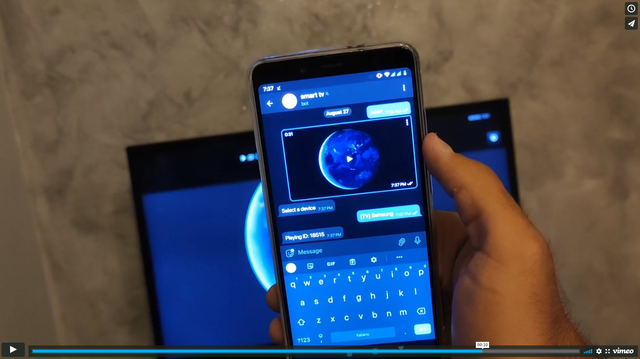
Demonstration video
Feature
- Streaming, the bot will not have to download the entire file before playing it on your device
- You can play anything if your device has the right codec
- You can stream on any device that supports UPnP (AVTransport)
- Chromecast, Vlc (telnet api) and Kodi (xbmc http api) support
- Streaming over HTTP
- Web interface that plays videos in your browser
Note: Chromecast (1st, 2nd and 3rd Gen.) only supports H.264 and VP8 video codecs
Note: Most LG TVs with WebOS have an incorrect UPnP implementation
How-to setup (Release from pypi)
Make sure you have an updated version of python, only the latest version will be supported
- Install smart-tv-telegram from pip
- Download config.ini.example as config.ini
- Edit config.ini
- Start from python entrypoint
python3 -m pip install --upgrade smart-tv-telegram
curl https://raw.githubusercontent.com/andrew-ld/smart-tv-telegram/master/config.ini.example -o config.ini
nano config.ini
smart_tv_telegram -c config.ini -v 1
How-to setup (Manual build)
Make sure you have an updated version of python, only the latest version will be supported
- Download the repository
- Build wheel package
- Install package
- Copy config.ini.example to config.ini
- Edit config.ini
- Start from python entrypoint
git clone https://github.com/andrew-ld/smart-tv-telegram
cd smart-tv-telegram
python3 -m pip install wheel setuptools
python3 setup.py sdist bdist_wheel
python3 -m pip install dist/*.whl
cp config.ini.example config.ini
nano config.ini
smart_tv_telegram -c config.ini -v 1
How-to setup (Docker)
- Copy config.ini.example to config.ini
- Edit config.ini
- Build Docker image
- Start Docker container
cp config.ini.example config.ini
nano config.ini
docker image build -t smart-tv-telegram:latest .
docker run --network host -v "$(pwd)/config.ini:/app/config.ini:ro" -d smart-tv-telegram:latest
Troubleshooting
Q: How do I use the web interface?
A: Set enabled to 1 in web_ui config block, and change the password
-
open http://
listen_ip:listen_port/static/index.html -
now if you send a video in the bot on telegram you can choose to play it in the browser
Q: My Firewall block upnp and broadcasting, how can use kodi without it
A: Set xbmc_enabled to 1 and add your kodi device to xbmc_devices list
Q: What is the format of xbmc_devices
A: A List of Python Dict with host, port, (and optional: username and password)
example: [{"host": "192.168.1.2", "port": 8080, "username": "pippo", "password": "pluto"}]
Q: How-To control vlc from this bot
A: set vlc_enabled to 1 and add your vlc device to vlc_devices list
Q: What is the format of vlc_devices
A: A List of Python Dict with host, port, (and optional: password)
example: [{"host": "127.0.0.1", "port": 4212, "password": "123"}]
Q: How-To enable upnp on my device that use kodi
A: follow this guide (you should enable remote control)
Q: How do I get a token?
A: From @BotFather
Q: How do I set up admins?
A: You have to enter your user_id, there are many ways to get it, the easiest is to use @getuseridbot
Q: How do I get an app_id and app_hash?
A: https://core.telegram.org/api/obtaining_api_id#obtaining-api-id
Q: The video keeps freezing
A: Check the video bitrate, this bot supports maximum ~4.5Mb/s
1 maintainer

Metadata
1 maintainer
Release files for smart-tv-telegram 1.4.0.dev1
For a detailed explanation of source distributions (sdists) and built distributions (wheels), please see the package formats documentation.
Source distribution (sdist)
| File | Size | Uploaded | Provenance | |
|---|---|---|---|---|
| smart_tv_telegram-1.4.0.dev1.tar.gz | 33.0 kB | Without provenance | Details |
Built distribution (wheel)
| File | Interpreter | ABI | Platform | Reset |
|---|---|---|---|---|
| smart_tv_telegram-1.4.0.dev1-py3-none-any.whl | Python 3 | none | any | Details |
Total release size: 69.8 kB
Release files / smart_tv_telegram-1.4.0.dev1.tar.gz
| Download URL | smart_tv_telegram-1.4.0.dev1.tar.gz |
|---|---|
| Size | 33.0 kB |
| Tags | Source |
|
SHA-256 checksum How to use checksums |
0055be8a43e98591126d7de5292952ad3fac4a7b346ce71d6b5b1c996f5b04e1
|
|
BLAKE2b-256 checksum How to use checksums |
fa627af6e5c9650ced0affad31b326070f2e2ba6e87d122c634c4f51616d6809
|
| Upload date | |
|
Uploaded using Trusted Publishing? What is trusted publishing? |
No |
| Uploaded via |
twine/6.2.0 CPython/3.13.7
|
Release files / smart_tv_telegram-1.4.0.dev1-py3-none-any.whl
| Download URL | smart_tv_telegram-1.4.0.dev1-py3-none-any.whl |
|---|---|
| Size | 36.8 kB |
| Tags | Python 3 |
|
SHA-256 checksum How to use checksums |
01222686b19cb516612140e2eb368edeff5398d5589c4560bbfedf84933b9201
|
|
BLAKE2b-256 checksum How to use checksums |
9542ded54e16717046a7103ddf342ce92046331186ef7ee760c27b227f9633d6
|
| Upload date | |
|
Uploaded using Trusted Publishing? What is trusted publishing? |
No |
| Uploaded via |
twine/6.2.0 CPython/3.13.7
|
Security for smart-tv-telegram 1.4.0.dev1
Provenance
Provenance describes where a file came from. On PyPI, provenance is shared via attestations, which provide a verifiable record of the build or publishing details. View details, limitations and caveats.
No provenance found
None of the files in this release were uploaded with provenance metadata.
A note on package security
PyPI is a repository for distributing packages, not a service for auditing them. While third-party security researchers and our staff do their best to detect and remove malicious packages, PyPI cannot guarantee the quality, security or suitability of any given package.
To learn more about protecting yourself from malicious actors, visit our package security documentation.














