
A Telegram Bot to stream content on your smart TV

Project description
smart-tv-telegram 
 Docker
A Telegram Bot to stream content on your smart TV (also Chromecast, FireTV and other UPnP device)
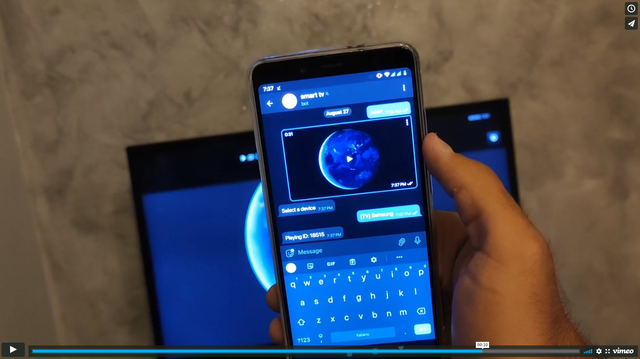
Demonstration video
Feature
- Streaming, the bot will not have to download the entire file before playing it on your device
- You can play anything if your device has the right codec
- You can stream on any device that supports UPnP (AVTransport)
- Chromecast, Vlc (telnet api) and Kodi (xbmc http api) support
- Streaming over HTTP
- Web interface that plays videos in your browser
Note: Chromecast (1st, 2nd and 3rd Gen.) only supports H.264 and VP8 video codecs
Note: Most LG TVs with WebOS have an incorrect UPnP implementation
How-to setup (Release from pypi)
Make sure you have an updated version of python, only the latest version will be supported
- Install smart-tv-telegram from pip
- Download config.ini.example as config.ini
- Edit config.ini
- Start from python entrypoint
python3 -m pip install --upgrade smart-tv-telegram
curl https://raw.githubusercontent.com/andrew-ld/smart-tv-telegram/master/config.ini.example -o config.ini
nano config.ini
smart_tv_telegram -c config.ini -v 1
How-to setup (Manual build)
Make sure you have an updated version of python, only the latest version will be supported
- Download the repository
- Build wheel package
- Install package
- Copy config.ini.example to config.ini
- Edit config.ini
- Start from python entrypoint
git clone https://github.com/andrew-ld/smart-tv-telegram
cd smart-tv-telegram
python3 -m pip install wheel setuptools
python3 setup.py sdist bdist_wheel
python3 -m pip install dist/*.whl
cp config.ini.example config.ini
nano config.ini
smart_tv_telegram -c config.ini -v 1
How-to setup (Docker)
- Copy config.ini.example to config.ini
- Edit config.ini
- Build Docker image
- Start Docker container
cp config.ini.example config.ini
nano config.ini
docker image build -t smart-tv-telegram:latest .
docker run --network host -v "$(pwd)/config.ini:/app/config.ini:ro" -d smart-tv-telegram:latest
Troubleshooting
Q: How do I use the web interface?
A: Set enabled to 1 in web_ui config block, and change the password
-
open http://
listen_ip:listen_port/static/index.html -
now if you send a video in the bot on telegram you can choose to play it in the browser
Q: My Firewall block upnp and broadcasting, how can use kodi without it
A: Set xbmc_enabled to 1 and add your kodi device to xbmc_devices list
Q: What is the format of xbmc_devices
A: A List of Python Dict with host, port, (and optional: username and password)
example: [{"host": "192.168.1.2", "port": 8080, "username": "pippo", "password": "pluto"}]
Q: How-To control vlc from this bot
A: set vlc_enabled to 1 and add your vlc device to vlc_devices list
Q: What is the format of vlc_devices
A: A List of Python Dict with host, port, (and optional: password)
example: [{"host": "127.0.0.1", "port": 4212, "password": "123"}]
Q: How-To enable upnp on my device that use kodi
A: follow this guide (you should enable remote control)
Q: How do I get a token?
A: From @BotFather
Q: How do I set up admins?
A: You have to enter your user_id, there are many ways to get it, the easiest is to use @getuseridbot
Q: How do I get an app_id and app_hash?
A: https://core.telegram.org/api/obtaining_api_id#obtaining-api-id
Q: The video keeps freezing
A: Check the video bitrate, this bot supports maximum ~4.5Mb/s
Release history Release notifications | RSS feed


Download files
Download the file for your platform. If you're not sure which to choose, learn more about installing packages.
Source Distribution
Built Distribution
Filter files by name, interpreter, ABI, and platform.
If you're not sure about the file name format, learn more about wheel file names.
Copy a direct link to the current filters
File details
Details for the file smart_tv_telegram-1.4.0.dev1.tar.gz.
File metadata
- Download URL: smart_tv_telegram-1.4.0.dev1.tar.gz
- Upload date:
- Size: 33.0 kB
- Tags: Source
- Uploaded using Trusted Publishing? No
- Uploaded via: twine/6.2.0 CPython/3.13.7
File hashes
| Algorithm | Hash digest | |
|---|---|---|
| SHA256 |
0055be8a43e98591126d7de5292952ad3fac4a7b346ce71d6b5b1c996f5b04e1
|
|
| MD5 |
58980e625ce151ec744f40f6d1b9e185
|
|
| BLAKE2b-256 |
fa627af6e5c9650ced0affad31b326070f2e2ba6e87d122c634c4f51616d6809
|
File details
Details for the file smart_tv_telegram-1.4.0.dev1-py3-none-any.whl.
File metadata
- Download URL: smart_tv_telegram-1.4.0.dev1-py3-none-any.whl
- Upload date:
- Size: 36.8 kB
- Tags: Python 3
- Uploaded using Trusted Publishing? No
- Uploaded via: twine/6.2.0 CPython/3.13.7
File hashes
| Algorithm | Hash digest | |
|---|---|---|
| SHA256 |
01222686b19cb516612140e2eb368edeff5398d5589c4560bbfedf84933b9201
|
|
| MD5 |
cdc5e1a69cc1d29291a1f9fa8633dccc
|
|
| BLAKE2b-256 |
9542ded54e16717046a7103ddf342ce92046331186ef7ee760c27b227f9633d6
|






