
Smart, simple, lightweight, secure cross-platform authentication for any application.

Project description
smartauthen v1.0.0
Smart, simple, lightweight, secure cross-platform authentication for any application.







Author and developer: Alexander Suvorov.
Supported
- Linux: All.
- Windows: 7/8/10/11?.
- Termux (Android).
Description
smartauthen - Smart, simple, lightweight, secure cross-platform authentication for any application.
-
Use simple yet very reliable and secure authentication in any of your applications.
-
Avoid passwords when registering and authenticating in your applications. It is difficult for a user to remember passwords, therefore, users use either short passwords or light passwords, which plays into the hands of cybercriminals. The secret phrase is difficult to find and easy to remember. At the moment there are no rainbow tables of secret phrases, since this is unrealistic. For example, I can use when registering as a secret Quatrain phrases from your favorite song.
-
It makes no difference to your authentication system how long the secret phrase is, in any case, you will receive only fixed-length key as a string.
-
Let your users register with an easy-to-remember secret phrase that the user will be easy to remember, but an attacker will not be able to pick it up.
-
Store only login and public key in your databases, if your database gets compromised, an attacker will not gain access to user accounts and will not be able to use public keys for authentication in any way, after all, by the public key, he will not be able to find out the secret phrase in any way.
Possibilities:
- Generation of a public key linked to a pair of login + secret phrase.
- Checking user data login + secret phrase + public key.
- Regulation of complexity in the generation of a public key.
Attention!
-
The public key for the login + secret phrase pair will always be the same.
-
With any change in the login or secret phrase, the key will change, therefore if the user changes his username or passphrase, the key needs to be regenerated.
-
If your system can use the same logins for registration and authentication, use something else, unique, to generate the public key, such as a unique identifier.
-
If you change the value of the
stepattribute in the SmartAuth object, the key for the login + secret phrase pair will also change. Always use the same value for this attribute. The higher the value of this attribute, the more secure the public key.
Usage:
-
When registering, you will receive a login and a secret phrase from the user.
-
Based on the data received, generate a public key for further storage, paired with a login. If your system can use the same logins for registration and authentication, use something else, unique, to generate the public key, such as a unique identifier.
-
When authenticating a user, you are asked to enter a login and a secret phrase.
-
Checking the data.
(During verification, a public key is first generated based on the received data, compared with the stored key, and a boolean value of the key comparison is returned.)
⚠️ Disclaimer
By using this software, you agree to the full disclaimer terms.
Summary: Software provided "AS IS" without warranty. You assume all risks.
Full legal disclaimer: See DISCLAIMER.md
Install and Use
Install
pip install smartauthen
Use
from smartauthen import SmartAuth

smart_auth = SmartAuth()

login = 'login'
secret = 'secret'

key = smart_auth.make_key(login, secret)

# True since the login + secret phrase is correct
print(smart_auth.check(login, secret, key))  # True

secret = 'secret2'

# False because the secret phrase is incorrect
print(smart_auth.check(login=login, secret=secret, key=key))  # False
For the developer
For run tests
pip install pytestpytest -v
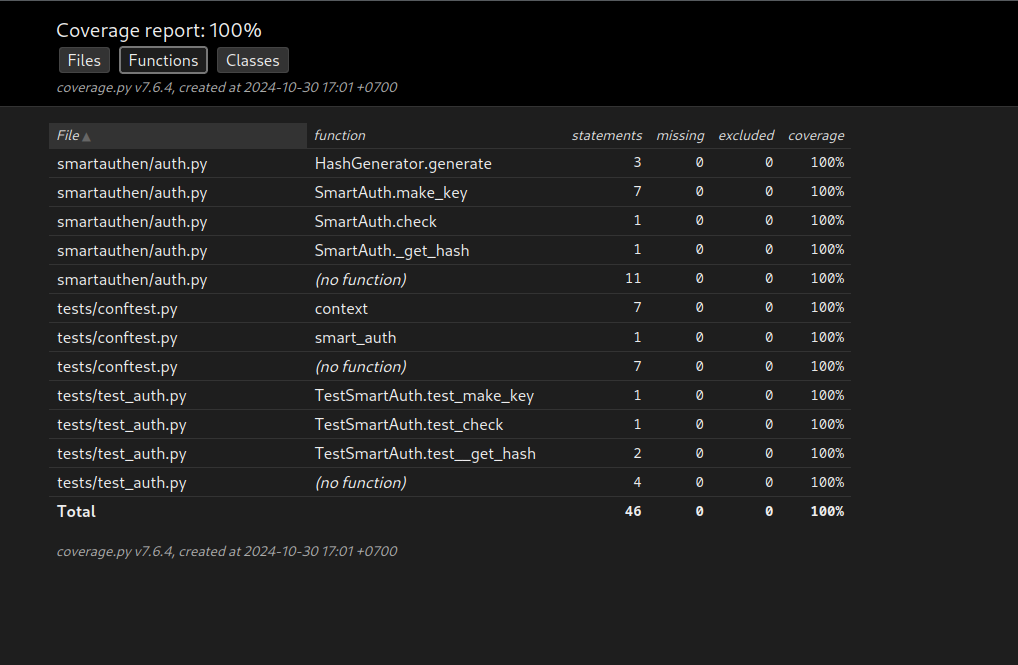
For run tests coverage
pip install pytest-covpytest --cov --cov-report=html
Test coverage
Coverage 100% !!!
Building and publishing a package:
python -m build
Or outdated method:
-
python setup.py sdist bdist_wheel -
twine upload dist/*
License
Copyright (©) 2026, Alexander Suvorov


Download files
Download the file for your platform. If you're not sure which to choose, learn more about installing packages.
Source Distribution
Built Distribution
Filter files by name, interpreter, ABI, and platform.
If you're not sure about the file name format, learn more about wheel file names.
Copy a direct link to the current filters
File details
Details for the file smartauthen-1.0.0.tar.gz.
File metadata
- Download URL: smartauthen-1.0.0.tar.gz
- Upload date:
- Size: 6.1 kB
- Tags: Source
- Uploaded using Trusted Publishing? No
- Uploaded via: twine/6.2.0 CPython/3.14.3
File hashes
| Algorithm | Hash digest | |
|---|---|---|
| SHA256 |
dfe78530c12960cc6b1af35224dc44510bbda66a273583d5fd6efb5f0e883395
|
|
| MD5 |
c91fef45efecf152d599883e716844c0
|
|
| BLAKE2b-256 |
572f6452dd6b90697d9f3ab592f30ba46af7bd8926d099656d3f73a90478c4ad
|
File details
Details for the file smartauthen-1.0.0-py3-none-any.whl.
File metadata
- Download URL: smartauthen-1.0.0-py3-none-any.whl
- Upload date:
- Size: 6.1 kB
- Tags: Python 3
- Uploaded using Trusted Publishing? No
- Uploaded via: twine/6.2.0 CPython/3.14.3
File hashes
| Algorithm | Hash digest | |
|---|---|---|
| SHA256 |
a3216342bd081b6586757019ac56379413cdd4497ef3a3f70b4bb713f02db02c
|
|
| MD5 |
2e626547d2190e34fff74bf847e0b8e3
|
|
| BLAKE2b-256 |
7d8dfd93ad25876cb4ff98091e1bdbbb50f4e501221875277a5111426ea87f9b
|






