
SmartLex
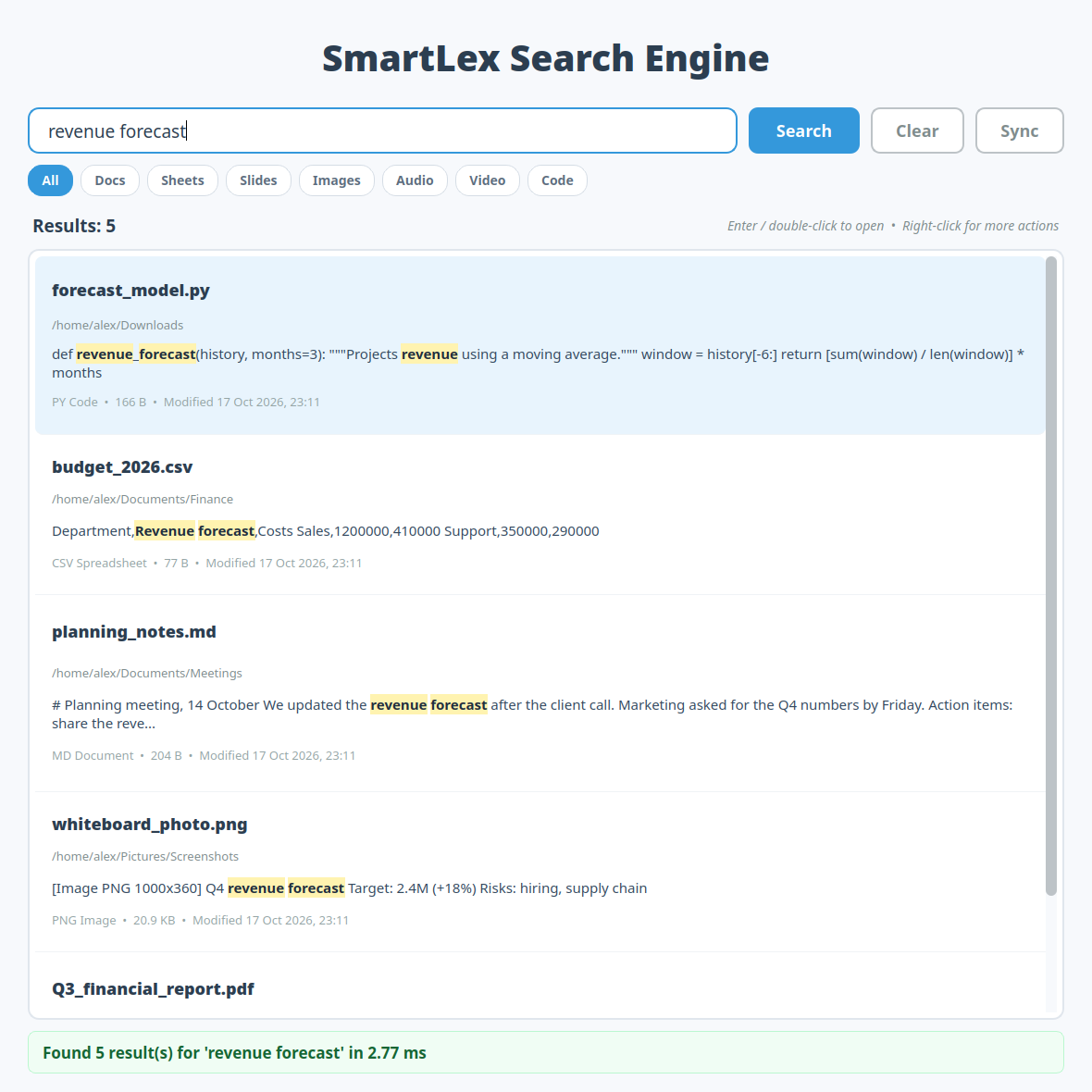
Search inside your files, including the text in your screenshots and photos.
SmartLex is a desktop search engine for Windows, macOS and Linux. Type a few words and it finds the documents, spreadsheets, slides, code, images, audio and video that contain them, ranked by relevance. It works offline: your files never leave your computer.




Why SmartLex
- It reads inside files. PDFs, Word, Excel, PowerPoint, e-books, Markdown, code and more, not just file names.
- It reads text in images. Screenshots, scanned receipts and photos of whiteboards are searchable by the words in them.
- It finds what you meant. Results are ranked by relevance. Typos are tolerated and word forms match, so
runningalso findsrun. - It stays up to date. New, edited, moved and deleted files are picked up while the app is open. Moved files are never re-read.
- It is fast. The search core is written in C++20. Searches take milliseconds, and the window opens instantly after the first run.
- It is private. Everything runs on your machine. Nothing is uploaded, and there is no account or telemetry.
Install
You need Python 3.10–3.14. Prebuilt packages are available for Windows (x64), macOS (Apple Silicon and Intel) and Linux (x64), so no compiler is needed.
pipx install smartlex-search
Then start the app:
smartlex
pipx installs SmartLex in its own environment and makes the smartlex command available everywhere. To get pipx, run python -m pip install --user pipx and then python -m pipx ensurepath, or use brew install pipx on macOS. Plain pip install smartlex-search works too.
To update later:
pipx upgrade smartlex-search
Using SmartLex
On the first launch SmartLex scans your home folder (all drives on Windows) and builds its index in the background. You can search right away: file names are searchable within seconds, contents follow as they are read, and text inside images is read last. Later launches only process files that changed.
Type in the search bar, pick a filter (Docs, Sheets, Slides, Images, Audio, Video, Code) and press Enter. Double-click a result to open it, or right-click to show it in its folder or copy its path.
Search syntax
| Query | Finds |
|---|---|
invoice 2024 |
Files containing these words, best matches first |
"neural network" |
The exact phrase |
report -draft |
Files with "report" but not "draft" |
budget ext:xlsx |
Only .xlsx files (ext:png,jpg for several) |
type:image receipt |
Only images; also doc, sheet, slide, audio, video, code |
notes path:projects |
Only files whose path contains "projects" |
recieve |
Also matches "receive" (typo tolerance) |
Searching images
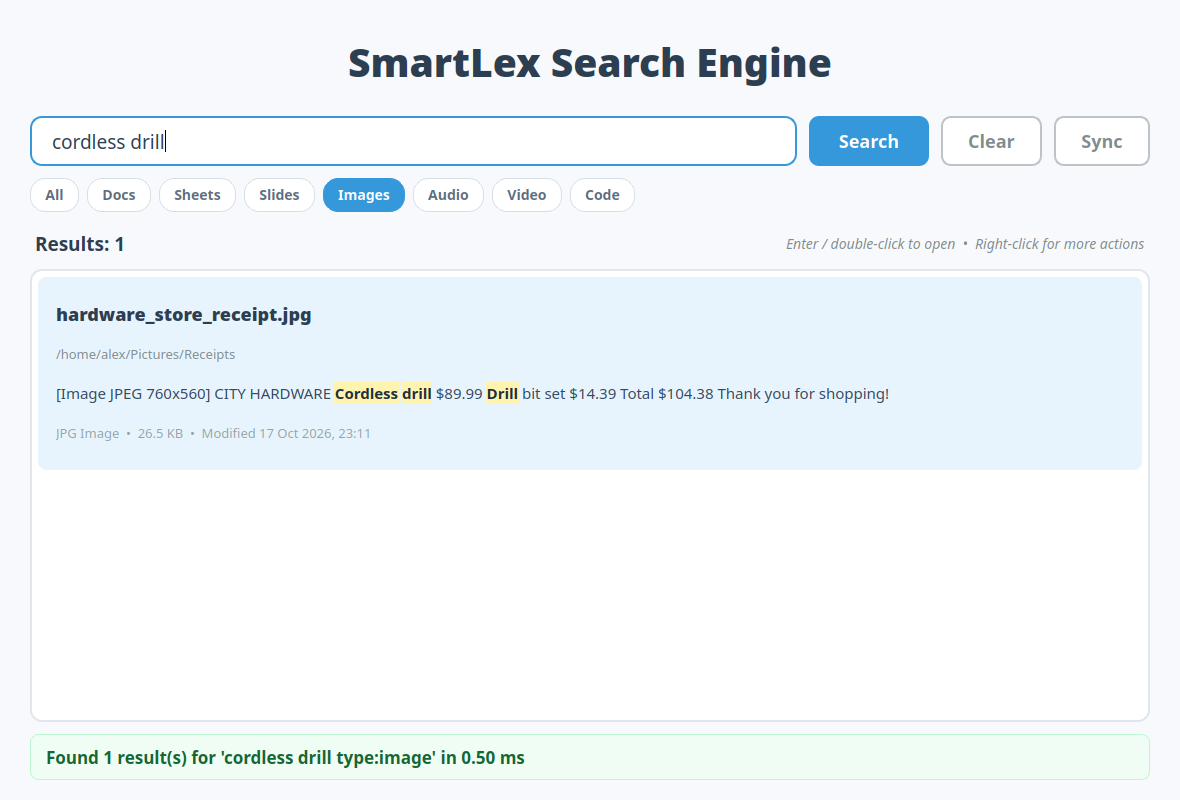
SmartLex reads the text inside images with RapidOCR, which is installed with it and runs locally.
- Documents come first. OCR takes about a second or two per image, so it runs after everything else is indexed. The progress bar shows "Reading text in images", and you can search the whole time.
- Each image is read once. Results are saved, so unchanged, moved or duplicated images are never read again.
- Real-world images work. Rotated phone photos, transparent logos, multi-page TIFF scans and long scrolling screenshots are handled.
- Metadata is included. Camera details, EXIF and XMP descriptions and tags, and a caption file next to the image (
photo.txtorphoto.caption) are searchable too.
Keyboard shortcuts
| Key | Action |
|---|---|
Enter |
Search, or open the selected result |
Tab / Down |
Move between the search bar and results |
Ctrl+Enter |
Show the selected result in its folder |
Ctrl+C |
Copy the selected result's path |
Ctrl+F |
Focus the search bar |
Esc |
Clear the search |
Terminal mode
smartlex-cli --dir ~/Documents                    # index a folder, then search interactively
smartlex-cli --dir ~/Documents --query "tax 2024" # one search, then exit
In interactive mode, type :auto <prefix> for word suggestions, :status for index size and :q to quit.
Supported files
| Kind | Formats | What is searched |
|---|---|---|
| Documents | .pdf .docx .odt .epub .txt .md |
Full text, with page numbers in results |
| Spreadsheets | .xlsx .ods .csv |
Every cell, with sheet names |
| Presentations | .pptx .odp |
Slide text and speaker notes |
| Code and data | .py .js .ts .c .cpp .h .hpp .html .xml .json .yaml |
Full text |
| Images | .png .jpg .jpeg .webp .bmp .tiff .tif .gif |
Text inside the image plus metadata |
| Audio | .mp3 .wav .flac .m4a .ogg .aac |
Tags, and lyrics or transcripts next to the file |
| Video | .mp4 .mkv .mov .webm .avi |
Metadata and subtitles, with timestamps in results |
| Subtitles | .srt .vtt .lrc |
Timestamped text |
Optional extras:
- Speech-to-text for audio and video without subtitles: install faster-whisper with
pipx inject smartlex-search faster-whisper. It downloads a speech model the first time it runs. - Embedded subtitle tracks in videos are read when
ffmpegis on your PATH. - Scanned PDFs with no text layer are OCR'd when Poppler's
pdftoppmis on your PATH.
How it works
- Scan. A multi-threaded C++ scanner walks your folders, skipping system, hidden and build folders such as
Windows,node_modulesand.git. - Index in tiers. File names become searchable first, then file contents, then text inside images, so the app is useful from the first seconds.
- Rank. A compressed positional inverted index in C++ scores results with BM25F, boosts exact phrases and nearby words, and falls back to stemming and typo matching.
- Remember. A local SQLite catalog stores each file's size, modification time, content hash and extracted text. Unchanged files are skipped, moved files are recognised by their content, and result snippets come from the catalog instead of re-opening files.
- Watch. A file watcher applies changes to the index while the app runs.
Settings and data
SmartLex keeps its index, catalog and logs in ~/.smartlex (C:\Users\<you>\.smartlex on Windows). Delete that folder to start fresh.
To change what is indexed, create ~/.smartlex/config.json. Any key you leave out keeps its default:
{
  "SUPPORTED_FORMATS": [".pdf", ".docx", ".xlsx", ".md", ".png", ".jpg"],
  "NUM_PROCESSES": 4
}
Troubleshooting
smartlex: command not found. Runpipx ensurepathand open a new terminal.- The first index takes a while. It depends on how many files you have, and OCR adds a second or two per image. This only happens once; you can search while it runs.
- macOS asks for access to Desktop, Documents or Downloads. Allow it to search those folders. If you decline, they are skipped.
- Linux: "Could not load the Qt platform plugin xcb". Install Qt's system libraries, for example
sudo apt install libxcb-xinerama0 libxkbcommon-x11-0on Ubuntu or Debian. - Linux on ARM and Windows on ARM are not supported yet, because PyQt5 or the OCR libraries are not available there.
Development
git clone https://github.com/dakshgoel2008/SmartLex.git
cd SmartLex
python -m venv .venv && source .venv/bin/activate   # Windows: .venv\Scripts\activate
pip install -e .
python -m unittest discover -s tests
Building from source needs a C++20 compiler (GCC 10+, Clang 14+ or Visual Studio 2022). Run the app from the checkout with python run.py.
SmartLex/
├── cpp/                  C++20 core: tokenizer, inverted index, parallel scanner, Python bindings
├── src/smartlex/
│   ├── core/             Text extraction, OCR, catalog, indexing pipeline, file watcher
│   ├── gui/              PyQt5 window and widgets
│   ├── main.py           Desktop app entry point
│   └── cli.py            Terminal mode
├── tests/                Unit and end-to-end tests
└── .github/workflows/    CI and release automation
Every push runs the tests on Windows, macOS and Linux. To publish a release, bump version in pyproject.toml, commit, then push a matching tag (git tag v2.1.1 && git push origin v2.1.1). The release workflow builds and tests packages for every platform and publishes to PyPI only if all of them pass.
Reference
License
Copyright (c) 2025 Daksh Goel. All rights reserved. See LICENSE.
1 maintainer

Metadata
1 maintainer
Release files for smartlex-search 2.1.0.post1
For a detailed explanation of source distributions (sdists) and built distributions (wheels), please see the package formats documentation.
Source distribution (sdist)
| File | Size | Uploaded | Provenance | Actions |
|---|---|---|---|---|
| smartlex_search-2.1.0.post1.tar.gz | 101.2 kB | With provenance | Details for smartlex_search-2.1.0.post1.tar.gz |
Built distributions (wheels)
Total release size: 11.2 MB
Release files / smartlex_search-2.1.0.post1.tar.gz
| Download URL | smartlex_search-2.1.0.post1.tar.gz |
|---|---|
| Size | 101.2 kB |
| Tags | Source |
|
SHA-256 checksum How to use checksums |
dbbd27821e9e87893a1887765f5f186d142ed326cc1f27e8c98ca4b90f9ccdfe
|
|
BLAKE2b-256 checksum How to use checksums |
6306f6838b31ae1a164ff606ebc463d96a1d66561b2d18e5c772cd7a0f84f0cc
|
| Upload date | |
|
Uploaded using Trusted Publishing? What is trusted publishing? |
Yes |
| Uploaded via |
twine/7.0.0 CPython/3.13.14
|
Provenance
Provenance describes where a file came from. On PyPI, provenance is shared via attestations, which provide a verifiable record of the build or publishing details. View details, limitations and caveats.


PyPI Publish Attestation
PyPI verified that this artifact, at this checksum, originated from the publisher listed below.
Signed by GitHub Actions, verified by PyPI on Oct 17, 2026.
Transparency logRelease files / smartlex_search-2.1.0.post1-cp314-cp314-win_amd64.whl
| Download URL | smartlex_search-2.1.0.post1-cp314-cp314-win_amd64.whl |
|---|---|
| Size | 362.2 kB |
| Tags | CPython 3.14 Windows x86-64 |
|
SHA-256 checksum How to use checksums |
6db522155dded62b9214c63bc9526b49f223507ec263cbab74a5dfcc28971790
|
|
BLAKE2b-256 checksum How to use checksums |
8841106b05b9b9ea9198b47fb597c994ce82d5dad5926d3b29c92b88c4f8c7d6
|
| Upload date | |
|
Uploaded using Trusted Publishing? What is trusted publishing? |
Yes |
| Uploaded via |
twine/7.0.0 CPython/3.13.14
|
Provenance
Provenance describes where a file came from. On PyPI, provenance is shared via attestations, which provide a verifiable record of the build or publishing details. View details, limitations and caveats.
PyPI Publish Attestation
PyPI verified that this artifact, at this checksum, originated from the publisher listed below.
Signed by GitHub Actions, verified by PyPI on Oct 17, 2026.
Transparency logRelease files / smartlex_search-2.1.0.post1-cp314-cp314-manylinux_2_24_x86_64.manylinux_2_28_x86_64.whl
| Download URL | smartlex_search-2.1.0.post1-cp314-cp314-manylinux_2_24_x86_64.manylinux_2_28_x86_64.whl |
|---|---|
| Size | 1.6 MB |
| Tags | CPython 3.14 Linux glibc 2.24+ x86-64 Linux glibc 2.28+ x86-64 |
|
SHA-256 checksum How to use checksums |
ce8af5bdc68e4d65e6eb7bed331af78c486d731790566cfea336ff27df809fce
|
|
BLAKE2b-256 checksum How to use checksums |
513347360eb9645c643d0dcb84b6980e4a558b8da14f6e8e82a01e18bc363da5
|
| Upload date | |
|
Uploaded using Trusted Publishing? What is trusted publishing? |
Yes |
| Uploaded via |
twine/7.0.0 CPython/3.13.14
|
Provenance
Provenance describes where a file came from. On PyPI, provenance is shared via attestations, which provide a verifiable record of the build or publishing details. View details, limitations and caveats.
PyPI Publish Attestation
PyPI verified that this artifact, at this checksum, originated from the publisher listed below.
Signed by GitHub Actions, verified by PyPI on Oct 17, 2026.
Transparency logRelease files / smartlex_search-2.1.0.post1-cp314-cp314-macosx_11_0_arm64.whl
| Download URL | smartlex_search-2.1.0.post1-cp314-cp314-macosx_11_0_arm64.whl |
|---|---|
| Size | 155.8 kB |
| Tags | CPython 3.14 macOS 11.0+ ARM64 |
|
SHA-256 checksum How to use checksums |
b45d55996e8d1969bbd6b8c7b61d21cc0526e8a374518782f151cf27b0c4984c
|
|
BLAKE2b-256 checksum How to use checksums |
34b72c4127e9b7b31ff7bd1022604875cc7552fd5e8f2f4faf1549feac73249c
|
| Upload date | |
|
Uploaded using Trusted Publishing? What is trusted publishing? |
Yes |
| Uploaded via |
twine/7.0.0 CPython/3.13.14
|
Provenance
Provenance describes where a file came from. On PyPI, provenance is shared via attestations, which provide a verifiable record of the build or publishing details. View details, limitations and caveats.
PyPI Publish Attestation
PyPI verified that this artifact, at this checksum, originated from the publisher listed below.
Signed by GitHub Actions, verified by PyPI on Oct 17, 2026.
Transparency logRelease files / smartlex_search-2.1.0.post1-cp313-cp313-win_amd64.whl
| Download URL | smartlex_search-2.1.0.post1-cp313-cp313-win_amd64.whl |
|---|---|
| Size | 353.1 kB |
| Tags | CPython 3.13 Windows x86-64 |
|
SHA-256 checksum How to use checksums |
a9d17593163bc0fc4ccd68347398cf5616305b75a8d53c2e59ee616f7f6001f5
|
|
BLAKE2b-256 checksum How to use checksums |
266a180fccb5cfa61aca70be5d5bbda82bae6f6fe7b388dd74b8c976d9d07c3e
|
| Upload date | |
|
Uploaded using Trusted Publishing? What is trusted publishing? |
Yes |
| Uploaded via |
twine/7.0.0 CPython/3.13.14
|
Provenance
Provenance describes where a file came from. On PyPI, provenance is shared via attestations, which provide a verifiable record of the build or publishing details. View details, limitations and caveats.
PyPI Publish Attestation
PyPI verified that this artifact, at this checksum, originated from the publisher listed below.
Signed by GitHub Actions, verified by PyPI on Oct 17, 2026.
Transparency logRelease files / smartlex_search-2.1.0.post1-cp313-cp313-manylinux_2_24_x86_64.manylinux_2_28_x86_64.whl
| Download URL | smartlex_search-2.1.0.post1-cp313-cp313-manylinux_2_24_x86_64.manylinux_2_28_x86_64.whl |
|---|---|
| Size | 1.6 MB |
| Tags | CPython 3.13 Linux glibc 2.24+ x86-64 Linux glibc 2.28+ x86-64 |
|
SHA-256 checksum How to use checksums |
0df35b5c1bc60086fae2e0f6e766ea5eabc61df5a8d0cee2268140794e553a02
|
|
BLAKE2b-256 checksum How to use checksums |
6fb10430a24c05f5b0c56763928d687f2129c64244ba087c68285ef261e9f93c
|
| Upload date | |
|
Uploaded using Trusted Publishing? What is trusted publishing? |
Yes |
| Uploaded via |
twine/7.0.0 CPython/3.13.14
|
Provenance
Provenance describes where a file came from. On PyPI, provenance is shared via attestations, which provide a verifiable record of the build or publishing details. View details, limitations and caveats.
PyPI Publish Attestation
PyPI verified that this artifact, at this checksum, originated from the publisher listed below.
Signed by GitHub Actions, verified by PyPI on Oct 17, 2026.
Transparency logRelease files / smartlex_search-2.1.0.post1-cp313-cp313-macosx_11_0_arm64.whl
| Download URL | smartlex_search-2.1.0.post1-cp313-cp313-macosx_11_0_arm64.whl |
|---|---|
| Size | 155.8 kB |
| Tags | CPython 3.13 macOS 11.0+ ARM64 |
|
SHA-256 checksum How to use checksums |
fde6a4b699b5e835fd6053e73dd59d7f320b6bc92ffd35b14f6848d9dd721785
|
|
BLAKE2b-256 checksum How to use checksums |
2bb507a963047bafc845cb348a972331a0ddc4469d393ba02bb64ede91539864
|
| Upload date | |
|
Uploaded using Trusted Publishing? What is trusted publishing? |
Yes |
| Uploaded via |
twine/7.0.0 CPython/3.13.14
|
Provenance
Provenance describes where a file came from. On PyPI, provenance is shared via attestations, which provide a verifiable record of the build or publishing details. View details, limitations and caveats.
PyPI Publish Attestation
PyPI verified that this artifact, at this checksum, originated from the publisher listed below.
Signed by GitHub Actions, verified by PyPI on Oct 17, 2026.
Transparency logRelease files / smartlex_search-2.1.0.post1-cp313-cp313-macosx_10_15_x86_64.whl
| Download URL | smartlex_search-2.1.0.post1-cp313-cp313-macosx_10_15_x86_64.whl |
|---|---|
| Size | 167.7 kB |
| Tags | CPython 3.13 macOS 10.15+ x86-64 |
|
SHA-256 checksum How to use checksums |
d170ed67d3c22485421a3df6155a8deb35fa2ca765a0b24045a9254ab40f5b4e
|
|
BLAKE2b-256 checksum How to use checksums |
51b299100a2c5d3fb8ba2fe4d09f18640440c4867eb6d7061bd0c6816e671dca
|
| Upload date | |
|
Uploaded using Trusted Publishing? What is trusted publishing? |
Yes |
| Uploaded via |
twine/7.0.0 CPython/3.13.14
|
Provenance
Provenance describes where a file came from. On PyPI, provenance is shared via attestations, which provide a verifiable record of the build or publishing details. View details, limitations and caveats.
PyPI Publish Attestation
PyPI verified that this artifact, at this checksum, originated from the publisher listed below.
Signed by GitHub Actions, verified by PyPI on Oct 17, 2026.
Transparency logRelease files / smartlex_search-2.1.0.post1-cp312-cp312-win_amd64.whl
| Download URL | smartlex_search-2.1.0.post1-cp312-cp312-win_amd64.whl |
|---|---|
| Size | 353.1 kB |
| Tags | CPython 3.12 Windows x86-64 |
|
SHA-256 checksum How to use checksums |
b81e5c07bec0d6a138da042f18cec46d05a43792de82f8026d0b0926d0dfb1e5
|
|
BLAKE2b-256 checksum How to use checksums |
bfd1ad4bebee06f684200dd183533e491a90734bcd151b37c011a423cf4efef8
|
| Upload date | |
|
Uploaded using Trusted Publishing? What is trusted publishing? |
Yes |
| Uploaded via |
twine/7.0.0 CPython/3.13.14
|
Provenance
Provenance describes where a file came from. On PyPI, provenance is shared via attestations, which provide a verifiable record of the build or publishing details. View details, limitations and caveats.
PyPI Publish Attestation
PyPI verified that this artifact, at this checksum, originated from the publisher listed below.
Signed by GitHub Actions, verified by PyPI on Oct 17, 2026.
Transparency logRelease files / smartlex_search-2.1.0.post1-cp312-cp312-manylinux_2_24_x86_64.manylinux_2_28_x86_64.whl
| Download URL | smartlex_search-2.1.0.post1-cp312-cp312-manylinux_2_24_x86_64.manylinux_2_28_x86_64.whl |
|---|---|
| Size | 1.6 MB |
| Tags | CPython 3.12 Linux glibc 2.24+ x86-64 Linux glibc 2.28+ x86-64 |
|
SHA-256 checksum How to use checksums |
dcc92630c2c76bde26a889a7001c5f3bb47823dfc03e1e6d7e9b67a49f32edcf
|
|
BLAKE2b-256 checksum How to use checksums |
1a0a3af5c63f61b3e55093685aa09f069a9a244f4352965c07e2e8823a6521af
|
| Upload date | |
|
Uploaded using Trusted Publishing? What is trusted publishing? |
Yes |
| Uploaded via |
twine/7.0.0 CPython/3.13.14
|
Provenance
Provenance describes where a file came from. On PyPI, provenance is shared via attestations, which provide a verifiable record of the build or publishing details. View details, limitations and caveats.
PyPI Publish Attestation
PyPI verified that this artifact, at this checksum, originated from the publisher listed below.
Signed by GitHub Actions, verified by PyPI on Oct 17, 2026.
Transparency logRelease files / smartlex_search-2.1.0.post1-cp312-cp312-macosx_11_0_arm64.whl
| Download URL | smartlex_search-2.1.0.post1-cp312-cp312-macosx_11_0_arm64.whl |
|---|---|
| Size | 155.8 kB |
| Tags | CPython 3.12 macOS 11.0+ ARM64 |
|
SHA-256 checksum How to use checksums |
cf5c36094a6e615f90393b05df4b5f83c59f6ee3164ab7f65326867369fac76d
|
|
BLAKE2b-256 checksum How to use checksums |
aad7bb2f144338de48dc49438a80069378620f639447d328c90e15d6789d919f
|
| Upload date | |
|
Uploaded using Trusted Publishing? What is trusted publishing? |
Yes |
| Uploaded via |
twine/7.0.0 CPython/3.13.14
|
Provenance
Provenance describes where a file came from. On PyPI, provenance is shared via attestations, which provide a verifiable record of the build or publishing details. View details, limitations and caveats.
PyPI Publish Attestation
PyPI verified that this artifact, at this checksum, originated from the publisher listed below.
Signed by GitHub Actions, verified by PyPI on Oct 17, 2026.
Transparency logRelease files / smartlex_search-2.1.0.post1-cp312-cp312-macosx_10_15_x86_64.whl
| Download URL | smartlex_search-2.1.0.post1-cp312-cp312-macosx_10_15_x86_64.whl |
|---|---|
| Size | 167.8 kB |
| Tags | CPython 3.12 macOS 10.15+ x86-64 |
|
SHA-256 checksum How to use checksums |
6360339d0334fd13978e0d504191f3c12860b400e31f6edbd25f2ab98b1ad3ae
|
|
BLAKE2b-256 checksum How to use checksums |
badbfa394a193f2fb6fad7b37275d0447bc6d6d74986d872fdb823463d6776aa
|
| Upload date | |
|
Uploaded using Trusted Publishing? What is trusted publishing? |
Yes |
| Uploaded via |
twine/7.0.0 CPython/3.13.14
|
Provenance
Provenance describes where a file came from. On PyPI, provenance is shared via attestations, which provide a verifiable record of the build or publishing details. View details, limitations and caveats.
PyPI Publish Attestation
PyPI verified that this artifact, at this checksum, originated from the publisher listed below.
Signed by GitHub Actions, verified by PyPI on Oct 17, 2026.
Transparency logRelease files / smartlex_search-2.1.0.post1-cp311-cp311-win_amd64.whl
| Download URL | smartlex_search-2.1.0.post1-cp311-cp311-win_amd64.whl |
|---|---|
| Size | 353.1 kB |
| Tags | CPython 3.11 Windows x86-64 |
|
SHA-256 checksum How to use checksums |
4029ce16449280622cd7b92fadf490401a0578cbab82d5b05e566ab8cb5e6901
|
|
BLAKE2b-256 checksum How to use checksums |
7a94f74b2ebb2b8caec009adadceaa3f866ab4f5f16524d7556d6bac5dcf2771
|
| Upload date | |
|
Uploaded using Trusted Publishing? What is trusted publishing? |
Yes |
| Uploaded via |
twine/7.0.0 CPython/3.13.14
|
Provenance
Provenance describes where a file came from. On PyPI, provenance is shared via attestations, which provide a verifiable record of the build or publishing details. View details, limitations and caveats.
PyPI Publish Attestation
PyPI verified that this artifact, at this checksum, originated from the publisher listed below.
Signed by GitHub Actions, verified by PyPI on Oct 17, 2026.
Transparency logRelease files / smartlex_search-2.1.0.post1-cp311-cp311-manylinux_2_24_x86_64.manylinux_2_28_x86_64.whl
| Download URL | smartlex_search-2.1.0.post1-cp311-cp311-manylinux_2_24_x86_64.manylinux_2_28_x86_64.whl |
|---|---|
| Size | 1.6 MB |
| Tags | CPython 3.11 Linux glibc 2.24+ x86-64 Linux glibc 2.28+ x86-64 |
|
SHA-256 checksum How to use checksums |
a90b66ffa002c0c9928827e164e69364ebb3a1e7d3137a7f29caad3847579d9a
|
|
BLAKE2b-256 checksum How to use checksums |
016f588a1a27d0e42ff903bcce08245ebd53fa5bde94ba72590317e3446142e9
|
| Upload date | |
|
Uploaded using Trusted Publishing? What is trusted publishing? |
Yes |
| Uploaded via |
twine/7.0.0 CPython/3.13.14
|
Provenance
Provenance describes where a file came from. On PyPI, provenance is shared via attestations, which provide a verifiable record of the build or publishing details. View details, limitations and caveats.
PyPI Publish Attestation
PyPI verified that this artifact, at this checksum, originated from the publisher listed below.
Signed by GitHub Actions, verified by PyPI on Oct 17, 2026.
Transparency logRelease files / smartlex_search-2.1.0.post1-cp311-cp311-macosx_11_0_arm64.whl
| Download URL | smartlex_search-2.1.0.post1-cp311-cp311-macosx_11_0_arm64.whl |
|---|---|
| Size | 155.7 kB |
| Tags | CPython 3.11 macOS 11.0+ ARM64 |
|
SHA-256 checksum How to use checksums |
14615dbf1e9a93719e2198e7cc994249eb80c9fdd506667f5be3913c39e380b4
|
|
BLAKE2b-256 checksum How to use checksums |
c40604260e56718e1f5ff56917b6d35af887cc4547c9eb729ed8a6b9168eb7f3
|
| Upload date | |
|
Uploaded using Trusted Publishing? What is trusted publishing? |
Yes |
| Uploaded via |
twine/7.0.0 CPython/3.13.14
|
Provenance
Provenance describes where a file came from. On PyPI, provenance is shared via attestations, which provide a verifiable record of the build or publishing details. View details, limitations and caveats.
PyPI Publish Attestation
PyPI verified that this artifact, at this checksum, originated from the publisher listed below.
Signed by GitHub Actions, verified by PyPI on Oct 17, 2026.
Transparency logRelease files / smartlex_search-2.1.0.post1-cp311-cp311-macosx_10_15_x86_64.whl
| Download URL | smartlex_search-2.1.0.post1-cp311-cp311-macosx_10_15_x86_64.whl |
|---|---|
| Size | 167.7 kB |
| Tags | CPython 3.11 macOS 10.15+ x86-64 |
|
SHA-256 checksum How to use checksums |
a103bafad95693d121007c2e552cde78774d6c32f473ff767d443e0cb67df2ff
|
|
BLAKE2b-256 checksum How to use checksums |
e2008c65f9936c560239cfe833934e6b3b6d91d8dd9fc5fdb8258236921df625
|
| Upload date | |
|
Uploaded using Trusted Publishing? What is trusted publishing? |
Yes |
| Uploaded via |
twine/7.0.0 CPython/3.13.14
|
Provenance
Provenance describes where a file came from. On PyPI, provenance is shared via attestations, which provide a verifiable record of the build or publishing details. View details, limitations and caveats.
PyPI Publish Attestation
PyPI verified that this artifact, at this checksum, originated from the publisher listed below.
Signed by GitHub Actions, verified by PyPI on Oct 17, 2026.
Transparency logRelease files / smartlex_search-2.1.0.post1-cp310-cp310-win_amd64.whl
| Download URL | smartlex_search-2.1.0.post1-cp310-cp310-win_amd64.whl |
|---|---|
| Size | 353.1 kB |
| Tags | CPython 3.10 Windows x86-64 |
|
SHA-256 checksum How to use checksums |
bb93b80a37f490329caf4e334922d86377c3bcac71605da59a03e18bb7129860
|
|
BLAKE2b-256 checksum How to use checksums |
0838e7e55e8751fdc84cd51127d88f326a37d1d2b4bf6fafb5fd662e8f2ba1c9
|
| Upload date | |
|
Uploaded using Trusted Publishing? What is trusted publishing? |
Yes |
| Uploaded via |
twine/7.0.0 CPython/3.13.14
|
Provenance
Provenance describes where a file came from. On PyPI, provenance is shared via attestations, which provide a verifiable record of the build or publishing details. View details, limitations and caveats.
PyPI Publish Attestation
PyPI verified that this artifact, at this checksum, originated from the publisher listed below.
Signed by GitHub Actions, verified by PyPI on Oct 17, 2026.
Transparency logRelease files / smartlex_search-2.1.0.post1-cp310-cp310-manylinux_2_24_x86_64.manylinux_2_28_x86_64.whl
| Download URL | smartlex_search-2.1.0.post1-cp310-cp310-manylinux_2_24_x86_64.manylinux_2_28_x86_64.whl |
|---|---|
| Size | 1.6 MB |
| Tags | CPython 3.10 Linux glibc 2.24+ x86-64 Linux glibc 2.28+ x86-64 |
|
SHA-256 checksum How to use checksums |
124cc3ac6528fc616517a0dfe79b96d8fe44b1f9daca0ed31d91984463cfecb1
|
|
BLAKE2b-256 checksum How to use checksums |
96fbbe740eb9ffba7ad2d4f3f8504a1d1dd3326ab0bc60931b99478f0de34b6e
|
| Upload date | |
|
Uploaded using Trusted Publishing? What is trusted publishing? |
Yes |
| Uploaded via |
twine/7.0.0 CPython/3.13.14
|
Provenance
Provenance describes where a file came from. On PyPI, provenance is shared via attestations, which provide a verifiable record of the build or publishing details. View details, limitations and caveats.
PyPI Publish Attestation
PyPI verified that this artifact, at this checksum, originated from the publisher listed below.
Signed by GitHub Actions, verified by PyPI on Oct 17, 2026.
Transparency logRelease files / smartlex_search-2.1.0.post1-cp310-cp310-macosx_11_0_arm64.whl
| Download URL | smartlex_search-2.1.0.post1-cp310-cp310-macosx_11_0_arm64.whl |
|---|---|
| Size | 155.7 kB |
| Tags | CPython 3.10 macOS 11.0+ ARM64 |
|
SHA-256 checksum How to use checksums |
4a906a26c2b94c608e0b956e3767aac4e02559b5f14c1d0fddf0fef7e59cc80e
|
|
BLAKE2b-256 checksum How to use checksums |
df284b963a2be8a26f1c1f12a62b5ce77bdcc633a3dbcabe944a0b9f68c76473
|
| Upload date | |
|
Uploaded using Trusted Publishing? What is trusted publishing? |
Yes |
| Uploaded via |
twine/7.0.0 CPython/3.13.14
|
Provenance
Provenance describes where a file came from. On PyPI, provenance is shared via attestations, which provide a verifiable record of the build or publishing details. View details, limitations and caveats.
PyPI Publish Attestation
PyPI verified that this artifact, at this checksum, originated from the publisher listed below.
Signed by GitHub Actions, verified by PyPI on Oct 17, 2026.
Transparency logRelease files / smartlex_search-2.1.0.post1-cp310-cp310-macosx_10_15_x86_64.whl
| Download URL | smartlex_search-2.1.0.post1-cp310-cp310-macosx_10_15_x86_64.whl |
|---|---|
| Size | 167.7 kB |
| Tags | CPython 3.10 macOS 10.15+ x86-64 |
|
SHA-256 checksum How to use checksums |
040d3a9ab2588853fac531b6a409d5bad7989ec82d572f4684a9a9d7fb36e519
|
|
BLAKE2b-256 checksum How to use checksums |
79421e9bbb764563cc66e45eb80c5e63536944fcf7a1999ad307f1655ccc0e1e
|
| Upload date | |
|
Uploaded using Trusted Publishing? What is trusted publishing? |
Yes |
| Uploaded via |
twine/7.0.0 CPython/3.13.14
|
Provenance
Provenance describes where a file came from. On PyPI, provenance is shared via attestations, which provide a verifiable record of the build or publishing details. View details, limitations and caveats.
PyPI Publish Attestation
PyPI verified that this artifact, at this checksum, originated from the publisher listed below.
Signed by GitHub Actions, verified by PyPI on Oct 17, 2026.
Transparency logSecurity for smartlex-search 2.1.0.post1
Provenance
Provenance describes where a file came from. On PyPI, provenance is shared via attestations, which provide a verifiable record of the build or publishing details. View details, limitations and caveats.
Full provenance
All 20 files in this release have been uploaded with provenance metadata.
Attestation for smartlex_search-2.1.0.post1.tar.gz
PyPI Publish Attestation
PyPI verified that this artifact, at this checksum, originated from the publisher listed below.
Signed by GitHub Actions, verified by PyPI on Oct 17, 2026.
Transparency logA note on package security
PyPI is a repository for distributing packages, not a service for auditing them. While third-party security researchers and our staff do their best to detect and remove malicious packages, PyPI cannot guarantee the quality, security or suitability of any given package.
To learn more about protecting yourself from malicious actors, visit our package security documentation.














