

SME BACnetSim
Simulate a building's BACnet devices on your laptop. Lighting, AC, AHUs, meters, sensors and PV
on one UDP port, with a live web UI.




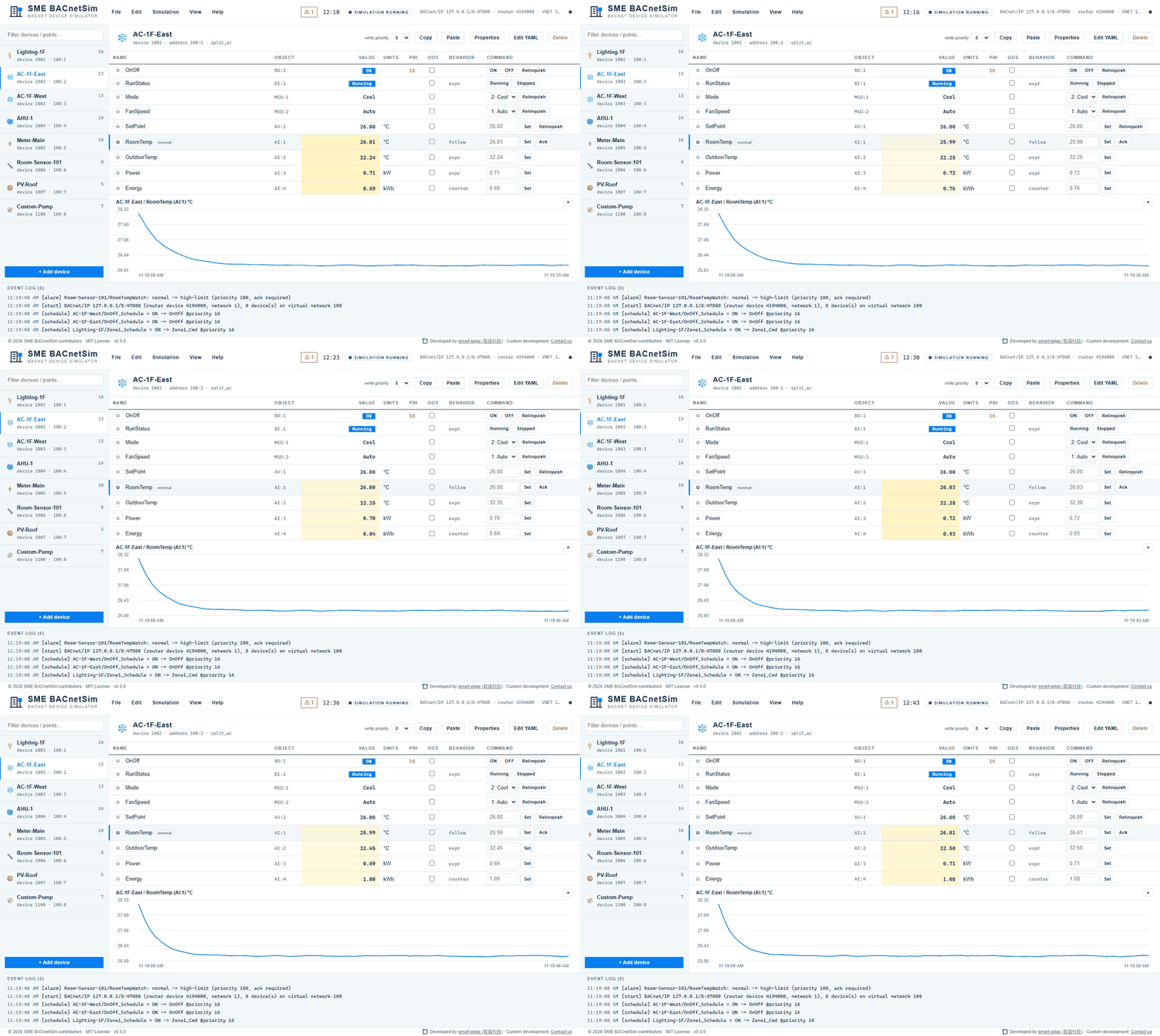
A BACnet/IP device simulator with a live web UI. Simulate lighting controllers, air conditioners, AHUs, power meters, sensors, PV inverters — or any device you describe in YAML — and watch their values change in the browser while a real BACnet client (Yabe, Niagara, your own EMS…) reads and commands them.
- Many devices on one port. A built-in BACnet router owns UDP 47808; every simulated device sits on a virtual network behind it (default network 100), so clients discover them all with one Who-Is.
- Realistic behavior. Room temperature follows the set point when the AC is on, energy integrates power, lights report feedback and power, PV output follows a day curve and respects a curtailment limit.
- Real BACnet semantics. Commandable outputs with a 16-level priority array and relinquish, out-of-service override, COV increments, Device / Network Port objects.
- Configurable. Import / export YAML or JSON, edit any device as YAML in the browser, add devices from templates, or save back to the config file.
- Live UI. Values stream over WebSocket, trend chart per point, event log of BACnet and UI writes.
- English, Japanese and Simplified Chinese. The UI follows the browser language; switch it under View → Language.
Built on bacpypes3 (asyncio BACnet stack, supports BACnet/IP, IPv6 and BACnet/SC) and FastAPI. No front-end build step.
SME BACnetSim is free and MIT-licensed, developed by smart-edge (智届科技) — custom development is available, see Commercial support & custom development.
Screenshots
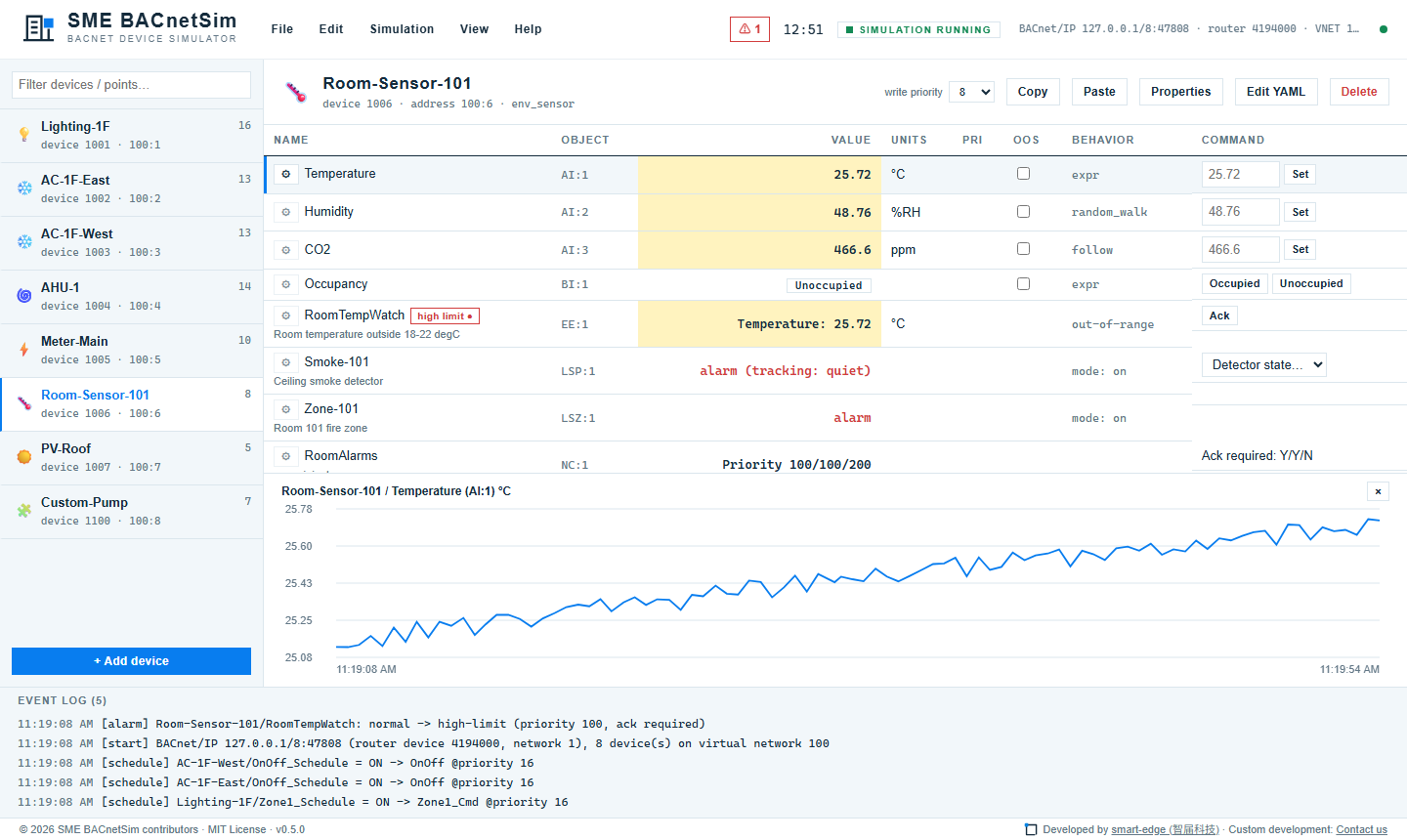 Event enrollment in alarm, notification class, life safety points |
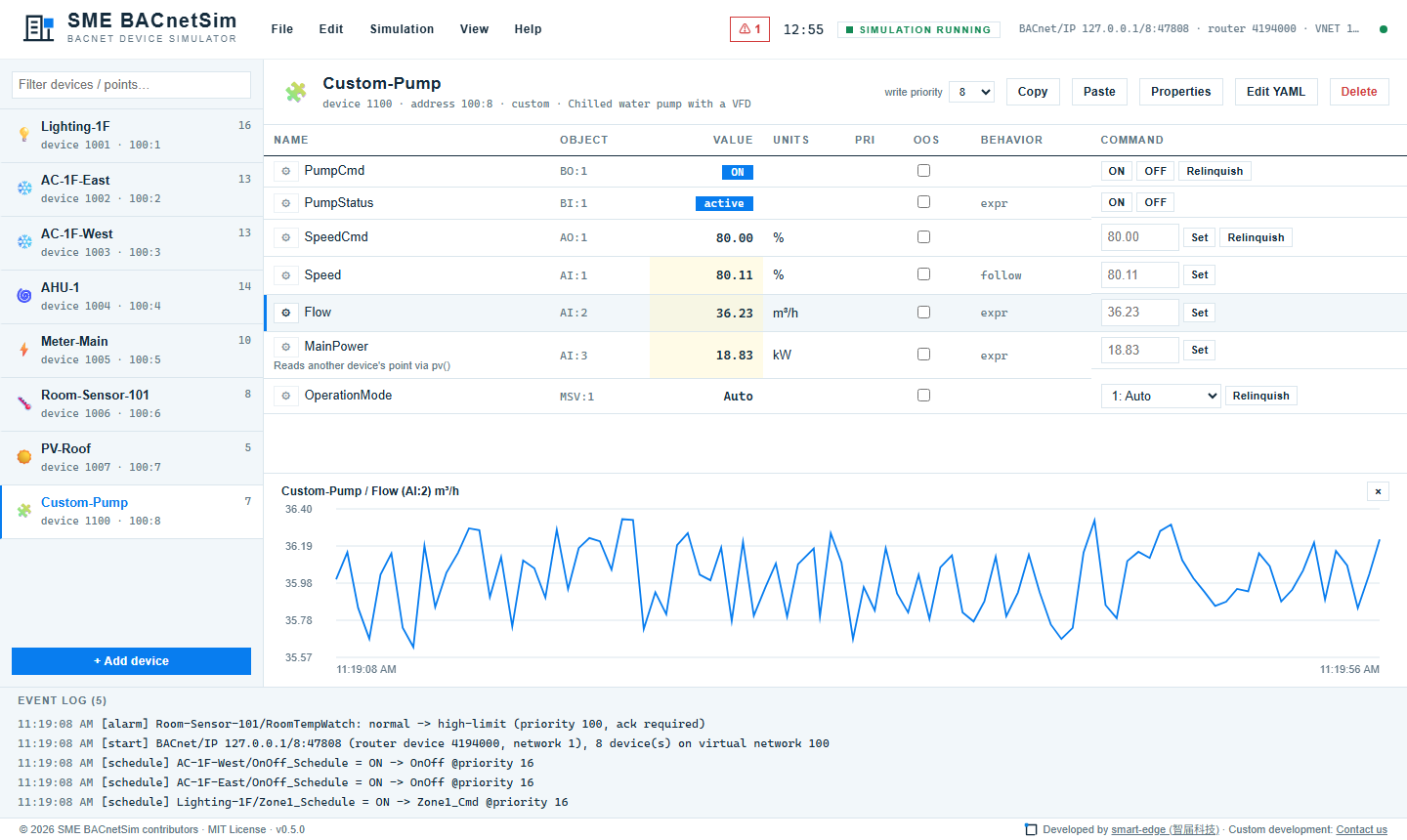 A device built from scratch in YAML (expression and follow behaviors) |
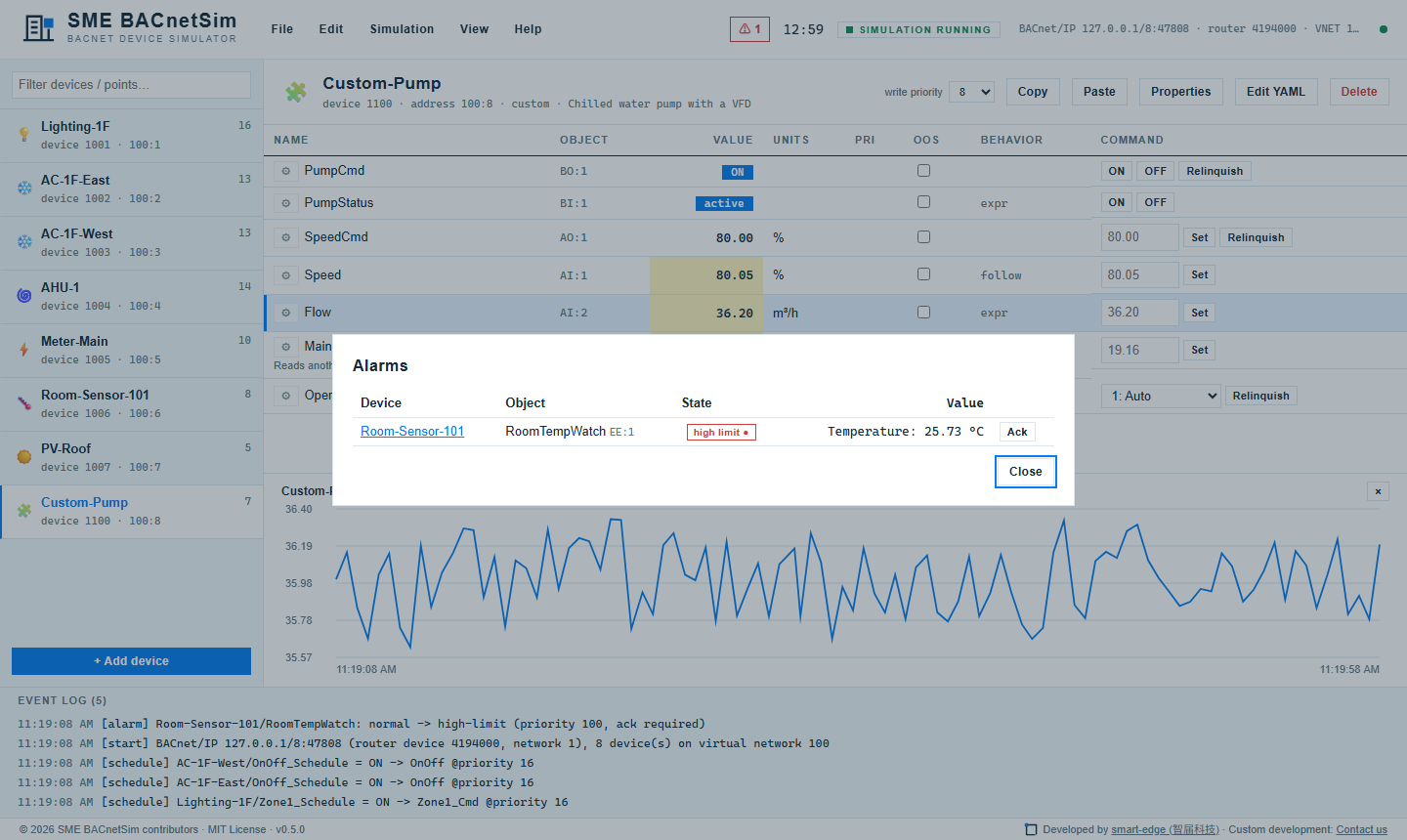 Alarm list with acknowledge |
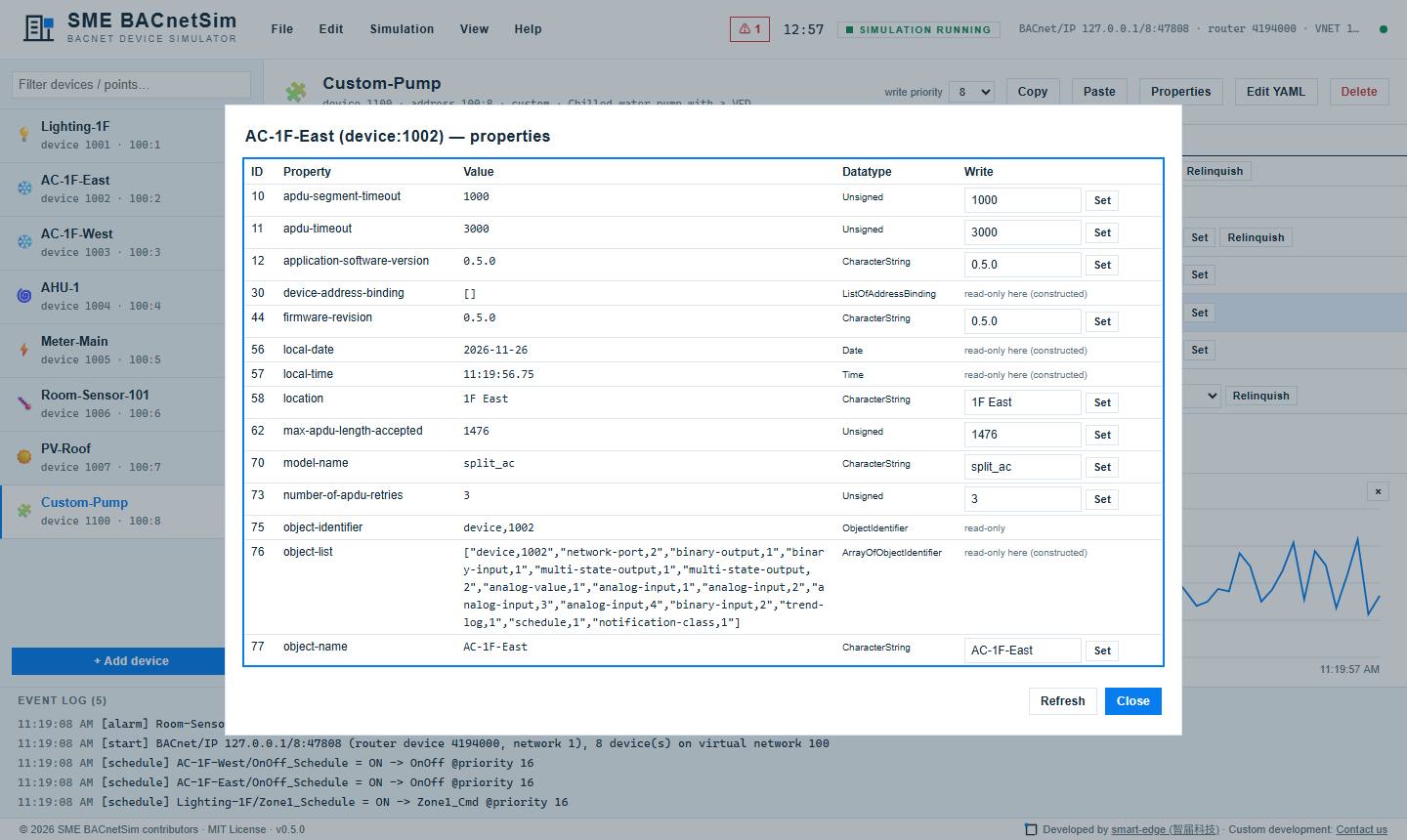 Property inspector: read and write any property |
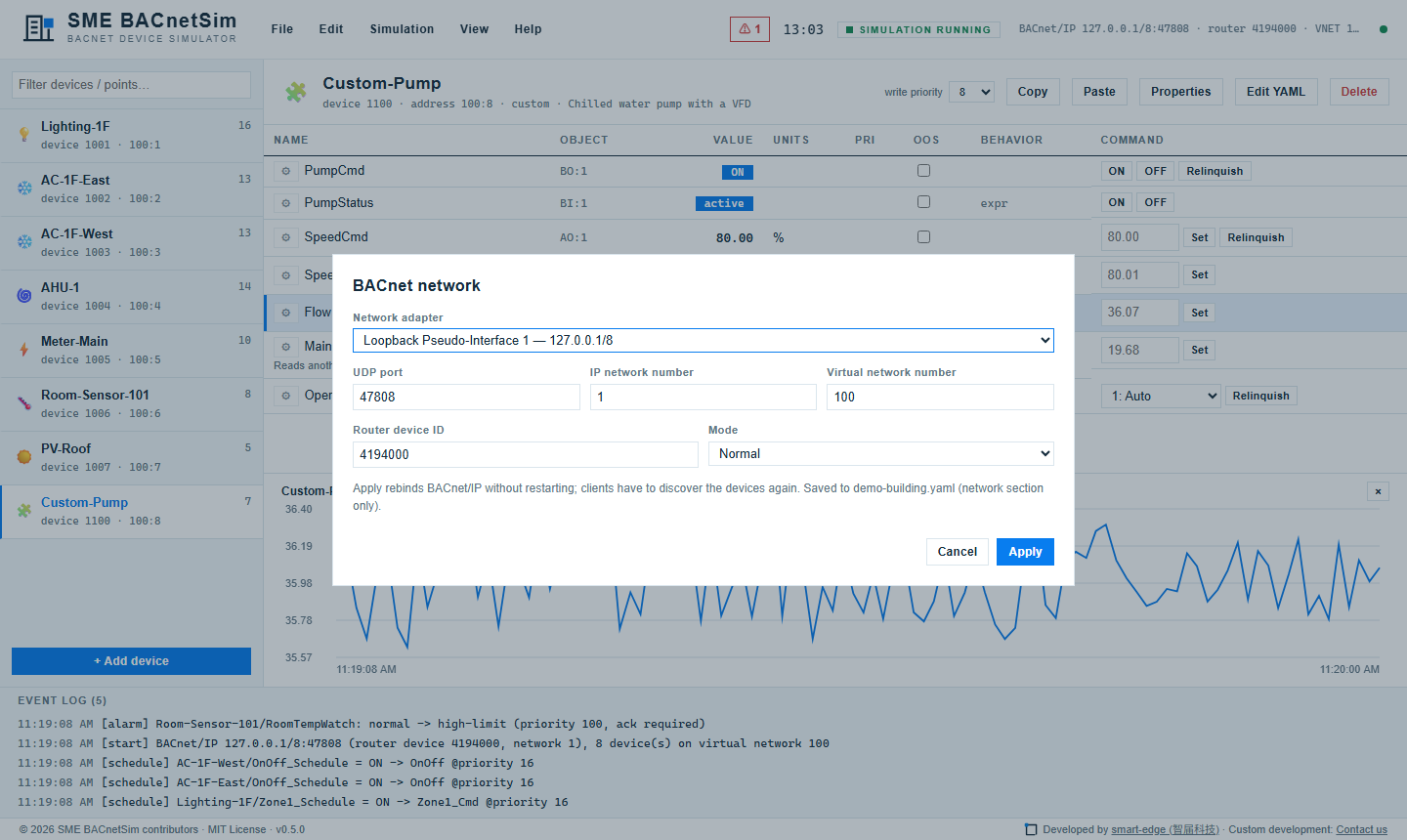 BACnet network settings, applied without a restart |
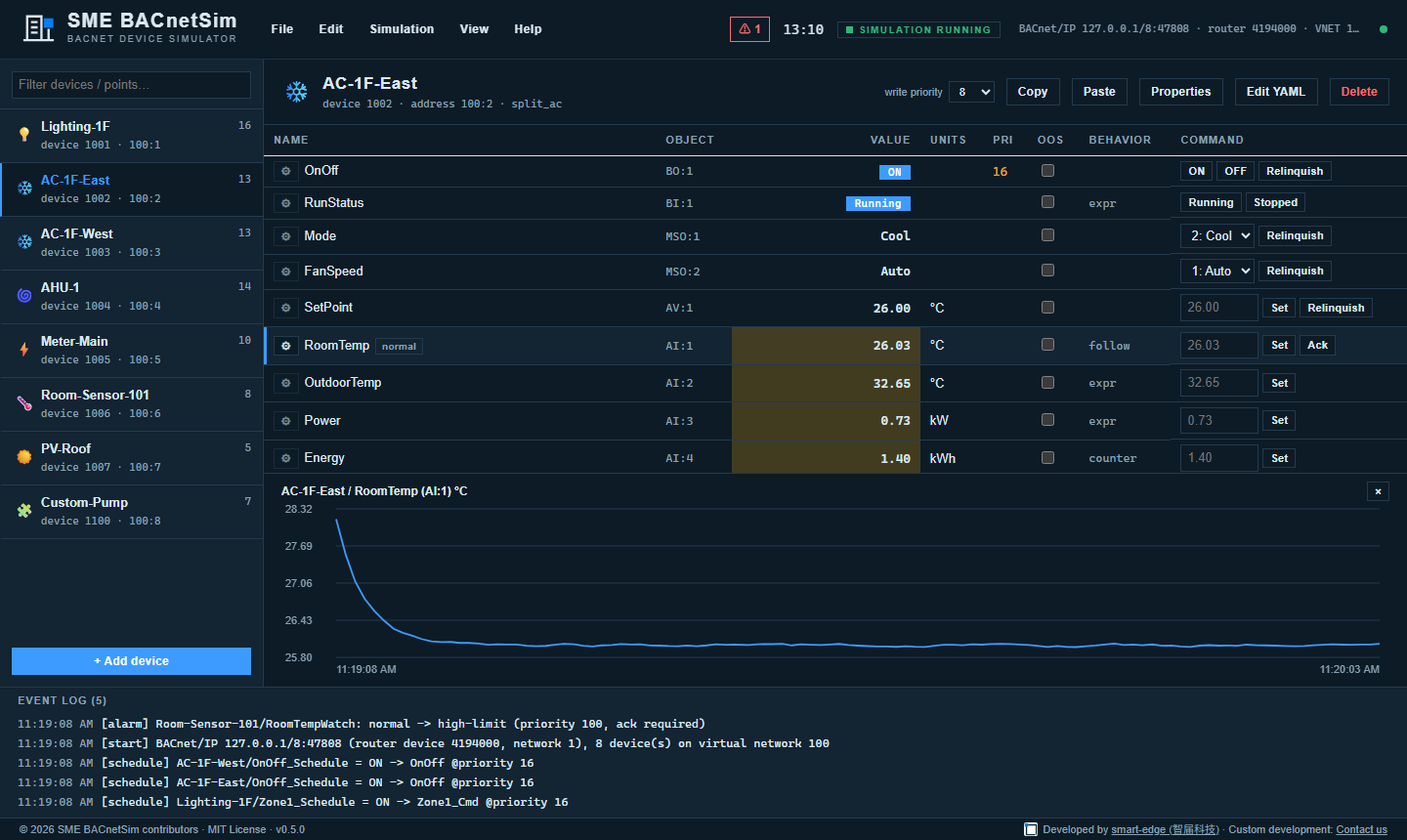 Dark theme |
Quick start
python -m venv .venv
.venv\Scripts\pip install -r requirements.txt
.venv\Scripts\python -m sme_bacnet_sim --config configs/demo-building.yaml
Open http://127.0.0.1:8080/ . Options:
| Option | Meaning |
|---|---|
-c, --config FILE |
YAML/JSON config (defaults to configs/demo-building.yaml) |
--ip 192.168.1.10/24 |
NIC address for BACnet/IP (default: auto-detect, /24) |
--bacnet-port 47808 |
BACnet/IP UDP port |
--foreign-bbmd 192.168.2.1[:47808] |
Register as a foreign device with this BBMD (overrides config) |
--foreign-ttl 300 |
Foreign device Time-to-Live in seconds (overrides config) |
--host 0.0.0.0 --http-port 8080 |
Web UI bind address (default localhost only) |
--browser |
Open the web UI in a browser on start (not opened by default; --no-browser is the default) |
Connecting a BACnet client
The client sees the router (device 4194000) at <ip>:47808 and the simulated devices at addresses such as
100:1, 100:2 (network 100, MAC 1, 2…) routed through it. In Yabe: Add device → BACnet/IP over UDP,
then Who-Is.
Same PC caveat: on Windows, a client on the same machine may not receive broadcast replies (Who-Is/I-Am) — unicast works. Run the client on another machine, bind the simulator to a different NIC than the client, or set
network.mode: bbmdand register the client as a foreign device.
Client on another UDP port: Who-Is / I-Am broadcasts go to the simulator's port (47808 by default). A client bound to another port (e.g. 47809) does not receive the I-Am broadcasts and finds no devices. Either use the same port on both sides, or set
network.mode: bbmdand register the client as a foreign device with the simulator (<simulator ip>:47808); the I-Am replies are then forwarded to the client.
Network settings in the web UI
Edit → BACnet network… (or a click on the BACnet/IP address in the status bar) changes the network adapter
(listed by name and address/prefix, or Auto-detect), the UDP port, the IP-side and virtual network numbers, the
router device ID and the mode (normal / BBMD / foreign device with BBMD address and TTL). Apply checks the settings
(an address of this computer, a free UDP port, different network numbers, unique device IDs), rebinds BACnet/IP
without restarting and writes the network: section back to the config file (other sections and unsaved edits are
left as they are; comments inside network: are lost). Command-line options such as --ip / --bacnet-port still
win at the next start. Clients have to discover the devices again after a change.
Not supported: switching off Read-Property-Multiple or segmentation support (always on).
Docker
docker run --rm --network host -e TZ=Asia/Tokyo ghcr.io/smartedge-tech-dev/sme-bacnet-sim:<ver>
--network host (Linux) is needed for Who-Is / I-Am broadcasts. Without TZ the container clock is UTC, and
schedules and the clock in the UI follow it (the image includes tzdata).
Foreign device registration (cross-subnet)
To reach clients on another subnet, the router port can register as a foreign device with an existing BBMD:
network.foreign_device: {bbmd: "<ipv4>[:port]", ttl: <seconds>} or --foreign-bbmd / --foreign-ttl
(the command line wins; TTL defaults to 300 s, port to 47808). The registration uses bacpypes3's foreign
link layer: it is renewed every TTL, retried while unanswered, and cancelled (TTL 0) on stop or reload. Results
(registered / NAK / no answer within 10 s / expired) are written to the event log and shown in the status bar as
FD → <bbmd> (…); the snapshot API reports them in network.foreign_device.
Not supported: combining foreign_device with mode: bbmd, BBMD host names (IPv4 literals only), and reading
or editing the BBMD's tables (Read-Broadcast-Distribution-Table, Read-Foreign-Device-Table and similar).
Configuration
network:
  ip: auto                # or "192.168.1.10/24"
  port: 47808
  network_number: 1       # IP-side network number
  virtual_network: 100    # network number of the simulated devices
  mode: normal            # or bbmd
  # foreign_device: {bbmd: "192.168.2.1:47808", ttl: 300}   # register with an external BBMD
  router: {device_id: 4194000, name: SME-BACnetSim-Router}

simulation:
  tick_seconds: 1.0
  time_scale: 1.0         # 60 = 1 simulated minute per second
  history_size: 600       # trend samples kept per point

devices:
  - device_id: 1002
    name: AC-1F-East
    template: split_ac             # optional
    params: {rated_kw: 2.8}        # template parameters
    objects:                       # add objects, or override template objects by name
      - {name: SetPoint, type: av, value: 24.0, commandable: true}
Objects
| Key | Notes |
|---|---|
type |
ai ao av bi bo bv msi mso msv acc pc loop file prog tl sch cal nc ee (or full names such as analog-input, trend-log, schedule, calendar, notification-class, event-enrollment) |
instance |
optional; auto-numbered per type |
name, description |
name is also the variable name in expressions |
units |
BACnet engineering units, e.g. degrees-celsius, kilowatts, percent |
value |
initial value (binary: 0/1, multi-state: 1-based index) |
states |
multi-state texts |
active_text, inactive_text |
binary texts (quote "ON"/"OFF" — YAML reads them as booleans) |
commandable |
for av/bv/msv; outputs are always commandable |
min, max, cov_increment |
analog limits and COV increment |
behavior |
how the value is simulated (below) |
log_object, log_property, log_interval, logging_type, client_cov_increment, buffer_size, enabled |
trend logs only (below) |
weekly, exceptions, default, targets, priority_for_writing, effective_period |
schedules only (below) |
dates |
calendars only (below) |
scale, prescale |
accumulators only (below) |
scale_factor, input_object |
pulse converters only (below) |
controlled_object, manipulated_object, setpoint, setpoint_object, proportional_constant, integral_constant, derivative_constant, bias, action, update_interval |
loops only (below) |
file_type, access, content, path, read_only, program_state, instance_of, program_location |
files and programs only (below) |
monitored_object, event_type, event_parameters, notification_class, event_enable, notify_type, time_delay, time_delay_normal |
event enrollments only (below) |
Accumulators, pulse converters and loops
- {type: acc, name: EnergyPulses, units: kilowatt-hours, scale: 0.01, max: 99999999,
   behavior: {type: pulse, rate: "ActivePower * 100 / 3600"}}
- {type: pc, name: EnergyFromPulses, input_object: EnergyPulses, scale_factor: 0.01, units: kilowatt-hours}
- type: loop
  name: SupplyTempLoop
  controlled_object: SupplyTemp      # controlled-variable-reference (present-value)
  manipulated_object: CoolValve      # manipulated-variable-reference (present-value)
  setpoint_object: SupplyTempSP      # or a fixed setpoint: 16
  proportional_constant: 8
  integral_constant: 0.2
  min: 0                             # minimum-output
  max: 100                           # maximum-output
  units: percent                     # output-units
  priority_for_writing: 10
| Type | Keys |
|---|---|
acc (Accumulator, 23) |
value (unsigned count), units, scale (Scale as a float scale, default 1), max (Max_Pres_Value, default 4294967295; above it the count wraps to 0), prescale ([multiplier, modulo_divide]) |
pc (Pulse Converter, 24) |
value, units, scale_factor (default 1), input_object (an accumulator of the same device → Input_Reference), cov_increment |
loop (Loop, 12) |
controlled_object, manipulated_object, setpoint or setpoint_object, proportional_constant (default 1), integral_constant (1/s, default 0), derivative_constant (s, default 0), bias (default 0), action (direct / reverse, default direct), update_interval (sim seconds, default 1; the Update_Interval property is in ms), min / max (output limits, default 0 / 100), units (Output_Units), priority_for_writing (default 16), cov_increment |
- Accumulator: driven by any behavior; the
pulsebehavior addsratepulses per second. - Pulse converter with
input_object: every tick the accumulator's count delta (wrap-around included) times Scale_Factor is added to Present_Value, and Count shows the accumulator's count. Withoutinput_objectit is a plain Real value object (behaviors apply). - Loop (textbook PID, on the simulated clock every Update_Interval):
e = PV − setpoint(direct) orsetpoint − PV(reverse);output = bias + Kp·e + Ki·∫e dt + Kd·de/dt, clamped to Minimum_Output .. Maximum_Output, with the integral held while the output is saturated (anti-windup). The output goes to the loop's Present_Value and to the manipulated object (its priority array at Priority_For_Writing when it is commandable, else its present value). Constants, setpoint, action, limits, update interval and write priority can be changed with WriteProperty. With asetpoint_object, Setpoint follows that object's value. Out of service: no computation and no output write. The UI shows the output plus PV / SP. - COV: pulse converters use the COV-increment criteria, loops the generic criteria (present-value / status-flags), as defined by bacpypes3. bacpypes3 has no COV criteria for the Accumulator, so SubscribeCOV on an accumulator is not available (SubscribeCOVProperty works).
- CreateObject creates accumulators and pulse converters (without input reference); loops are declared in the config only. DeleteObject refuses objects referenced by a pulse converter or loop.
- EDE: accumulators and pulse converters are exported (unit code; the
maxcolumn of an accumulator is Max_Pres_Value) and imported; loops are exported but skipped on import with a warning (EDE carries no references / PID constants).
Not supported: applying Prescale (stored only), Value_Set / Value_Before_Change / Value_Change_Time /
Logging_Record / Pulse_Rate and limit monitoring of the Accumulator; the Adjust_Value semantics of the
Pulse Converter (it is a plain writable property: Count and Present_Value are not adjusted),
Count_Before_Change / Count_Change_Time / Update_Time and COV_Period periodic notifications; intrinsic
reporting on these three types (alarm is rejected); references to other devices or to properties other
than Present_Value.
Files and programs
- {type: program, name: AHU-Sequence, instance_of: AHU-Seq-v2, program_state: running}
- type: file
  name: MaintenanceLog
  file_type: text/plain            # File_Type (MIME type)
  access: record                   # stream (default) | record
  content: |-                      # or: path: logs/maintenance.txt (relative to the config file)
    2026-04-01 filter replaced
    2026-10-01 belt tension checked
- {type: file, name: Firmware, file_type: application/octet-stream, path: fw.bin, read_only: true}
| Type | Keys |
|---|---|
file (File, 10) |
file_type (default text/plain), access (stream / record), content (text) or path (file loaded at start, relative to the config file), read_only (default false) |
program (Program, 16) |
program_state (initial idle / running / halted, default idle), instance_of (default the object name), program_location |
File content is held in memory. Stream access works on the bytes; record access makes every line one record
(without the line terminator). File_Size is the byte count (record access: the sum of the record lengths) and
Record_Count the number of records. AtomicReadFile / AtomicWriteFile support both access methods: a start
position / record -1 appends, a start beyond the end answers services / invalid-file-start-position, the
wrong access method invalid-file-access-method, a Read_Only file file-access-denied, a non-File object
inconsistent-object-type and a missing object object / unknown-object. A write updates File_Size /
Record_Count and Modification_Date (simulated clock). Written content of a content file is kept in the config,
so Save / Export store it (only when it is valid UTF-8); a path file is changed in memory only, the file
on disk is never written. File_Size, Modification_Date, File_Access_Method, Record_Count and Read_Only are
read-only for clients (write-access-denied).
Program: writing Program_Change applies the request at once and sets it back to ready: load, run and
restart -> running, halt -> halted (Reason_For_Halt normal, Description_Of_Halt "halted by request"),
unload -> idle, ready -> no change. Every request is accepted in every state. The UI shows the state and
a Program_Change menu (POST /api/devices/{id}/program/{instance}/change). Program_State, Reason_For_Halt,
Description_Of_Halt and Instance_Of are read-only for clients.
EDE carries no file content, file type or access method: imported files are empty stream files (with a warning); programs are imported with their name.
Not supported: the transitional states loading, waiting and unloading, rejecting requests that are not
valid in the current state, any real program execution or failure (Reason_For_Halt other than normal),
writing File_Size to truncate a file, the Archive semantics (plain writable flag) and a consistency check of
the request's Record_Count against the records sent; the exact rules exist only in the paid ASHRAE 135 text.
Trend logs
type: tl (or trend-log) creates a BACnet Trend Log object that logs another object of the same
device (polled or on change) and keeps the samples in a ring buffer (oldest records are dropped,
stop-when-full is false):
- {type: tl, name: RoomTemp_Log, log_object: RoomTemp, log_interval: 60, buffer_size: 1000}
- {type: tl, name: RoomTemp_Cov, log_object: RoomTemp, logging_type: cov, client_cov_increment: 0.5}
| Key | Default | Notes |
|---|---|---|
log_object |
(required) | name of the logged object; must exist in the device |
log_property |
present-value |
any numeric / enumerated / boolean property of the target |
log_interval |
60 |
simulated seconds (BACnet log-interval is reported in 1/100 s); polled mode only |
logging_type |
polled |
polled or cov (BACnet logging-type) |
client_cov_increment |
target's cov-increment |
cov mode only; minimum change of a real value that is logged |
buffer_size |
1000 |
ring buffer size |
enabled |
true |
initial value of the enable property (also writable over BACnet and from the UI) |
Samples are taken on the simulated clock and time-stamped with the simulated date/time, so with
time_scale: 3600 an hour of real time yields a day of history at the configured interval. When one tick
is longer than log_interval, the missed intervals collapse into one sample. Read the buffer with
ReadRange (by position, by sequence number, by time, or without a range for everything that fits in
the response); log-buffer is not readable with ReadProperty. Writing 0 to record-count clears the log.
The split_ac and power_meter templates include one trend log each. EDE export / import carries trend logs
(see EDE below).
COV logging (logging_type: cov): instead of sampling on an interval, a record is appended whenever the
logged value has changed since the last record by at least the increment — client_cov_increment if set
(read back as client-cov-increment), else the target's cov-increment when logging its present value, else
any change; boolean / enumerated / integer values log on any change — or when the target's status flags
change. The first record is taken as soon as the log is enabled with an empty buffer (also after clearing).
Changes are detected once per simulation tick and stamped with the simulated clock; log-interval reads 0.
Not supported: the triggered logging type, logging objects of other devices (and therefore COV
subscriptions to them / cov-resubscription-interval), and log-status / time-change records in the buffer.
Schedules and calendars
type: sch (or schedule) creates a BACnet Schedule object that writes its value to objects of the
same device or of another simulated device; type: cal (or calendar) creates a Calendar object whose present-value is true on
the listed dates.
- {type: cal, name: Holidays, dates: ["2026-12-25", {from: "2026-12-29", to: "2027-01-03"}, "*-01-01"]}
- type: sch
  name: Light_Sch
  targets:                      # written via list-of-object-property-references
    - Zone1_Cmd                 # object of this device
    - {device: AHU-1, object: Fan_Cmd}            # object of another simulated device (name or device id)
    - {device: 300100, object: "binary-value:4"}  # device outside the simulator: listed, never written
  priority_for_writing: 16
  default: "OFF"                # schedule-default
  weekly:
    weekdays: [{time: "08:00", value: "ON"}, {time: "18:00", value: "OFF"}]
    sat: [{time: "09:00", value: "ON"}, {time: "12:00", value: null}]   # null = back to default
  exceptions:
    - {calendar: Holidays, priority: 10, times: [{time: "00:00", value: "OFF"}]}
    - {date: "2026-11-03", priority: 5, times: [{time: "10:00", value: "ON"}]}
    - {date: {from: "2026-08-10", to: "2026-08-14"}, priority: 6, times: [{time: "00:00", value: "OFF"}]}
    - {date: {weeknday: ["*", 6, 5]}, priority: 8, times: [{time: "13:00", value: "OFF"}]}  # last Friday
  effective_period: {from: "2026-01-01", to: "2027-12-31"}   # optional, default always
| Key | Default | Notes |
|---|---|---|
weekly |
— | keys mon..sun, or weekdays / weekend / daily; each a list of {time: "HH:MM[:SS]", value} |
exceptions |
— | special events: one of date (same forms as calendar dates: YYYY-MM-DD with * wildcards, a {from, to} range or {weeknday: [...]}) or calendar (calendar object name), priority 1–16 (1 wins), times |
default |
0 / OFF / 1 |
schedule-default; at least one of weekly / exceptions is required |
targets |
none | output or value objects, all of the same kind: a name (this device) or {device, object}; device is a simulated device's name or id, object a name or type:instance (av:3, binary-output:1). A device id not in the simulator needs object: type:instance; it appears in list-of-object-property-references with its deviceIdentifier, is skipped (logged once at start) and never written over the network |
priority_for_writing |
16 |
priority-array slot used for commandable targets |
effective_period |
always | {from, to}; outside it the schedule keeps its value and writes nothing |
dates (calendar) |
[] |
dates, {from, to} ranges, or {weeknday: [month, week-of-month, day-of-week]} (* = any; month 13 / 14 = odd / even months; week 1–5 = days 1–7 … 29–31, 6 = last 7 days of the month, 7–9 = the 7-day blocks before that; day 1 = Monday) |
The value type follows the targets: analog → REAL, binary → ENUMERATED (0/1, true/false, ON/OFF,
active/inactive or the target's texts), multi-state → UNSIGNED state number. Without targets the
values are REAL. Quote times ("18:00"): unquoted, YAML 1.1 reads 18:00 as the number 1080 (it is
still understood, but quoting is clearer).
Schedules run on the simulated clock, so time_scale fast-forwards them. bacpypes3's own schedule
interpreter uses the wall clock and asyncio timers, so the simulator keeps its Schedule object and
evaluation rules but re-evaluates every tick from the simulated date/time. When the value changes, or a
time entry of the weekly / exception schedule is reached (even with the same value, so a scheduled action
overrides operator changes), the schedule's present-value is set and the value is written to each target
at priority_for_writing (non-commandable value objects get present-value directly); between scheduled
actions nothing is written. A relinquish from a client therefore works normally; the schedule writes again
at its next time entry. Targets in other simulated devices are written directly into that device's object.
A ReinitializeDevice of a target's device re-commands the scheduled value; COV subscriptions are kept. weekly-schedule, exception-schedule and
schedule-default are writable over BACnet and take effect on the next tick (values of the wrong type set
reliability to configuration-error); exception entries may use dates, date ranges, weekNDay or
calendar references. The written content is kept in the config (Save / Export) as weekly / exceptions / default (binary values as 0 / 1, only the changed keys are rewritten; for a template schedule as an override entry); content the config cannot hold (wrong datatype, a calendar reference that is not a calendar of this device, a value the targets do not accept) is not kept and the config keeps the last valid content. exception-schedule is an array, so Add/RemoveListElement answers property-is-not-a-list. Calendar date-list is writable, too, and writing list-of-object-property-references changes the targets (present-value of output / value objects of the schedule's kind on this or another simulated device, or of a device outside the simulator; anything else is value-out-of-range); both are kept in the config (Save / Export). A client write to the schedule's own
present-value (with the schedule datatype, otherwise invalid-data-type) is forwarded to all targets at
priority_for_writing and holds until the next scheduled time entry; it is accepted whether or not
out-of-service is set.
Not supported: writing to targets on devices outside the simulator (no network WriteProperty).
The lighting template has a schedule switching Zone1_Cmd (weekdays 08:00 on, 18:00 off) and the
split_ac template one for OnOff (weekdays 09:00–18:00); disable them with the template parameter
schedule: false. The UI lists schedules and calendars with their current value and next transition;
click a row for the weekly / exception table. EDE export lists them as object types 17 / 6; EDE import
skips them.
Alarms (intrinsic reporting)
type: nc (or notification-class) creates a Notification Class object; its instance is the
notification class number. The web UI lists notification classes in the device's object list (read-only:
priorities, ack-required flags and recipients; edit them in the configuration).
| key | meaning |
|---|---|
priority |
[to-offnormal, to-fault, to-normal], default [100, 100, 200] |
ack_required |
3 flags, default [true, true, false] |
recipients |
list of {device: <id> and/or address: "<net>:<mac>" | "<ip>:<port>", process_id, confirmed, transitions: [3 flags], from_time, to_time, days} |
A recipient given only by device is resolved with Who-Is (another simulated device directly; otherwise
the Who-Is goes out through the router, so the recipient must listen on the simulator's UDP port, usually a
BMS on another host). An address ("<ip>:<port>" means a station on the BACnet/IP side) skips the lookup.
Any value object can carry an alarm block that enables intrinsic reporting:
- type: ai
  name: RoomTemp
  alarm: {notification_class: NC1, high_limit: 30, low_limit: 15, deadband: 0.5, time_delay: 60}
- {type: bi, name: FilterAlarm, alarm: {notification_class: 1, alarm_value: active}}
- {type: msi, name: Status, states: [Stopped, Running, Fault], alarm: {notification_class: 1, fault_values: [Fault]}}
| key | meaning |
|---|---|
notification_class |
name or instance of a notification-class object in the same device |
high_limit, low_limit, deadband, limit_enable |
analog (OUT_OF_RANGE); limit_enable [low, high] defaults to the limits that are set |
alarm_value |
binary (CHANGE_OF_STATE): active / inactive |
alarm_values, fault_values |
multi-state: state numbers or texts; a fault value puts the object in fault |
time_delay, time_delay_normal |
simulated seconds (default 0 / time_delay) |
event_enable |
[to-offnormal, to-fault, to-normal], default all true |
notify_type |
alarm (default) or event |
Event states are evaluated on the simulated clock (time delays follow the speed and stop while paused;
writes are evaluated immediately). Transitions update Event_State, Event_Time_Stamps, Acked_Transitions and
the in-alarm status flag, are sent as Confirmed / UnconfirmedEventNotification to the recipients, and appear
in the event log. The simulator answers AcknowledgeAlarm, GetEventInformation, GetAlarmSummary and
GetEnrollmentSummary (all filters, including the enrollment filter = recipient + process identifier of the
object's notification class); the web UI shows an alarm badge per row, an
Ack button, the active-alarm count in the header and View → Alarms. The split_ac, ahu and
power_meter templates add NC1 (no recipients) and a few alarms; set the template parameter
alarms: false to leave them out. split_ac's RoomTemp high limit (template parameter high_limit,
default 35 °C) is an overheat alarm above the template's ambient peak (33 °C), so the demo starts and runs
without alarms while the ACs follow their schedules; to see one, write high-limit (e.g. 28) from a client.
BACnet writes (WriteProperty / WritePropertyMultiple) to event-enable, limit-enable, high-limit,
low-limit, deadband, time-delay, time-delay-normal, notification-class (must be a notification-class
object of the device) and alarm-value / alarm-values take effect and are written into the config, so
Save / Export keep them. acked-transitions is read-only (WriteProperty answers write-access-denied).
WritePropertyMultiple validates every item first (object exists, property exists, array index, datatype, the alarm property rules above, Priority_Array of commandable objects) and writes nothing if one fails; the error names the first failing object / property. Value checks done only inside an object's own write hook (e.g. trend log / schedule range checks) still run while writing, so such a failure can leave the earlier items of the request applied.
bacpypes3 0.1.0 cannot decode a GetAlarmSummary / GetEnrollmentSummary ACK whose list is empty (a filter
that matches nothing) and reports it as invalid-tag; the simulator itself encodes the empty ACK correctly
and patches the decoder for bacpypes3 clients running in the same process (sme_bacnet_sim/alarm.py).
Other bacpypes3 0.1.0 clients see the same error until they apply the same fix.
A multi-state object that is already offnormal and changes to a different alarm value makes a new
offnormal -> offnormal transition (and notification) after time_delay.
Limitations: bacpypes3's own intrinsic-reporting algorithms run on the wall clock, so the simulator uses its
own (see sme_bacnet_sim/alarm.py).
Not supported: acknowledgment notifications (notify type ack-notification). AcknowledgeAlarm is answered and
updates Acked_Transitions, but no notification is sent to recipients. Exact all-or-nothing semantics of
WritePropertyMultiple beyond the up-front validation above (rollback of already applied writes). SME BACnetSim is free and is built from
public sources only; behaviors that can only be specified from the paid ASHRAE 135 text are left out.
Event enrollments (algorithmic reporting)
type: ee (or event-enrollment) creates an Event Enrollment object that monitors the present-value of
another value object of the same device and reports through a notification class, so a point without an
alarm block (e.g. a template's temperature) can still raise alarms:
- type: ee
  name: RoomTempWatch
  monitored_object: Temperature
  event_type: out-of-range
  event_parameters: {low_limit: 18, high_limit: 28, deadband: 0.5}
  notification_class: RoomAlarms
  time_delay: 60
- {type: ee, name: ModeWatch, monitored_object: OperationMode, event_type: change-of-state,
   event_parameters: {alarm_values: [Maintenance]}, notification_class: 1, notify_type: event}
| key | meaning |
|---|---|
monitored_object |
name of a value object of the same device (Object_Property_Reference = its present-value) |
event_type |
out-of-range (analog, accumulator excluded) or change-of-state (binary / multi-state) |
event_parameters |
out-of-range: low_limit, high_limit (both required, both always enabled), deadband; change-of-state: alarm_values (state numbers or texts, active / inactive for binary) |
notification_class |
name or instance of a notification-class object in the same device |
time_delay, time_delay_normal |
simulated seconds (default 0 / time_delay); time_delay is the Time_Delay of Event_Parameters |
event_enable |
[to-offnormal, to-fault, to-normal], default all true |
notify_type |
alarm (default) or event |
Event enrollments use the same event state machine, notifications, AcknowledgeAlarm,
GetEventInformation / GetAlarmSummary / GetEnrollmentSummary and web UI (row with badge and Ack,
View → Alarms) as intrinsic reporting. BACnet writes to event-parameters (same event type),
event-enable, notify-type, time-delay-normal and notification-class take effect and are written into
the config; acked-transitions is read-only. The demo configuration's Room-Sensor-101 has one. EDE export
lists event enrollments (object type 9); EDE import skips them with a warning (EDE carries no monitored
object or parameters).
Not supported: the event types floating-limit, change-of-value and all others (their exact algorithms are
specified only in ASHRAE 135), fault detection of event enrollments (no fault state / change-of-reliability),
monitoring objects of other devices or properties other than present-value, changing event-type or
object-property-reference by a BACnet write, and creating / deleting event enrollments with
CreateObject / DeleteObject. A value object monitored by an event enrollment cannot be deleted.
Life safety points and zones
      - {type: lsp, name: Smoke-101, description: Smoke detector}   # life-safety-point (object type 21)
      - type: lsp
        name: Heat-101
        value: quiet               # initial state (BACnetLifeSafetyState: quiet, pre-alarm, alarm, fault, ...)
        mode: "on"                 # BACnetLifeSafetyMode (default on; quote on / off in YAML)
        accepted_modes: ["on", "off", test]   # default [off, on, test]
        operation_expected: none   # BACnetLifeSafetyOperation, read-only (default none)
        silenced: unsilenced       # initial BACnetSilencedState
        behavior: {type: random_alarm, probability: 0.001, state: alarm}  # optional, per sim second
      - {type: lsz, name: Zone-101, zone_members: [Smoke-101, Heat-101]}  # life-safety-zone (object type 22)
The simulator uses a simplified model (the full state machine is only specified in ASHRAE 135):
- Tracking_Value is the live detector state. Set it from the UI (detector-state menu of the row,
POST /api/devices/{id}/life-safety/{type:instance}/state) or with the optionalrandom_alarmbehavior (goes tostateat random, back toquieton the next tick). It is read-only for BACnet clients. - Present_Value follows Tracking_Value while that is not
quietand stays latched when it returns toquiet, until a reset. BACnet writes to present-value are only accepted while out-of-service. - Zone: its Tracking_Value is the present value of the first member (in Zone_Members order) that is not
quiet, elsequiet. This is a simplification: no severity order between the states is applied. - LifeSafetyOperation:
silence/silence-audible/silence-visualset andunsilence*clear the audible / visible part of Silenced;reset/reset-alarm/reset-fault(all the same here) copy Tracking_Value to Present_Value and unsilence;nonedoes nothing. An operation on a zone also acts on its members; without an object identifier it acts on every life safety object of the device. Vendor-specific operations returnservices/optional-functionality-not-supported, other object typesobject/unsupported-object-type. Every operation is written to the event log. - Mode is writable but must be one of accepted-modes (else
property/value-out-of-range); zone-members is writable (WriteProperty, AddListElement / RemoveListElement) and written back to the config as member names (references to other devices are ignored). - ReinitializeDevice restores the configured state. EDE export lists them (object type 21 / 22, state number as value); EDE import keeps type, name and state.
Not supported: change-of-life-safety event reporting (alarm-values, life-safety-alarm-values, fault-values and the event properties are not evaluated), the severity order of the states and mode-dependent transitions, maintenance-required / direct-reading / setting behaviour, and creating / deleting life safety objects with CreateObject / DeleteObject.
Device management services
Each simulated device also serves (bacpypes3 0.1.0 leaves most of these unimplemented or broken on the server
side, so the simulator implements them in sme_bacnet_sim/engine.py / sme_bacnet_sim/devmgmt.py):
- COV increment default (analog objects without
cov_increment): a point with abehavior(it changes every tick) gets 1 % of its span (min/maxof the object, elsemin/maxof the behavior), else a per-unit default (0.1 for °C / kW / kWh / A, 0.5 for % / %RH / V / m³/h, 1 for W / Pa, 5 for ppm / lx / W/m², 0.01 Hz; see_UNIT_COVinsme_bacnet_sim/engine.py), else0; points without a behavior keep0(= any change). Setcov_incrementexplicitly to override. - SubscribeCOV (confirmed / unconfirmed, with lifetime) on all value objects: a notification on a
presentValue change of at least
covIncrement(analog), whether it comes from a behavior, a BACnet write or the UI, and on any status-flags change (alarm, fault, out-of-service). SubscribeCOVProperty on any property, with the client's COV increment (default: the object'scovIncrementfor present-value); the notification carries the property and the status flags. - CreateObject / DeleteObject for value objects (AI/AO/AV/BI/BO/BV/MSI/MSO/MSV, Accumulator, Pulse Converter), by object type (first free
instance) or by object identifier, with optional initial values: object-name, present-value, description,
units / cov-increment (analog), active-text / inactive-text (binary), state-text (multi-state, default
State 1,State 2), out-of-service. A created object is appended to the device'sobjectsin the running config (so Save / Export keep it) and appears in the UI at once. Deleting removes it fromobjects; if the object comes from a template its name is added to the device'sremovedlist, which template expansion skips (remove the name fromremovedto get the template object back; creating an object with that name also drops it fromremoved). Not deletable (object/object-deletion-not-permitted): the device object, network ports, trend logs, schedules, calendars, notification classes, and value objects logged by a trend log or written by a schedule. Errors on create use CreateObject-Error with the failing element number (dynamic-creation-not-supported,object-identifier-already-exists,duplicate-name,write-access-deniedfor other properties,invalid-data-type). - TimeSynchronization / UTCTimeSynchronization (to a device, or to the router / broadcast): moves the
simulated clock so that it shows the received time (UTC is converted with the host's time zone); the
elapsed simulated time keeps running, schedules are re-evaluated at once and trend logs continue on the new
clock. Simulation → Sync to PC clock (or
POST /api/simulation {"set_time": ...}) does the same from the UI. - DeviceCommunicationControl enable / disable / disable-initiation with an optional time duration in minutes, measured on the wall clock (the duration is a real-world timeout in the standard, independent of the simulation speed). While disabled the device ignores everything except DeviceCommunicationControl and ReinitializeDevice and sends nothing (no I-Am, COV or event notifications); disable-initiation still answers requests and Who-Is but initiates nothing else. The device header in the UI shows the state with an Enable communication button.
- ReinitializeDevice warmstart: values back to the configured initial values, priority arrays
relinquished, out-of-service cleared, behaviors and alarms (event state normal, all acknowledged) reset,
communication re-enabled. Coldstart: the same, and trend-log buffers are cleared. Other states return
services/optional-functionality-not-supported.
Device keys for these services:
  - device_id: 1002
    name: AC-1F-East
    dcc_password: secret      # DeviceCommunicationControl password (default: none = not checked)
    reinit_password: boot     # ReinitializeDevice password (default: none = not checked)
    removed: [FilterAlarm]    # template objects deleted with DeleteObject (written by the simulator)
A wrong password returns security / password-failure.
Text messages, private transfer and list element services
- ConfirmedTextMessage / UnconfirmedTextMessage received by a simulated device are written to the event
log (kind
text-message: sender address and device, priority, message class, text). A simulated device can send one withPOST /api/devices/{id}/text-message{"message": "...", "address": "100:2", "priority": "normal", "message_class": 5, "confirmed": false}(addressdefault: global broadcast*:*, which cannot be confirmed;message_classa number or text). - ConfirmedPrivateTransfer / UnconfirmedPrivateTransfer are written to the event log (kind
private-transfer). A confirmed request is answered as declared in the device'sprivate_transferlist;result: echo(default) returns the service parameters as the result block,nullno result block, a string / integer / real / boolean that value. Without a matching entry the answer is a ConfirmedPrivateTransfer-Errorservices/optional-functionality-not-supported: the device does support the service, only not that vendor / service number, so the simulator uses this error rather than aunrecognized-servicereject (which would claim the whole service is missing). - AddListElement / RemoveListElement on any writable list property (e.g. notification class
recipient-list, calendar date-list, schedule list-of-object-property-references, life safety zone
zone-members). Elements are decoded with the bacpypes3 property datatype; the new list is written exactly
like a WriteProperty of the whole list (same checks and follow-ups). Elements already in the list are
ignored on add. Errors (Add/RemoveListElement-Error): unknown object / property,
services/property-is-not-a-list(property is not a list),property/property-is-not-an-array(array index given),write-access-denied,invalid-data-type, andservices/list-element-not-foundwith the (1-based) number of the first element that is not in the list on remove. Written back to the config: zone-members, recipient-list (also used for sending notifications at once), date-list and list-of-object-property-references (the schedule writes to the new targets), as with WriteProperty; objects that come from a template are kept as an override entry.
  - device_id: 1006
    name: Room-Sensor-101
    private_transfer:
      - {vendor_id: 999, service_number: 1}              # result: echo (default)
      - {vendor_id: 999, service_number: 2, result: 42}  # fixed value
Not supported: vendor-specific meaning of private transfer parameters (they are not decoded), text messages from the router device, and the AddListElement / RemoveListElement rules that only ASHRAE 135 defines for individual properties beyond the checks above.
Behaviors
type |
Parameters | Example |
|---|---|---|
sine |
min max period phase noise |
daily or periodic swings |
random |
min max |
uniform noise |
random_walk |
min max step |
drifting sensor |
expr |
expr |
"Zone1_Cmd", "1.732 * Voltage * Current * PowerFactor / 1000" |
follow |
target tau noise |
first-order lag to a target: "SetPoint if OnOff else 30" |
counter |
rate |
integrates units/second: "Power / 3600" → kWh |
pulse |
rate |
accumulator pulses per second (fractions carried over): "ActivePower * 100 / 3600" |
replay |
file column interpolate loop offset |
play a CSV time series (below) |
CSV replay (replay): the first CSV column is the timestamp — elapsed time (HH:MM:SS or seconds) or an
ISO datetime — and every other column is a value series. Each point names the file and its column, so one CSV
can drive many points (the file is parsed once). Relative paths resolve against the config file's directory.
Replay time 0 is the first row and advances with the simulated clock, so it follows simulation.time_scale.
interpolate: linear (default) or step (hold the previous row); binary and multi-state points always step-hold
(active / inactive / 1 / 0, state numbers). offset starts mid-file ("06:00:00", seconds, or an ISO
datetime for ISO CSVs); loop: true repeats, otherwise the last value is held. An empty cell holds the previous
value. Bad timestamps, rows going backwards or an unknown column are reported when the config is loaded. The
point row shows the replay position, e.g. replay 06:12:30 (26%). Example: configs/replay-example.yaml with
configs/data/day-profile.csv:
time,oat,rh,occupied,mode
00:00:00,13.8,71,inactive,1
08:00:00,17.2,64,active,2
19:00:00,20.2,56,inactive,1
24:00:00,13.8,71,inactive,1
- {type: ai, name: OutdoorTemp, units: degreesCelsius,
   behavior: {type: replay, file: data/day-profile.csv, column: oat, loop: true, offset: "06:00:00"}}
- {type: bi, name: Occupied,
   behavior: {type: replay, file: data/day-profile.csv, column: occupied, loop: true, offset: "06:00:00"}}
Expressions are sandboxed Python expressions. Available names: the device's object names, t (sim seconds),
dt, hour (sim clock, 0–24), pv("Device", "Object") to read another device, and
sin cos exp log sqrt pi abs min max round clamp random uniform noise gauss.
Objects that are out of service stop following their behavior, which is how you inject a fixed value or a fault. Writing a simulated input from the UI sets it out of service automatically.
Templates
lighting, split_ac, ahu, power_meter, env_sensor, pv_inverter, custom — see
sme_bacnet_sim/templates.py. Adding your own is a ~20-line function.
EDE import / export
SME BACnetSim reads and writes EDE files (B.I.G.-EU Engineering Data Exchange, layout 2.3), the CSV point list most BACnet tools and integrators exchange.
- Export: the
EDEbutton (GET /api/config/export?format=ede) downloads a zip with the main filesme-bacnet-sim-ede.csv(one row per object, plus one device row with object-type 8; numeric object-type and unit codes; templates expanded) and the state-text filesme-bacnet-sim-ede-statetexts.csv(binary objects: Text 1 = inactive, Text 2 = active; multi-state objects: states 1..N). - Import: select the main CSV, optionally together with the state-text CSV (or the exported zip).
The state-text file is recognised by its header. Semicolon or comma delimiters, UTF-8 (with or without
BOM) and cp1252 are accepted. Rows are grouped into one device per device instance (name taken from the
device row, else
Device-<id>);settable = Yon AV/BV/MSV makes the object commandable. Object types the simulator does not support are skipped and reported as warnings in the event log. Network and simulation settings of the running config are kept; imported objects are static (no behaviors). - Trend logs (object type 20): export writes the trend-log settings into the
vendor-specific-addresscolumn askey=valuepairs separated by|(e.g.log_object=RoomTemp|log_interval=60|logging_type=cov; keys as in YAML), so an exported file re-imports with its trend logs. Files from other tools carry no logged object reference; the import then logs<name>for a trend log named<name>_Logwhen that object exists, else the first analog / binary / multi-state object of the device (polled, 60 s), with a warning. - Accumulator / Pulse Converter / Loop (object types 23 / 24 / 12): see Objects above.
- hi-limit / low-limit map to
alarm.high_limit/alarm.low_limitof analog objects. On import the alarm uses the device's first notification class; if the file has none,NC-1(instance 1, no recipients) is created. Notification classes are imported with default priorities and no recipients (EDE has no columns for them). Other alarm settings (deadband, time delay, binary / multi-state alarm values) are not carried by EDE.
Excel point list
File → Download blank Excel template (GET /api/config/xlsx-template) gives an empty .xlsx point list;
File → Export → Excel point list (GET /api/config/xlsx) writes the running config;
File → Import accepts the .xlsx. Sheets: Devices (one row per device: device_id, name, template,
params, vendor / location / passwords), Points (one row per object: device_id, type, instance, name,
units, value, commandable, min / max, cov_increment, state_texts, active / inactive text,
behavior, alarm_class / alarm_high_limit / alarm_low_limit / alarm_deadband / alarm_values /
alarm_time_delay), StateTexts (ref, text_1..N) and an optional Network sheet (key / value).
Column names are English; the row below the header is a # comment row with Japanese / Chinese descriptions.
Settings without a column go into the extra column as a YAML flow mapping, so export → import round-trips.
Import errors name the sheet, row and column (Points row 12, column 'instance': not an integer); warnings go to
the event log. Details: docs/en/excel.md.
Cloning real devices
sme-bacnet-sim clone reads real BACnet devices (read-only) and writes a simulator config, so later tests run
offline. Full reference: docs/en/cloning.md.
-
Get the customer's permission first; prefer non-operating hours. Start with a small
--who-isrange and keep the default--rate(5 requests/s): MS/TP trunks and low-end controllers are easily loaded. -
Read-only guarantee: the clone client can only send Who-Is, ReadProperty and ReadPropertyMultiple (any other APDU is refused in code, a test asserts it) and never answers requests from other devices.
-
On a gateway (e.g. Moxa, ARM) use Docker —
--network hostis required for Who-Is / I-Am:docker load -i sme-bacnet-sim-<ver>-linux-<arch>.tar.gz # offline; or: docker pull ghcr.io/smartedge-tech-dev/sme-bacnet-sim:<ver> docker run --rm --network host --user "$(id -u):$(id -g)" -v "$PWD":/out \ ghcr.io/smartedge-tech-dev/sme-bacnet-sim:<ver> sme-bacnet-sim clone --who-is 1000-1010 -o /out/site.yaml
Images:
linux/amd64,linux/arm64,linux/arm/v7(uname -m=armv7l, e.g. Moxa). Offline gateways: downloadsme-bacnet-sim-<ver>-linux-<arch>.tar.gz(amd64/arm64/arm-v7) from the GitHub Release, copy it over (e.g. FTP) anddocker load -iit as is (no need to gunzip). Seedocs/en/cloning.md.With Python 3.10+:
pip install .(venv orpip install --user .) from a checkout. The release only ships a PyInstaller executable for x86-64 Windows (no Linux / macOS / ARM executable). -
Targets:
--who-is LOW-HIGH(local broadcast),--address IP[:PORT](unicast; with--devices IDno Who-Is at all),--network N(with--address: the router to network N),--devices ID,.... One is required. -
Across subnets:
--foreign-bbmd HOST[:PORT](and--foreign-ttl) registers the client as a foreign device with a BBMD so the broadcast I-Am answers reach it, e.g.clone --foreign-bbmd 192.168.251.8 --who-is 0-4194302. -
Other options:
--ip,--port(default 47808),--client-device-id(default 4194300),--rate,--timeout,--retries,--no-rpm,--object-list-file(object table for devices whose object-list cannot be read),--no-keep-ids,--resume,-o OUT.yaml. -
Object lists are read by array index (no segmentation needed); RPM falls back to ReadProperty; requests stay within the device's max-apdu. The YAML is rewritten after each device (Ctrl+C keeps what was read) and
OUT.yaml.log.jsonllogs every request / answer / error / warning. -
Cloned: device info, all supported object types with names, units, state texts, COV increments, commandable, alarm parameters, notification classes, schedules, calendars, trend logs and the other supported objects' settings. Not cloned: file content, address recipients, references to other devices (warnings in the log).
-
Coexisting with another BACnet client on the gateway (e.g. BAC0 on 47808): use
--port 47809; I-Am answers may go to 47808, so use--address <device IP> --devices <id>; pick--client-device-idif 4194300 collides. -
Offline: when nothing can run on site, export EDE from the customer's tool and use the EDE import.
-
Recording values for replay:
sme-bacnet-sim recordpolls present-values (RPM with ReadProperty fallback) into a CSV for thereplaybehavior, and with--trend-logreads Trend Log buffers (ReadRange). Read-only like clone; stop with--duration/--count/ Ctrl-C,--resumeappends. Seedocs/en/cloning.md.sme-bacnet-sim record -c site.yaml --address 192.168.1.50 --interval 60 --duration 8h -o data/site.csv
Copy / paste and the property grid
- Devices: Copy in the device header (or right-click a device in the list, or Ctrl+C with no point selected),
then Paste (header button, Edit → Paste or Ctrl+V) adds a duplicate with the next free device ID after the
source and the name
Name (copy). The duplicate is written to the configuration like Add device. - Points: select rows with Ctrl / Shift click, Ctrl+C (or Edit → Copy), select a device (the same or another
one) and Ctrl+V. Each pasted object gets the next free instance of its type and, on a name clash, a
(copy)suffix. References (log_object, scheduletargets/ exceptioncalendar,input_object, loop*_object,monitored_object,notification_class,alarm.notification_class) are kept by name; a reference to an object pasted in the same batch follows the renamed copy. When a referenced name does not exist in the target device the object is not pasted and the reason is shown and written to the event log. Ctrl+C / Ctrl+V only act while no text field or dialog has the focus; the clipboard lives in the page memory. - Properties: the ⚙ button on a row (or Properties in the device header for the device object) lists every property of the BACnet object, ordered by property identifier, with value, datatype and whether it can be written. Writes take the same path as a BACnet WriteProperty request (same checks, alarm properties written back to the configuration); a commandable Present_Value is written at a chosen priority or relinquished. Only basic types (real, double, unsigned, integer, boolean, enumerated, character string) can be edited; constructed values (arrays, lists, sequences) are shown as JSON and are read-only in the UI. Object_Identifier, Object_Type and Property_List are never written from the UI.
HTTP API
| Method | Path | |
|---|---|---|
| GET | /api/version |
{name, version, common_version} |
| GET | /api/state |
full snapshot |
| WS | /ws |
snapshot + value changes + log events |
| POST | /api/devices/{id}/objects/{type:instance}/write |
{"value": 1, "priority": 8} |
| POST | .../relinquish, .../oos |
{"priority": 8}, {"out_of_service": true} |
| POST | /api/devices/{id}/objects/{type:instance}/ack |
acknowledge all unacknowledged transitions of the object's alarm |
| POST | /api/devices/{id}/dcc |
{"state": "enable"} (or disable / disable-initiation) |
| POST | /api/simulation |
{"running": true, "time_scale": 60, "set_time": "2026-11-23T08:00:00"} (all optional; naive time = local) |
| GET/PUT | /api/config |
whole config (PUT accepts YAML or JSON text) |
| POST | /api/config/save |
write the running config to the -c file (400 if started without -c); returns {ok, path} |
| GET/PUT | /api/network |
network settings + local IPv4 interfaces ({network, bind, config_path, interfaces}); PUT {ip, port, network_number, virtual_network, mode, router, foreign_device} validates, rebinds and writes the network: section back → {ok, bind, saved, save_error} |
| POST | /api/config/import |
multipart upload: one YAML / JSON / Excel (.xlsx) file, or EDE CSV files / zip (field file, repeatable) |
| GET | /api/config/export?format=yaml|json|ede |
download (ede = zip of main + state-text CSV; Excel: GET /api/config/xlsx) |
| GET | /api/config/xlsx |
download the running config as an Excel point list |
| GET | /api/config/xlsx-template |
blank Excel point-list template |
| GET | /api/templates |
template catalog |
| POST | /api/templates/reload |
reload user templates; returns {dir, loaded, errors, templates} |
| POST | /api/templates/from-device/{id} |
{"name": "my-ahu", "title": ..., "description": ..., "overwrite": false} saves the device as a user template; returns {ok, name, path} (409 if it exists) |
| POST/PUT/DELETE | /api/devices, /api/devices/{id}/config |
add / edit / delete device; POST /api/devices without device_id takes the first free ID from 1001 and returns {ok, name, device} (409 if the ID exists); GET /api/devices/{id}/config returns the device as YAML |
| POST | /api/devices/{id}/duplicate |
copy of the device (optional {"device_id"}, else next free ID; name Name (copy)); returns {ok, name, device} (name = new device ID, device = the copy) |
| GET | /api/devices/{id}/objects/config?keys=analog-value:1,... |
object configs (template objects expanded) for copying |
| POST | /api/devices/{id}/objects/paste |
{"objects": [object config, ...]} → {"pasted": [{name, key}], "rejected": [{name, reason}]} |
| GET | /api/devices/{id}/objects/{type:instance}/properties |
all properties (device:{id} = device object): [{id, name, value, datatype, writable, editable, kind}] |
| PUT | /api/devices/{id}/objects/{type:instance}/properties/{property} |
{"value": 21.5, "priority": 8} (basic types only; null + priority relinquishes) |
| GET | /api/history/{id}/{type:instance} |
trend samples |
| GET | /api/devices/{id}/trendlog/{instance} |
trend-log buffer [[timestamp, value], ...] (simulated clock) |
| POST | /api/devices/{id}/trendlog/{instance}/enable |
{"enabled": true} |
| POST | /api/devices/{id}/program/{instance}/change |
{"request": "halt"} (load / run / halt / restart / unload / ready) |
| POST | /api/devices/{id}/text-message |
{"message": "...", "address": "100:2", "priority": "normal", "message_class": 5, "confirmed": false} (address default: global broadcast) |
| POST | /api/devices/{id}/life-safety/{type:instance}/state |
{"state": "alarm"} (Tracking_Value of a life safety point) |
Development
.venv\Scripts\pip install pytest
.venv\Scripts\python -m pytest -q
The end-to-end test starts the simulator on UDP 47900 and talks to it with a bacpypes3 client through the router.
Commercial support & custom development
SME BACnetSim is developed by smart-edge — Nanjing Smart-Edge Technology Co., Ltd. (南京智届科技有限公司, 智届科技). Since its founding in 2023 the company has developed end-to-end software for distributed energy resources such as solar, batteries and EVs, from equipment control to the cloud and electricity markets. Its products include the AERIS RA platform (リソースアグリゲーター向け) and an AC system (アグリゲーションコーディネーター) for the Japanese electricity markets. The team supports projects in Japanese, from requirements definition through design, implementation, operation and maintenance.
Services:
- Energy management systems (EMS), cloud and on-site
- RA / AC systems for electricity markets (JEPX, EPRX, OCCTO)
- Edge IoT and equipment-control software
- Equipment integration: Modbus, MQTT, BACnet, ECHONET Lite, OpenADR 2.0b
- Energy forecasting and data analytics
- Cloud infrastructure design, build and operation
Need a feature added to SME BACnetSim, or help integrating your devices or EMS? Get in touch:
- Website: https://smartedge-tech.com
- Contact page: https://smartedge-tech.com/contact/
- E-mail: business@smartedge-tech.com
License
1 maintainer

Metadata
1 maintainer
Release files for sme-bacnet-sim 0.5.0
For a detailed explanation of source distributions (sdists) and built distributions (wheels), please see the package formats documentation.
Source distribution (sdist)
| File | Size | Uploaded | Provenance | Actions |
|---|---|---|---|---|
| sme_bacnet_sim-0.5.0.tar.gz | 264.6 kB | With provenance | Details for sme_bacnet_sim-0.5.0.tar.gz |
Built distribution (wheel)
| File | Interpreter | ABI | Platform | Actions Reset |
|---|---|---|---|---|
| sme_bacnet_sim-0.5.0-py3-none-any.whl | Python 3 | none | any | Details for sme_bacnet_sim-0.5.0-py3-none-any.whl |
Total release size: 448.5 kB
Release files / sme_bacnet_sim-0.5.0.tar.gz
| Download URL | sme_bacnet_sim-0.5.0.tar.gz |
|---|---|
| Size | 264.6 kB |
| Tags | Source |
|
SHA-256 checksum How to use checksums |
e75a805e157361d0a0a892e57de728f171e88fa6607813c373c10dee7e135238
|
|
BLAKE2b-256 checksum How to use checksums |
c8a972b29f77b126ada28a0eb01dd0c5a204dfbd814817e74bf1e4206c1dd471
|
| Upload date | |
|
Uploaded using Trusted Publishing? What is trusted publishing? |
Yes |
| Uploaded via |
twine/7.0.0 CPython/3.13.16
|
Provenance
Provenance describes where a file came from. On PyPI, provenance is shared via attestations, which provide a verifiable record of the build or publishing details. View details, limitations and caveats.


PyPI Publish Attestation
PyPI verified that this artifact, at this checksum, originated from the publisher listed below.
Signed by GitHub Actions, verified by PyPI on Nov 26, 2026.
Transparency logRelease files / sme_bacnet_sim-0.5.0-py3-none-any.whl
| Download URL | sme_bacnet_sim-0.5.0-py3-none-any.whl |
|---|---|
| Size | 184.0 kB |
| Tags | Python 3 |
|
SHA-256 checksum How to use checksums |
eec09a16bb320ba5a5b523e02849e882e5295dbd57a41bbe14d0518e391d84ea
|
|
BLAKE2b-256 checksum How to use checksums |
762dd8010f651f5fb4d1f251d1b397429ee9f03e08aed927643ac18d30756ba2
|
| Upload date | |
|
Uploaded using Trusted Publishing? What is trusted publishing? |
Yes |
| Uploaded via |
twine/7.0.0 CPython/3.13.16
|
Provenance
Provenance describes where a file came from. On PyPI, provenance is shared via attestations, which provide a verifiable record of the build or publishing details. View details, limitations and caveats.
PyPI Publish Attestation
PyPI verified that this artifact, at this checksum, originated from the publisher listed below.
Signed by GitHub Actions, verified by PyPI on Nov 26, 2026.
Transparency logSecurity for sme-bacnet-sim 0.5.0
Provenance
Provenance describes where a file came from. On PyPI, provenance is shared via attestations, which provide a verifiable record of the build or publishing details. View details, limitations and caveats.
Full provenance
Both files in this release have been uploaded with provenance metadata.
Attestation for sme_bacnet_sim-0.5.0.tar.gz
PyPI Publish Attestation
PyPI verified that this artifact, at this checksum, originated from the publisher listed below.
Signed by GitHub Actions, verified by PyPI on Nov 26, 2026.
Transparency logA note on package security
PyPI is a repository for distributing packages, not a service for auditing them. While third-party security researchers and our staff do their best to detect and remove malicious packages, PyPI cannot guarantee the quality, security or suitability of any given package.
To learn more about protecting yourself from malicious actors, visit our package security documentation.













