
This release is a pre-release and may not be stable for production use.
Smooth
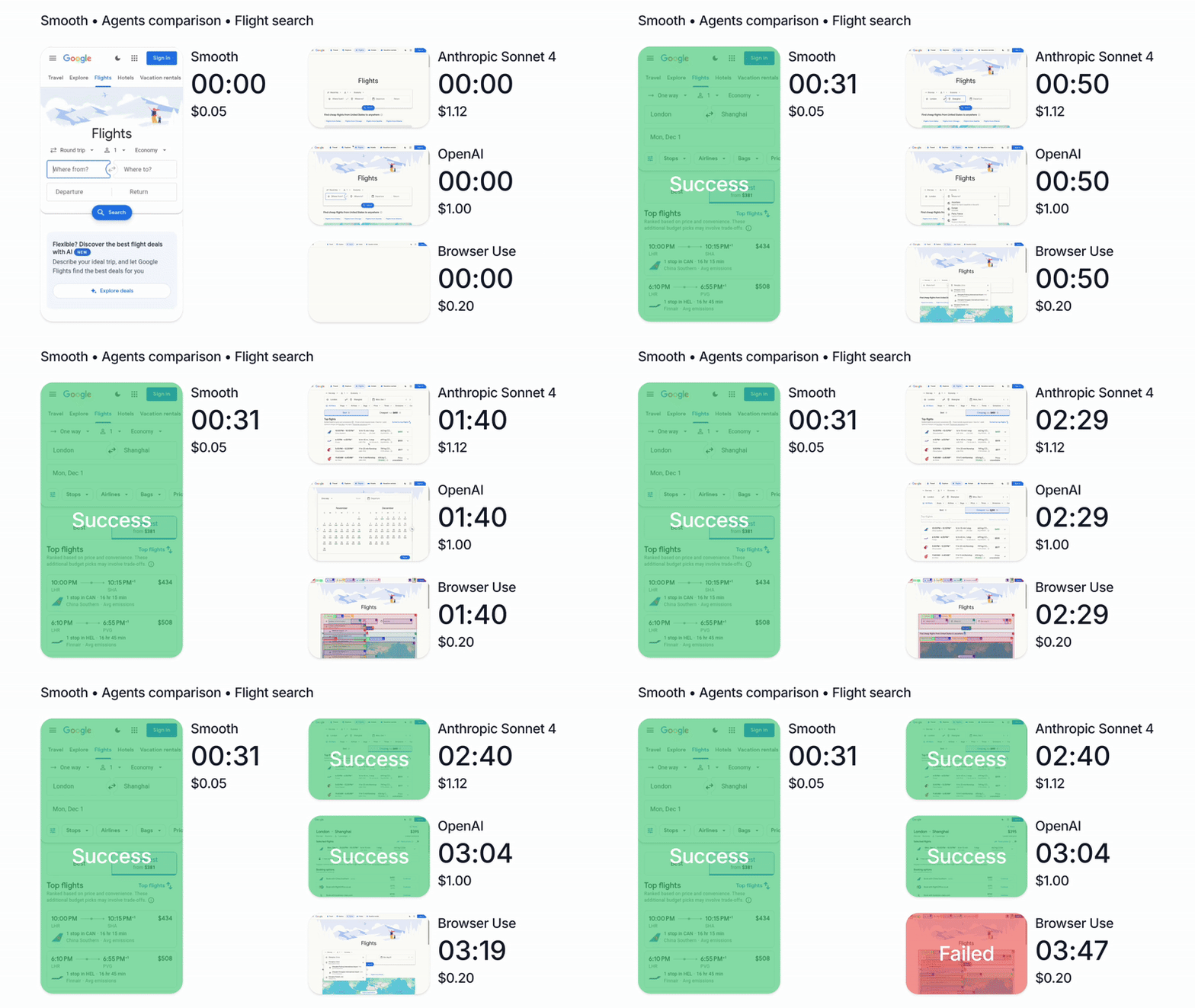
TL;DR: Smooth is an AI browser automation SDK and CLI that can act and extract information from the web. It's powered by our browser agent which controls the browser with mouse and keyboard to carry out tasks autonomously on the web.
Discord · Documentation · Get API Key
Table of Contents
CLI
The Smooth CLI is a browser for AI agents, enabling tools like Claude Code to navigate the web quickly, cheaply, and reliably. It can use your IP address to avoid captchas.
Why Smooth?
Autonomous agents like Claude Code are amazing at meaningful work—but they're mostly stuck in the CLI. Meanwhile, most valuable human work happens in the browser.
Current browser tools (Playwright MCP, --chrome flags, etc.) operate at the wrong abstraction level. They expose hundreds of low-level actions—click, type, select—forcing large models to think about mechanics instead of goals.
This creates three problems:
- Cost & Latency — Using a massive model for button clicks is expensive and slow
- Context Pollution — Every click pollutes the context window, degrading performance on actual tasks
- Lack of Expertise — General-purpose models aren't web navigation experts
Smooth solves this with a higher-level interface designed for how agents actually think: natural language and goals, not DOM manipulation.
Today, Smooth is 20x faster and 5x cheaper than Claude Code with --chrome.
Get your API key at app.smooth.sh and then run:
pip install smooth-py
smooth config --api-key <your-key>
npx skills add https://github.com/circlemind-ai/smooth-sdk
Full CLI documentation: docs.smooth.sh/cli
How It Works
Instead of this:
click(x=342, y=128)
type("search query")
click(x=401, y=130)
scroll(down=500)
click(x=220, y=340)
... (50 more steps)
Your agent just says:
"Search for flights from NYC to LA and find the cheapest option"
The agent thinks about your goals. Smooth handles the browser.
Quick Example
# Start a session
smooth start-session

# Run a task (navigate to a starting URL with --url)
smooth run <session-id> "Find the pricing page and extract all plan names and prices" --url "https://example.com"

# Close when done
smooth close-session <session-id>
Pro Tip: You can also give your agent complex goals. Our skill will teach your agent how to break them into subtasks and distribute them across multiple concurrent browser sessions automatically.
Works With
- Claude Code
- Clawdbot / Moltbot / OpenClaw
- Codex
- Cursor
- Antigravity
- Cline
- Factory AI
- Github Copilot
- Kiro
- OpenCode
- Windsurf
- Any other agent that can run CLI commands
Python SDK
Use our Smooth SDK to automate any digital work.
pip install smooth-py
Full SDK documentation: docs.smooth.sh/sdk
Quick Example
from smooth import SmoothClient

smooth_client = SmoothClient(api_key="cmzr-YOUR_API_KEY")
task = smooth_client.run("Go to google flights and find the cheapest flight from London to Paris today")

print(f"Live URL: {task.live_url()}")
print(f"Agent response: {task.result()}")
We have async clients, persistent sessions, auto-captcha solvers, stealth mode, infinite scaling, and much more. Dive deep in the docs, it's fun.
Smooth is state-of-the-art on reliability, speed, and cost, check out our performance summary: https://docs.smooth.sh/performance
Authentication
Get your API key at app.smooth.sh
Option 1: Environment variable
export CIRCLEMIND_API_KEY="your-api-key"
Option 2: Direct configuration
client = SmoothClient(api_key="your-api-key")
Option 3: CLI config
smooth config --api-key <your-key>
Links
1 maintainer

Metadata
1 maintainer
Release files for smooth-py 0.4.6.dev20260812
For a detailed explanation of source distributions (sdists) and built distributions (wheels), please see the package formats documentation.
Source distribution (sdist)
| File | Size | Uploaded | |
|---|---|---|---|
| smooth_py-0.4.6.dev20260812.tar.gz | 37.6 kB | Details |
Built distribution (wheel)
| File | Interpreter | ABI | Platform | Reset |
|---|---|---|---|---|
| smooth_py-0.4.6.dev20260812-py3-none-any.whl | Python 3 | none | any | Details |
Total release size: 78.0 kB
Release files / smooth_py-0.4.6.dev20260812.tar.gz
| Download URL | smooth_py-0.4.6.dev20260812.tar.gz |
|---|---|
| Size | 37.6 kB |
| Tags | Source |
|
SHA-256 checksum How to use checksums |
c9c0fda68f57ce40f02747c2bc28343884761dffb03de054a1d63d5a0a604b55
|
|
BLAKE2b-256 checksum How to use checksums |
ee10416611670a10c9f8b8c4cc8ed0a964ee1158f370dc5ca360ba33bcce23b9
|
| Upload date | |
|
Uploaded using Trusted Publishing? What is trusted publishing? |
Yes |
| Uploaded via |
twine/7.0.0 CPython/3.13.14
|
Provenance
Provenance describes where a file came from. On PyPI, provenance is shared via attestations, which provide a verifiable record of the build or publishing details. View details, limitations and caveats.


PyPI Publish Attestation
PyPI verified that this artifact, at this checksum, originated from the publisher listed below.
Signed by GitHub Actions, verified by PyPI on Aug 12, 2026.
Transparency logRelease files / smooth_py-0.4.6.dev20260812-py3-none-any.whl
| Download URL | smooth_py-0.4.6.dev20260812-py3-none-any.whl |
|---|---|
| Size | 40.4 kB |
| Tags | Python 3 |
|
SHA-256 checksum How to use checksums |
a01c8768271b6b7993a894fbebdd7049c10ec18a939c1e23913baeab3b867698
|
|
BLAKE2b-256 checksum How to use checksums |
f7733f51410f69adc9830a9c6097a9e685e02c442e880d6ec3abf5889a0cccf4
|
| Upload date | |
|
Uploaded using Trusted Publishing? What is trusted publishing? |
Yes |
| Uploaded via |
twine/7.0.0 CPython/3.13.14
|
Provenance
Provenance describes where a file came from. On PyPI, provenance is shared via attestations, which provide a verifiable record of the build or publishing details. View details, limitations and caveats.
PyPI Publish Attestation
PyPI verified that this artifact, at this checksum, originated from the publisher listed below.
Signed by GitHub Actions, verified by PyPI on Aug 12, 2026.
Transparency log













