
Transform pixelated geometries from raster data into smooth natural looking features

Project description



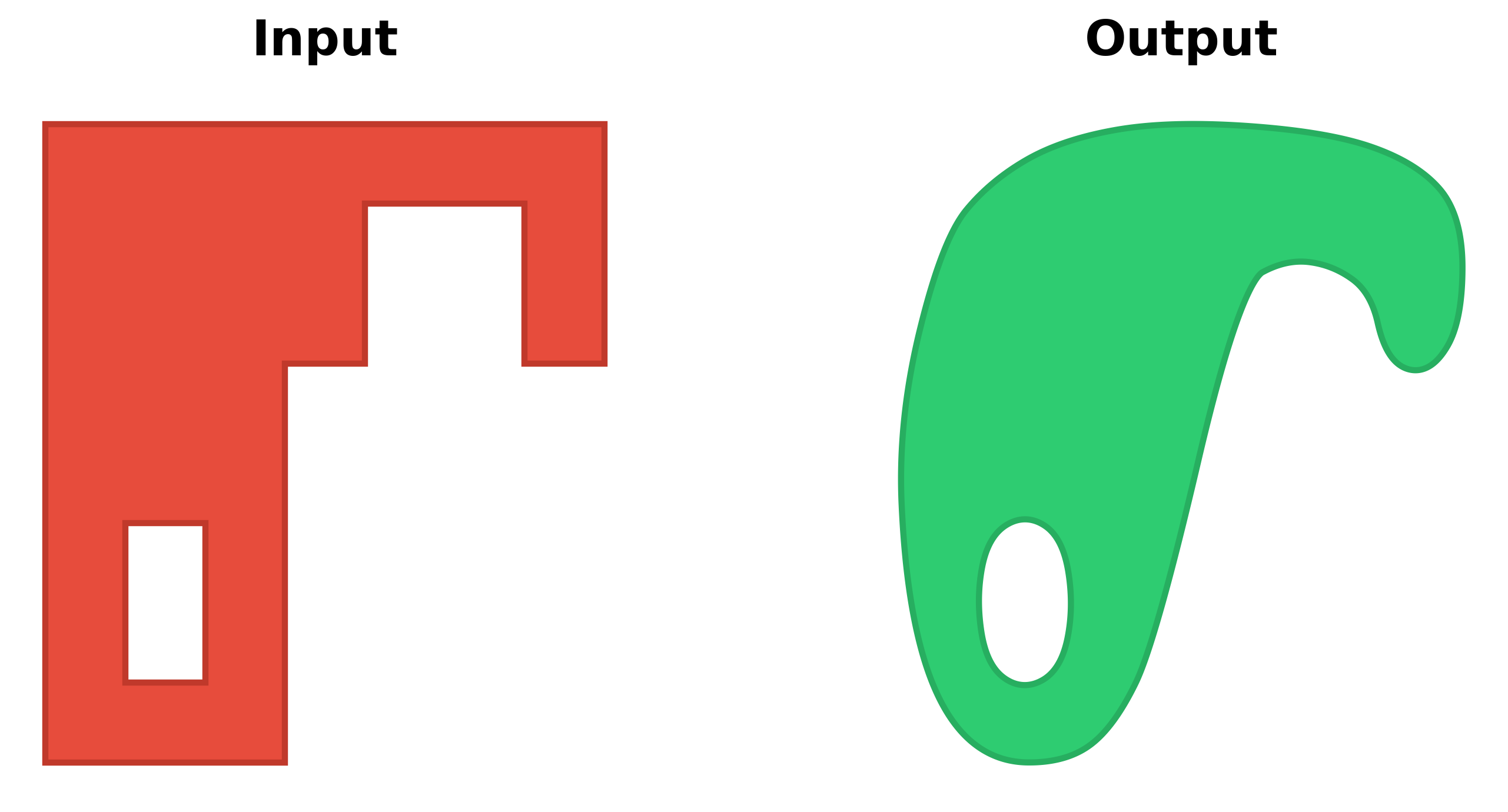
A Python package for smoothing and refining geometries derived from raster data classifications. Smoothify transforms jagged polygons and lines resulting from raster-to-vector conversion into smooth, visually appealing features using an optimized implementation of Chaikin's corner-cutting algorithm.
Problem
Polygons and lines derived from classified raster data (e.g., ML model predictions, spectral indices, or remote sensing classifications) often have unnatural "stair-stepped" or "pixelated" edges that:
- Are visually unappealing in maps and GIS applications
- Can be difficult to work with in downstream vector processing
- Don't represent the real-world features they're meant to depict
Solution
Smoothify applies an optimized implementation of Chaikin's corner-cutting algorithm along with other geometric processing to create smooth, natural-looking features while:
- Preserving the general shape and area of polygons
- Supporting all shapley geometry types
- Handling shapes with interior holes
- Efficiently processing large datasets with multiprocessing
Installation
uv add smoothify
or
pip install smoothify
Quick Start
import geopandas as gpd
from smoothify import smoothify

# Load your polygonized raster data
polygon_gdf = gpd.read_file("path/to/your/polygons.gpkg")

# Apply smoothing (segment_length auto-detected from geometry)
smoothed_gdf = smoothify(
    geom=polygon_gdf,
    smooth_iterations=3,  # More iterations = smoother result
    num_cores=4  # Use parallel processing for large datasets
)

# Or specify segment_length explicitly (generally recommended)
smoothed_gdf = smoothify(
    geom=polygon_gdf,
    segment_length=10.0,  # Use the original raster resolution
    smooth_iterations=3,
    num_cores=4
)

# Save the result
smoothed_gdf.to_file("smoothed_polygons.gpkg")
General Usage
The smoothify() function accepts three types of input:
1. GeoDataFrame
import geopandas as gpd
from smoothify import smoothify

gdf = gpd.read_file("polygons.gpkg")
smoothed_gdf = smoothify(
    geom=gdf,
    segment_length=10.0,
    smooth_iterations=3,
    num_cores=4
)
2. Single Geometry
from shapely.geometry import Polygon
from smoothify import smoothify

polygon = Polygon([(0, 0), (10, 0), (10, 10), (0, 10)])
smoothed_polygon = smoothify(
    geom=polygon,
    smooth_iterations=3
)
3. List of Geometries or GeometryCollection
from shapely.geometry import Polygon, LineString
from smoothify import smoothify

geometries = [
    Polygon([(0, 0), (10, 0), (10, 10), (0, 10)]),
    LineString([(0, 0), (5, 5), (10, 0)])
]
smoothed = smoothify(
    geom=geometries,
    segment_length=1.0,
    smooth_iterations=3
)
Parameters
| Parameter | Type | Default | Description |
|---|---|---|---|
geom |
GeoDataFrame, BaseGeometry, or list[BaseGeometry] | Required | The geometry/geometries to smooth |
segment_length |
float | None | Resolution of the original raster data in map units. If None (default), automatically detects by finding the minimum segment length (from a data sample). Recommended to specify explicitly when known |
smooth_iterations |
int | 3 | Number of Chaikin corner-cutting iterations (typically 3-5). Higher values = smoother output with more vertices |
num_cores |
int | 0 | Number of CPU cores for parallel processing (0 = all available cores, 1 = serial) |
merge_collection |
bool | True | Whether to merge/dissolve adjacent geometries in collections before smoothing |
merge_multipolygons |
bool | True | Whether to merge adjacent polygons within MultiPolygons before smoothing |
preserve_area |
bool | True | Whether to restore original area after smoothing via buffering (applies to Polygons only) |
area_tolerance |
float | 0.01 | Percentage of original area allowed as error (e.g., 0.01 = 0.01% error = 99.99% preservation). Only affects Polygons when preserve_area=True |
How It Works
Smoothify uses an advanced multi-step smoothing pipeline:
- Adds intermediate vertices along line segments (segmentize)
- Generates multiple rotated variants (for Polygons) to avoid artifacts
- Simplifies each variant to remove noise
- Applies Chaikin corner cutting to smooth
- Merges all variants via union to eliminate start-point artifacts
- Applies final smoothing pass
- Optionally restores original area via buffering (for Polygons)
Performance Considerations
- Parallel Processing: For large GeoDataFrames or collections, use
num_cores= 0 to enable parallel processing - Smoothing Iterations: Values of 3-5 typically provide good results. Higher values create smoother output but increase processing time and vertex count
- Memory Usage: Scales with geometry complexity. The algorithm creates multiple variants during smoothing
- Optimal segment_length: Should match the original raster cell size (pixel size) or be slightly larger for best results
Contributing
Contributions are welcome! Please feel free to submit a Pull Request.
- Fork the repository
- Create your feature branch (
git checkout -b feature/amazing-feature) - Commit your changes (
git commit -m 'Add some amazing feature') - Push to the branch (
git push origin feature/amazing-feature) - Open a Pull Request
License
This project is licensed under the MIT License - see the LICENSE file for details.


Download files
Download the file for your platform. If you're not sure which to choose, learn more about installing packages.
Source Distribution
Built Distribution
Filter files by name, interpreter, ABI, and platform.
If you're not sure about the file name format, learn more about wheel file names.
Copy a direct link to the current filters
File details
Details for the file smoothify-0.1.1.tar.gz.
File metadata
- Download URL: smoothify-0.1.1.tar.gz
- Upload date:
- Size: 24.2 kB
- Tags: Source
- Uploaded using Trusted Publishing? No
- Uploaded via: uv/0.8.0
File hashes
| Algorithm | Hash digest | |
|---|---|---|
| SHA256 |
7fdd6797f5b97ee377774b46d16591cd7d2964aa5166197aa64c62387a96cd1d
|
|
| MD5 |
08e1f025e8c4297a7253239f75634d83
|
|
| BLAKE2b-256 |
369bbbcb512125511f760b1a3ff9f0a9c066fcd192d0bb7edcc94fa736bffd6e
|
File details
Details for the file smoothify-0.1.1-py3-none-any.whl.
File metadata
- Download URL: smoothify-0.1.1-py3-none-any.whl
- Upload date:
- Size: 15.0 kB
- Tags: Python 3
- Uploaded using Trusted Publishing? No
- Uploaded via: uv/0.8.0
File hashes
| Algorithm | Hash digest | |
|---|---|---|
| SHA256 |
029c0064a0da793ff62c7d5a10d8ca6f1df0e69a04ce6dc037100445436b8ed1
|
|
| MD5 |
af20537b0337176e203baaea6ea50a71
|
|
| BLAKE2b-256 |
ea3b83eff661cb2cb55505cd258f7241db97091bc3b10cb51bdabfa13b75db0a
|






