





sMRIPrep is a structural magnetic resonance imaging (sMRI) data preprocessing pipeline that is designed to provide an easily accessible, state-of-the-art interface that is robust to variations in scan acquisition protocols and that requires minimal user input, while providing easily interpretable and comprehensive error and output reporting. It performs basic processing steps (subject-wise averaging, B1 field correction, spatial normalization, segmentation, skullstripping etc.) providing outputs that can be easily connected to subsequent tools such as fMRIPrep or dMRIPrep.
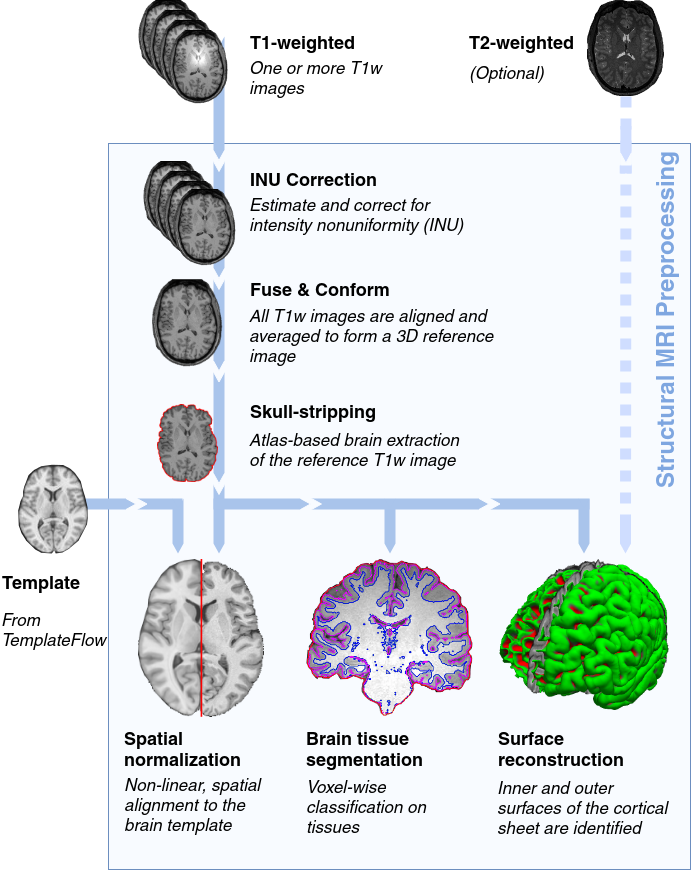
The workflow is based on Nipype and encompasses a combination of tools from well-known software packages, including FSL, ANTs, FreeSurfer, and Connectome Workbench.
More information and documentation can be found at https://www.nipreps.org/smriprep/. Support is provided on neurostars.org.
Principles
sMRIPrep is built around three principles:
Robustness - The pipeline adapts the preprocessing steps depending on the input dataset and should provide results as good as possible independently of scanner make, scanning parameters or presence of additional correction scans (such as fieldmaps).
Ease of use - Thanks to dependence on the BIDS standard, manual parameter input is reduced to a minimum, allowing the pipeline to run in an automatic fashion.
“Glass box” philosophy - Automation should not mean that one should not visually inspect the results or understand the methods. Thus, sMRIPrep provides visual reports for each subject, detailing the accuracy of the most important processing steps. This, combined with the documentation, can help researchers to understand the process and decide which subjects should be kept for the group level analysis.
Acknowledgements
Please acknowledge this work by mentioning explicitly the name of this software (sMRIPrep) and the version, along with a link to the GitHub repository or the Zenodo reference (doi:10.5281/zenodo.2650521).


Release files for smriprep 0.20.0
For a detailed explanation of source distributions (sdists) and built distributions (wheels), please see the package formats documentation.
Source distribution (sdist)
| File | Size | Uploaded | |
|---|---|---|---|
| smriprep-0.20.0.tar.gz | 22.5 MB | Details |
Built distribution (wheel)
| File | Interpreter | ABI | Platform | Reset |
|---|---|---|---|---|
| smriprep-0.20.0-py3-none-any.whl | Python 3 | none | any | Details |
Total release size:41.3 MB
Release files / smriprep-0.20.0.tar.gz
| Download URL | smriprep-0.20.0.tar.gz |
|---|---|
| Size | 22.5 MB |
| Tags | Source |
|
SHA-256 checksum How to use checksums |
0af020c897b3774122044bb863917643f8b1acd13c43db65bd9ee8ef6e06631d
|
|
BLAKE2b-256 checksum How to use checksums |
89653375c6a096074a2cb93a843aecdba0a1c8bca2762e48126a6b1a8635da4f
|
| Upload date | |
|
Uploaded using Trusted Publishing? What is trusted publishing? |
Yes |
| Uploaded via |
twine/7.0.0 CPython/3.13.14
|
Provenance
Provenance describes where a file came from. On PyPI, provenance is shared via attestations, which provide a verifiable record of the build or publishing details. View details, limitations and caveats.


PyPI Publish Attestation
PyPI verified that this artifact, at this checksum, originated from the publisher listed below.
Signed by GitHub Actions, verified by PyPI on Aug 25, 2026.
Transparency logRelease files / smriprep-0.20.0-py3-none-any.whl
| Download URL | smriprep-0.20.0-py3-none-any.whl |
|---|---|
| Size | 18.8 MB |
| Tags | Python 3 |
|
SHA-256 checksum How to use checksums |
26db082607841351125576a85b423cd2e8e035d20387c9c571541e8b7523f0c7
|
|
BLAKE2b-256 checksum How to use checksums |
574aacba705828bc2cfc247d59aafffd828751ddb118c415313fc53713fab42b
|
| Upload date | |
|
Uploaded using Trusted Publishing? What is trusted publishing? |
Yes |
| Uploaded via |
twine/7.0.0 CPython/3.13.14
|
Provenance
Provenance describes where a file came from. On PyPI, provenance is shared via attestations, which provide a verifiable record of the build or publishing details. View details, limitations and caveats.
PyPI Publish Attestation
PyPI verified that this artifact, at this checksum, originated from the publisher listed below.
Signed by GitHub Actions, verified by PyPI on Aug 25, 2026.
Transparency log













