
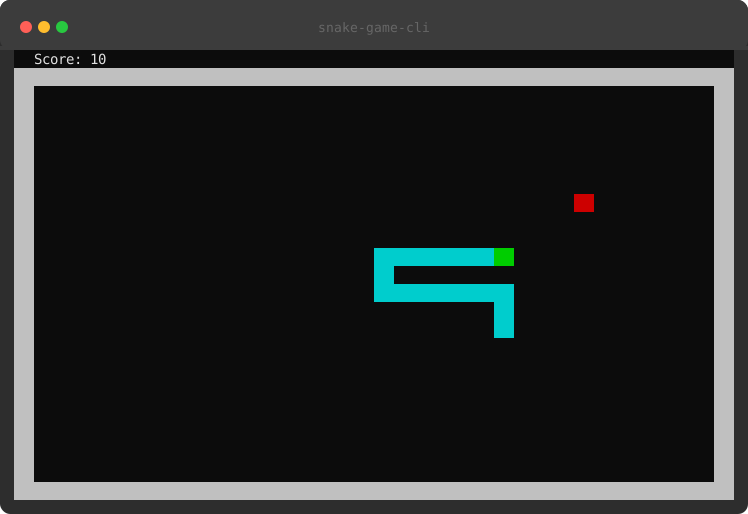
Play snake game in your terminal.

Project description
snake-game-cli
Play snake game in your terminal.
Installation
pip install snake-game-cli
Usage
play-snake                 # start at Normal difficulty
play-snake -d hard         # or easy / normal / hard
You can also pick the difficulty on the start screen with ← / →, then press Enter to begin.
Controls
| Key | Action |
|---|---|
↑ / W |
Move up |
↓ / S |
Move down |
← / A |
Move left |
→ / D |
Move right |
P |
Pause / Resume |
Q |
Quit |
On the start screen, ← / → change the difficulty and Enter starts the game.
Features
- Three difficulty presets (easy / normal / hard), selectable via
-dor on the start screen - Restarting after game over returns to the difficulty selector, so you can switch presets between runs
- Snake speeds up as your score increases
- High score persists across sessions
- Pressing a direction key triggers an immediate move
- Terminal resize is handled gracefully
Development
Checks run automatically before every git push via a tracked pre-push hook.
Enable it once after cloning:
git config core.hooksPath .githooks
The hook runs the same checks on your local Python and blocks the push if any fail:
ruff check .
ruff format --check .
mypy snake_game_cli.py
pytest
Bypass it in an emergency with git push --no-verify.
On release (pushing a v* tag), GitHub Actions runs the test suite across Python
3.10–3.13 and only publishes to PyPI if every version passes.
Release history Release notifications | RSS feed


Download files
Download the file for your platform. If you're not sure which to choose, learn more about installing packages.
Source Distribution
Built Distribution
Filter files by name, interpreter, ABI, and platform.
If you're not sure about the file name format, learn more about wheel file names.
Copy a direct link to the current filters
File details
Details for the file snake_game_cli-0.3.1.tar.gz.
File metadata
- Download URL: snake_game_cli-0.3.1.tar.gz
- Upload date:
- Size: 13.2 kB
- Tags: Source
- Uploaded using Trusted Publishing? No
- Uploaded via: twine/6.2.0 CPython/3.9.25
File hashes
| Algorithm | Hash digest | |
|---|---|---|
| SHA256 |
1e86e1aa2c39c1458bb314ed5a40c36ea713b820e43272c923ee4107d59ac26d
|
|
| MD5 |
32a16fabd9f16ef93ad12443618044dc
|
|
| BLAKE2b-256 |
88b1c79ea0edd9c76a92f4184476ab7a51c37259eeceac035d7c55410e946929
|
File details
Details for the file snake_game_cli-0.3.1-py3-none-any.whl.
File metadata
- Download URL: snake_game_cli-0.3.1-py3-none-any.whl
- Upload date:
- Size: 8.5 kB
- Tags: Python 3
- Uploaded using Trusted Publishing? No
- Uploaded via: twine/6.2.0 CPython/3.9.25
File hashes
| Algorithm | Hash digest | |
|---|---|---|
| SHA256 |
0dcdfdfa1b997dc4c35685d53d1071a795356b748005901225b075572e6357bd
|
|
| MD5 |
7256767595c86abcf1b947a446329420
|
|
| BLAKE2b-256 |
0bdeec1202aa0c491919707539642ab4c97bf50fbe5a857f2304685f10f85723
|






