
⚡ Snapcall
Build better decision models.
An open-source toolkit to train, evaluate and deploy calibrated System One decision models (Jev-style): typed questions in, a real probability for every option out, in one forward pass.







Train. Evaluate. Deploy.
pip install snapcall
snapcall ui
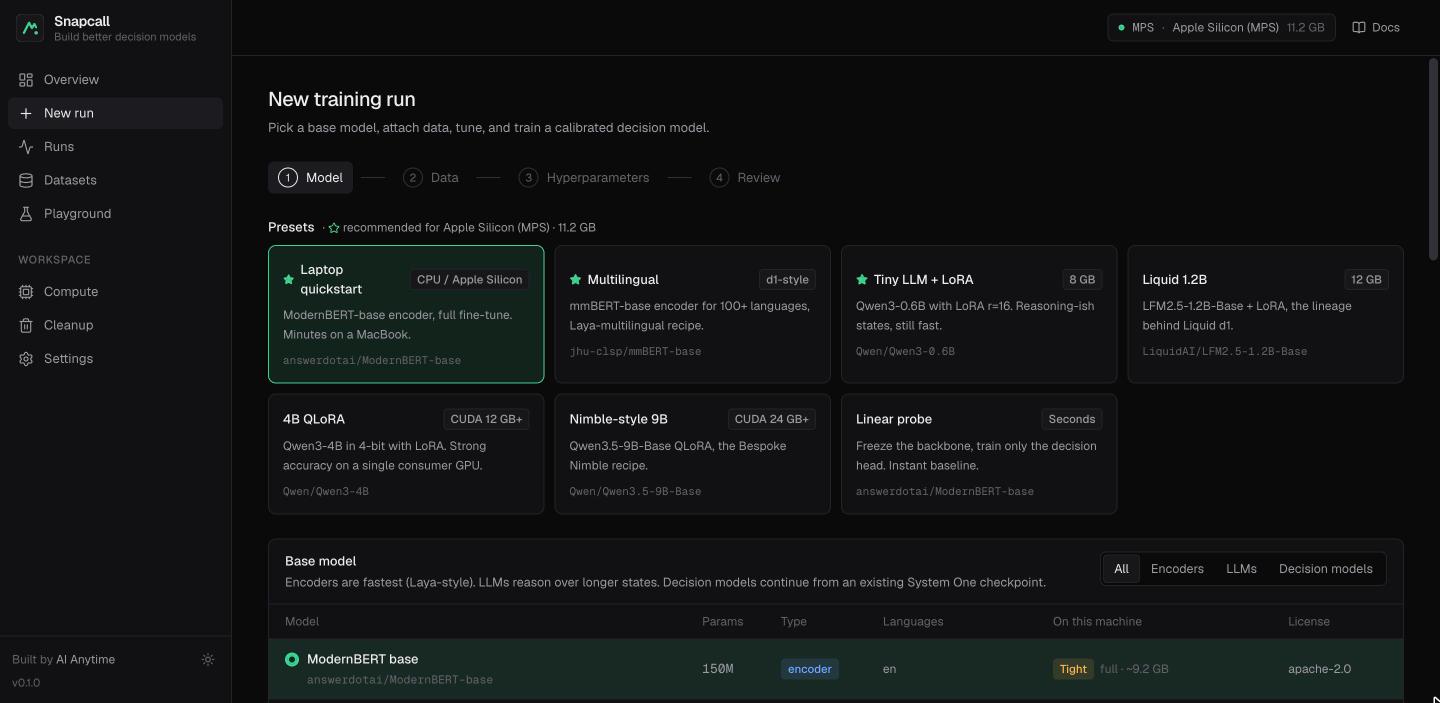
That's it: a dashboard opens at http://127.0.0.1:7860. Pick a model, attach data, press Train.
🤔 What is a decision model?
Decision models like TypeSafe's Jev, Cloudflare's Clef, Liquid's d1, Convai's Laya and Bespoke's Nimble don't write text. You give them a state (text or JSON) and typed questions, and they return a calibrated probability for every option:
model.decide(
    state="My card still hasn't arrived and I need it for my trip on Friday",
    questions={
        "intent":  {"type": "choice", "instructions": "Which banking intent?",
                    "criteria": {"card_arrival": "Card not delivered", "lost_or_stolen_card": "Card lost"}},
        "urgency": {"type": "score",  "instructions": "How urgent?", "criteria": ["low", "medium", "high"]},
        "upset":   {"type": "noul",   "instructions": "Is the customer upset?"},
    },
)
# {"answers": {"intent": {"choice": "card_arrival", "confidence": 0.97, "probabilities": {...}},
#              "urgency": {"score": 1.82, ...}, "upset": {"noul": 0.71}}}
| Type | Answers | Returns |
|---|---|---|
choice |
one of 2–255 named options | the top option, its confidence, and a probability for every option |
score |
an ordinal level (2–10 levels) | the expected level and a distribution over levels |
noul |
yes / no | P(yes) |
They can't hallucinate an option you didn't offer, and when they say 0.8 they should be right about 80% of the time. Snapcall lets you build your own on any open model, with your data, on your hardware.
✨ Highlights
- 🧠 Any backbone: ModernBERT, mmBERT (multilingual), DeBERTa, SmolLM2, LFM2/LFM2.5, Qwen3/3.5, or any Hugging Face id. You can also continue training open decision models (Laya, d1, Tev1, Clef).
- 🎯 Calibration-first training: SFT → RLCD (Reinforcement Learning for Calibrated Decisions) → temperature scaling.
- 🧮 Compute-aware: detects CUDA, Apple Silicon or CPU and shows which models fit before you train. It also picks a micro-batch that fits and recovers from out-of-memory errors automatically.
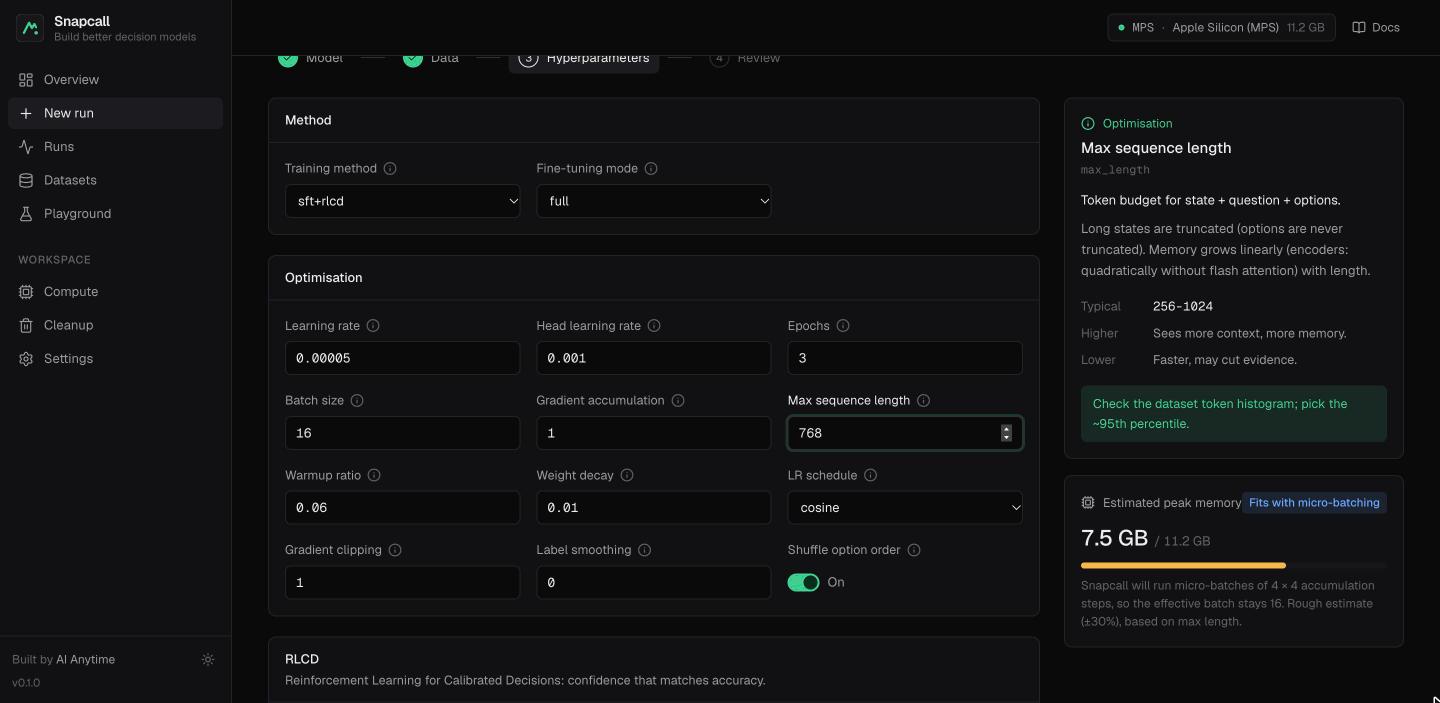
- 🎛️ Presets plus explained hyperparameters: every knob says what it does and what happens when you raise or lower it.
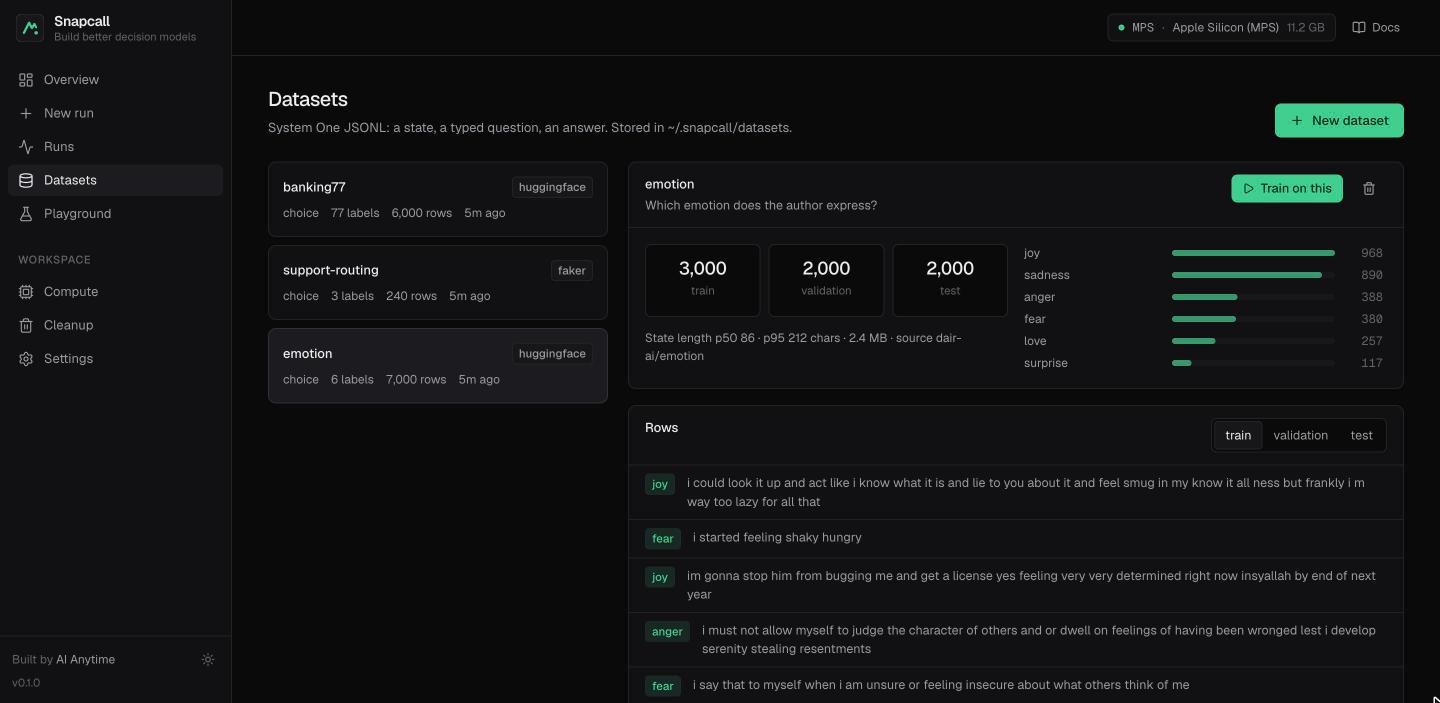
- 📦 Data four ways: 🤗 Hugging Face, your own JSONL/CSV, ✨ LLM synthetic data (Anthropic or any OpenAI-compatible API), and 🎭 Faker templates with no key needed.
- 📈 TensorBoard-style observability: live loss, accuracy, ECE, Brier, LR, grad norm, throughput and memory, plus reliability diagrams and confusion matrices.
- 🚀 Ship it: a playground, one-click push to the Hub with an auto-generated model card, and a System One compatible
/v1/systemoneserver. - ☁️ Cloud-GPU ready: on RunPod,
snapcall uiprints the pod URL, sets a password and can auto-stop the pod. - 🧹 Cleanup built in: checkpoints, event files, failed runs and Hugging Face cache, with sizes shown.
🖥️ Tour
 |
 |
|---|---|
| 🎛️ Tune with explainers. What each knob does, typical values, and a live memory estimate. | 📦 Bring data. Hugging Face presets, file upload, LLM synthetic data or Faker templates. |
🧠 How it works
-
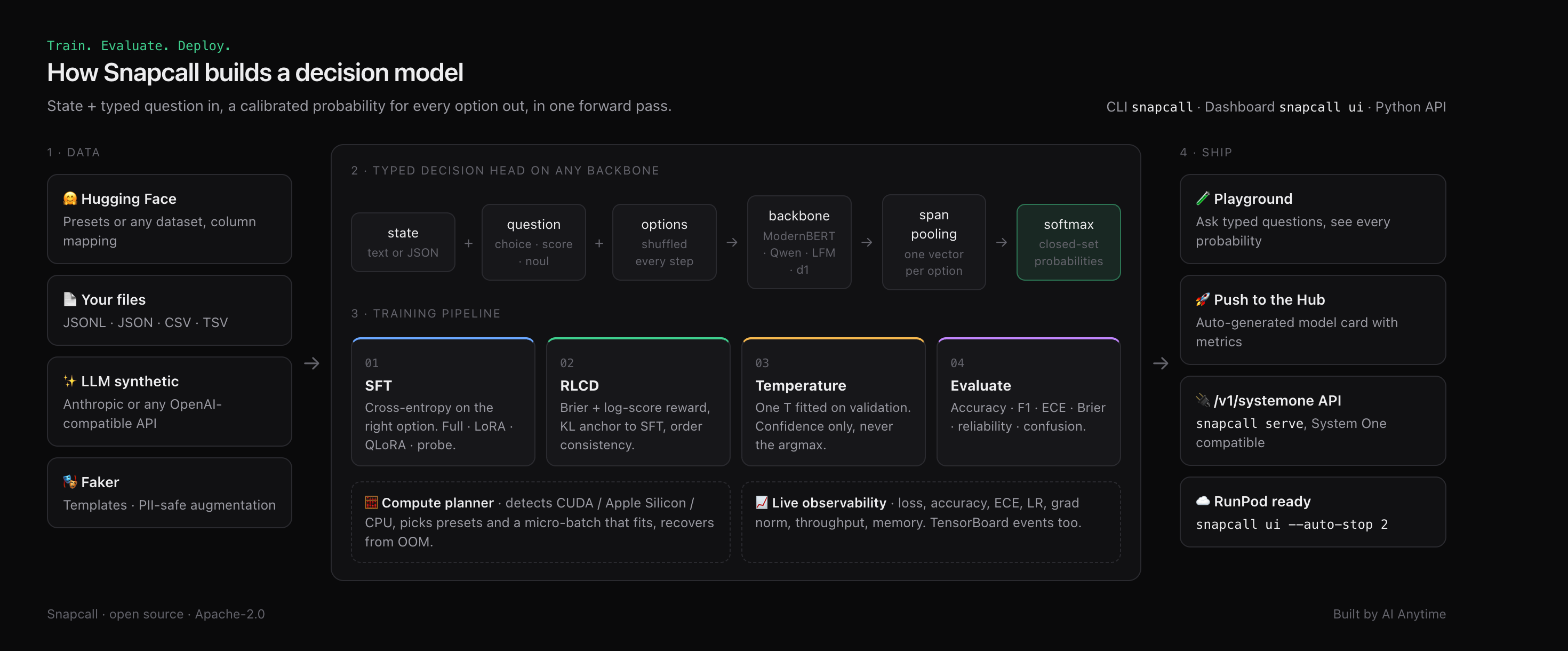
Typed decision head. The state, question and options are rendered into one sequence. Each option's token span is pooled (mean for encoders, last token for decoders) and scored by a small head. A softmax over the options gives a closed-set distribution. Options are shuffled every step, so the model learns what an option means, not where it sits.
-
SFT. Cross-entropy on the correct option (or on soft annotator distributions), with AdamW, warmup, a cosine or linear schedule, gradient accumulation, best-checkpoint restore and early stopping.
-
RLCD. TypeSafe has only described RLCD at a high level. Snapcall's version is an open, KL-regularised proper-scoring objective:
- reward: Brier score plus log-score;
- anchor:
β·KL(π ‖ π_SFT)keeps it close to the SFT model; - consistency: a term that agrees across shuffled option orders.
Decisions stay put while confidence gets honest.
-
Temperature scaling on the validation split (it never changes the top answer).
-
Evaluation: accuracy, macro F1, 15-bin ECE, Brier, NLL, reliability bins and a confusion matrix.
📊 Results
Measured on an Apple M3 laptop (16 GB) with answerdotai/ModernBERT-base on
dair-ai/emotion (6 emotions), 3,000 training examples,
2 epochs of SFT and 0.5 epochs of RLCD (33 minutes):
| Stage | Val accuracy | Val ECE ↓ |
|---|---|---|
| After SFT | 77.4% | 0.032 |
| After RLCD | 81.6% | 0.020 |
| Held-out test (2,000 examples) | 82.0% | 0.019 |
ECE is expected calibration error: an ECE of 0.019 means confidence is, on average, within about 2 points of actual accuracy.
🚀 Quickstart
🖥️ Dashboard
pip install snapcall
snapcall ui
New run → pick a preset or model → pick or create a dataset → tune → Start training. The run page streams metrics and logs, then gives you Evaluation, Model, Test, Publish and Files tabs. Training runs in a background process, so you can close the browser.
⌨️ CLI
snapcall doctor                                   # 🧮 hardware + recommendations
snapcall data hf banking77                        # 📦 import a preset HF dataset
snapcall train -p laptop-quick -d banking77       # 🏋️ train with live progress
snapcall runs                                     # 📋 list runs
snapcall predict <run> -s "I was charged twice for my coffee"
snapcall eval <run> --split test                  # 📊 metrics on any split
snapcall push <run> --repo you/banking77-snapcall # 🚀 Hub + model card
snapcall serve <run> --port 8000                  # 🔌 /v1/systemone API
snapcall clean --checkpoints --failed             # 🧹 free disk
More: snapcall models, snapcall presets, snapcall explain [param], snapcall init,
snapcall logs <run> -f, snapcall stop <run>, snapcall card <run>, snapcall tensorboard,
snapcall data {list,show,upload,faker,synth}.
🐍 Python
from snapcall import Trainer, TrainConfig, DataConfig, DecisionModel

cfg = TrainConfig(
    base_model="answerdotai/ModernBERT-base",
    data=DataConfig(dataset="banking77"),
    method="sft+rlcd", finetune="full", epochs=3, learning_rate=5e-5,
)
Trainer(cfg, run_dir="runs/banking77").train()

model = DecisionModel.from_pretrained("runs/banking77/model")   # or a Hub repo id
model.decide(state="Where is my new card?", questions={"intent": model.meta["question"]})
🧩 Models and presets
| Family | Models | Mode | Notes |
|---|---|---|---|
| Encoders | ModernBERT base/large, mmBERT small/base, DeBERTa v3 | full | ⚡ Fastest, Laya-style. Trains on a laptop |
| Small LLMs | SmolLM2, LFM2 350M, LFM2.5 1.2B, Qwen3 0.6B/1.7B/4B | LoRA · QLoRA | Longer states, more reasoning |
| Big bases | Qwen3.5 4B/9B Base | LoRA · QLoRA | Bases of Nimble, Tev1, Decider, kev |
| Decision models | Laya, d1 600M/3B, Tev1 4B, Clef Flash 9B, Clef 27B | LoRA · QLoRA | 🧪 Experimental: continue from an open System One model |
| Preset | For | Base |
|---|---|---|
laptop-quick |
💻 CPU / Apple Silicon | ModernBERT base, full |
multilingual |
🌍 100+ languages | mmBERT base, full |
tiny-llm-lora |
8 GB GPU | Qwen3 0.6B, LoRA |
liquid-1b |
12 GB GPU | LFM2.5 1.2B Base, LoRA |
gpu-4b-qlora |
CUDA 12 GB+ | Qwen3 4B, QLoRA |
nimble-9b |
CUDA 24 GB+ | Qwen3.5 9B Base, QLoRA |
probe |
⏱️ seconds | frozen backbone, head only |
📦 Data
| Source | How |
|---|---|
| 🤗 Hugging Face | Presets (Banking77, Emotion, AG News, SST-2, BoolQ, Yelp, MASSIVE, multilingual sentiment) or any dataset with column mapping |
| 📄 Your files | .jsonl, .json, .csv, .tsv: native System One rows or any table with a text and a label column |
| ✨ LLM synthetic | Describe the use case. The LLM proposes the question and options, then writes balanced examples (Anthropic, OpenAI, OpenRouter, Groq, Ollama…) |
| 🎭 Faker | Templates such as "I was charged {amount} for order {order_id}", filled with realistic fake values in 14 locales, no API key |
Faker also does PII-safe augmentation at train time: it swaps emails, phones, amounts and IDs, so the model learns the decision rather than the entities. Every dataset gets stratified train/validation/test splits.
📝 Native row format
{"state": "I was charged twice", "question": {"type": "choice", "instructions": "Route to a team",
  "criteria": {"billing": "Charges, refunds", "shipping": "Delivery"}}, "answer": "billing"}
Multi-question rows ("questions": {...}, "answers": {...}) are flattened automatically. score answers
are level indices, and noul answers are booleans. An optional "soft": {"billing": 0.7, "shipping": 0.3}
trains on annotator distributions.
☁️ Run on a cloud GPU (RunPod)
pip install snapcall
snapcall ui --auto-stop 2
On a RunPod pod, snapcall ui detects the pod and:
- 🔗 prints the proxy URL;
- 🔒 generates a password (proxy URLs are public);
- 💾 keeps runs and models on
/workspace; - ⏱️ with
--auto-stop, stops the pod after N hours so a small balance lasts.
See the RunPod guide for pod settings and a $2 session plan.
🔌 Serving
snapcall serve <run-or-hub-repo> --port 8000
curl -s localhost:8000/v1/systemone -H 'content-type: application/json' -d '{
  "state": "Where is my new card?",
  "questions": {"intent": {"type": "choice", "instructions": "Which intent?",
                "criteria": {"card_arrival": "Card not delivered", "activate_my_card": "Activation"}}}}'
The dashboard server exposes the same endpoint at /v1/systemone. Pass "model": "<run id>", or omit it
to use the latest model.
🗂️ Workspace
Everything lives in ~/.snapcall (override with SNAPCALL_HOME):
datasets/runs/<id>/, which holdsconfig.json,status.json,metrics.jsonl,train.log,tensorboard/,checkpoints/,eval.jsonandmodel/settings.json, which holds API keys (chmod 600)
HF_TOKEN, ANTHROPIC_API_KEY, OPENAI_API_KEY and OPENAI_BASE_URL work as fallbacks. To expose the
dashboard beyond localhost, use snapcall ui --host 0.0.0.0. It is then password-protected automatically,
or you can set --password / SNAPCALL_PASSWORD.
🛠️ Development
git clone https://github.com/AIAnytime/snapcall && cd snapcall
cd ui && pnpm install && pnpm build && cd ..   # dashboard -> snapcall/server/static
pip install -e ".[anthropic,dev]"
pytest -q
Extras: snapcall[anthropic] adds the Anthropic SDK for synthetic data, and snapcall[qlora] adds
bitsandbytes for QLoRA on CUDA.
🗺️ Limitations and roadmap
- Text states only. Image states and
boxquestions are next. - QLoRA needs CUDA plus bitsandbytes. On Apple Silicon, use LoRA in bf16.
- Qwen3.5, d1, Laya and Clef checkpoints are experimental.
- Large option sets (50+) make sequences long. The memory planner shrinks micro-batches automatically, but training is slower.
🤝 Contributing
Issues and PRs are welcome: new backbones, question types, datasets and evals especially.
Built with ❤️ by AI Anytime · Apache-2.0
1 maintainer

Metadata
1 maintainer
Release files for snapcall 0.1.0
For a detailed explanation of source distributions (sdists) and built distributions (wheels), please see the package formats documentation.
Source distribution (sdist)
| File | Size | Uploaded | Provenance | Actions |
|---|---|---|---|---|
| snapcall-0.1.0.tar.gz | 437.7 kB | Without provenance | Details for snapcall-0.1.0.tar.gz |
Built distribution (wheel)
| File | Interpreter | ABI | Platform | Actions Reset |
|---|---|---|---|---|
| snapcall-0.1.0-py3-none-any.whl | Python 3 | none | any | Details for snapcall-0.1.0-py3-none-any.whl |
Total release size: 886.8 kB
Release files / snapcall-0.1.0.tar.gz
| Download URL | snapcall-0.1.0.tar.gz |
|---|---|
| Size | 437.7 kB |
| Tags | Source |
|
SHA-256 checksum How to use checksums |
ead2e953322296ce1dc8c3eed46219c4a2ce2a953d5a5bc9796949eb77f2bad3
|
|
BLAKE2b-256 checksum How to use checksums |
bd15064f09a7920dc13fa7bf221084be986efc4f80d82e1b71587d0f9888fadb
|
| Upload date | |
|
Uploaded using Trusted Publishing? What is trusted publishing? |
No |
| Uploaded via |
uv/0.13.5 {"installer":{"name":"uv","version":"0.13.5","subcommand":["publish"]},"python":null,"implementation":{"name":null,"version":null},"distro":{"name":"macOS","version":null,"id":null,"libc":null},"system":{"name":null,"release":null},"cpu":null,"openssl_version":null,"setuptools_version":null,"rustc_version":null,"ci":null}
|
Release files / snapcall-0.1.0-py3-none-any.whl
| Download URL | snapcall-0.1.0-py3-none-any.whl |
|---|---|
| Size | 449.2 kB |
| Tags | Python 3 |
|
SHA-256 checksum How to use checksums |
dd12f4b8f2a82a9a2b7b8d2d10d8422326e1a51ff05104c4b65ac58975a007ff
|
|
BLAKE2b-256 checksum How to use checksums |
9880929ac84bdd10798dd4a9809b68b7a2f0703addef43371bc0a07780f1b140
|
| Upload date | |
|
Uploaded using Trusted Publishing? What is trusted publishing? |
No |
| Uploaded via |
uv/0.13.5 {"installer":{"name":"uv","version":"0.13.5","subcommand":["publish"]},"python":null,"implementation":{"name":null,"version":null},"distro":{"name":"macOS","version":null,"id":null,"libc":null},"system":{"name":null,"release":null},"cpu":null,"openssl_version":null,"setuptools_version":null,"rustc_version":null,"ci":null}
|
Security for snapcall 0.1.0
Provenance
Provenance describes where a file came from. On PyPI, provenance is shared via attestations, which provide a verifiable record of the build or publishing details. View details, limitations and caveats.
No provenance found
None of the files in this release were uploaded with provenance metadata.
A note on package security
PyPI is a repository for distributing packages, not a service for auditing them. While third-party security researchers and our staff do their best to detect and remove malicious packages, PyPI cannot guarantee the quality, security or suitability of any given package.
To learn more about protecting yourself from malicious actors, visit our package security documentation.














