

Superfast config loader for Python, powered by Rust + rkyv.
See benchmarks below.





What it does
- Parses JSON / YAML / TOML / INI / .env, compiles once, then memory‑maps the cache
- Zero-copy reads via Rust rkyv +
mmap, so repeated loads stay fast and page-shared across processes - Dict-like access in Python (
[],.get,in,len, iteration) plus dot-notation lookup - Cache freshness check on load; caches are written atomically to avoid torn files
Inspiration
- Need for superfast loading of large JSON files and other configs across processes/workers in AI workflow orchestrators.
- uv package manager, which uses rkyv to deserialize cached data without copying.
Installation
pip install snapconfig
Quick start
import snapconfig

# Load any config format, automatically cached on first load
config = snapconfig.load("config.json")
config = snapconfig.load("config.yaml")
config = snapconfig.load("pyproject.toml")
config = snapconfig.load("settings.ini")

# Access values like a dict
db_host = config["database"]["host"]
db_port = config.get("database.port", default=5432)  # dot notation with default

# Load .env files
env = snapconfig.load_env(".env")
snapconfig.load_dotenv(".env")  # populates os.environ
How it works
First load:    config.json → parse → compile → config.json.snapconfig (cached)
                                                    ↓
Subsequent:                              mmap() → zero-copy access (~30µs)
- First load: Parses source file and compiles to optimized binary cache
- Subsequent loads: Memory-maps the cache file for instant zero-copy access
The cache file is automatically regenerated when the source file changes.
Benchmarks (local run)
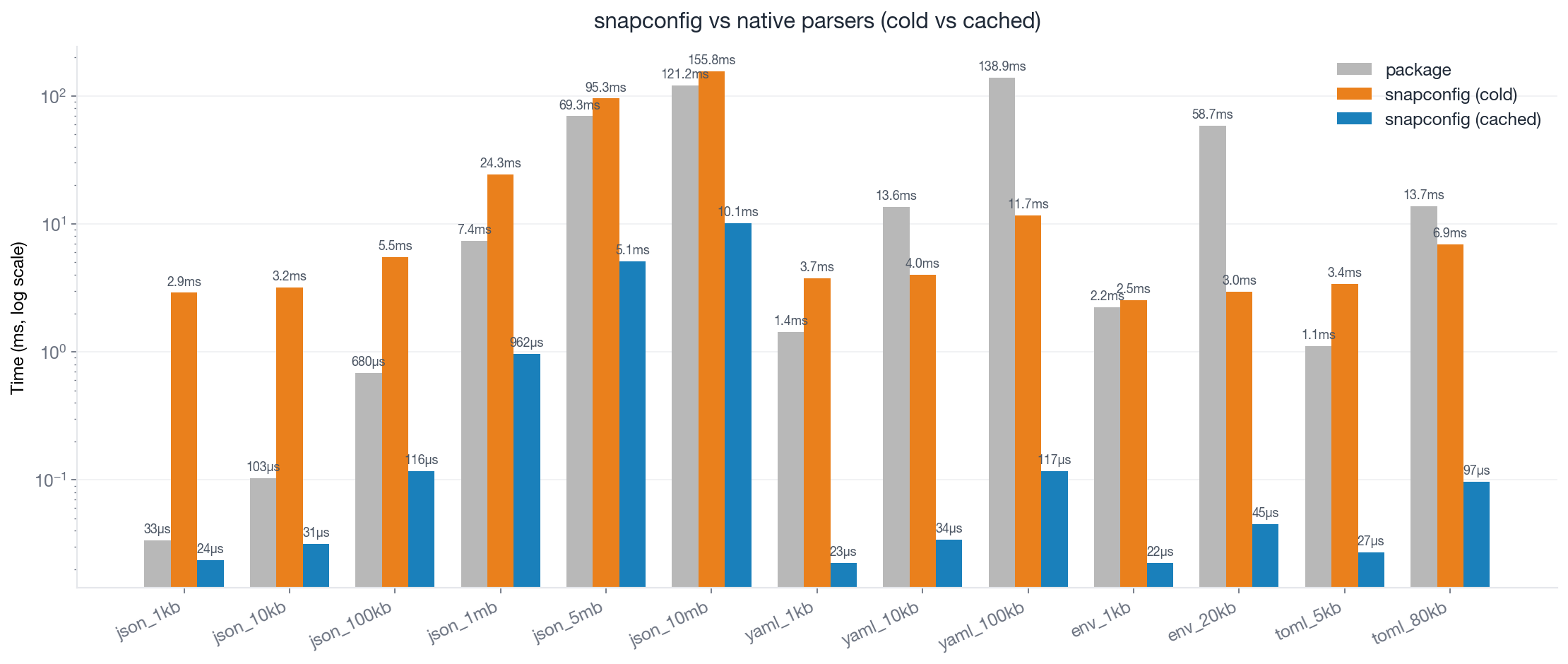
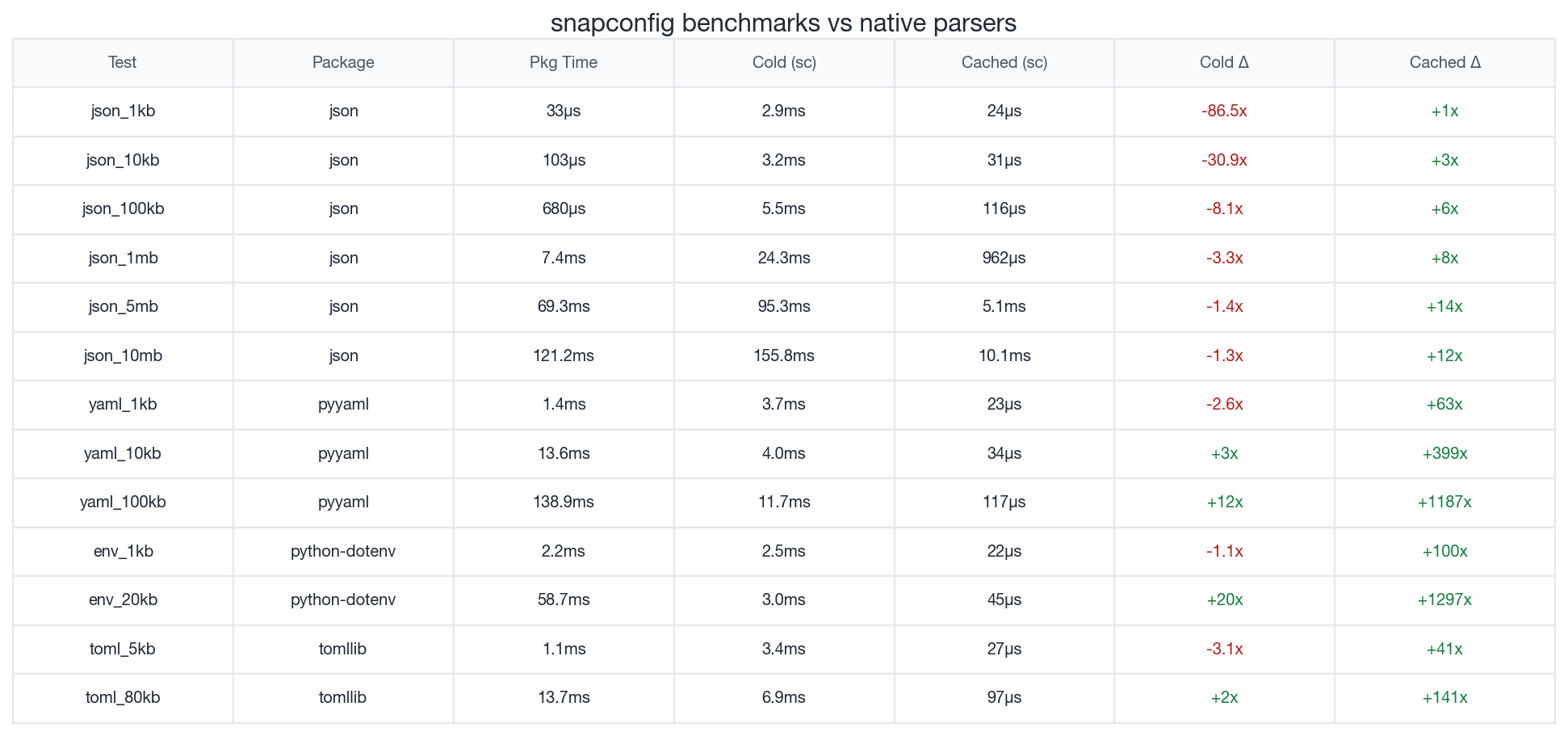
Numbers from running pipenv run python benchmark.py on an M3 Pro (see benchmark.py for exact scenarios).
Takeaways:
- Cached reads stay in the low milliseconds down to tens of microseconds; big files benefit most.
- Cold loads beat YAML/ENV/TOML parsers; Python’s
jsonstill wins cold, but cached loads dominate.
When snapconfig shines
- CLI tools that start frequently
- Serverless functions with cold starts
- Multiple worker processes reading the same config
- Large config files (package-lock.json, monorepo configs)
Cold vs cached
| Scenario | What Happens | vs JSON | vs YAML/TOML/ENV |
|---|---|---|---|
| Cold (first load) | Parse + compile + write cache | Slower | 3-170x faster |
| Cached (subsequent) | mmap() only | 3-5,000x faster | 50-7,000x faster |
Cold loads are slower than Python's json module (it's highly optimized C code), but faster than pyyaml, tomllib, and python-dotenv. The real payoff comes on cached loads.
Supported formats
| Format | Extensions | Parser |
|---|---|---|
| JSON | .json |
simd-json |
| YAML | .yaml, .yml |
serde_yaml |
| TOML | .toml |
toml |
| INI | .ini, .cfg, .conf |
rust-ini |
| dotenv | .env, .env.* |
custom |
API Reference
Loading
# Load with automatic caching (recommended)
config = snapconfig.load("config.json")
config = snapconfig.load("config.json", cache_path="custom.snapconfig")
config = snapconfig.load("config.json", force_recompile=True)

# Load directly from cache (skips freshness check)
config = snapconfig.load_compiled("config.json.snapconfig")

# Parse string content (no caching)
config = snapconfig.loads('{"key": "value"}', format="json")
config = snapconfig.loads("key: value", format="yaml")
dotenv support
# Load .env with caching
env = snapconfig.load_env(".env")
env = snapconfig.load_env(".env.production")

# Load into os.environ
count = snapconfig.load_dotenv(".env")
count = snapconfig.load_dotenv(".env", override_existing=True)

# Parse .env string
env = snapconfig.parse_env("KEY=value\nDEBUG=true")
Cache management
# Pre-compile config (e.g., during Docker build)
snapconfig.compile("config.json")
snapconfig.compile("config.json", "config.snapconfig")

# Check cache status
info = snapconfig.cache_info("config.json")
# {'source_exists': True, 'cache_exists': True, 'cache_fresh': True, ...}

# Clear cache
snapconfig.clear_cache("config.json")
SnapConfig object
config = snapconfig.load("config.json")

# Dict-like access
config["database"]["host"]
config["database"]["port"]
config["servers"][0]          # Array index access

# Dot notation for nested access (with optional default)
config.get("database.host")
config.get("database.port", default=5432)       # Returns 5432 if missing
config.get("servers.0.name", default="unknown") # Array index in path

# Iteration
for key in config:            # Iterates keys (objects) or values (arrays)
    print(key, config[key])

# Membership
"database" in config  # True

# Length
len(config)           # Number of keys (objects) or items (arrays)

# Introspection
config.keys()         # List of top-level keys
config.to_dict()      # Convert to Python dict (loses zero-copy benefits)
config.root_type()    # "object", "array", "string", "int", etc.
config.cache_path     # Path to the cache file
config.source_path    # Path to the source file (if known)
Cross-process benefits
When multiple processes load the same cached config:
# Worker 1, Worker 2, Worker 3...
config = snapconfig.load("config.json")  # All share same memory pages
The operating system's virtual memory system ensures all processes share the same physical memory pages via mmap(). This is particularly useful for:
- Prefect/Celery workers
- Gunicorn/uWSGI workers
- Multiprocessing pools
- Serverless function instances
Pre-compilation
For production deployments, pre-compile configs during build:
# Dockerfile
RUN python -c "import snapconfig; snapconfig.compile('config.json')"
# CI/CD
- run: python -c "import snapconfig; snapconfig.compile('config.json')"
This ensures the first load in production is already cached.
Acknowledgements
snapconfig is built on:
- rkyv - Zero-copy deserialization framework for Rust
- PyO3 - Rust bindings for Python
- simd-json - SIMD-accelerated JSON parser
- maturin - Build and publish Rust Python extensions
License
MIT
1 maintainer

Release files for snapconfig 0.8.0
For a detailed explanation of source distributions (sdists) and built distributions (wheels), please see the package formats documentation.
Source distribution (sdist)
| File | Size | Uploaded | |
|---|---|---|---|
| snapconfig-0.8.0.tar.gz | 307.3 kB | Details |
Built distribution (wheel)
| File | Interpreter | ABI | Platform | Reset |
|---|---|---|---|---|
| snapconfig-0.8.0-cp313-cp313-macosx_12_0_arm64.whl | CPython 3.13 | CPython 3.13 | macOS 12.0+ ARM64 | Details |
Total release size: 916.9 kB
Release files / snapconfig-0.8.0.tar.gz
| Download URL | snapconfig-0.8.0.tar.gz |
|---|---|
| Size | 307.3 kB |
| Tags | Source |
|
SHA-256 checksum How to use checksums |
1fe867720d1138bbf6428ea3cb59ec1eddf93c8d227f6db9769893c0754ab31a
|
|
BLAKE2b-256 checksum How to use checksums |
ff5bb0b5ddcc0f61da83ce78bee9b786240a8d85000565955fc5d1c83f502265
|
| Upload date | |
|
Uploaded using Trusted Publishing? What is trusted publishing? |
No |
| Uploaded via |
maturin/1.10.2
|
Release files / snapconfig-0.8.0-cp313-cp313-macosx_12_0_arm64.whl
| Download URL | snapconfig-0.8.0-cp313-cp313-macosx_12_0_arm64.whl |
|---|---|
| Size | 609.6 kB |
| Tags | CPython 3.13 macOS 12.0+ ARM64 |
|
SHA-256 checksum How to use checksums |
bb32266b75b8d14be755bcfbb30077854c0b01c3fa71e9d668f1f35b5d00bc12
|
|
BLAKE2b-256 checksum How to use checksums |
68ec34c22fb5a68f8ec02566c9b98148b296557a428fdb49da9d695217bd6b37
|
| Upload date | |
|
Uploaded using Trusted Publishing? What is trusted publishing? |
No |
| Uploaded via |
maturin/1.10.2
|














