



Snapm
Snapshot manager (snapm) manages named snapshot sets on Linux systems. Each snapshot set captures coordinated snapshots across multiple volumes, representing a consistent point-in-time system state that can be referenced and managed as a single unit.

Features
- Coordinated snapshot sets: Create coordinated snapshots across multiple volumes
- Bootable snapshots: Generate boot entries for snapshot boot and failsafe revert
- Multiple backends: Support for LVM2 (Copy-on-Write and Thin) and Stratis
- Flexible scheduling: Integration with systemd timers for automated snapshot creation with retention policies
- Size policies: Flexible snapshot sizing with multiple strategies
- Difference engine: Compare snapshot sets to identify added, removed, moved, and modified files with multiple output formats
- Plugin architecture: Extensible design for additional storage backends
Screenshots
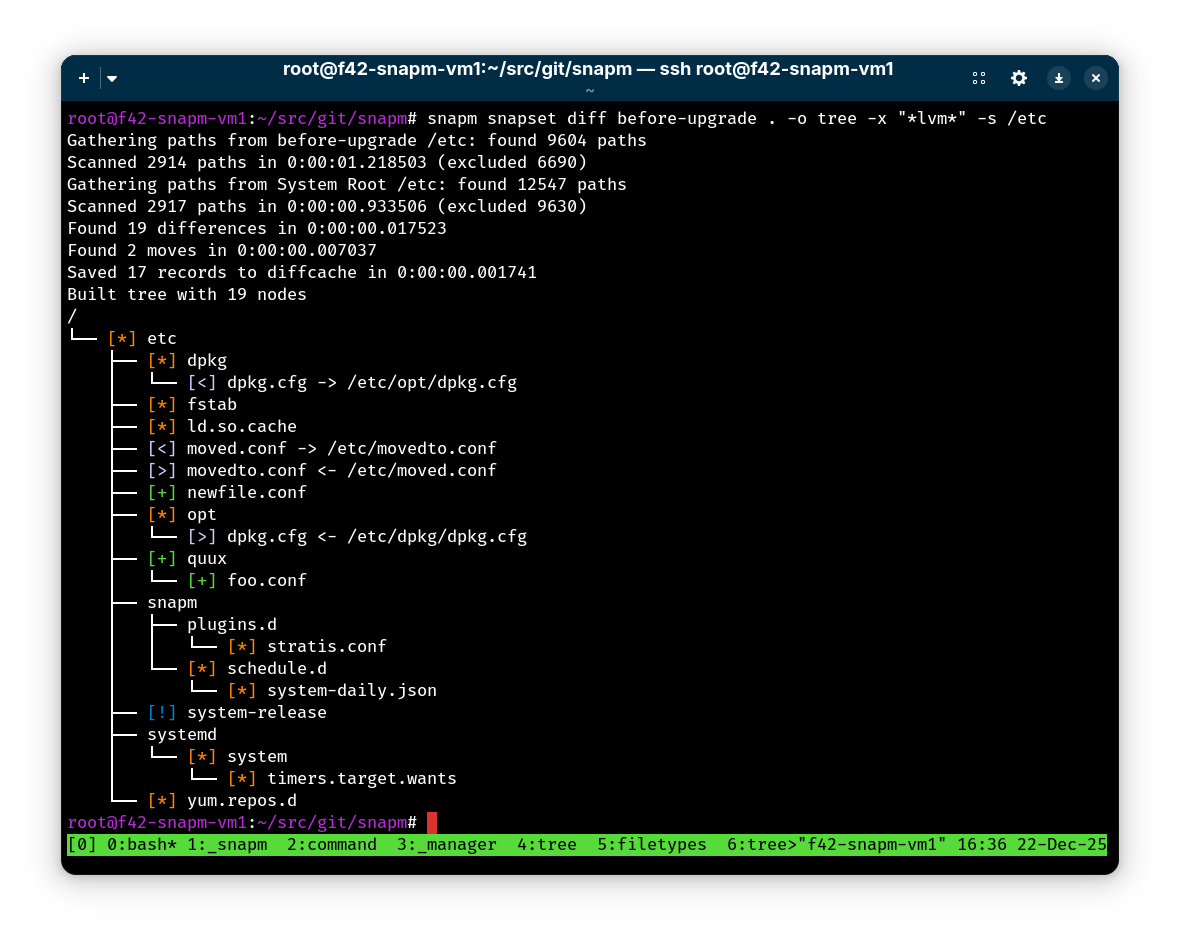
Difference Engine Tree Output
Compare a snapshot set to the running system with a hierarchical tree view:
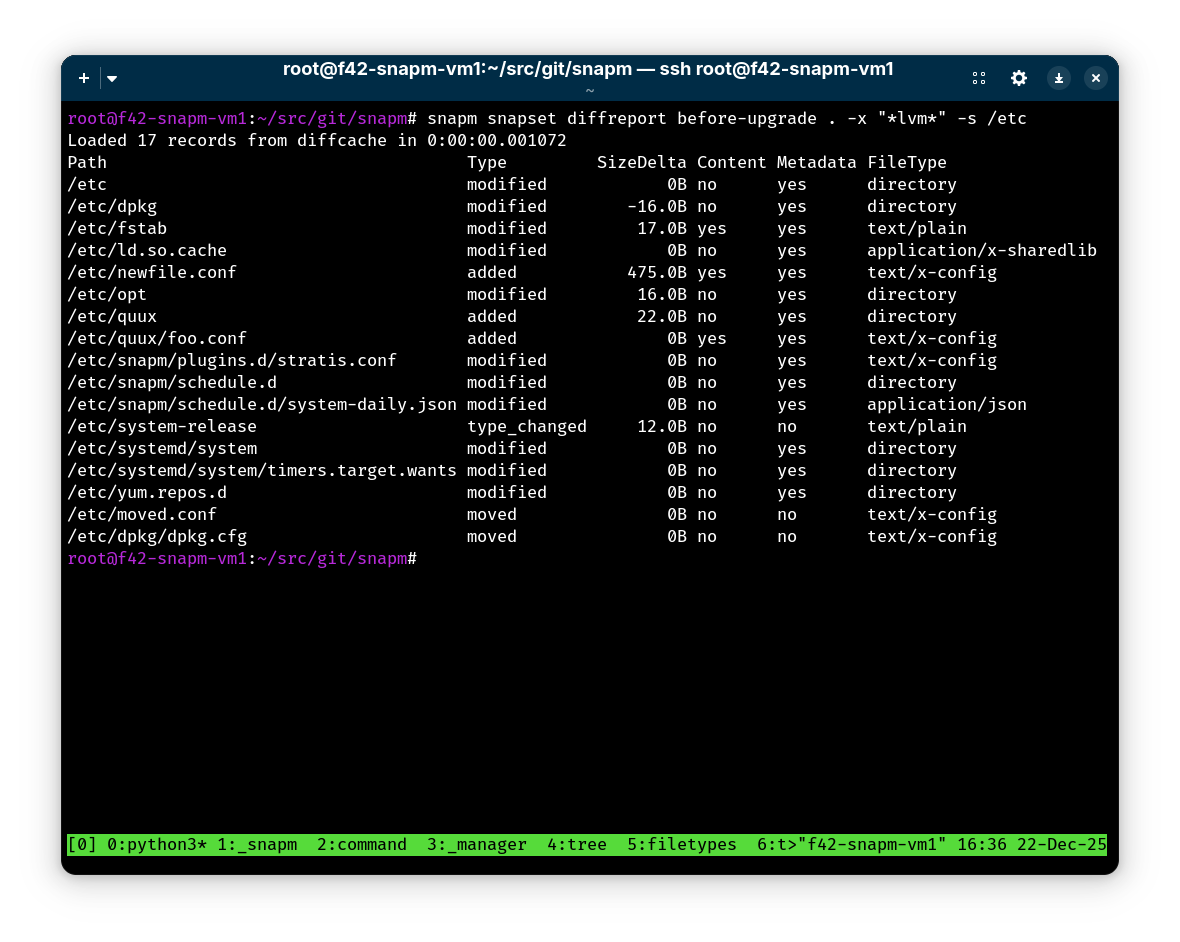
Difference Report
Generate tabular reports of changes between snapshot sets:
Quick Start
Installation
From RPM (Fedora/CentOS/RHEL)
Install from distribution repositories (when available):
dnf install snapm boom-boot
Manual Installation
- Create and activate a virtual environment:
python3 -m venv --system-site-packages .venv && source .venv/bin/activate
- If
boom-bootis not installed from your distribution's packages, clone and install it withpip:
git clone https://github.com/snapshotmanager/boom-boot.git
cd boom-boot
python3 -m pip install .
- Repeat the process with the
snapmrepository:
git clone https://github.com/snapshotmanager/snapm.git
cd snapm
python3 -m pip install .
Basic Usage
Create a bootable snapshot set
Create a snapshot set named "before-upgrade" of root and home, with snapshot boot and revert boot entries:
snapm snapset create --bootable --revert before-upgrade / /home
List snapshot sets
snapm snapset list
Show detailed information:
snapm snapset show before-upgrade
Boot into a snapshot
- Reboot and select the snapshot boot entry from the GRUB menu
- Entry will be named: "Snapshot before-upgrade YYYY-MM-DD HH:MM:SS (version)"
- Optionally run
grub2-reboot <title>to pre-select snapshot boot entry, e.g.:
grub2-reboot "Snapshot before-upgrade YYYY-MM-DD HH:MM:SS (version)"
- Use
grub-rebootinstead ofgrub2-rebooton Debian and Ubuntu systems.
Revert to snapshot state
snapm snapset revert before-upgrade
Then reboot into the Revert boot entry.
Note: Reverting destroys the snapshot set (snapshots are merged back into the origin volumes).
Clean up
Delete snapshot set when no longer needed:
snapm snapset delete before-upgrade
Common Workflows
System Updates
Before major system updates:
snapm snapset create --bootable --revert pre-update / /var
If update goes wrong, revert:
snapm snapset revert pre-update
When satisfied with update, clean up:
snapm snapset delete pre-update
Development Snapshots
Quick development checkpoint:
snapm snapset create dev-checkpoint /home /var
Continue working...
If needed, revert specific volumes by splitting them into a dedicated snapshot set first:
snapm snapset split dev-checkpoint dev-checkpoint-home /home
Example output:
SnapsetName:      dev-checkpoint-home
Sources:          /home
NrSnapshots:      1
Time:             2025-08-30 12:44:00
UUID:             ee82269f-8c78-5814-b47a-b9be31bcebb5
Status:           Inactive
Autoactivate:     no
Bootable:         no
snapm snapset revert dev-checkpoint-home
Alternatively revert the entire snapshot set:
snapm snapset revert dev-checkpoint
Understanding Changes
Compare a snapshot set to the current system to see what changed:
snapm snapset diff pre-update .
View changes as a hierarchical tree (default):
snapm snapset diff --output-format tree pre-update .
Generate a unified diff of modified file contents:
snapm snapset diff --output-format diff pre-update .
Get a summary of change counts:
snapm snapset diff --output-format summary pre-update .
Export changed paths for use with other tools:
snapm snapset diff --output-format paths pre-update . | xargs tar cvf changes.tar
Generate a tabular report of differences:
snapm snapset diffreport -o path,type,size_delta pre-update .
Documentation
- User Guide - Comprehensive usage documentation
- API Documentation - Auto-generated API docs
- Manual Pages - System manual pages
Requirements
- Linux system with LVM2 or Stratis volumes
- boom-boot
- Root privileges for performing storage operations
- Python 3.9+
Supported Storage Backends
| Backend | Type | Snapshots | Thin Provisioning | Status |
|---|---|---|---|---|
| LVM2 | Copy-on-Write | ✓ | ✗ | Stable |
| LVM2 Thin | Thin Pools | ✓ | ✓ | Stable |
| Stratis | Thin Pools | ✓ | ✓ | Stable |
Contributing
We welcome contributions! Please see CONTRIBUTING.md for guidelines.
Support
License
Licensed under the Apache License, Version 2.0. See LICENSE for details.
The Snapshot Manager logo incorporates an image of Tux, the Linux mascot originally conceived and designed by Larry Ewing.
Related Projects
- boom - Boot manager for Linux snapshot boot
- stratis-cli - Command-line tool for Stratis storage
- lvm2 - The LVM2 logical volume manager
1 maintainer

Download files
Download the file for your platform. If you're not sure which to choose, learn more about installing packages.
Source Distribution
Built Distribution
Filter files by name, interpreter, ABI, and platform.
If you're not sure about the file name format, learn more about wheel file names.
Copy a direct link to the current filters
File details
Details for the file snapm-0.7.0.tar.gz.
File metadata
- Download URL: snapm-0.7.0.tar.gz
- Upload date:
- Size: 210.9 kB
- Tags: Source
- Uploaded using Trusted Publishing? No
- Uploaded via:
twine/6.1.0 CPython/3.13.9
File hashes
| Algorithm | Hash digest | |
|---|---|---|
| SHA256 |
8005994bd29366dde96482b037580b38a60db022140c60b5168b54a6c6ecbb00
|
|
| MD5 |
2522dcd37abcc6e3908c019a463354c5
|
|
| BLAKE2b-256 |
5e6b26cab222469923b3aba054032a5c7529473c5d891a1388b82d3192a04dfd
|
File details
Details for the file snapm-0.7.0-py3-none-any.whl.
File metadata
- Download URL: snapm-0.7.0-py3-none-any.whl
- Upload date:
- Size: 186.4 kB
- Tags: Python 3
- Uploaded using Trusted Publishing? No
- Uploaded via:
twine/6.1.0 CPython/3.13.9
File hashes
| Algorithm | Hash digest | |
|---|---|---|
| SHA256 |
0dead49f0a4ea132dbd002c52a61a82b9ae5e004fc58c95b300bdf8c1634f1e6
|
|
| MD5 |
2f2e739c9f6e6cb5250c78a4f8166a08
|
|
| BLAKE2b-256 |
b8ff5f02314b37da19285ddf4524ccc5a9dd3acf87a16e15071427dba2906794
|














