
Snapshot and restore Python environments for reproducible notebooks

Project description
snapmyenv 📸
Snapshot and restore Python environments for reproducible notebooks
snapmyenv is a lightweight library designed for Google Colab and Jupyter users to capture and restore runtime environments, making notebooks fully reproducible. Share your notebooks with confidence knowing others can recreate your exact environment.



Features
- 📸 Capture environments - Snapshot Python version, OS, and all installed packages
- 🔄 Restore environments - Recreate exact package versions from snapshots
- 📓 Notebook integration - Embed snapshots directly in
.ipynbmetadata - 🌐 Colab-friendly - Designed for Google Colab and local Jupyter
- 🪶 Zero dependencies - No external dependencies beyond Python stdlib
- 🛡️ Production-ready - Clean error handling, validation, and logging
Installation
pip install snapmyenv
Based on the files provided, here is an analysis of the snapmyenv project.
Executive Summary
snapmyenv is a lightweight Python library designed to solve the "it works on my machine" problem for Google Colab and Jupyter Notebooks. It allows users to capture the current state of a Python environment (libraries, versions, OS info) and embed that "snapshot" directly into a notebook's metadata. This makes the notebook self-reproducible, allowing anyone who opens it to restore the exact environment used by the original author.
Key Features
- Environment Capture: It records the Python version, Operating System details (Platform), and a complete list of installed pip packages with their exact versions.
- Notebook Embedding: Unlike
requirements.txtwhich is a separate file,snapmyenvembeds the dependency snapshot directly into the.ipynbfile's JSON metadata under the keysnapmyenv_snapshot. - Restoration: It can read a snapshot (from memory, a file, or notebook metadata) and reinstall the specific package versions using
pip. - Colab Integration: It includes specific utilities to detect if code is running in Google Colab or a standard Jupyter environment.
- Zero Dependencies: The library itself has no external dependencies (only uses the Python standard library), making it easy to install without causing dependency conflicts.
Technical Architecture
- Data Models (
models.py): The core data structure is theEnvironmentSnapshotdataclass, which holds metadata (timestamp, python version) and a list ofPackageobjects. It handles serialization to and from JSON/dict formats. - Capture Mechanism (
capture.py): Instead of relying onpkg_resourcesorimportlib.metadatadirectly, it spawns a subprocess runningpip list --format=json. This is a robust way to get the exact list of installed packages aspipsees them. - Restore Mechanism (
restore.py): Restoration involves iterating through the captured package list and callingpip install package==versionvia subprocess. It includes adry_runmode to preview changes without installing them. It also warns the user if the Python version differs from the snapshot. - Notebook Integration (
notebook.py): This module reads the raw JSON of a.ipynbfile, injects the snapshot dictionary intometadata["snapmyenv_snapshot"], and writes it back to disk. This allows the environment data to travel with the notebook file itself.
Code Quality & Best Practices
- Modern Packaging: The project uses
pyproject.tomlfor configuration, adhering to modern Python packaging standards (PEP 517/518). - Type Hinting: The code is fully type-hinted, improving readability and allowing for static analysis.
- Testing: There is a comprehensive test suite using
pytestlocated in thetests/directory, covering capture, models, and restoration logic. - Safety: The code includes a verification script (
verify_package.py) to check structure and imports before distribution.
Potential Limitations
- Pip Only: The README explicitly notes it only captures pip-installed packages, not Conda packages or system-level binaries.
- Virtual Environments: It captures the state of packages, but does not recreate the virtual environment directory structure itself; it simply installs packages into currently active environment.
Use Cases
- Research Papers: Researchers can embed the exact environment used to generate their results into the supplementary notebook files.
- Teaching: Instructors can distribute problem sets with embedded environments so students don't face version mismatch errors.
- Debugging: Developers can capture a "broken" environment state to share with a colleague for troubleshooting.
Quick Start
Basic Usage
import snapmyenv

# Capture your current environment
snapshot = snapmyenv.capture("my-analysis")
# ✓ Captured environment 'my-analysis'
#   Python: 3.10.12
#   Platform: Linux
#   Packages: 147
#   Colab: Yes

# Later, restore the exact environment
snapmyenv.restore("my-analysis")
# Installing 147 packages...
# ✓ Restoration complete: 147 succeeded, 0 failed
Make Notebooks Self-Reproducible
Embed your environment snapshot directly into your notebook:
# In your notebook:
import snapmyenv

# 1. Capture environment
snapmyenv.capture("v1")

# 2. Embed in notebook metadata
snapmyenv.embed("v1", "my_analysis.ipynb")
# ✓ Embedded snapshot 'v1' into my_analysis.ipynb

# Now anyone opening your notebook can restore:
snapmyenv.restore_from_nb("my_analysis.ipynb")
Google Colab Example
Perfect for sharing reproducible analyses on Colab:
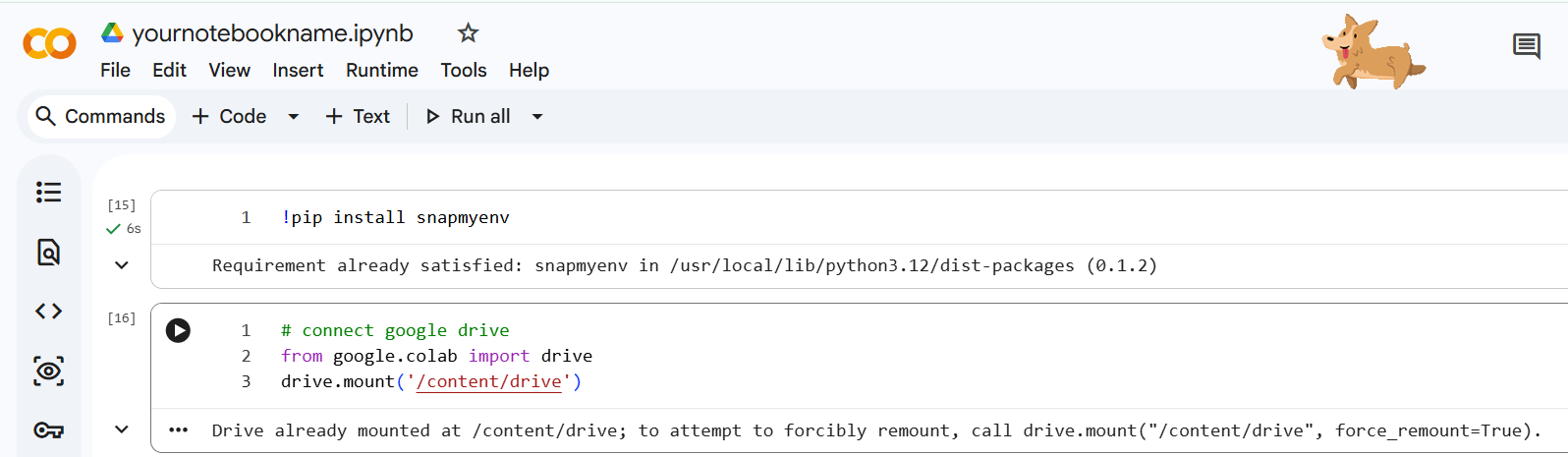
# At the top of your Colab notebook:
!pip install snapmyenv


# connect google drive
from google.colab import drive
drive.mount('/content/drive')

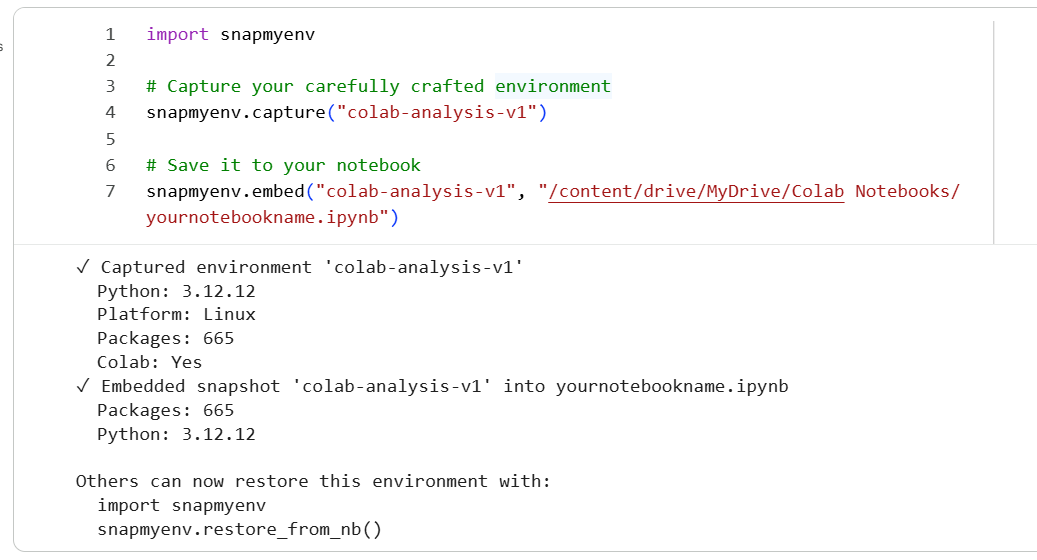
import snapmyenv

# Capture your carefully crafted environment
snapmyenv.capture("colab-analysis-v1")

# Save it to your notebook
snapmyenv.embed("colab-analysis-v1", "/content/drive/MyDrive/Colab Notebooks/analysis.ipynb")
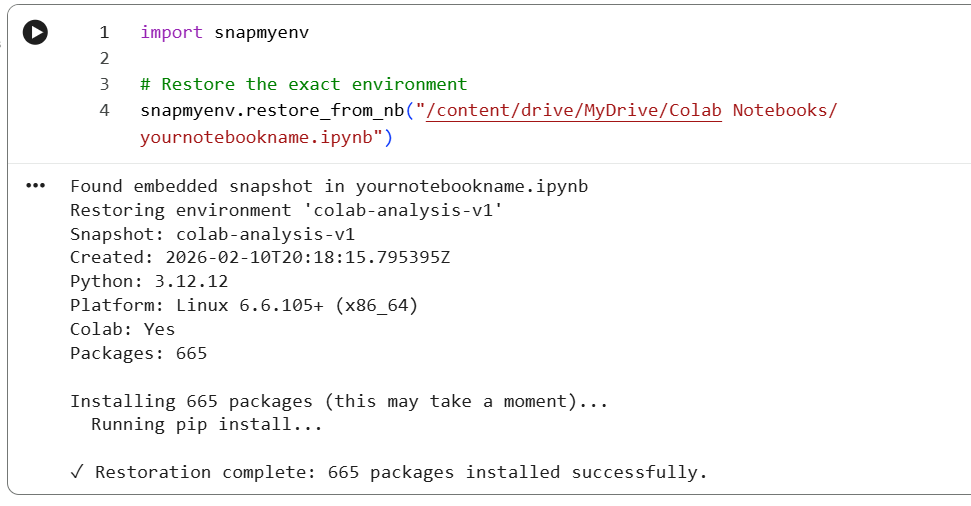
When someone else opens your notebook:
import snapmyenv

# Restore the exact environment
snapmyenv.restore_from_nb("/content/drive/MyDrive/Colab Notebooks/analysis.ipynb")
API Reference
capture(name: str = "default", metadata: dict = None) -> dict
Capture the current Python environment.
Parameters:
name(str): Name for this snapshot (default: "default")metadata(dict): Optional metadata to store with snapshot
Returns:
- Dictionary containing snapshot data
Example:
snapshot = snapmyenv.capture("my-project", metadata={"author": "Alice"})
restore(name: str = "default", dry_run: bool = False) -> None
Restore environment from a previously captured snapshot.
Parameters:
name(str): Name of snapshot to restore (default: "default")dry_run(bool): If True, show what would be installed without installing
Example:
# Preview what would be installed
snapmyenv.restore("my-project", dry_run=True)

# Actually restore
snapmyenv.restore("my-project")
embed(name: str = "default", notebook_path: str = None) -> None
Embed snapshot into Jupyter notebook metadata.
Parameters:
name(str): Name of snapshot to embed (default: "default")notebook_path(str): Path to notebook file (optional, auto-detected in some environments)
Example:
snapmyenv.embed("v1", "analysis.ipynb")
restore_from_nb(notebook_path: str = None, dry_run: bool = False) -> None
Restore environment from notebook-embedded snapshot.
Parameters:
notebook_path(str): Path to notebook file (optional, auto-detected in some environments)dry_run(bool): If True, show what would be installed without installing
Example:
snapmyenv.restore_from_nb("shared_analysis.ipynb")
What Gets Captured?
Each snapshot includes:
- Python version - Major, minor, and patch version
- Platform information - OS, release, and machine architecture
- All installed packages - With exact version numbers
- Colab detection - Whether running in Google Colab
- Timestamp - When snapshot was created
- Custom metadata - Any additional information you provide
Use Cases
1. Reproducible Research
# At the start of your research
import snapmyenv
snapmyenv.capture("paper-v1")

# ... months of analysis ...

# Before submission, embed in your analysis notebook
snapmyenv.embed("paper-v1", "analysis.ipynb")
2. Teaching & Tutorials
# Create a tutorial notebook with specific package versions
snapmyenv.capture("tutorial-2024")
snapmyenv.embed("tutorial-2024", "lesson.ipynb")

# Students can restore the exact environment
snapmyenv.restore_from_nb("lesson.ipynb")
3. Team Collaboration
# Team member A captures their working environment
snapmyenv.capture("project-stable")
snapshot = snapmyenv.capture("project-stable")

# Share the snapshot dict via git, email, etc.
# Team member B restores it
snapmyenv.restore_from_dict(snapshot)
4. Environment Debugging
# When something works on one machine but not another
snapmyenv.capture("working-config")

# On the broken machine, compare:
snapmyenv.restore("working-config", dry_run=True)
Advanced Usage
Preview Changes (Dry Run)
# See what would be installed without actually installing
snapmyenv.restore("my-project", dry_run=True)
Multiple Snapshots
# Capture different configurations
snapmyenv.capture("dev")
snapmyenv.capture("production")
snapmyenv.capture("minimal")

# Switch between them
snapmyenv.restore("production")
Working with Snapshot Data
# Get the snapshot dictionary
snapshot = snapmyenv.capture("test")

# Access snapshot details
print(f"Python version: {snapshot['python_version']}")
print(f"Package count: {len(snapshot['packages'])}")
print(f"Created: {snapshot['timestamp']}")

# Save to file
import json
with open("snapshot.json", "w") as f:
    json.dump(snapshot, f, indent=2)

# Restore from file later
with open("snapshot.json", "r") as f:
    loaded = json.load(f)
snapmyenv.restore_from_dict(loaded)
Error Handling
snapmyenv provides informative error messages and graceful degradation:
try:
    snapmyenv.restore("my-project")
except snapmyenv.RestoreError as e:
    print(f"Restoration failed: {e}")
Common scenarios:
- Python version mismatches → Warning issued, continues with installation
- Package installation failures → Individual packages skipped with warnings
- Missing snapshots → Clear error message with available snapshot names
Limitations
- Package sources: Only captures pip-installed packages (not conda, system packages, etc.)
- Binary dependencies: Cannot capture system libraries or non-Python dependencies
- Platform differences: Snapshots capture platform info but cannot enforce it
- Version conflicts: Some package combinations may be impossible to install together
Development
Setup Development Environment
git clone https://github.com/lovnishverma/snapmyenv.git
cd snapmyenv
pip install -e ".[dev]"
Run Tests
pytest
pytest --cov=snapmyenv --cov-report=html
Code Quality
black snapmyenv tests
ruff check snapmyenv tests
mypy snapmyenv
Contributing
Contributions are welcome! Please:
- Fork the repository
- Create a feature branch (
git checkout -b feature/amazing-feature) - Make your changes with tests
- Run the test suite
- Submit a pull request
License
MIT License - see LICENSE file for details.
FAQ
Q: Does this work outside of Jupyter/Colab?
A: Yes! The core capture/restore functionality works in any Python environment. The notebook features require Jupyter.
Q: Can I use this in production applications?
A: snapmyenv is designed for notebooks and development workflows. For production, consider Docker, conda environments, or proper dependency management tools.
Q: What if a package version isn't available anymore?
A: snapmyenv will warn you and skip that package, installing everything else that's available.
Q: Does this capture virtual environment state?
A: No, it captures installed packages regardless of whether you're in a venv. It's meant for recreating package sets, not virtual environment structure.
Q: How is this different from pip freeze?
A: snapmyenv adds platform/Python version tracking, Jupyter integration, user-friendly interfaces, and graceful error handling. It's specifically designed for notebook reproducibility.
Changelog
v0.1.0 (2024)
- Initial release
- Core capture/restore functionality
- Notebook metadata embedding
- Google Colab support
- Comprehensive test suite
Support
- 📧 Issues: GitHub Issues
- 💬 Discussions: GitHub Discussions
- 📖 Documentation: README
Made with ❤️ for the Jupyter and Google Colab community


Download files
Download the file for your platform. If you're not sure which to choose, learn more about installing packages.
Source Distribution
Built Distribution
Filter files by name, interpreter, ABI, and platform.
If you're not sure about the file name format, learn more about wheel file names.
Copy a direct link to the current filters
File details
Details for the file snapmyenv-0.1.3.tar.gz.
File metadata
- Download URL: snapmyenv-0.1.3.tar.gz
- Upload date:
- Size: 21.4 kB
- Tags: Source
- Uploaded using Trusted Publishing? No
- Uploaded via: twine/6.2.0 CPython/3.14.2
File hashes
| Algorithm | Hash digest | |
|---|---|---|
| SHA256 |
3b439ebbf43cfe6ed8282194515b4ff91c79aa535575757e2b44341360435a23
|
|
| MD5 |
e9b6e31b3f0ff41f0889399b896762d6
|
|
| BLAKE2b-256 |
46593a584f875b6adacad767257033864ab8bc9295ba06b81801f0beae099f4c
|
File details
Details for the file snapmyenv-0.1.3-py3-none-any.whl.
File metadata
- Download URL: snapmyenv-0.1.3-py3-none-any.whl
- Upload date:
- Size: 16.6 kB
- Tags: Python 3
- Uploaded using Trusted Publishing? No
- Uploaded via: twine/6.2.0 CPython/3.14.2
File hashes
| Algorithm | Hash digest | |
|---|---|---|
| SHA256 |
ecc1688df471de2740d2fd559ced9ca9b4cb0f6b2bf07c74537e6e13c7056ea5
|
|
| MD5 |
7174e504698279d3c0eed964e5819013
|
|
| BLAKE2b-256 |
72476707314610ad0679bb28d75b569c510dc3a910f602a71b6403310907b511
|






