
A framework for reproducible machine learning


Project description
SnapperML




SnapperML is a comprehensive framework for experiment tracking and machine learning operationalization (MLOps), built using well-supported technologies like Mlflow, Ray, Docker, and more. It provides an opinionated workflow designed to facilitate both local and cloud-based experimentation.
Key Features
- Automatic Tracking: Seamless integration with MLflow for parameter and metric tracking.
- Distributed Training: First-class support for distributed training and hyperparameter optimization using Optuna and Ray.
- CLI-Based Execution: Easily package and execute projects within containers using our intuitive Command Line Interface (CLI).
- Web Interface: A modern web interface developed with Vite, React, TypeScript, and Bootstrap for managing experiment configurations.
Project Goals
SnapperML aims to:
- Enhance Maintainability: By addressing technical debt and improving the codebase, making it cleaner and more efficient.
- Improve Scalability: Ensure the system can handle large-scale experiments and concurrent requests smoothly.
- Provide a Robust Web UI: A user-friendly interface that simplifies the setup and execution of ML experiments.
- Ensure Reproducibility: Leverage MLOps principles to ensure experiments can be replicated easily.
Architecture
Overview
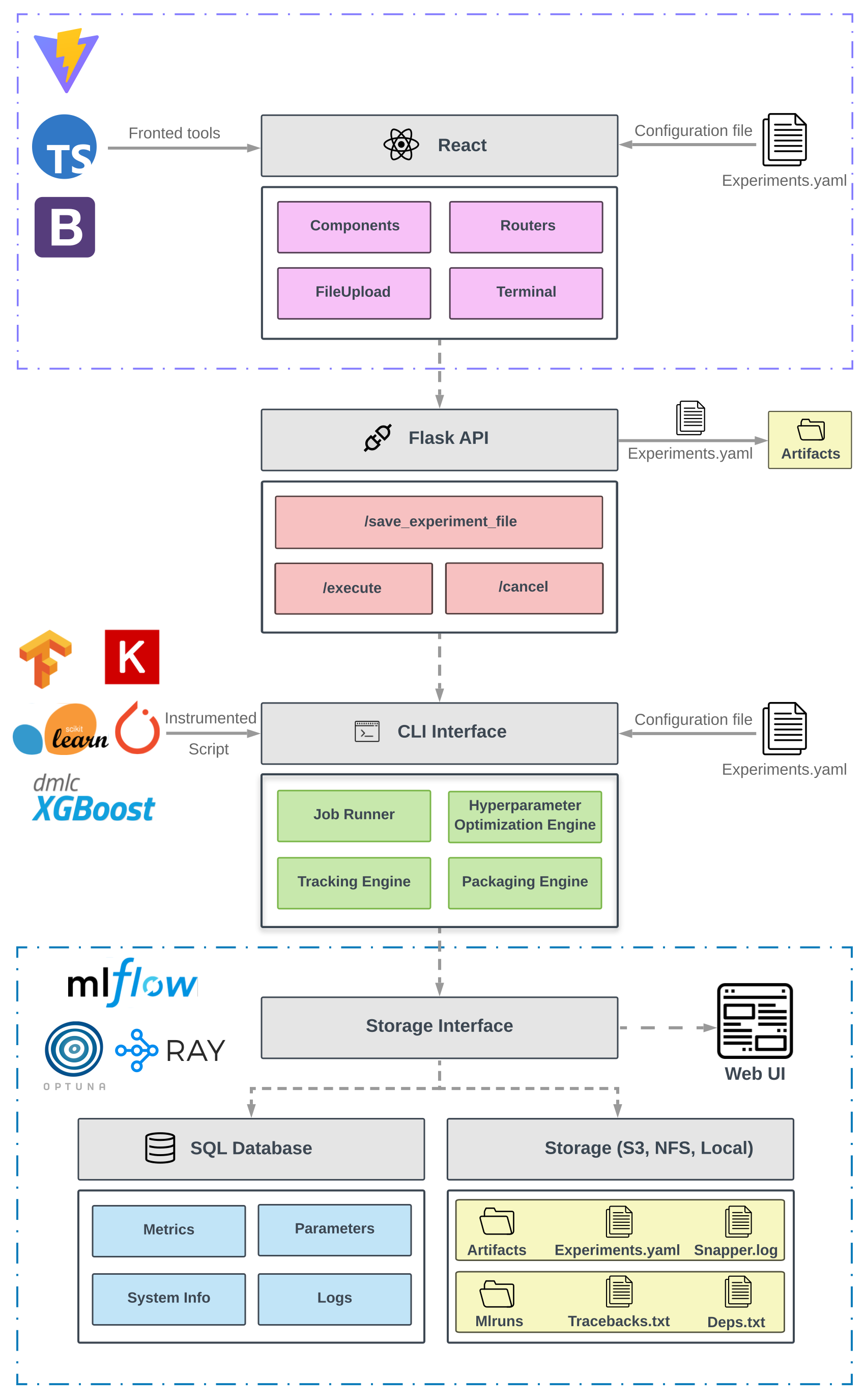
SnapperML integrates several components to streamline machine learning workflows:
- CLI Framework: Facilitates command-based interactions and logging for experiment execution.
- Flask API: Manages requests from the frontend and interfaces with backend processes.
- Vite-Powered Web UI: An accessible and intuitive web application that handles experiment configurations and tracks real-time logs.
- Containerized Databases: Securely stores experiment results using containerized MLflow and Optuna databases.
[!IMPORTANT] Be sure to configure your databases and network settings carefully to ensure the security and integrity of your experiment data.
Installation
Prerequisites
- docker
- python 3.12+
- node.js (for UI development)
Install
The python package can be install using pip:
pip install snapper-ml
Or from this repo:
pip install .
[!NOTE] Python 3.12 or later is required. Ensure that Docker is installed and running on your system for full functionality.
Deploy
To run SnapperML, you first need to deploy MLflow and Optuna databases. Execute:
[!TIP] To use the SnapperML web interface, deploy it with:
snapper-ml make docker
Once the deploy finished you can execute snapper-ml in the CLI. For an ilustrative example, check the example section.
To use snapperML web interface you need to deploy it too.
snapper-ml make UI
Open localhost:4000 and upload your firsts experiments!
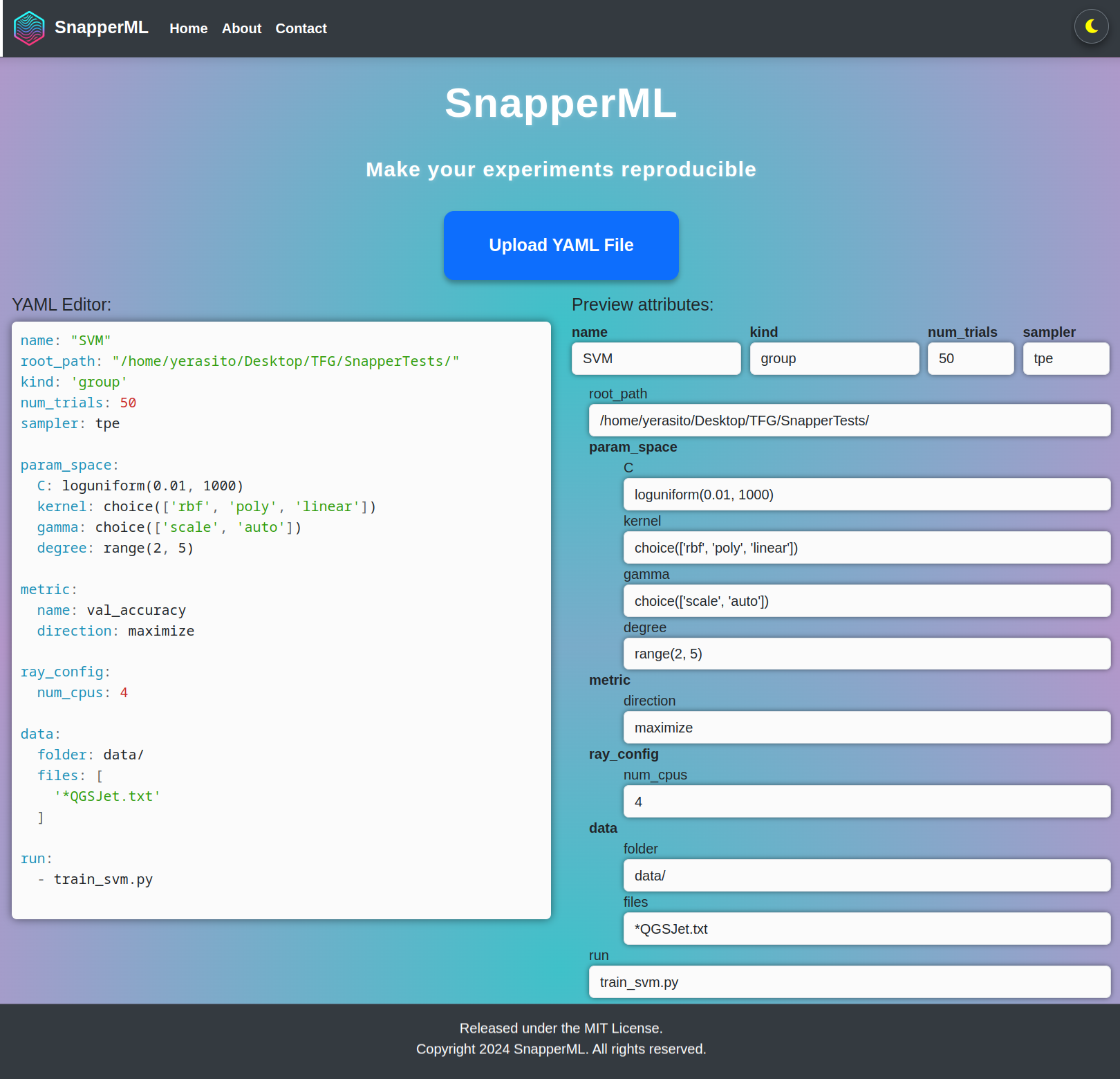
To stop snapper UI just execute:
make stop_UI
And to stop mlflow and optuna databases execute:
make stop_docker
[!CAUTION] Running make stop_UI also stops the Docker containers for the databases, so ensure you have saved all necessary data.
Documentation
The documentation is available here
[!TIP] Visit the documentation for more examples and detailed instructions.
Example
# train_svm.py

from snapper_ml import job

@job
def main(C, kernel, gamma='scale'):
    np.random.seed(1234)
    X_train, X_val, y_train, y_val = load_data()
    model = SVC(C=C, gamma=gamma, kernel=kernel)
    model.fit(X_train, y_train)
    accuracy = model.score(X_val, y_val)
    return {'val_accuracy': accuracy}


if __name__ == '__main__':
    main()
# train_svm.yaml

name: "SVM"
kind: "group"
num_trials: 12
sampler: TPE

param_space:
  C: loguniform(0.01, 1000)
  gamma: choice(['scale', 'auto'])

metric:
  name: val_accuracy
  direction: maximize

ray_config:
  num_cpus: 4

data:
  folder: data/
  files: ["*QGSJet.txt"]

run:
  - train_svm.py
snapper-ml run --config_file=train_svm.yaml
[!WARNING] Make sure the configuration files are correctly set to avoid runtime errors. Misconfigured parameters could lead to unexpected behavior.
There are more examples in the examples folder.
Release history Release notifications | RSS feed


Download files
Download the file for your platform. If you're not sure which to choose, learn more about installing packages.
Source Distribution
Built Distribution
Filter files by name, interpreter, ABI, and platform.
If you're not sure about the file name format, learn more about wheel file names.
Copy a direct link to the current filters
File details
Details for the file snapper_ml-0.4.1.tar.gz.
File metadata
- Download URL: snapper_ml-0.4.1.tar.gz
- Upload date:
- Size: 2.3 MB
- Tags: Source
- Uploaded using Trusted Publishing? No
- Uploaded via: twine/5.1.0 CPython/3.12.7
File hashes
| Algorithm | Hash digest | |
|---|---|---|
| SHA256 |
e162449ddf15eb757c7fc19822acfaafe96ff497606e2d674de8568fb0e9f092
|
|
| MD5 |
dddede3225f685a4ac89800e6d20f518
|
|
| BLAKE2b-256 |
78eb3013e61c2d3adabc09314a9653f38dc525233467840aba9b08d282bcd3d6
|
File details
Details for the file snapper_ml-0.4.1-py3-none-any.whl.
File metadata
- Download URL: snapper_ml-0.4.1-py3-none-any.whl
- Upload date:
- Size: 2.3 MB
- Tags: Python 3
- Uploaded using Trusted Publishing? No
- Uploaded via: twine/5.1.0 CPython/3.12.7
File hashes
| Algorithm | Hash digest | |
|---|---|---|
| SHA256 |
97b386e821c92142b888e00157389ca6df3d408a20ba3d550e5fd0b7840523a8
|
|
| MD5 |
073f68d3ac550906a3803b70a4b0164c
|
|
| BLAKE2b-256 |
b3c03264fe1a0a1e32369105a68d2046db1cdad5fd64be7159477ff2a0535455
|






