
 SnapXO (Snapchat Export Organizer)



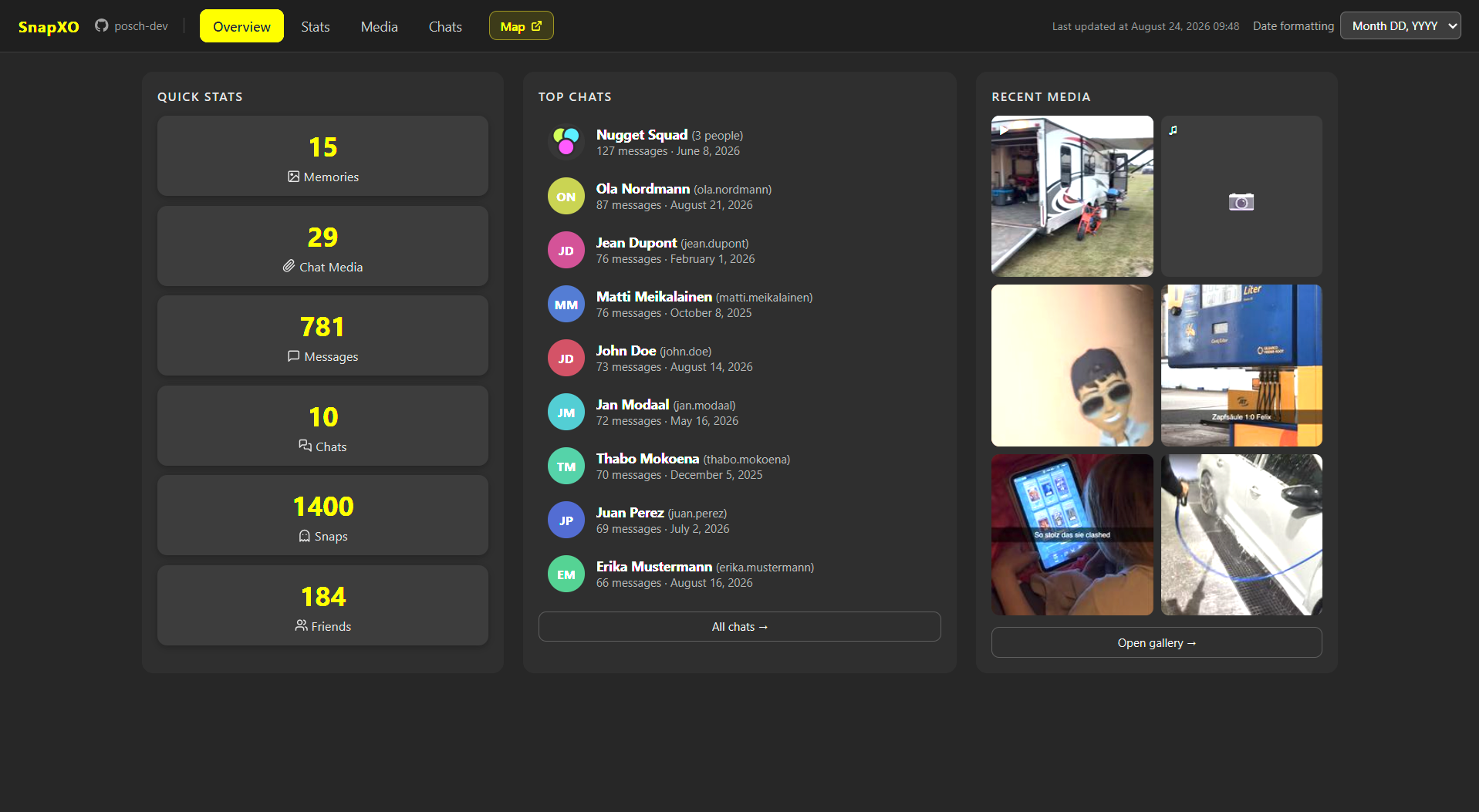
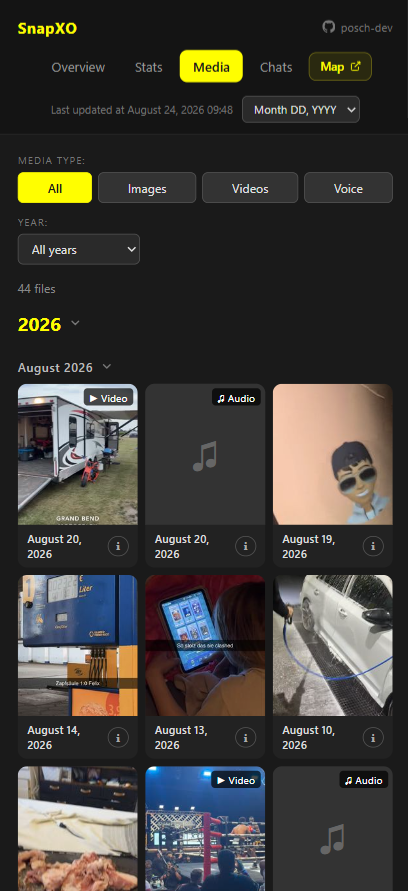
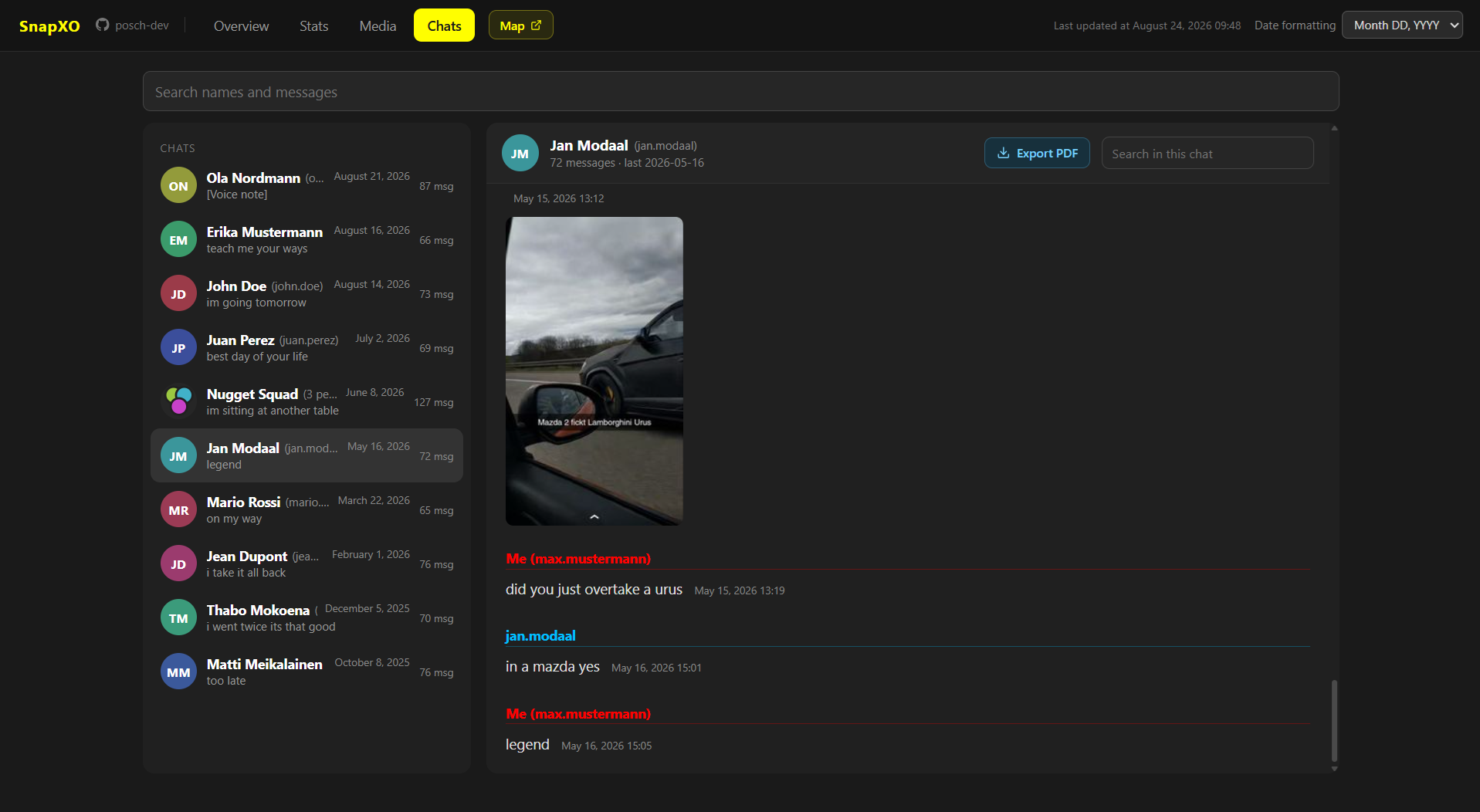
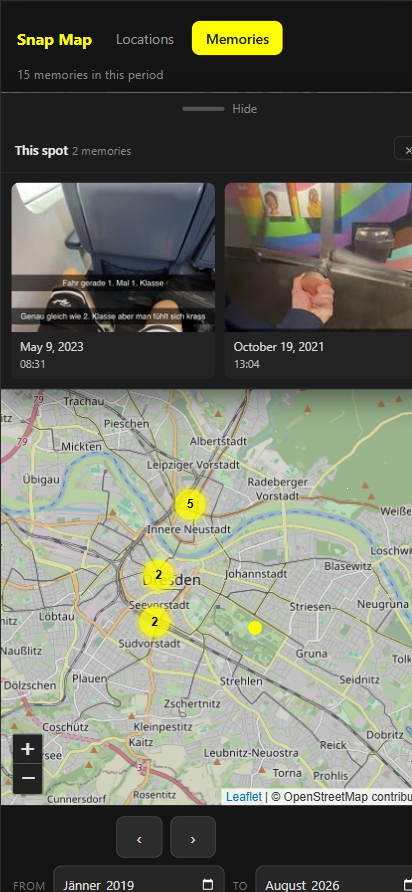
Snapchat hands you your data back as a jumbled mess of JSON, HTML and media files, with no structure whatsoever. SnapXO turns that into a well-organized folder you can actually use: your media sorted and dated, your chats readable again, your stats as charts, and a map of where it all happened. On top of that it builds you a proper UI for all of it, not just the media. It runs offline on your own machine and is useful across PC and Mobile.
pip install snapxo
| Overview | Media |
 |
 |
| Chats | Snap Map |
 |
 |
see more of the UI and files SnapXO generates here.
Features
index.html is the full archive of your Snapchat data export, packed with
an Overview, your Stats, Media and Chats. It opens straight from disk,
works without a server, offers user-friendly file names and
folders, and works just as well on a phone as on a desktop. Natively.
Main features
- Chats: full chat history with images, voice messages, videos and snaps. searchable names and messages included.
- Media: A gallary of your Snapchat media, sorted and efficiently encoded, with type and yeaar filters, and a details panel per file.
- Stats: Your Snapchat statistics neatly formatet and illustratet with charts.
- Overview: one familiar interface; Organized, backwards-compatible and user-friendly, out of the box
Other features
- Media organization: memories and chat media in structured folders with
clean filenames (
2026-05-08_0444.mp4) - Snap Map: see where you took your snaps on the globe.
- Location visuualisation: see where you've been. (even comes with an animation)
- Charts: Statistical Charts for:
- messages
- chat media
- snaps
- friends
- story views over time
- activity by time of day
- activity by weekday
- type distribution
- who writes you most
- etc.
- Interactive Use of SnapXO:
snapxo -iwalks you through the enitre tool instead of crafting a command. - PDF:
snapxo pdf, media, chats, stats baked right into a PDF file, ready to print or save - Spreadsheets: your stats as XLSX, ODS or CSV, the XLSX with real Excel charts you can edit
- Self-hosting: a docker compose file that hosts the archive on your own network. Got a Raspberry Pi or a home server? Run it there and browse your archive comfortably from your phone or other devices.
- Verify: for data integrity and to catch data corruption early
- Rebuild: backwards-compatible and idempotent. Bring an older archive up to date, or just regenerate it (without needing the original export ZIP)
- Merge: Merge several exports into one, deduplicated and renumbered
- Duplicate removal: MD5 deduplication, before encoding (storage and time efficient)
- H.265 encoding: Intel QSV hardware acceleration, automatic fallback to libx265
- Overlay burning: Snapchat overlays burned onto photos and videos
- GPS/EXIF: coordinates from
memories_history.jsonwritten into image EXIF - Voice messages: audio-only MP4s detected and converted to MP3
- Timezone:
--timezone Europe/Viennaconverts every timestamp out of UTC, so your numbers reflect the timezone you actually lived in
Runs on Windows, Linux and macOS,
with a UI that works the same on desktop and mobile.
Installation
pip install snapxo
snapxo doctor tells you if external tools are missing and prints the install command for the
system you are on.
For video processing: ffmpeg and ffprobe are native programs, so pip cannot install them.
| System | Command |
|---|---|
| Windows | winget install Gyan.FFmpeg |
| Debian/Ubuntu | sudo apt install ffmpeg |
| Fedora | sudo dnf install ffmpeg |
| Arch | sudo pacman -S ffmpeg |
| macOS | brew install ffmpeg |
You can also use pip install "snapxo[ffmpeg]", which brings both binaries along,
but those have no hardware encoding. A system-wide
ffmpeg is recommended.
For snapxo pdf on the command line only:
playwright install chromium
downloads the browser that renders the PDFs. This only applies if you export
PDFs through the CLI. On Linux it may also need
playwright install-deps chromium.
PDFs can still be exported through the UI without installing any of this.
The export buttons build their files in the browser you already have. SnapXO loses nothing by skipping this step; it only affects snapxo pdf.
Quick start
- Ask Snapchat for your data at accounts.snapchat.com, then download the ZIP it mails you
snapxo organize mydata.zip -o ./my-archive -y- Open
my-archive/index.html, or just explore the folder yourself
That is the whole tool. Everything below is optional, extra features that
build on the archive organize just made.
| Command | What it does |
|---|---|
snapxo organize EXPORT -o ARCHIVE |
turn an export into an archive |
snapxo info EXPORT |
see what a ZIP export from Snapchat contains, writes nothing |
snapxo rebuild ARCHIVE |
bring an older archive up to date, without the export ZIP |
snapxo pdf ARCHIVE |
render the media, the statistics and every chat for paper |
snapxo spreadsheet ARCHIVE |
your stats as XLSX, ODS or CSV |
snapxo docker ARCHIVE |
serve the archive on your home network (read-only, password optional) |
snapxo -i |
skip the flags answer a few questions and SnapXO runs the command for you |
# Several ZIPs, or a whole folder of them
snapxo organize export1.zip export2.zip -o ./my-archive -y
snapxo organize ~/Downloads -o ./my-archive -y

# Look before you write
snapxo info mydata.zip
snapxo organize mydata.zip --dry-run
ARCHIVE means a folder SnapXO already organized.
Four more commands exist:
html: writes the one page per topic versionsmerge: merges several archives into oneverify: checks an archive against its manifestdoctor: checks your tools.
Running from a clone? Every command works the same as
python -m snapxo ..., so nothing has to be installed:
python -m snapxo organize mydata.zip -o ./my-archive -y
See DOCUMENTATION.md for the full feature list, every command and every flag.
Output Structure
output/
├── 2022/                    folders with organized media
├── ...
├── 2026/
│   ├── 2026-05-08_0444.mp4  H.265 encoded, with EXIF/GPS
│   ├── 2026-05-08_0445.jpg
│   └── 2026-05-08_0446.mp3
├── _overlays/               Overlays that matched no media
├── _meta/                   Raw JSON + HTML from export
│   ├── manifest.json        What each file is and where it came from
│   ├── checksums.json       Fingerprint for `snapxo verify`
│   ├── integrity.json       Files that arrived damaged, if any
│   ├── app-chats.js         Every chat and message, for the Chats tab
│   ├── app-media.js         Every file and its details, for the Media tab
│   ├── app-stats.js         The numbers behind the charts, for the export buttons
│   ├── thumbs/              Preview images for the gallery and the chats
│   │   └── medium/          Larger copies, written by `snapxo pdf` only
│   ├── json/
│   └── html/
├── index.html               The archive: Overview, Stats, Media, Chats
└── map.html                 Interactive Snap Map
The other commands add to it:
| Command | What it adds |
|---|---|
snapxo pdf |
creates pdf/ with media-details.pdf, media-plain.pdf, stats.pdf and pdf/chats/ |
snapxo spreadsheet |
creates spreadsheet/ with one file per format |
snapxo docker |
creates or appends docker-compose.yml file |
snapxo html |
creates seperate individual independant html pages ( gallery.html, chats.html, stats.html and conversations/) |
Flags
The most-used ones. The full list for every command is in DOCUMENTATION.md.
| Flag | Description |
|---|---|
-o, --output PATH |
Directory the archive is written to, created if it doesn't exist |
-y, --yes |
Organize everything without asking |
--dry-run |
Show what would happen, without it happening |
--media SOURCE,SOURCE |
Which media get pulled from the export: memories, chat (default: both) |
--types KIND,KIND |
Which of those "--media" get processed: photos, videos, voice (default: all three) |
--since / --until YYYY-MM-DD |
Limit to this time range, both inclusive |
--timezone ZONE |
Convert Snapchat's UTC timestamps into your own timezone, e.g. Europe/Vienna |
--no-encode |
Don't encode videos to H.265 |
--no-meta |
Don't copy the raw export to _meta/ see the warning below |
-v, --verbose |
Print every file as it is processed, not just the totals |
--no-metais permanent.rebuildandmergewon't work on that folder again, ever. You've been warned.
Privacy
SnapXO runs entirely on your machine, on files you downloaded yourself and handed to the tool. It makes no network requests, never logs into an account and never contacts Snapchat.
Two things are worth knowing:
map.htmlloads its map library and its map tiles from the internet when you open it. That has nothing to do with SnapXO's own functionality. Its purely how the map draws itself and its UI elements. Generating the page does not touch the network at all; every other page works with none.snapxo dockerserves your archive on your home network, which is what makes it reachable from your phone. Set a password, and do not forward the port through your router.
The browser Chromium that snapxo pdf uses is put into offline mode, so it
cannot reach the network even if a page asked it to. This only applies to the
CLI's pdf command, nothing else in SnapXO touches a browser.
Disclaimer
Not affiliated with Snap Inc.
This is an independent, unofficial open-source tool. It is not created, endorsed, sponsored or supported by Snap Inc., and has no connection to Snapchat, Snap Inc. or any of its products. "Snapchat" and "Snap" are trademarks of Snap Inc., used here only to describe what this tool reads. SnapXO works purely offline on a data export you requested and downloaded yourself. This tool never logs into an account and never contacts Snapchat.
Credits
SnapXO couldn't have been built without these tools: click, rich, Pillow, Leaflet, Lucide and more. Every one of them, what it is used for and the licence it comes under, is listed in THIRD-PARTY-NOTICES.md.
License
1 maintainer

Metadata
1 maintainer
Release files for snapxo 2.0.0
For a detailed explanation of source distributions (sdists) and built distributions (wheels), please see the package formats documentation.
Source distribution (sdist)
| File | Size | Uploaded | |
|---|---|---|---|
| snapxo-2.0.0.tar.gz | 191.8 kB | Details |
Built distribution (wheel)
| File | Interpreter | ABI | Platform | Reset |
|---|---|---|---|---|
| snapxo-2.0.0-py3-none-any.whl | Python 3 | none | any | Details |
Total release size: 365.7 kB
Release files / snapxo-2.0.0.tar.gz
| Download URL | snapxo-2.0.0.tar.gz |
|---|---|
| Size | 191.8 kB |
| Tags | Source |
|
SHA-256 checksum How to use checksums |
11189a3044d25e66388d3eac48cdff9d0b44ffdb89288ffe273e94e290e50557
|
|
BLAKE2b-256 checksum How to use checksums |
c716777e719bce9f180b9741bf3b073b85bacf1e6e4cd9e4d87134ad102d8445
|
| Upload date | |
|
Uploaded using Trusted Publishing? What is trusted publishing? |
Yes |
| Uploaded via |
twine/7.0.0 CPython/3.13.14
|
Provenance
Provenance describes where a file came from. On PyPI, provenance is shared via attestations, which provide a verifiable record of the build or publishing details. View details, limitations and caveats.


PyPI Publish Attestation
PyPI verified that this artifact, at this checksum, originated from the publisher listed below.
Signed by GitHub Actions, verified by PyPI on Aug 24, 2026.
Transparency logRelease files / snapxo-2.0.0-py3-none-any.whl
| Download URL | snapxo-2.0.0-py3-none-any.whl |
|---|---|
| Size | 173.9 kB |
| Tags | Python 3 |
|
SHA-256 checksum How to use checksums |
d8bfb15d44dbc29c34906201ad1c3e62e37eb1628a996f85ae02d77727b18d97
|
|
BLAKE2b-256 checksum How to use checksums |
b045669b3d36d6b4c9352544199713344477982d94750c07435c50fbd39b4f17
|
| Upload date | |
|
Uploaded using Trusted Publishing? What is trusted publishing? |
Yes |
| Uploaded via |
twine/7.0.0 CPython/3.13.14
|
Provenance
Provenance describes where a file came from. On PyPI, provenance is shared via attestations, which provide a verifiable record of the build or publishing details. View details, limitations and caveats.
PyPI Publish Attestation
PyPI verified that this artifact, at this checksum, originated from the publisher listed below.
Signed by GitHub Actions, verified by PyPI on Aug 24, 2026.
Transparency log













