
snazzy
Stylish ANSI terminal colors and helpers.





Usage
from snazzy import enable_colors, green, wrap

enable_colors()

print("That looks " + green("good") + ", right?")
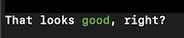
Note two things:
- snazzy is inactive by default, so we have to call
enable_colors()first. - The function
green(<text>)wraps the text in ANSI escape sequences to apply green foreground color and reset to the default color afterwards.
The function green(<text>) is only a convenience shortcut for wrap(<text>, ...):
assert green("good") == wrap("good", fg="green")
However wrap() is more powerful and flexible, since it also allows to set background
color and attributes (bold, italic, underline):
print(wrap("white on blue", "white", bg="blue"))
print(wrap("ERROR:", "yellow", bg="red", bold=True) + " that went wrong.")
Alternative pattern, using a context manager:
with Snazzy(fg="green", bg="black"))
    print("This is so eighties...")
The context manager pattern is syntactic sugar for for this explicit code:
print(ansi("green", bg="black"), end="")
print("This is so eighties...")
print(ansi_reset(), end="")
Available Formats
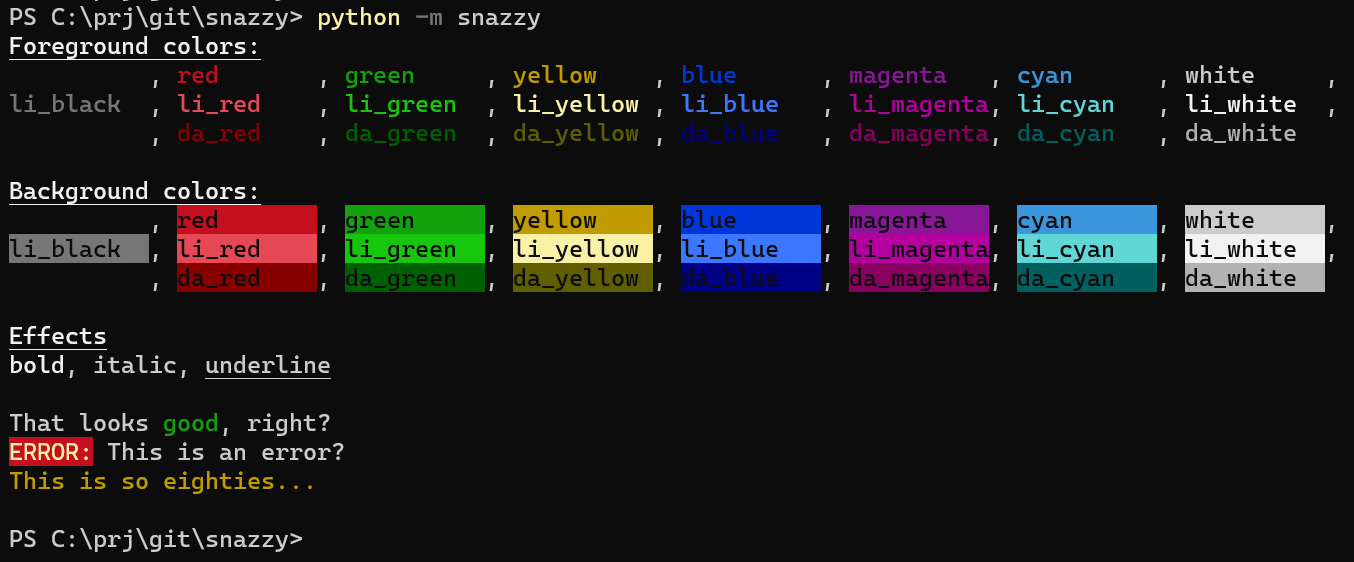
Colors
Color keys can be used as foreground or background using the fg=COLOR and
bg=COLOR option respectively.
Note: Not all platforms implement all features
see here for an overview.
These are well supported in most terminals:
"black", "red", "green", "yellow", "blue", "magenta", "cyan", "white".
These are less good supported:
"li_black", "li_red", "li_green", "li_yellow", "li_blue", "li_magenta",
"li_cyan", "li_white".
These are less supported:
"da_black", "da_red", "da_green", "da_yellow", "da_blue", "da_magenta",
"da_cyan", "da_white".
We can also pass RGB tuples like so if the platform supports it:
print(wrap("white on blue", (255, 255, 255), bg=(0, 0, 200)))
Effects
The following effects are available:
"bold", "dim", "italic", "underline", "blink", "inverse", "hidden",
"strike".
("b", "i", and "u" may be used as alias for bold, italic, and underline.)
Format Reset
The following codes reset distinct formattings to default values:
"reset_all", "reset_fg", "reset_bg", "reset_bold_dim", "reset_italic",
"reset_underline", "reset_blink", "reset_inverse", "reset_hidden",
"reset_strike".
(The wrap() methods appends this automatically to the wrapped text.)
Enable Colors
Snazzy is disabled by default, because not all terminals and platforms support
ANSI codes, resulting in ugly text.
Also, when output is redirected to log files, we want to suppress those escape
sequences.
Finally, a command line tool that uses snazzy might want to offer a
command line argument --no-color to disable colors:
if not args.no_color:
    snazzy.enable_colors()
Until explicitly enabled, no escape sequencrs are generated, so the the wrappers behave transparently:
from snazzy import red, enable_colors

assert red("error") == "error"

enable_colors(True)
assert red("error") == "\x1b[91merror\x1b[39m"
Emojis
The emoji(s, fallback) method allows to emit emojis and other fancy unicode
characters, but fallback to a replacement string if the terminal does not
support this.
print("{} this is a bug.".format(emoji("❌", red("X"))))
print(emoji("✨ 🍰 ✨", ":-)"))
Note: Currently we assume that Windows does not support emojis, but other terminals do.
1 maintainer

Metadata
1 maintainer
Release files for snazzy 0.2.2
For a detailed explanation of source distributions (sdists) and built distributions (wheels), please see the package formats documentation.
Source distribution (sdist)
| File | Size | Uploaded | |
|---|---|---|---|
| snazzy-0.2.2.tar.gz | 8.1 kB | Details |
Built distribution (wheel)
| File | Interpreter | ABI | Platform | Reset |
|---|---|---|---|---|
| snazzy-0.2.2-py3-none-any.whl | Python 3 | none | any | Details |
Total release size: 15.8 kB
Release files / snazzy-0.2.2.tar.gz
| Download URL | snazzy-0.2.2.tar.gz |
|---|---|
| Size | 8.1 kB |
| Tags | Source |
|
SHA-256 checksum How to use checksums |
c9525f217293169cccbba330f19b6665ad3bd579cffd5d1f85f7430c77e26d04
|
|
BLAKE2b-256 checksum How to use checksums |
b88928d81c41014a2f9fc4158f6e714c094a100b12f6d79e15082600e75e04f4
|
| Upload date | |
|
Uploaded using Trusted Publishing? What is trusted publishing? |
No |
| Uploaded via |
twine/3.3.0 pkginfo/1.6.1 requests/2.25.1 setuptools/51.0.0 requests-toolbelt/0.9.1 tqdm/4.55.0 CPython/3.9.1
|
Release files / snazzy-0.2.2-py3-none-any.whl
| Download URL | snazzy-0.2.2-py3-none-any.whl |
|---|---|
| Size | 7.7 kB |
| Tags | Python 3 |
|
SHA-256 checksum How to use checksums |
e52ecd18adc56cd550ec8697e2021d8b4e319bcb55d0f5393eb20331815ea3ae
|
|
BLAKE2b-256 checksum How to use checksums |
11ee49de693ee08ef439e8d8985e106e575a386bb5084089a8cbb5133cfa7fa0
|
| Upload date | |
|
Uploaded using Trusted Publishing? What is trusted publishing? |
No |
| Uploaded via |
twine/3.3.0 pkginfo/1.6.1 requests/2.25.1 setuptools/51.0.0 requests-toolbelt/0.9.1 tqdm/4.55.0 CPython/3.9.1
|














