
sncscan
Tool for analyzing SAP Secure Network Communications (SNC).
How to use?
In its current state, sncscan can be used to read the SNC configurations for SAP Router and DIAG (SAP GUI) connections. The implementation for the SAP RFC protocol is currently in development.
SAP Router
SAP Routers can either support SNC or not, a more granular configuration of the SNC parameters is not possible.
Nevertheless, sncscan find out if it is activated:
sncscan -H 10.3.161.4 -S 3299 -p router
DIAG / SAP GUI
The SNC configuration of a DIAG connection used by a SAP GUI can have more versatile settings than the router configuration.
A detailled overview of the system parameterss that can be read with sncscan and impact the connections security is in the section Background
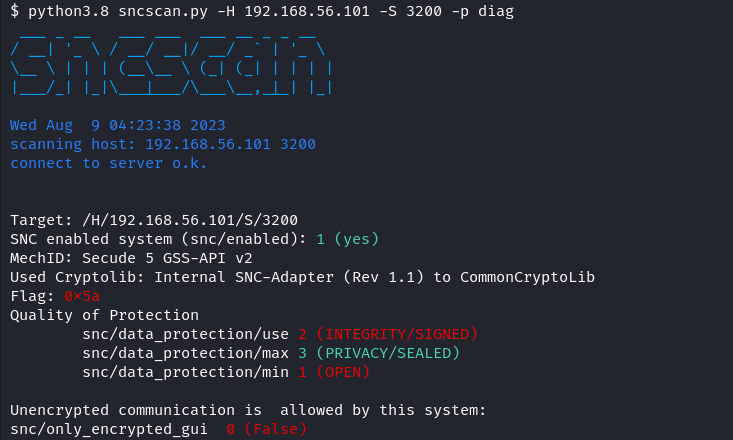
sncscan -H 10.3.161.3 -S 3200 -p diag
Multiple targets can be scanned with one command:
sncscan -L /H/192.168.56.101/S/3200,/H/192.168.56.102/S/3206
Through SAP Router
sncscan --route-string /H/10.3.161.5/S/3299/H/10.3.161.3/S/3200 -p diag
Install
Requirements: Currently the sncscan only works with the pysap libary from our fork.
pip install sncscan
Background: SNC system parameters
SNC Basics
SAP protocols, such as DIAG or RFC, do not provide high security themselves. To increase security and ensure Authentication, Integrity and Encryption, the use of SNC (Secure Network Communications) is required. SNC protects the data communication paths between various client and server components of the SAP system that use the RFC, DIAG or router protocol by applying known cryptographic algorithms to the data in order to increase its security. There are three different levels of data protection, that can be applied for an SNC secured connection:
- Authentication only: Verifies the identity of the communication partners
- Integrity protection: Protection against manipulation of the data
- Confidentiality protection: Encrypts the transmitted messages
SNC Parameter
Each SAP system can be configured with SNC parameters for the communication security. The level of the SNC connection is determined by the Quality of Protection parameters:
- snc/data_protection/min: Minimum security level required for SNC connections.
- snc/data_protection/max: highest security level, initiated by the SAP system
- snc/data_protection/use: default security level, initiated from the SAP system
Additional SNC parameters can be used for further system-specific configuration options, including the snc/only_encrypted_gui parameter, which ensures that encrypted SAPGUI connections are enforced.
Reading out SNC Parameters
As long as a SAP System is addressed that is capable of sending SNC messages, it also responds to valid SNC requests, regardless of which IP, port, and CN were specified for SNC. This response contains the requirements that the SAP system has for the SNC connection, which can then be used to obtain the SNC parameters. This can be used to find out whether an SAP system has SNC enabled and, if so, which SNC parameters have been set.
1 maintainer

Metadata
1 maintainer
Release files for sncscan 1.0.1
For a detailed explanation of source distributions (sdists) and built distributions (wheels), please see the package formats documentation.
Source distribution (sdist)
| File | Size | Uploaded | Provenance | |
|---|---|---|---|---|
| sncscan-1.0.1.tar.gz | 20.1 kB | Without provenance | Details |
Built distribution (wheel)
| File | Interpreter | ABI | Platform | Reset |
|---|---|---|---|---|
| sncscan-1.0.1-py3-none-any.whl | Python 3 | none | any | Details |
Total release size: 40.6 kB
Release files / sncscan-1.0.1.tar.gz
| Download URL | sncscan-1.0.1.tar.gz |
|---|---|
| Size | 20.1 kB |
| Tags | Source |
|
SHA-256 checksum How to use checksums |
0ddf9ebd571ba8847229c126c1ccc324b06be255cbc260778cd3b6cba00b1e39
|
|
BLAKE2b-256 checksum How to use checksums |
44caf7a5b70a1d42fc91ae21a3eabce3b9b3f51a8618038b80b2ba9b421b5d2c
|
| Upload date | |
|
Uploaded using Trusted Publishing? What is trusted publishing? |
No |
| Uploaded via |
twine/4.0.2 CPython/3.10.12
|
Release files / sncscan-1.0.1-py3-none-any.whl
| Download URL | sncscan-1.0.1-py3-none-any.whl |
|---|---|
| Size | 20.5 kB |
| Tags | Python 3 |
|
SHA-256 checksum How to use checksums |
b7e88368f4211e011cc7ac0d6bf664a47791569b56b2015a9de8d6df0029f436
|
|
BLAKE2b-256 checksum How to use checksums |
405c086ff1d6457b902188465b527a2e8aeaeaa12fe967f4bf5b14ac5dcd18b0
|
| Upload date | |
|
Uploaded using Trusted Publishing? What is trusted publishing? |
No |
| Uploaded via |
twine/4.0.2 CPython/3.10.12
|
Security for sncscan 1.0.1
Provenance
Provenance describes where a file came from. On PyPI, provenance is shared via attestations, which provide a verifiable record of the build or publishing details. View details, limitations and caveats.
No provenance found
None of the files in this release were uploaded with provenance metadata.
A note on package security
PyPI is a repository for distributing packages, not a service for auditing them. While third-party security researchers and our staff do their best to detect and remove malicious packages, PyPI cannot guarantee the quality, security or suitability of any given package.
To learn more about protecting yourself from malicious actors, visit our package security documentation.














