


Documentation · Install · Guides · Keys
A terminal viewer that keeps an eye on your Claude Code agents. Watch every running session from one board, answer their permission prompts, comment on their diffs, and see what each prompt cost, without switching terminals.

Install
It runs on macOS, Linux and Windows, and every install method delivers the same prebuilt binary.
With Homebrew, on macOS or Linux:
brew install jzills/tap/snoop
Or the install script, which checks the build against the release's checksums and installs it without sudo:
curl -fsSL https://jzills.github.io/snoop/install.sh | sh
Or from npm or PyPI, where the package is snoop-cli and the command is snoop:
npm install -g snoop-cli
pipx install snoop-cli
On Windows, use npm, PyPI or the PowerShell script:
irm https://jzills.github.io/snoop/install.ps1 | iex
See the install guide for more.
Follow a session
Keep it open in a second terminal next to claude, and every prompt, reply, thinking block and tool call appears as it happens.
The right pane shows the selected item in full: the command, the diff, the subagent's prompt and result.
snoop --follow    # the newest session in this directory, live
snoop             # pick any past session
Each prompt shows its tokens, estimated cost and duration, and the header shows how full the context window is.
Selecting a prompt shows where its turn's time went, in a waterfall where parallel calls overlap.
Press x on an Agent call to expand its subagent's work inline, live while it runs.
See the following guide for more.
Watch every agent at once
The live board lists every session at work across your projects, with the ones waiting on you first.
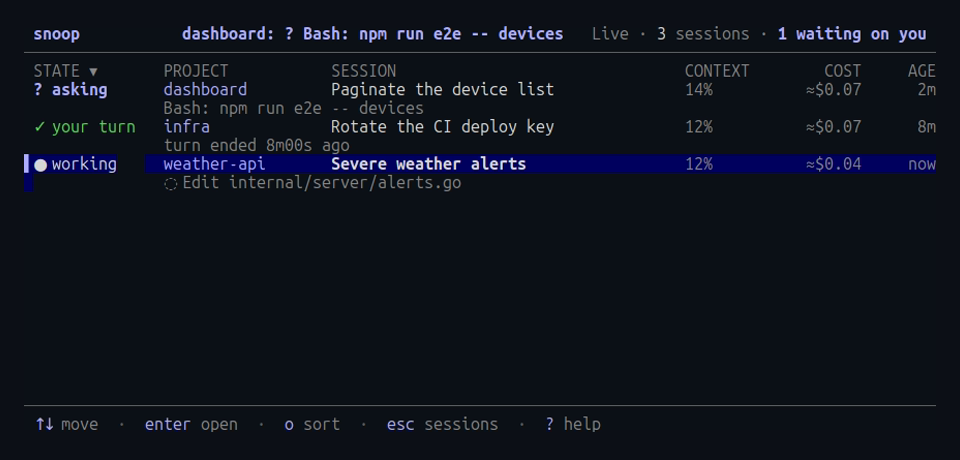
snoop --live --notify # every running session, with desktop notifications
When a session asks for permission, the request appears in full under the list.
Press A to allow it once, Y to always allow it, or D to deny it with a reason Claude sees.
When a session's turn ends, press R to reply, and the agent carries on as if you'd typed it in its terminal.
See the live board guide for more.
Review and comment
The Diff tab shows what a session changed, either since the last commit or across its whole branch.
Leave comments on a line, a range or a file, and press S to send them all to the agent, which picks them up mid-turn or keeps going after it finished.
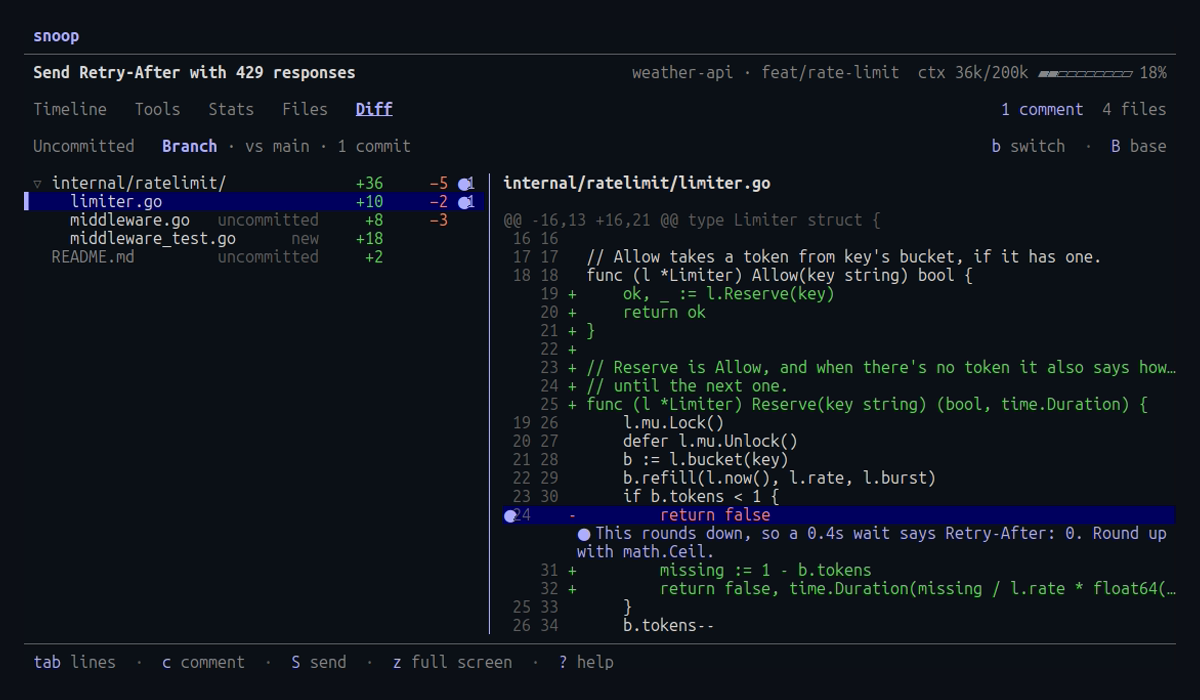
Replies, comments and answers to permission prompts reach the agent through Claude Code hooks, which you add once:
snoop hooks install
See the review guide for more.
Cost, files and time
The Stats tab breaks a session down by prompt, tool and model, and the Files tab lists every file it read or changed, each with its history as diffs.
In the session picker, press s for totals across sessions and a daily cost chart, or f to find sessions by a file they changed, a command they ran or a prompt.
See the cost and context guide for more.
Alerts
While a session runs, the header flags a failed tool call, a stalled one, a finished turn, a compaction, a nearly full context or a permission request.
With --notify, the same alerts arrive as desktop notifications through your terminal or the system, over SSH and in WSL too.
With --cost-alert 5 and --long-turn 15m, a runaway session gets flagged as well.
See the alerts reference for more.
Copy and export
Press y to copy the selected command, diff or message, over SSH too, or e to export the timeline to Markdown.
From the shell, snoop export <session> writes the whole session to stdout.
See the export guide for more.
Notes
- It reads the transcripts Claude Code already writes and sends nothing anywhere.
The only change it makes to Claude Code's settings is the hooks, which
snoop hooks uninstallremoves. - The transcript format is undocumented, and testing covers Claude Code 2.1.280 through 2.1.310. Unknown records are ignored, so a new version may show less rather than break, and an issue helps when something goes missing.
- A 75 MB transcript opens in about 150 ms.
- This independent project isn't affiliated with or endorsed by Anthropic. Claude and Claude Code are trademarks of Anthropic.
Contributing
Run go run ./cmd/probe to parse every local transcript and report timings.
The demo GIF and the site's screenshots are rendered from fictional sessions by demo/render.sh and demo/shots.sh, which need vhs.
License
Released under the MIT License.
1 maintainer

Metadata
1 maintainer
Release files for snoop-cli 0.3.3
For a detailed explanation of source distributions (sdists) and built distributions (wheels), please see the package formats documentation.
Built distributions (wheels)
Total release size: 14.8 MB
Release files / snoop_cli-0.3.3-py3-none-win_arm64.whl
| Download URL | snoop_cli-0.3.3-py3-none-win_arm64.whl |
|---|---|
| Size | 2.4 MB |
| Tags | Python 3 Windows ARM64 |
|
SHA-256 checksum How to use checksums |
7195715e42f612418956e9fb2206aa7a913b72da6dae5c3136f32b999a0943d6
|
|
BLAKE2b-256 checksum How to use checksums |
30f0112e17490d1bbc0bfed3278b9ee6ef972b165d200907d7fc39211250fbe2
|
| Upload date | |
|
Uploaded using Trusted Publishing? What is trusted publishing? |
Yes |
| Uploaded via |
twine/7.0.0 CPython/3.13.16
|
Provenance
Provenance describes where a file came from. On PyPI, provenance is shared via attestations, which provide a verifiable record of the build or publishing details. View details, limitations and caveats.


PyPI Publish Attestation
PyPI verified that this artifact, at this checksum, originated from the publisher listed below.
Signed by GitHub Actions, verified by PyPI on Nov 11, 2026.
Transparency logRelease files / snoop_cli-0.3.3-py3-none-win_amd64.whl
| Download URL | snoop_cli-0.3.3-py3-none-win_amd64.whl |
|---|---|
| Size | 2.7 MB |
| Tags | Python 3 Windows x86-64 |
|
SHA-256 checksum How to use checksums |
a2e07ac7a8b5702b8951e9bf4a33feafc7779cec4a4a6a65ce48e40a6479a1c0
|
|
BLAKE2b-256 checksum How to use checksums |
3df38138f4dbc3d0c582e6f9a8df50f93595a1975d4fc475aa0311a356a86929
|
| Upload date | |
|
Uploaded using Trusted Publishing? What is trusted publishing? |
Yes |
| Uploaded via |
twine/7.0.0 CPython/3.13.16
|
Provenance
Provenance describes where a file came from. On PyPI, provenance is shared via attestations, which provide a verifiable record of the build or publishing details. View details, limitations and caveats.
PyPI Publish Attestation
PyPI verified that this artifact, at this checksum, originated from the publisher listed below.
Signed by GitHub Actions, verified by PyPI on Nov 11, 2026.
Transparency logRelease files / snoop_cli-0.3.3-py3-none-manylinux_2_17_x86_64.musllinux_1_1_x86_64.whl
| Download URL | snoop_cli-0.3.3-py3-none-manylinux_2_17_x86_64.musllinux_1_1_x86_64.whl |
|---|---|
| Size | 2.6 MB |
| Tags | Linux glibc 2.17+ x86-64 Linux musl 1.1+ x86-64 Python 3 |
|
SHA-256 checksum How to use checksums |
19aed8b8f3c3491e190bfa3be41da49551332fadbe2545eece1984f5b1d86dcb
|
|
BLAKE2b-256 checksum How to use checksums |
5b1bdbc1009f9f6179a7474c968d3ac73cd0fb70b81c45be914b9eb5449c3984
|
| Upload date | |
|
Uploaded using Trusted Publishing? What is trusted publishing? |
Yes |
| Uploaded via |
twine/7.0.0 CPython/3.13.16
|
Provenance
Provenance describes where a file came from. On PyPI, provenance is shared via attestations, which provide a verifiable record of the build or publishing details. View details, limitations and caveats.
PyPI Publish Attestation
PyPI verified that this artifact, at this checksum, originated from the publisher listed below.
Signed by GitHub Actions, verified by PyPI on Nov 11, 2026.
Transparency logRelease files / snoop_cli-0.3.3-py3-none-manylinux_2_17_aarch64.musllinux_1_1_aarch64.whl
| Download URL | snoop_cli-0.3.3-py3-none-manylinux_2_17_aarch64.musllinux_1_1_aarch64.whl |
|---|---|
| Size | 2.3 MB |
| Tags | Linux glibc 2.17+ ARM64 Linux musl 1.1+ ARM64 Python 3 |
|
SHA-256 checksum How to use checksums |
b9fbff6000d31c399cf5642fe3c179ebe8fc01525fe4aaa97fe5ee6fcf2f654d
|
|
BLAKE2b-256 checksum How to use checksums |
fcecb611a1f1184428f89c93aaea03adacf8591ea21a41279d6b7ccdbc85cef9
|
| Upload date | |
|
Uploaded using Trusted Publishing? What is trusted publishing? |
Yes |
| Uploaded via |
twine/7.0.0 CPython/3.13.16
|
Provenance
Provenance describes where a file came from. On PyPI, provenance is shared via attestations, which provide a verifiable record of the build or publishing details. View details, limitations and caveats.
PyPI Publish Attestation
PyPI verified that this artifact, at this checksum, originated from the publisher listed below.
Signed by GitHub Actions, verified by PyPI on Nov 11, 2026.
Transparency logRelease files / snoop_cli-0.3.3-py3-none-macosx_11_0_arm64.whl
| Download URL | snoop_cli-0.3.3-py3-none-macosx_11_0_arm64.whl |
|---|---|
| Size | 2.4 MB |
| Tags | Python 3 macOS 11.0+ ARM64 |
|
SHA-256 checksum How to use checksums |
f12b458285f5fe310cbc3f6f9c80b010d9ae92b1c4ea3fdb5b1529044e9eeb60
|
|
BLAKE2b-256 checksum How to use checksums |
53dea0cab41bcc3a1c62ed7831870854c1355051a477a36fa0e8360b82ba8592
|
| Upload date | |
|
Uploaded using Trusted Publishing? What is trusted publishing? |
Yes |
| Uploaded via |
twine/7.0.0 CPython/3.13.16
|
Provenance
Provenance describes where a file came from. On PyPI, provenance is shared via attestations, which provide a verifiable record of the build or publishing details. View details, limitations and caveats.
PyPI Publish Attestation
PyPI verified that this artifact, at this checksum, originated from the publisher listed below.
Signed by GitHub Actions, verified by PyPI on Nov 11, 2026.
Transparency logRelease files / snoop_cli-0.3.3-py3-none-macosx_10_12_x86_64.whl
| Download URL | snoop_cli-0.3.3-py3-none-macosx_10_12_x86_64.whl |
|---|---|
| Size | 2.6 MB |
| Tags | Python 3 macOS 10.12+ x86-64 |
|
SHA-256 checksum How to use checksums |
f7072ee9a8d54678c2713654fca1359bfff493d9ad64a4b5b67c203b2326dee4
|
|
BLAKE2b-256 checksum How to use checksums |
1386f0348d1c4b96f8ebe0d8be8d1e1123513a3be948a4364d6c788c404fd3bd
|
| Upload date | |
|
Uploaded using Trusted Publishing? What is trusted publishing? |
Yes |
| Uploaded via |
twine/7.0.0 CPython/3.13.16
|
Provenance
Provenance describes where a file came from. On PyPI, provenance is shared via attestations, which provide a verifiable record of the build or publishing details. View details, limitations and caveats.
PyPI Publish Attestation
PyPI verified that this artifact, at this checksum, originated from the publisher listed below.
Signed by GitHub Actions, verified by PyPI on Nov 11, 2026.
Transparency logSecurity for snoop-cli 0.3.3
Provenance
Provenance describes where a file came from. On PyPI, provenance is shared via attestations, which provide a verifiable record of the build or publishing details. View details, limitations and caveats.
Full provenance
All 6 files in this release have been uploaded with provenance metadata.
Attestation for snoop_cli-0.3.3-py3-none-win_arm64.whl
PyPI Publish Attestation
PyPI verified that this artifact, at this checksum, originated from the publisher listed below.
Signed by GitHub Actions, verified by PyPI on Nov 11, 2026.
Transparency logA note on package security
PyPI is a repository for distributing packages, not a service for auditing them. While third-party security researchers and our staff do their best to detect and remove malicious packages, PyPI cannot guarantee the quality, security or suitability of any given package.
To learn more about protecting yourself from malicious actors, visit our package security documentation.














