
Convert Touchstone S-parameter files into lumped-element netlists for Ngspice and VACASK

Project description

snp2le: S-Parameter To Lumped Element Netlist Converter



(c) 2026 Simon Dorrer
Institute for Integrated Circuits and Quantum Computing (IICQC), Johannes Kepler University (JKU), Linz, Austria
[!IMPORTANT] The converter (GUI and CLI) runs anywhere with Python ≥ 3.10, see Install below. Running the exported netlists in a testbench additionally needs Xschem plus Ngspice and/or VACASK. The easiest way to get all of them is the IIC-OSIC-TOOLS container.
Description
snp2le turns a Touchstone .sNp S-parameter file (for example from an AWS Palace EM simulation) into an equivalent lumped-element netlist for Ngspice (Berkeley SPICE3) and VACASK (Spectre syntax). An EM-extracted structure can then be co-simulated at circuit level, without re-running the field solve.
It offers two conversion philosophies:
- Universal (any N-port). Vector-fits the S-parameters with scikit-rf
VectorFitting, optionally enforces passivity, and synthesises a passive macromodel of R, C and controlled sources. It works for any structure and port count, and is electrically exact but not physically interpretable. - Structure-specific. Fits a known physical topology, so every component maps to reality (series L, shunt C, coupling k, and so on) at a chosen extraction frequency. See Available structures.
A single dialect-agnostic Circuit IR drives both netlist backends and the on-screen schematic, so the outputs always agree. The code is split into a pure-Python, Qt-free snp2le.core (fully unit-tested) and a thin PySide6 snp2le.gui, both driven by one entry point, engine.convert(state, net).
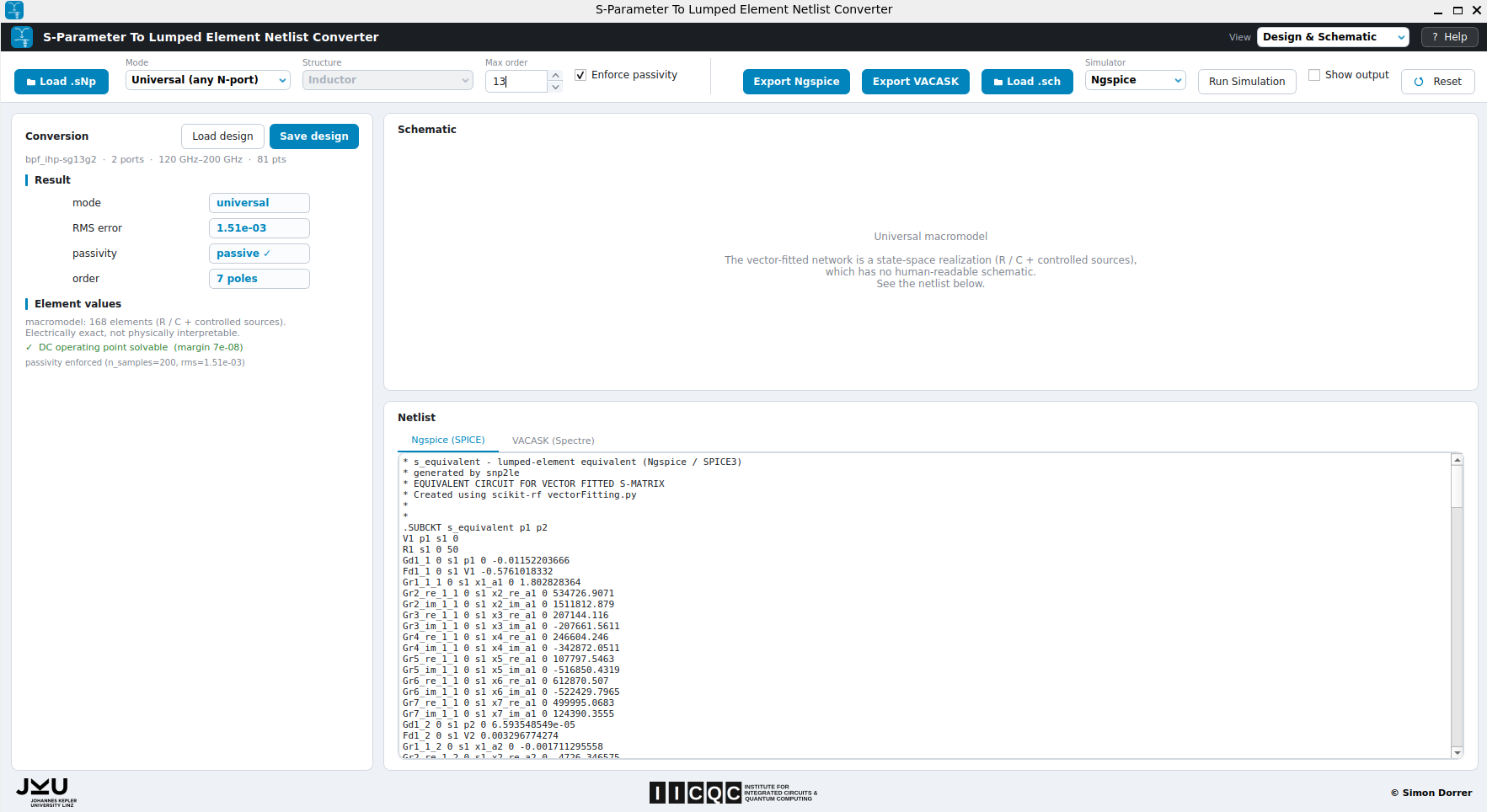
The snp2le GUI converting a band-pass filter (BPF) S-parameter file into a lumped-element netlist.
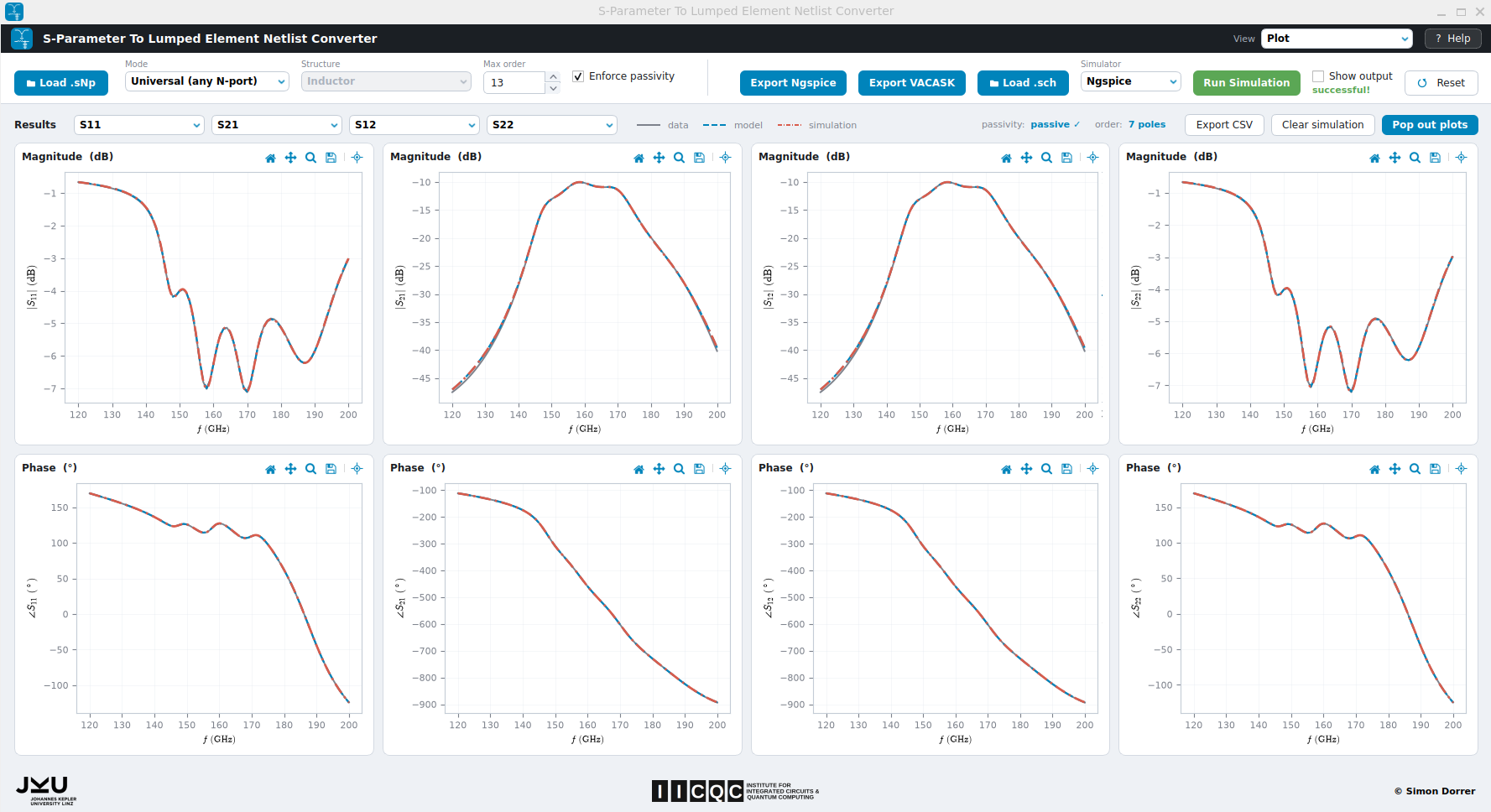
Plot view: loaded data (grey) vs extracted model (blue) vs imported testbench simulation (red).
Directory Structure
- 📄 pyproject.toml packaging metadata, dependencies and the
snp2leentry point - 📄 MANIFEST.in source-distribution manifest (bundles the examples and assets)
- 📄 requirements.txt runtime dependencies (mirrors
pyproject.toml) - 📁 snp2le/ the application package (pip-installable)
- 📄
__init__.pypackage version - 📄
__main__.pysingle entry point (snp2leopens the GUI,snp2le -bruns the CLI) - 📄
app.pyGUI launcher - 📄
cli.pycommand-line interface - 📁 core/ pure Python, Qt-free, all the maths
- 📄
engine.pyconvert(state, net)returnsResults, the single entry point - 📄
io.pyload Touchstone (scikit-rf), parse Ngspice result tables - 📄
units.pyengineering-notation parse and format - 📄
ir.pydialect-agnostic Circuit IR (element list and couplings) - 📄
netlist.pyrender the IR to Ngspice (SPICE3) and VACASK (Spectre) - 📄
universal.pyvector-fit passive macromodel - 📄
mna.pyrebuild N-port S-parameters from an RLC IR (model overlay) - 📄
dc.pyDC operating-point (singularity) check for the macromodel - 📄
state.pyConverterStateandResultsdataclasses - 📄
xschem.pyheadless Xschem netlist and simulate commands - 📁 structures/ physical extractors, one file per topology
- 📄
base.py,inductor_pi.py,mim_cap.py,tline.py - 📄
wilkinson.py,balun.py,branchline.py - 📄
__init__.pyregistry (the GUI dropdown and CLI auto-discover it)
- 📄
- 📄
- 📁 gui/ PySide6, no maths
- 📄
main_window.pythe controller - 📄
top_bar.pyload, mode, structure, options, simulator, run - 📄
design_view.pyresult, element values, tolerances, schematic, netlist - 📄
plot_view.pyfour S-parameter or extracted-parameter plots - 📄
help_dialog.py,style.py,widgets.py, and more - 📁 assets/ logos (svg and png),
snp2le.ico
- 📄
- 📁 examples/ Touchstone
.sNpsample files (BPF, inductor, balun, BLC, WPD, and more)
- 📄
- 📁 tests/ pytest suite (
test_core.py) - 📁 doc/
architecture.mdand screenshots (infig/) - 📁 testbenches/xschem/ BPF testbenches (Ngspice and VACASK) plus postprocess eval scripts
- 📁 netlist/ exported lumped-element netlists
- 📁 spice/ Ngspice (
.spice) - 📁 spectre/ VACASK (
.inc) plussyntax_cheatsheet.inc
- 📁 spice/ Ngspice (
- 📁 schematic/xschem/ DUT symbol (
bpf_le.sym) andxschemrc - 📁 sim_data/ simulation results, imported and overlaid on the plots
- 📄 README.md, 📄 LICENSE (Apache-2.0), 📄 CITATION.cff
How to Use
Install
From PyPI:
pip install snp2le
# or, for an isolated install with its own command on PATH:
pipx install snp2le
From source (for development), an editable install pulls in every dependency:
git clone https://github.com/iic-jku/snp2le.git
cd snp2le

python -m venv .venv
# Windows:        .venv\Scripts\activate
# macOS / Linux:  source .venv/bin/activate

pip install -e .
Run the GUI
snp2le              # after installing (pip / pipx)
python -m snp2le    # from the repo root of a source checkout, no install needed
A bundled example is preloaded on first run. More live in snp2le/examples/.
[!NOTE] Start it as a module (
python -m snp2le), notpython snp2le/app.py. The launcher imports thesnp2lepackage, which Python only finds when it is run as a module from the repo root (or afterpip install).
Typical workflow
- Load a Touchstone
.sNpfile from the top bar. The header shows the port count and frequency range. - Choose a mode. Universal (set Max order and Enforce passivity) or Structure-specific (pick a structure and set the extraction frequency). Some structures expose an extra option such as Stages, Isolation R or Resistive loss.
- Inspect the result, element values, per-element tolerances at the extraction frequency, the drawn schematic, and the generated netlist in the Design & Schematic view.
- Compare the loaded data (grey) against the extracted model (blue) in the Plot view (up to four traces, magnitude and phase).
- Export the netlist. Export Ngspice writes a
.spicefile and Export VACASK writes an.incfile. The.SUBCKTis named after the file, so a testbench that instantiates it resolves the include.
[!TIP] The Help button in the top bar opens a full in-app guide to every control.
Run a testbench (simulate)
Drop the exported subcircuit into an Xschem testbench, then run it from the GUI:
- Load .sch. Pick the testbench. The Simulator auto-selects from the file name (a name ending in
_ngspice.schselects Ngspice or_vacask.schselects VACASK) and can be overridden. - Run Simulation. Both simulators netlist and simulate through Xschem and write their result to
sim_data/, which is imported and overlaid on the plots automatically. The button turns green on success or red on failure. On failure the dialog shows the simulator log. - Show output. Tick it to show the simulator's console and plot windows. Leave it unticked to run quietly. The result is imported either way.
[!NOTE] A simulator (Xschem plus Ngspice and/or VACASK) is only needed for this step. The conversion and export themselves are pure Python.
Run the tests
pytest # from the repo root
CLI Overview
The same engine is available headlessly for Makefiles and batch use, through the -b (batch) flag:
snp2le -b list-structures
snp2le -b convert <file.sNp> [options]
From a source checkout without installing, use python -m snp2le -b ... in place of snp2le -b.
convert options
| Option | Scope | Description |
|---|---|---|
inputs |
all | one or more .sNp files or globs |
--mode universal|structure |
both | conversion philosophy (default universal) |
--structure KEY |
structure | structure key (see list-structures) |
--order N |
universal | maximum model order (poles) |
--passive / --no-passive |
universal | enforce passivity (default on) |
--fext FREQ |
structure | extraction frequency, e.g. 7GHz |
--stages N |
structure | RLGC ladder cells (transmission line) |
--iso-r / --no-iso-r |
structure | Wilkinson isolation R or branch-line arm loss |
--format ngspice|vacask|both |
both | output dialect(s). VACASK writes .inc |
-o, --output PATH |
both | output path (single input), names the .SUBCKT |
--values |
structure | print the extracted element values |
--tolerances |
structure | print per-element tolerances at f_ext |
--simulate SCH |
sim | run an Xschem testbench after converting |
--simulator ngspice|vacask |
sim | simulator for --simulate (default: auto from .sch name) |
--show-output |
sim | show the simulator's console and plot windows |
--timeout S |
sim | seconds to wait for a --simulate result (default 180) |
--plot [SPARAMS] |
sim | display data, model and sim plots (e.g. S11,S21) |
--quiet |
both | suppress the per-file status line |
Examples
# universal macromodel to an Ngspice netlist
snp2le -b convert coupler.s4p --mode universal --order 12 -o coupler.spice

# structure extraction at 7 GHz, both dialects, print values and tolerances
snp2le -b convert ind.s2p --mode structure --structure inductor-pi \
    --fext 7GHz --format both --values --tolerances

# convert the BPF, run its Xschem testbench, and show data vs model vs sim plots
snp2le -b convert snp2le/examples/bpf_ihp-sg13g2.s2p \
    --mode universal --order 13 -o netlist/spice/bpf_le.spice \
    --simulate testbenches/xschem/bpf_le_tb_acsp_ngspice.sch --plot
[!NOTE]
--simulateand--plotneed Xschem (and a display for--plot). They print a clear message and skip if Xschem is not onPATH.
Available structures
| Key | Model | Ports | Notes |
|---|---|---|---|
inductor-pi |
Inductor | 2 | series R-L plus shunt C/R per port |
mim-cap |
MIM capacitor | 2 | series C with parasitic L/R plus shunt C (use it for MOM caps too) |
tline-rlgc |
Transmission line (RLGC) | 2 | N-cell pi-ladder (--stages) |
wilkinson-inphase |
Wilkinson divider (in-phase) | 3 | optional isolation resistor (--iso-r) |
wilkinson |
Wilkinson divider (quadrature) | 3 | quadrature (90 deg) outputs |
balun |
Balun (transformer) | 4 | coupled inductors (k, M, n), Qp and Qs |
branchline |
Branch-line coupler | 4 | optional fitted arm loss (--iso-r) |
New structures plug in by subclassing snp2le.core.structures.base.Structure and registering them in snp2le/core/structures/__init__.py. They then appear in the GUI dropdown and the CLI automatically.
Cite This Work
@misc{2026_snp2le,
  author = {Dorrer, Simon},
  month = july,
  year = {2026},
  title = {{GitHub Repository for snp2le: A S-Parameter To Lumped Element Netlist Converter}},
  url = {https://github.com/iic-jku/snp2le},
  doi = {ToDo}
}
Acknowledgements
- The structure-specific extractors (inductor, MIM capacitor, RLGC line) were inspired by Volker Mühlhaus' lumpedmodel.
- The passivity-enforcement strategy for the universal macromodel was adapted from the COBRA project.
- Vector fitting is provided by scikit-rf.

License
Licensed under the Apache License 2.0, see LICENSE.
Release history Release notifications | RSS feed

Download files
Download the file for your platform. If you're not sure which to choose, learn more about installing packages.
Source Distribution
Built Distribution
Filter files by name, interpreter, ABI, and platform.
If you're not sure about the file name format, learn more about wheel file names.
Copy a direct link to the current filters
File details
Details for the file snp2le-0.1.1.tar.gz.
File metadata
- Download URL: snp2le-0.1.1.tar.gz
- Upload date:
- Size: 333.5 kB
- Tags: Source
- Uploaded using Trusted Publishing? No
- Uploaded via: twine/6.2.0 CPython/3.14.2
File hashes
| Algorithm | Hash digest | |
|---|---|---|
| SHA256 |
d837f1c0875555d6b6ab8ebc63515851cbacf2289ecb4c621c32df86a22f8311
|
|
| MD5 |
f7d1c7f7d108864f3aaeaba60635c7d8
|
|
| BLAKE2b-256 |
075ce828d7432cf79ab00febeb203abbcf1451d49f601fdfc852b4ef938aa5bf
|
File details
Details for the file snp2le-0.1.1-py3-none-any.whl.
File metadata
- Download URL: snp2le-0.1.1-py3-none-any.whl
- Upload date:
- Size: 339.6 kB
- Tags: Python 3
- Uploaded using Trusted Publishing? No
- Uploaded via: twine/6.2.0 CPython/3.14.2
File hashes
| Algorithm | Hash digest | |
|---|---|---|
| SHA256 |
112f55350b4075019c5d8343267324c436601e3ed02c78be4d6a46c823a8366d
|
|
| MD5 |
65355107322cd717e74b3e12ca044887
|
|
| BLAKE2b-256 |
2236921a5e006bfcdca9e4c512ea9ff7cabe26184aa686775e8632bf0d3cf7a7
|






