
No project description provided

Project description
snyk-threadfix
This tool allows you to generate .threadfix file data from Snyk project data. It outputs JSON data in the ThreadFix file format - both printing to standard out and also allowing you to specify an output filename.
It does not upload directly to ThreadFix at this time. However:
- We will likely do that in the future given sufficient demand
- There is a ThreadFix API endpoint that you can use for this: ThreadFix Upload Scan API
Installation
pip install snyk-threadfix
Configuration
You must first obtain a Snyk API token from your Snyk account. Once you have a token you must either install the Snyk CLI and run snyk auth <your-token> or simply run:
export SNYK_TOKEN=<your-token>
Usage
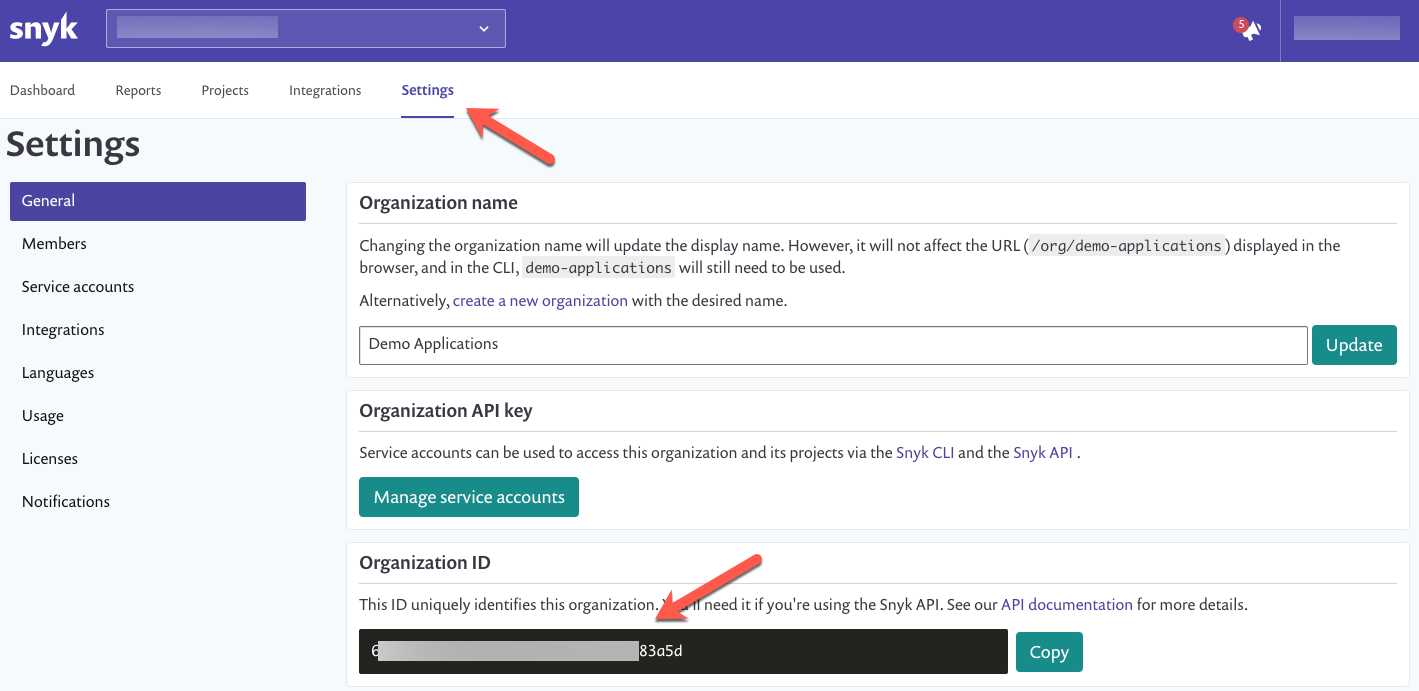
You must first identify your Snyk org ID. This is easy - simply log into your Snyk account, click on Settings, and find your Organization ID there. If you have multiple orgs in your Snyk account, make sure to first choose the one you want.
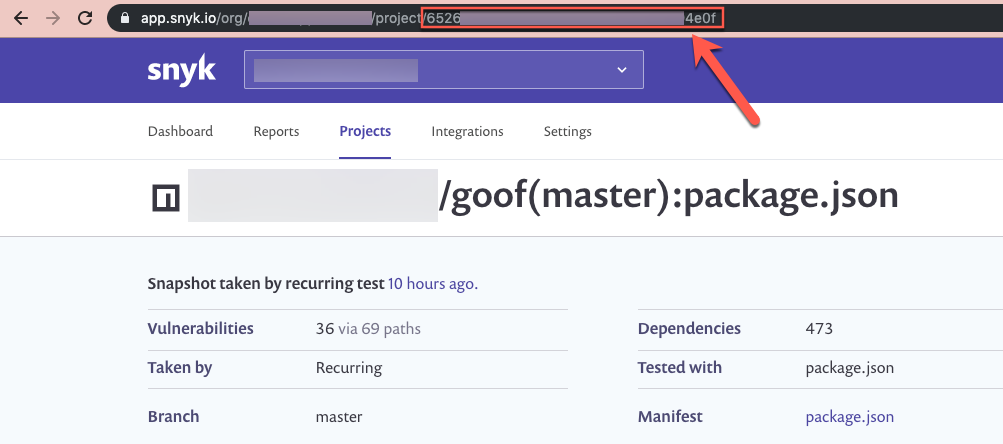
You must also identify the Snyk project ID's for which you would like to generate ThreadFix data. You can do this using the Snyk API, for example, using the List all projects endpoint. See also the pysnyk SDK. Another way of identifying the project IDs you want to use is simply by browsing to the desired project(s) with the Snyk UI and grabbing the UUID from the address bar of your browser.
Once you have a project ID or list of project IDs that you would like to generate a threadfix file for, run the following:
For a single project ID:
snyk-threadfix --orgId=<your-snyk-org-id> --projectIds=<snyk-project-id>
For multiple IDs:
snyk-threadfix --orgId=<your-snyk-org-id> --projectIds=<snyk-project-id-0>,<snyk-project-id-1>,<snyk-project-id-2>,...
ThreadFix JSON data will be output to standard out. If you would like to save the JSON to a file you can either pipe it to a file or use the --output parameter, for example:
snyk-threadfix --output=<your-desired-output-filename>.threadfix --orgId=<your-snyk-org-id> --projectIds=<snyk-project-id>
Additional input parameters are available:
snyk-threadfix main.py --help


Download files
Download the file for your platform. If you're not sure which to choose, learn more about installing packages.
Source Distribution
Built Distribution
Filter files by name, interpreter, ABI, and platform.
If you're not sure about the file name format, learn more about wheel file names.
Copy a direct link to the current filters
File details
Details for the file snyk-threadfix-0.0.2.tar.gz.
File metadata
- Download URL: snyk-threadfix-0.0.2.tar.gz
- Upload date:
- Size: 5.8 kB
- Tags: Source
- Uploaded using Trusted Publishing? No
- Uploaded via: poetry/1.0.0b1 CPython/3.7.4 Darwin/18.2.0
File hashes
| Algorithm | Hash digest | |
|---|---|---|
| SHA256 |
d3850f8d82ce0a4f6426d2f2589651a78b0dc661ed38a891cbfe13b4dfbe02de
|
|
| MD5 |
6f9e7bb78d7da0d7af74175d1f6230ce
|
|
| BLAKE2b-256 |
8d407eb196a5151388a5971d5ee4b10a65579bded14db6f75f2e2ac48d0e7063
|
File details
Details for the file snyk_threadfix-0.0.2-py3-none-any.whl.
File metadata
- Download URL: snyk_threadfix-0.0.2-py3-none-any.whl
- Upload date:
- Size: 6.6 kB
- Tags: Python 3
- Uploaded using Trusted Publishing? No
- Uploaded via: poetry/1.0.0b1 CPython/3.7.4 Darwin/18.2.0
File hashes
| Algorithm | Hash digest | |
|---|---|---|
| SHA256 |
d24440ad57a127b54ea34910378926626e5ee7e3a023b3141c3750d53be34a87
|
|
| MD5 |
df96fca33ab4ee40b924b9c2c3c16970
|
|
| BLAKE2b-256 |
dbb6a2494f14a2f8bad475ea11d2a322f10488f0deefe4ddb87dd233ec75f17b
|






